1. ആമുഖം
This manual provides complete instructions for the installation and operation of your AT&T CRL81212 DECT 6.0 Cordless Phone System. This system features DECT 6.0 digital technology for enhanced sound quality and security, an extra-large LCD display, and large, backlit buttons for ease of use. It includes caller ID, call waiting, and a 50-name/number phonebook directory.
2. പാക്കേജ് ഉള്ളടക്കം
നിങ്ങളുടെ പാക്കേജിൽ ഇനിപ്പറയുന്ന ഇനങ്ങൾ ഉണ്ടെന്ന് ഉറപ്പാക്കുക:
- One (1) AT&T CRL81212 base unit with power adapter
- Two (2) AT&T CRL81212 cordless handsets
- Two (2) handset chargers with power adapters
- Two (2) battery packs for handsets
- One (1) telephone line cord
- ഈ ഉപയോക്തൃ മാനുവൽ
3. സജ്ജീകരണം
3.1 ബാറ്ററി ഇൻസ്റ്റാളേഷൻ
Before using your phone, you must install and charge the battery pack in each handset.
- ഹാൻഡ്സെറ്റിന്റെ പിൻഭാഗത്തുള്ള ബാറ്ററി കമ്പാർട്ട്മെന്റ് കവർ തുറക്കുക.
- കമ്പാർട്ടുമെന്റിനുള്ളിലെ ജാക്കിലേക്ക് ബാറ്ററി പായ്ക്ക് കണക്റ്റർ സുരക്ഷിതമായി ബന്ധിപ്പിക്കുക.
- Place the battery pack with the label UP.
- ബാറ്ററി കമ്പാർട്ട്മെൻ്റ് കവർ അടയ്ക്കുക.
3.2 ബേസ് യൂണിറ്റ് കണക്ഷൻ
Connect the base unit to a telephone line and power outlet.
- ടെലിഫോൺ ലൈൻ കോഡിന്റെ ഒരറ്റം ബേസ് യൂണിറ്റിന്റെ പിൻഭാഗത്തുള്ള ടെൽ ലൈൻ ജാക്കിലേക്ക് പ്ലഗ് ചെയ്യുക.
- ടെലിഫോൺ ലൈൻ കോഡിന്റെ മറ്റേ അറ്റം ഒരു ടെലിഫോൺ വാൾ ജാക്കിൽ പ്ലഗ് ചെയ്യുക.
- ബേസ് യൂണിറ്റിന്റെ പവർ അഡാപ്റ്ററിന്റെ ചെറിയ അറ്റം ബേസ് യൂണിറ്റിന്റെ പിൻഭാഗത്തുള്ള പവർ ജാക്കിലേക്ക് പ്ലഗ് ചെയ്യുക.
- ബേസ് യൂണിറ്റ് പവർ അഡാപ്റ്ററിന്റെ വലിയ അറ്റം ഒരു വാൾ സ്വിച്ച് ഉപയോഗിച്ച് നിയന്ത്രിക്കാത്ത ഒരു ഇലക്ട്രിക്കൽ ഔട്ട്ലെറ്റിലേക്ക് പ്ലഗ് ചെയ്യുക.
3.3 ഹാൻഡ്സെറ്റ് ചാർജിംഗ്
Place each handset in its respective charger or the base unit cradle to charge. The CHARGE indicator on the handset will illuminate. Allow at least 16 hours for the initial charge.
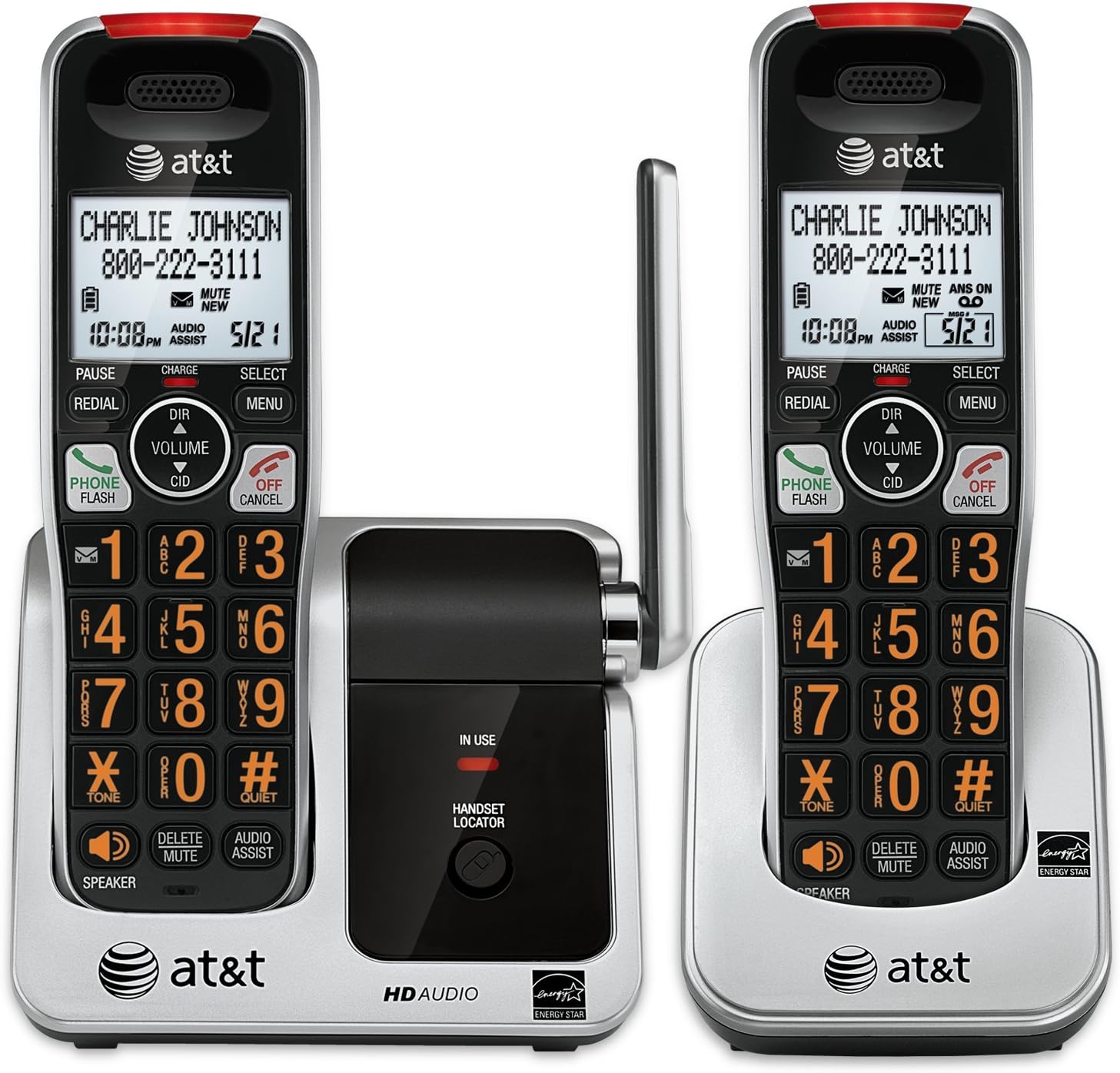
Image: The AT&T CRL81212 DECT 6.0 Cordless Phone System, showing two handsets in their charging cradles. The handsets feature large, backlit buttons and an extra-large LCD display. The base unit includes a handset locator button and an 'in use' indicator.
4. നിങ്ങളുടെ ഫോൺ പ്രവർത്തിപ്പിക്കുക
4.1 കോളുകൾ ചെയ്യലും സ്വീകരിക്കലും
- ഒരു കോൾ ചെയ്യാൻ: അമർത്തുക ഫോൺ / ഫ്ലാഷ് or സ്പീക്കർ, തുടർന്ന് നമ്പർ ഡയൽ ചെയ്യുക.
- ഒരു കോളിന് ഉത്തരം നൽകാൻ: അമർത്തുക ഫോൺ / ഫ്ലാഷ് or സ്പീക്കർ ഫോൺ റിംഗ് ചെയ്യുമ്പോൾ.
- ഒരു കോൾ അവസാനിപ്പിക്കാൻ: അമർത്തുക ഓഫ്/റദ്ദാക്കുക അല്ലെങ്കിൽ ഹാൻഡ്സെറ്റ് ചാർജറിൽ വയ്ക്കുക.
4.2 കോളർ ഐഡി
The handset displays the caller's name and number (if available) after the first ring. To review caller ID history, press സി.ഐ.ഡി.
4.3 ഫോൺബുക്ക്
Store up to 50 names and numbers in the phonebook directory.
- ഒരു എൻട്രി ചേർക്കാൻ: അമർത്തുക മെനു, select 'Phonebook', then 'Add New Entry'. Follow the on-screen prompts.
- To Search/Dial: അമർത്തുക ഡിഐആർ, then use the arrow keys to scroll or enter the first letter of the name. Press ഫോൺ / ഫ്ലാഷ് ഡയൽ ചെയ്യാൻ.
4.4 Voicemail and Message Retrieval
When you have new voicemail messages, the voicemail icon will appear on the handset display. To retrieve messages, press and hold 1 on the keypad (if configured for speed dial to voicemail) or dial your voicemail service number.
4.5 Intercom and Conference Calls
- ഇൻ്റർകോം: മറ്റൊരു ഹാൻഡ്സെറ്റിലേക്ക് വിളിക്കാൻ, മെനു, select 'Intercom', then the desired handset number.
- ത്രീ-വേ കോൺഫറൻസ് കോൾ: ഒരു ബാഹ്യ കോളിനിടെ, ഫ്ലാഷ് to get a dial tone, dial the second party's number, and once connected, press ഫ്ലാഷ് വീണ്ടും എല്ലാ പാർട്ടികളിലും ചേരാൻ.
4.6 മറ്റ് പ്രവർത്തനങ്ങൾ
- സ്പീക്കർഫോൺ: അമർത്തുക സ്പീക്കർ during a call to activate/deactivate.
- നിശബ്ദമാക്കുക: അമർത്തുക ഇല്ലാതാക്കുക/മ്യൂട്ട് ചെയ്യുക നിങ്ങളുടെ മൈക്രോഫോൺ മ്യൂട്ട് ചെയ്യാൻ ഒരു കോളിനിടെ. അൺമ്യൂട്ട് ചെയ്യാൻ വീണ്ടും അമർത്തുക.
- വീണ്ടും ഡയൽ ചെയ്യുക: അമർത്തുക റിഡിയൽ വരെ view അവസാനം ഡയൽ ചെയ്ത 10 നമ്പറുകൾ. അമർത്തുക ഫോൺ / ഫ്ലാഷ് തിരഞ്ഞെടുത്ത ഒരു നമ്പർ ഡയൽ ചെയ്യാൻ.
- ഓഡിയോ അസിസ്റ്റ്: അമർത്തുക ഓഡിയോ അസിസ്റ്റ് to temporarily boost the audio volume during a call.
- ഹാൻഡ്സെറ്റ് ലൊക്കേറ്റർ: അമർത്തുക ഹാൻഡ്സെറ്റ് ലോക്കേറ്റർ on the base unit to page all registered handsets.
5. സവിശേഷതകൾ കഴിഞ്ഞുview
- DECT 6.0 ഡിജിറ്റൽ സാങ്കേതികവിദ്യ: Provides superior sound quality, security, and range.
- Extra-Large LCD Display: Offers clear visibility of caller ID, menu options, and phonebook entries.
- Extra-Large Backlit Buttons: Enhances usability, especially in low-light conditions, and for users with visual impairments.
- Visual Ringer Indicator: A light on the handset flashes when there is an incoming call, providing an additional alert.
- വികസിപ്പിക്കാവുന്ന സിസ്റ്റം: Supports up to 12 handsets (sold separately) on a single base unit.
- 50-Name/Number Phonebook: Conveniently store frequently called contacts.
- 17-Minute Digital Answering System: (If applicable to your specific model variant, check product packaging for confirmation) Records incoming messages.
6. പരിപാലനം
- വൃത്തിയാക്കൽ: ഒരു സോഫ്റ്റ്, ഡി ക്ലീനർ ഉപയോഗിച്ച് ഫോണും ചാർജറും വൃത്തിയാക്കുക.amp തുണി. ക്ലീനിംഗ് സ്പ്രേകളോ കഠിനമായ രാസവസ്തുക്കളോ ഉപയോഗിക്കരുത്.
- ബാറ്ററി കെയർ: Replace the battery pack when the handset indicates low battery or when operating time decreases significantly. Use only the specified replacement battery type.
- പരിസ്ഥിതി വ്യവസ്ഥകൾ: നേരിട്ട് സൂര്യപ്രകാശം ഏൽക്കുന്ന സ്ഥലങ്ങളിലോ, താപ സ്രോതസ്സുകൾക്ക് സമീപമോ, അമിതമായ ഈർപ്പമോ പൊടിയോ ഉള്ള സ്ഥലങ്ങളിലോ ഫോൺ വയ്ക്കുന്നത് ഒഴിവാക്കുക.
7. പ്രശ്നപരിഹാരം
7.1 ഡയൽ ടോൺ ഇല്ല
- ടെലിഫോൺ ലൈൻ കോർഡ് ബേസ് യൂണിറ്റിലും വാൾ ജാക്കിലും സുരക്ഷിതമായി പ്ലഗ് ചെയ്തിട്ടുണ്ടെന്ന് ഉറപ്പാക്കുക.
- Verify the base unit power adapter is properly connected to a working electrical outlet.
- ഹാൻഡ്സെറ്റ് ബാറ്ററി ചാർജ്ജ് ആണോ എന്ന് പരിശോധിക്കുക.
7.2 Handset Not Charging
- Ensure the handset is correctly seated in the charger.
- ചാർജറിന്റെ പവർ അഡാപ്റ്റർ പ്രവർത്തിക്കുന്ന ഒരു ഇലക്ട്രിക്കൽ ഔട്ട്ലെറ്റിലേക്ക് പ്ലഗ് ചെയ്തിട്ടുണ്ടോയെന്ന് പരിശോധിക്കുക.
- ഹാൻഡ്സെറ്റിലെയും ചാർജറിലെയും ചാർജിംഗ് കോൺടാക്റ്റുകൾ ഉണങ്ങിയ തുണി ഉപയോഗിച്ച് വൃത്തിയാക്കുക.
7.3 മോശം ശബ്ദ നിലവാരം
- അടിസ്ഥാന യൂണിറ്റിന് അടുത്തേക്ക് ഹാൻഡ്സെറ്റ് നീക്കുക.
- തടസ്സത്തിന് കാരണമായേക്കാവുന്ന മറ്റ് ഇലക്ട്രോണിക് ഉപകരണങ്ങൾക്ക് സമീപം ബേസ് യൂണിറ്റ് സ്ഥാപിക്കുന്നത് ഒഴിവാക്കുക.
- ഏതെങ്കിലും അയഞ്ഞ കണക്ഷനുകൾ പരിശോധിക്കുക.
8 സ്പെസിഫിക്കേഷനുകൾ
| ബ്രാൻഡ് | AT&T |
| മോഡൽ | CRL81212 |
| വയർലെസ് ടെക്നോളജി | DECT 6.0 |
| ഡിസ്പ്ലേ തരം | എൽസിഡി |
| പവർ ഉറവിടം | Corded Electric, Battery Operated |
| ബാറ്ററികൾ ആവശ്യമാണ് | 2 AA (ഉൾപ്പെടുന്നു) |
| റെക്കോർഡിംഗ് ശേഷി | 17 Minutes (for models with answering machine) |
| അളവുകൾ (അടിസ്ഥാന യൂണിറ്റ്) | ഏകദേശം 20 x 15 x 11 സെ.മീ |
| ഭാരം (ഹാൻഡ്സെറ്റ്) | Approximately 85.05 g (3 Ounces) |
9. വാറൻ്റിയും പിന്തുണയും
For warranty information and technical support, please refer to the warranty card included in your product packaging or visit the official AT&T webസൈറ്റ്. വാങ്ങിയതിന്റെ തെളിവായി നിങ്ങളുടെ വാങ്ങൽ രസീത് സൂക്ഷിക്കുക.
For further assistance, you may contact AT&T customer service.


