ആമുഖം
This manual provides detailed instructions for the safe and effective use of your KODAK PIXPRO AZ365 Digital Camera. Please read this manual thoroughly before operating the camera and keep it for future reference. The KODAK PIXPRO AZ365 features a 16-megapixel sensor, 36x optical zoom, 24mm wide-angle lens, optical image stabilization, and 720p HD video recording capabilities.
ബോക്സിൽ എന്താണുള്ളത്
താഴെ ലിസ്റ്റ് ചെയ്തിരിക്കുന്ന എല്ലാ ഇനങ്ങളും നിങ്ങളുടെ ക്യാമറ പാക്കേജിൽ ഉൾപ്പെടുത്തിയിട്ടുണ്ടെന്ന് ഉറപ്പാക്കുക:
- KODAK PIXPRO AZ365 ഡിജിറ്റൽ ക്യാമറ
- AA ആൽക്കലൈൻ ബാറ്ററികൾ (4)
- USB കേബിൾ
- നെക്ക് സ്ട്രാപ്പ്
- ലെൻസ് കവർ
- സേവന കാർഡ്
- ദ്രുത ആരംഭ ഗൈഡ്
- വാറൻ്റി കാർഡ്
ക്യാമറ ഓവർview
Familiarize yourself with the main components of your KODAK PIXPRO AZ365 camera.

ചിത്രം 1: മുൻഭാഗം View (Flash Raised) - This image shows the front of the KODAK PIXPRO AZ365 camera in red, with the built-in flash unit in the raised position. The lens is retracted, and the KODAK logo is visible above the lens barrel.
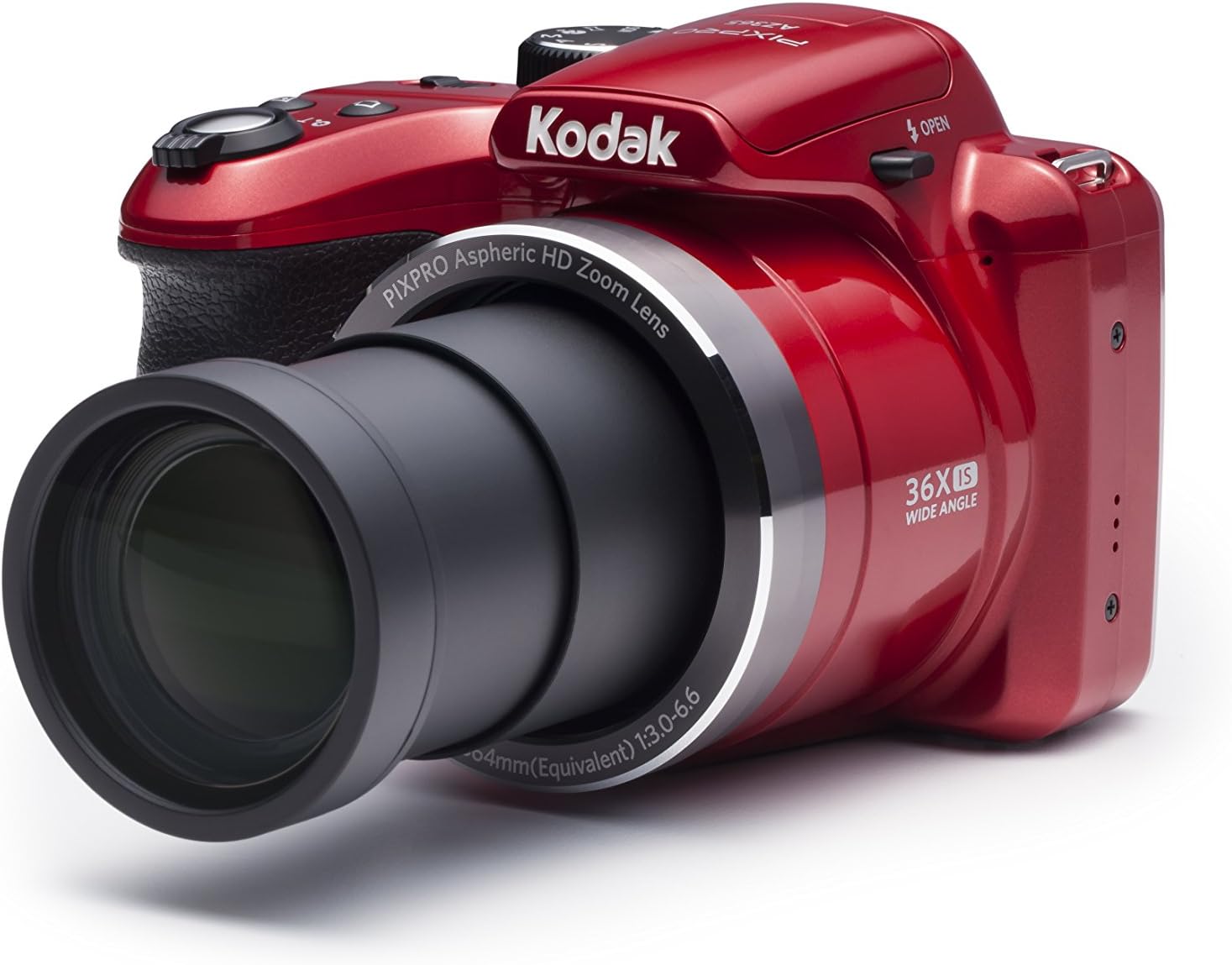
ചിത്രം 2: മുൻഭാഗം View (Lens Extended) - This image displays the KODAK PIXPRO AZ365 camera from the front, with its 36x optical zoom lens fully extended. The camera body is red, and the lens barrel indicates "PIXPRO Aspheric HD Zoom Lens" and "36X IS WIDE ANGLE".

ചിത്രം 3: മുകളിൽ View - This image provides a top-down view of the KODAK PIXPRO AZ365 camera. Key controls visible include the power on/off switch, the shutter button with zoom lever, and the mode dial with settings like P, S, A, M, Auto, SCN, Movie, and Panorama.

ചിത്രം 4: പിൻഭാഗം View - This image shows the back of the KODAK PIXPRO AZ365 camera, highlighting the 3-inch LCD screen. To the right of the screen are various control buttons, including menu, info, playback, display, and a directional pad with AF, SET, and flash controls.
സജ്ജമാക്കുക
1. ബാറ്ററികൾ ഇൻസ്റ്റാൾ ചെയ്യുന്നു
- ക്യാമറയുടെ അടിയിൽ സ്ഥിതിചെയ്യുന്ന ബാറ്ററി കമ്പാർട്ട്മെന്റ് കവർ തുറക്കുക.
- Insert four (4) AA Alkaline batteries, ensuring correct polarity (+/-) as indicated inside the compartment.
- ബാറ്ററി കമ്പാർട്ട്മെൻ്റ് കവർ സുരക്ഷിതമായി അടയ്ക്കുക.
കുറിപ്പ്: For optimal performance, use new, high-quality alkaline batteries. Battery life can vary significantly based on usage and battery type.
2 ഒരു മെമ്മറി കാർഡ് ചേർക്കുന്നു
- മെമ്മറി കാർഡ് സ്ലോട്ട് കണ്ടെത്തുക, സാധാരണയായി ബാറ്ററി കമ്പാർട്ടുമെന്റിന് സമീപം.
- Insert an SDXC memory card with the metal contacts facing the correct direction until it clicks into place.
- കാർഡ് നീക്കം ചെയ്യാൻ, അത് പുറത്തേക്ക് വരുന്നത് വരെ സൌമ്യമായി അമർത്തുക.
കുറിപ്പ്: The camera supports SDXC memory cards. An 8MB internal memory is available, but an SDXC card is recommended for storing photos and videos.
3. നെക്ക് സ്ട്രാപ്പ് ഘടിപ്പിക്കൽ
Thread the neck strap through the strap eyelets on the camera body to prevent accidental drops.
ക്യാമറ പ്രവർത്തിപ്പിക്കുന്നത്
പവർ ഓൺ/ഓഫ്
സ്ലൈഡ് ചെയ്യുക ഓൺ/ഓഫ് switch located on the top of the camera to power it on or off. The lens will extend upon power-on.
ഫോട്ടോകൾ എടുക്കുന്നു
- Turn the mode dial to your desired shooting mode (e.g., ഓട്ടോ for general use).
- 3 ഇഞ്ച് എൽസിഡി സ്ക്രീൻ ഉപയോഗിച്ച് നിങ്ങളുടെ ഷോട്ട് ഫ്രെയിം ചെയ്യുക.
- Use the zoom lever around the shutter button to adjust the optical zoom (36x) or digital zoom (4x).
- Press the shutter button halfway down to focus. The camera will automatically detect focus points.
- ചിത്രം പകർത്താൻ ഷട്ടർ ബട്ടൺ പൂർണ്ണമായി താഴേക്ക് അമർത്തുക.
ഫ്ലാഷ് ഉപയോഗിക്കുന്നു
The camera features a built-in flash. Press the flash button on the directional pad to cycle through flash modes:
- ഓട്ടോ ഫ്ലാഷ്: Camera automatically determines if flash is needed.
- Red-Eye Reduction: റെഡ്-ഐ ഇഫക്റ്റ് കുറയ്ക്കുന്നതിന് ഒരു പ്രീ-ഫ്ലാഷ് പ്രവർത്തിപ്പിക്കുന്നു.
- Fill Flash: ആംബിയന്റ് ലൈറ്റ് കണക്കിലെടുക്കാതെ ഫ്ലാഷ് മിന്നുന്നു.
- Slow Synchro: Combines flash with a slow shutter speed for balanced exposure in low light.
- Red-Eye Reduction + Slow Synchro: Combines both effects.
ഷൂട്ടിംഗ് മോഡുകൾ
The mode dial allows you to select various shooting modes for different scenarios:
- സ്വയമേവ: മിക്ക സാഹചര്യങ്ങൾക്കും അനുയോജ്യമായ ക്രമീകരണങ്ങൾ ക്യാമറ യാന്ത്രികമായി സജ്ജമാക്കുന്നു.
- പ്രോഗ്രാം (പി): ക്യാമറ അപ്പർച്ചറും ഷട്ടർ സ്പീഡും സജ്ജമാക്കുന്നു, പക്ഷേ നിങ്ങൾക്ക് മറ്റ് ക്രമീകരണങ്ങൾ ക്രമീകരിക്കാൻ കഴിയും.
- ഷട്ടർ പ്രയോറിറ്റി (എസ്): ഷട്ടർ സ്പീഡ് നിങ്ങൾ സജ്ജമാക്കുന്നു, ക്യാമറ അപ്പർച്ചർ സജ്ജമാക്കുന്നു.
- അപ്പേർച്ചർ പ്രയോറിറ്റി (എ): അപ്പേർച്ചർ നിങ്ങൾ സജ്ജമാക്കുന്നു, ക്യാമറ ഷട്ടർ സ്പീഡ് സജ്ജമാക്കുന്നു.
- മാനുവൽ (എം): അപ്പർച്ചറും ഷട്ടർ സ്പീഡും നിയന്ത്രിക്കുന്നത് നിങ്ങളാണ്.
- രംഗം (SCN): Access various scene modes like Landscape, Portrait, Sports, Macro, etc.
- സിനിമ: വീഡിയോ റെക്കോർഡിംഗിനായി.
- പനോരമ: വിശാലമായ പനോരമിക് ഷോട്ടുകൾ പകർത്തുക.
വീഡിയോ റെക്കോർഡിംഗ്
The KODAK PIXPRO AZ365 can record high-definition video.
- Turn the mode dial to സിനിമ മോഡ്.
- Press the dedicated video recording button (usually marked with a red dot) to start recording.
- റെക്കോർഡിംഗ് നിർത്താൻ ബട്ടൺ വീണ്ടും അമർത്തുക.
Videos are recorded in 720p resolution in MOV (H.264) format.
പ്ലേബാക്ക്
ലേക്ക് view നിങ്ങളുടെ പകർത്തിയ ഫോട്ടോകളും വീഡിയോകളും:
- അമർത്തുക പ്ലേബാക്ക് button (usually marked with a triangle icon).
- നിങ്ങളുടെ ചിത്രങ്ങളിലൂടെയും വീഡിയോകളിലൂടെയും നാവിഗേറ്റ് ചെയ്യാൻ ഡയറക്ഷണൽ പാഡ് ഉപയോഗിക്കുക.
- അമർത്തുക സെറ്റ് വീഡിയോകൾ പ്ലേ ചെയ്യാനുള്ള ബട്ടൺ.
- ഇല്ലാതാക്കാൻ എ file, select it and press the delete button (often marked with a trash can icon) and confirm.
മെയിൻ്റനൻസ്
ക്യാമറ വൃത്തിയാക്കുന്നു
- ക്യാമറ ബോഡി വൃത്തിയാക്കാൻ മൃദുവായ, ലിന്റ് രഹിത തുണി ഉപയോഗിക്കുക.
- ലെൻസിനും എൽസിഡി സ്ക്രീനിനും, ഒരു പ്രത്യേക ലെൻസ് ക്ലീനിംഗ് തുണിയും ലായനിയും ഉപയോഗിക്കുക. കഠിനമായ രാസവസ്തുക്കൾ ഒഴിവാക്കുക.
- Use a blower brush to remove dust from the lens surface.
ബാറ്ററി കെയർ
- ക്യാമറ കൂടുതൽ നേരം ഉപയോഗിക്കാത്തപ്പോൾ ബാറ്ററികൾ നീക്കം ചെയ്യുക.
- തണുത്തതും വരണ്ടതുമായ സ്ഥലത്ത് ബാറ്ററികൾ സൂക്ഷിക്കുക.
- ഉപയോഗിച്ച ബാറ്ററികൾ പ്രാദേശിക ചട്ടങ്ങൾക്കനുസൃതമായി നീക്കം ചെയ്യുക.
സംഭരണം
Store the camera in a dry, dust-free environment, away from extreme temperatures and direct sunlight. Use the provided lens cover to protect the lens.
ട്രബിൾഷൂട്ടിംഗ്
| പ്രശ്നം | സാധ്യമായ കാരണം / പരിഹാരം |
|---|---|
| ക്യാമറ പവർ ഓൺ ചെയ്യുന്നില്ല. |
|
| മോശം ബാറ്ററി ലൈഫ്. |
|
| ചിത്രങ്ങൾ അവ്യക്തമാണ്. |
|
| മെമ്മറി കാർഡ് പിശക്. |
|
സ്പെസിഫിക്കേഷനുകൾ
| ഫീച്ചർ | വിശദാംശങ്ങൾ |
|---|---|
| മോഡലിൻ്റെ പേര് | AZ365 |
| ഫലപ്രദമായ സ്റ്റിൽ റെസല്യൂഷൻ | 16.1 എം.പി |
| ഫോട്ടോ സെൻസർ ടെക്നോളജി | സിസിഡി |
| ഒപ്റ്റിക്കൽ സൂം | 36x |
| ഡിജിറ്റൽ സൂം | 4x |
| കുറഞ്ഞ ഫോക്കൽ ലെങ്ത് | 24 Millimeters (Wide Angle) |
| പരമാവധി ഫോക്കൽ ദൈർഘ്യം | 864 മില്ലിമീറ്റർ |
| ഇമേജ് സ്റ്റെബിലൈസേഷൻ | Optical (OIS) |
| വീഡിയോ റെസല്യൂഷൻ | 720p HD |
| വീഡിയോ ക്യാപ്ചർ ഫോർമാറ്റ് | എംഒവി (H.264) |
| സ്ക്രീൻ വലിപ്പം | 3 ഇഞ്ച് |
| ഡിസ്പ്ലേ തരം | എൽസിഡി |
| പിന്തുണച്ചു File ഫോർമാറ്റ് | JPEG |
| ഫ്ലാഷ് മെമ്മറി തരം | SDXC |
| ബാറ്ററി തരം | AA Alkaline (4) |
| ഇനത്തിൻ്റെ ഭാരം | 15.36 ഔൺസ് |
| നിറം | ചുവപ്പ് |
വാറൻ്റിയും പിന്തുണയും
Your KODAK PIXPRO AZ365 Digital Camera comes with a limited warranty. Please refer to the included Warranty Card for detailed terms and conditions, including warranty period and coverage.
For technical support, service, or inquiries regarding your product, please contact KODAK customer service. Contact information can typically be found on the Warranty Card or the official KODAK PIXPRO webസൈറ്റ്.