1. ആമുഖം
Thank you for choosing the Samsung SHS-H700 Digital Door Lock. This manual provides essential information for the safe and efficient use of your new digital door lock. Please read it thoroughly before installation and operation, and keep it for future reference.
The SHS-H700 is an advanced keyless entry system featuring fingerprint verification, a touch-screen keypad, and robust security functions designed to enhance the safety of your home or office.
2 സുരക്ഷാ വിവരങ്ങൾ
- ഇലക്ട്രിക് ഷോക്ക് സംരക്ഷണം: The lock incorporates circuit technology designed to withstand high-voltage electric shocks, enhancing user safety.
- Fire Detection Sensor: An integrated sensor detects indoor temperatures of 60 degrees Celsius (140 degrees Fahrenheit) or above. Upon detection, an alarm sounds, and the door lock automatically releases to facilitate emergency exit.
- മാനുവൽ അസാധുവാക്കൽ: In the event of electronic malfunction or power failure, the door can be opened using the provided emergency keys or the manual lever.
- നുഴഞ്ഞുകയറ്റം കണ്ടെത്തൽ: The system is equipped with an alarm that activates upon physical shocks to the door or repeated incorrect authentication attempts, deterring unauthorized entry.
- Crime Setting Feature: When activated, this feature sounds an alarm if the door lock is operated from inside the home while you are away, providing an additional layer of security against intrusion.
3. ഉൽപ്പന്നം കഴിഞ്ഞുview
The Samsung SHS-H700 Digital Door Lock combines modern design with advanced security features. It offers multiple access methods including fingerprint, password, and key tag/card.
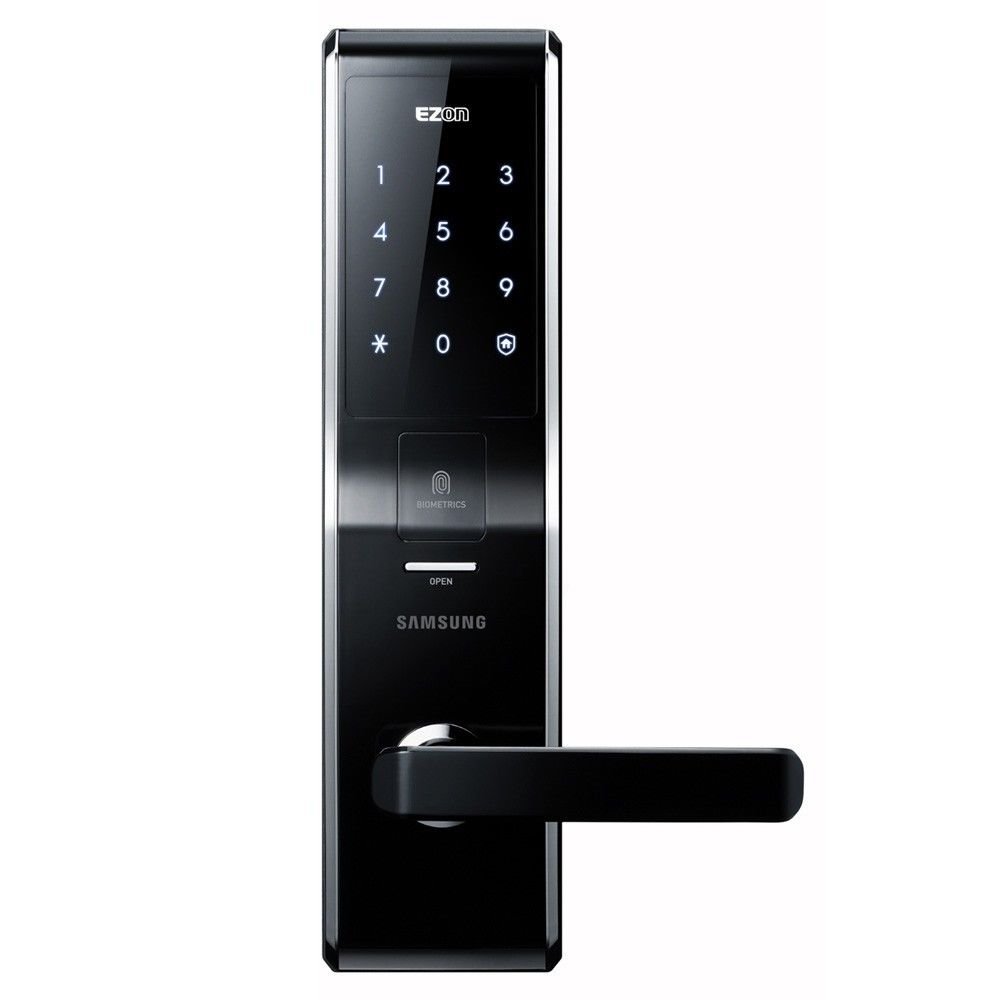
ചിത്രം: മുൻഭാഗം view of the Samsung SHS-H700 Digital Door Lock, showcasing the sleek black design, illuminated touchscreen keypad, fingerprint scanner labeled 'BIOMETRICS', and the 'OPEN' indicator above the handle.
4. ഇൻസ്റ്റലേഷൻ
Proper installation is crucial for the optimal performance and security of your digital door lock. It is highly recommended to have the lock installed by a qualified professional.
This manual does not cover detailed installation steps. Please refer to the separate installation guide provided with your product package for comprehensive instructions, including door preparation, lock assembly, and alignment.
5. സജ്ജീകരണവും പ്രോഗ്രാമിംഗും
5.1 മാസ്റ്റർ പാസ്വേഡ് സജ്ജീകരിക്കൽ
- Open the battery cover on the indoor unit.
- Press the [Registration] button.
- Enter your desired 4 to 12 digit master password on the outdoor keypad.
- Press the [*] button to confirm.
- Test the new password to ensure it is correctly set.
5.2 Registering Fingerprints
- ബാറ്ററി കവർ തുറന്ന് [രജിസ്ട്രേഷൻ] ബട്ടൺ അമർത്തുക.
- ഫിംഗർപ്രിൻ്റ് സ്കാനറിൽ നിങ്ങളുടെ വിരൽ വയ്ക്കുക.
- Follow the voice prompts or indicator lights to lift and place your finger multiple times until registration is complete.
- Repeat for additional fingerprints as needed.
5.3 Registering Key Tags/Cards
- ബാറ്ററി കവർ തുറന്ന് [രജിസ്ട്രേഷൻ] ബട്ടൺ അമർത്തുക.
- താക്കോൽ വയ്ക്കുക tag or card on the card reader area of the outdoor unit.
- The lock will confirm successful registration. Repeat for additional key tags/cards.
6. പ്രവർത്തന നിർദ്ദേശങ്ങൾ
6.1 Opening the Door from Outside
- Using Password: Touch the keypad to activate, enter your 4-12 digit password, then press [*].
- വിരലടയാളം ഉപയോഗിക്കുന്നു: Place your registered finger on the fingerprint scanner.
- Using Key Tag/Card: Place a registered key tag or card on the card reader.
- എമർജൻസി കീ: Insert and turn one of the provided emergency keys.
6.2 Opening the Door from Inside
- Push down the handle to open.
- In case of electronic malfunction, use the manual lever.
6.3 Automatic Locking Feature
The door lock automatically engages as soon as the door is closed, eliminating concerns about forgetting to lock the door.
6.4 Dual-Way Security (Magic Number)
This feature adds an extra layer of security by allowing you to enter random numbers before or after your actual password, preventing others from guessing your code based on fingerprint smudges.
7. പരിപാലനം
7.1 ബാറ്ററി മാറ്റിസ്ഥാപിക്കൽ
The lock requires 8 AA batteries. When the battery level is low, the lock will provide an audible or visual indicator. Replace all 8 batteries simultaneously with new, high-quality alkaline batteries.
7.2 വൃത്തിയാക്കൽ
Wipe the lock's surface with a soft, dry cloth. Avoid using abrasive cleaners, solvents, or harsh chemicals, as these can damage the finish or electronic components.
8. പ്രശ്നപരിഹാരം
- ലോക്ക് പ്രതികരിക്കുന്നില്ല: Check battery level and replace if necessary. Ensure the keypad is activated by touching it.
- വിരലടയാളം തിരിച്ചറിയാൻ കഴിഞ്ഞില്ല: നിങ്ങളുടെ വിരൽ വൃത്തിയുള്ളതും വരണ്ടതുമാണെന്ന് ഉറപ്പാക്കുക. പ്രശ്നങ്ങൾ നിലനിൽക്കുകയാണെങ്കിൽ നിങ്ങളുടെ വിരലടയാളം വീണ്ടും രജിസ്റ്റർ ചെയ്യാൻ ശ്രമിക്കുക.
- പാസ്വേഡ് പ്രവർത്തിക്കുന്നില്ല: Verify you are entering the correct 4-12 digit password followed by [*].
- അപ്രതീക്ഷിതമായി അലാറം മുഴങ്ങുന്നു: Check for physical impacts on the door. If the fire detection alarm sounds, evacuate and ensure safety.
- Door not locking automatically: Ensure the door is fully closed and aligned correctly with the strike plate.
ഈ പരിഹാരങ്ങൾ പരീക്ഷിച്ചതിന് ശേഷവും പ്രശ്നങ്ങൾ നിലനിൽക്കുകയാണെങ്കിൽ, ദയവായി ഉപഭോക്തൃ പിന്തുണയുമായി ബന്ധപ്പെടുക.
9 സ്പെസിഫിക്കേഷനുകൾ
| ഫീച്ചർ | വിശദാംശങ്ങൾ |
|---|---|
| ബ്രാൻഡ് | സാംസങ് |
| മോഡൽ നമ്പറുകൾ | SHS-H700, SHS-5230, 4331022788 |
| പ്രത്യേക സവിശേഷതകൾ | Auto-Lock, Fingerprint Recognition, Fire Detection, Intrusion Alarm |
| ആക്സസ് രീതികൾ | Password (4-12 digits), Fingerprint, Key Tag/Card, Emergency Key |
| നിയന്ത്രണ രീതി | സ്പർശിക്കുക |
| കണക്റ്റിവിറ്റി പ്രോട്ടോക്കോൾ | Wi-Fi (for SmartThings integration, if applicable) |
| പവർ ഉറവിടം | 8 AA ബാറ്ററികൾ (ആവശ്യമാണ്) |
| ഇനത്തിൻ്റെ ഭാരം | 7.48 പൗണ്ട് |
| പാക്കേജ് അളവുകൾ | 15 x 11.89 x 4.29 ഇഞ്ച് |
| ആദ്യ തീയതി ലഭ്യമാണ് | ഓഗസ്റ്റ് 2, 2014 |
10. വാറൻ്റിയും പിന്തുണയും
വാറന്റി വിവരങ്ങൾക്ക്, ദയവായി നിങ്ങളുടെ ഉൽപ്പന്നത്തിനൊപ്പം ഉൾപ്പെടുത്തിയിരിക്കുന്ന വാറന്റി കാർഡ് പരിശോധിക്കുകയോ ഔദ്യോഗിക Samsung വെബ്സൈറ്റ് സന്ദർശിക്കുകയോ ചെയ്യുക. webസൈറ്റ്. വാറന്റി ക്ലെയിമുകൾക്കായി നിങ്ങളുടെ വാങ്ങലിന്റെ തെളിവ് സൂക്ഷിക്കുക.
For technical support, troubleshooting assistance, or service inquiries, please contact Samsung customer service through their official channels. Contact details can typically be found on the Samsung webസൈറ്റിലോ നിങ്ങളുടെ ഉൽപ്പന്ന പാക്കേജിംഗിലോ.


