1. ഉൽപ്പന്നം കഴിഞ്ഞുview
The D-Link DGS-1510-28X is a Smart Managed Switch designed for Small to Medium Enterprise (SME/SMB) networks. It features 24 Gigabit Ethernet ports and 4 10-Gigabit SFP+ ports, providing high-speed connectivity and uplink capabilities. This switch integrates advanced management and security functions, offering a balance between a fully managed switch's capabilities and ease of use. It supports physical stacking, virtual stacking, Layer 2 and Layer 3 Lite features, and various security protocols to ensure network reliability and performance.

ചിത്രം 1: മുൻഭാഗം view of the D-Link DGS-1510-28X switch.
2. സുരക്ഷാ മാർഗ്ഗനിർദ്ദേശങ്ങൾ
- വൈദ്യുത അപകടങ്ങൾ തടയുന്നതിന് ഉപകരണത്തിന് ശരിയായ ഗ്രൗണ്ടിംഗ് ഉറപ്പാക്കുക.
- Do not expose the switch to water or excessive humidity.
- Operate the device within the specified temperature and humidity ranges (23°F to 122°F).
- Use only the power cord provided with the device or a compatible replacement.
- അമിതമായി ചൂടാക്കുന്നത് തടയാൻ വെൻ്റിലേഷൻ ഓപ്പണിംഗുകൾ തടയുന്നത് ഒഴിവാക്കുക.
- വൃത്തിയാക്കുന്നതിനോ അറ്റകുറ്റപ്പണികൾ നടത്തുന്നതിനോ മുമ്പ് വൈദ്യുതി വിച്ഛേദിക്കുക.
3. പാക്കേജ് ഉള്ളടക്കം
നിങ്ങളുടെ പാക്കേജിൽ ഇനിപ്പറയുന്ന ഇനങ്ങൾ അടങ്ങിയിട്ടുണ്ടെന്ന് പരിശോധിക്കുക:
- D-Link DGS-1510-28X Switch
- റാക്ക്മ ount ണ്ട് കിറ്റ്
- പവർ കോർഡ്
- ദ്രുത ഇൻസ്റ്റാളേഷൻ ഗൈഡ് (QIG)
4. ഹാർഡ്വെയർ ഓവർview
4.1 ഫ്രണ്ട് പാനൽ

ചിത്രം 2: കോണാകൃതിയിലുള്ള മുൻഭാഗം view of the DGS-1510-28X switch, showing all ports and indicators.
- 24 x 10/100/1000ബേസ്-ടി പോർട്ടുകൾ: Standard Gigabit Ethernet ports for connecting network devices.
- 4 x 10-Gigabit SFP+ Ports: High-speed fiber optic ports for uplinks or stacking.
- കൺസോൾ പോർട്ട്: RJ-45 port for command-line interface (CLI) access.
- LED സൂചകങ്ങൾ: Power, Link/Activity, Speed for each port, and Stack ID indicators.
4.2 പിൻ പാനൽ

ചിത്രം 3: പിൻഭാഗം view of the DGS-1510-28X switch, showing the power input and grounding screw.
- എസി പവർ ഇൻപുട്ട്: പവർ കോർഡിനുള്ള കണക്റ്റർ.
- ഗ്രൗണ്ടിംഗ് സ്ക്രൂ: For connecting an earth ground cable.
- കെൻസിംഗ്ടൺ ലോക്ക് സ്ലോട്ട്: ഭൗതിക സുരക്ഷയ്ക്കായി.
4.3 അളവുകൾ
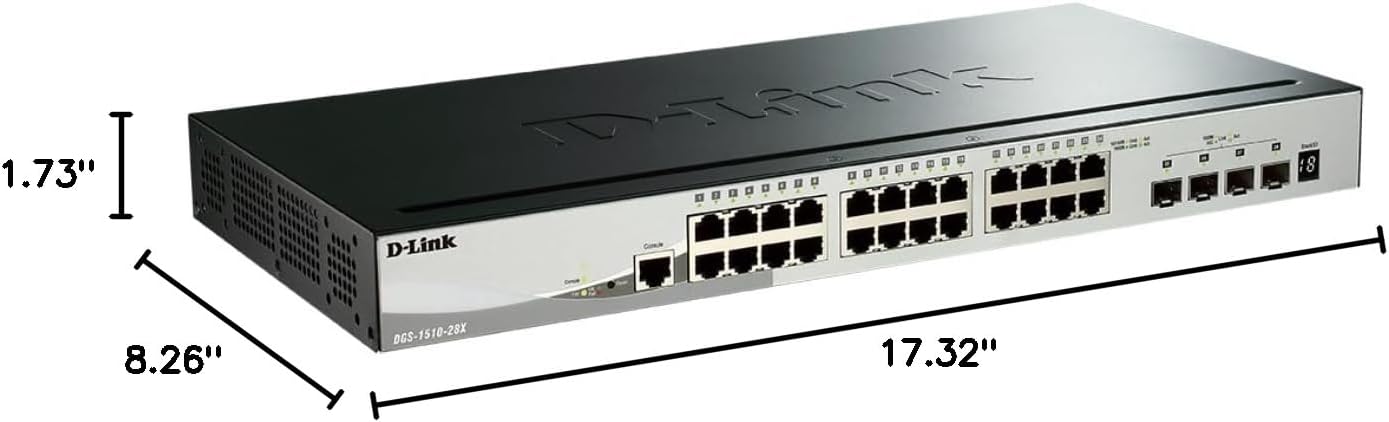
Figure 4: Dimensions of the DGS-1510-28X switch: 17.32"L x 8.26"W x 1.73"H.
5. ഇൻസ്റ്റലേഷനും സജ്ജീകരണവും
5.1 റാക്ക് മൗണ്ടിംഗ്
The DGS-1510-28X can be installed in a standard 19-inch equipment rack. Use the provided rackmount kit to secure the switch. Attach the mounting brackets to the sides of the switch using the included screws, then secure the switch into the rack.
5.2 പവർ കണക്ഷൻ
- Connect the provided AC power cord to the power input on the rear panel of the switch.
- പവർ കോർഡിന്റെ മറ്റേ അറ്റം അനുയോജ്യമായ പവർ ഔട്ട്ലെറ്റിലേക്ക് പ്ലഗ് ചെയ്യുക.
- സ്വിച്ച് പവർ സ്വീകരിക്കുന്നുണ്ടെന്ന് സൂചിപ്പിക്കുന്ന തരത്തിൽ മുൻ പാനലിലെ പവർ എൽഇഡി പ്രകാശിക്കുന്നുണ്ടെന്ന് ഉറപ്പാക്കുക.
5.3 നെറ്റ്വർക്ക് കണക്ഷനുകൾ
- Connect your network devices (computers, servers, printers, NAS, IP cameras, wireless APs, VoIP phones) to the 10/100/1000BASE-T ports using standard Ethernet cables.
- For high-speed uplinks or connections to other network segments, insert compatible SFP+ transceivers into the 10-Gigabit SFP+ ports and connect appropriate fiber optic cables.
6. പ്രവർത്തനവും കോൺഫിഗറേഷനും
6.1 Accessing the Management Interface
The DGS-1510-28X can be managed via a web-based graphical user interface (GUI) or a Command Line Interface (CLI).
- Webഅടിസ്ഥാന മാനേജ്മെൻ്റ്: Connect a computer to any Gigabit Ethernet port on the switch. Configure your computer's IP address to be in the same subnet as the switch's default IP address (refer to the Quick Installation Guide for default IP). Open a web ലോഗിൻ പേജ് ആക്സസ് ചെയ്യുന്നതിന് ബ്രൗസറിൽ പോയി സ്വിച്ചിന്റെ ഐപി വിലാസം നൽകുക.
- കമാൻഡ് ലൈൻ ഇന്റർഫേസ് (CLI): Connect a console cable from your computer's serial port to the switch's console port. Use a terminal emulation program (e.g., PuTTY) with appropriate serial settings (e.g., 115200 baud rate, 8 data bits, no parity, 1 stop bit, no flow control) to access the CLI.

ചിത്രം 5: ഉദാample of the intuitive web-അധിഷ്ഠിത മാനേജ്മെന്റ് ഇന്റർഫേസ്.
6.2 Key Features Configuration
- VLAN-കൾ: Configure Virtual Local Area Networks to segment network traffic and enhance security and performance. The switch supports various VLAN types, including port-based, tag-based, and protocol-based VLANs.
- സ്റ്റാക്കിംഗ്: The DGS-1510-28X supports physical stacking of up to 6 units using the 10GbE SFP+ ports, creating a single logical unit for simplified management. Virtual stacking via D-Link's Single IP Management (SIM) allows management of up to 32 units.
- 10GbE SFP+ Ports: Utilize these ports for high-bandwidth connections to servers, storage devices, or other core network equipment.
- Surveillance Mode: This feature streamlines IP surveillance network deployment. When enabled in the web UI, it automatically detects ONVIF-compliant devices and segments them into a dedicated Auto Surveillance VLAN, optimizing video traffic.
- സുരക്ഷാ സവിശേഷതകൾ: The switch includes a comprehensive security suite:
- ആക്സസ് കൺട്രോൾ ലിസ്റ്റ് (ACL): Filters network traffic based on MAC or IP addresses.
- ARP Spoofing Prevention: Protects against attacks that can redirect network traffic.
- IP-MAC-പോർട്ട് ബൈൻഡിംഗ്: Binds specific IP and MAC addresses to switch ports for enhanced security.
- D-Link Safeguard Engine: Protects the switch's CPU from traffic flooding caused by malicious attacks.
- DoS Attack Prevention: Mitigates various Denial of Service attacks.
- Layer 3 Lite & Static Routing: Supports IPv4/IPv6 routing and IP segmentation to improve network performance and manage traffic across different subnets.

Figure 6: Illustration of 10G SFP+ stacking capabilities.

Figure 7: Screenshot of the Surveillance Mode interface, showing device detection and network topology.
7. പരിപാലനം
- ഫേംവെയർ അപ്ഡേറ്റുകൾ: Regularly check the D-Link support website for the latest firmware versions. Updating firmware can provide new features, performance improvements, and security patches. Follow the instructions provided with the firmware update package.
- വൃത്തിയാക്കൽ: Use a soft, dry cloth to clean the exterior of the switch. Do not use liquid or aerosol cleaners. Ensure ventilation openings are free from dust and debris.
- കോൺഫിഗറേഷൻ ബാക്കപ്പ്: Periodically back up your switch configuration to an external device to facilitate quick recovery in case of a reset or failure.
8. പ്രശ്നപരിഹാരം
- ശക്തിയില്ല: Ensure the power cord is securely connected to both the switch and a working power outlet. Verify the power LED is illuminated.
- നെറ്റ്വർക്ക് കണക്റ്റിവിറ്റി ഇല്ല: Check the Link/Activity LEDs for the connected ports. Ensure Ethernet cables are properly seated and undamaged. Verify IP address settings on connected devices and the switch.
- മന്ദഗതിയിലുള്ള പ്രകടനം: Check for network loops (Spanning Tree Protocol should be enabled). Monitor port utilization and ensure connected devices are operating at their expected speeds. Consider upgrading cable types if necessary (e.g., for 10GbE connections).
- ആക്സസ് ചെയ്യാൻ കഴിയില്ല Web UI: Verify your computer's IP address is in the same subnet as the switch. Clear your browser's cache or try a different browser. Ensure no firewall is blocking access.
- Console Access Issues: Confirm serial port settings (baud rate, data bits, parity, stop bits, flow control) match the switch's requirements. Ensure the console cable is correctly connected.
9 സാങ്കേതിക സവിശേഷതകൾ
| ഫീച്ചർ | സ്പെസിഫിക്കേഷൻ |
|---|---|
| മോഡൽ നമ്പർ | ഡിജിഎസ് -1510-28 എക്സ് |
| ഉൽപ്പന്ന അളവുകൾ (LxWxH) | 17.32" x 8.26" x 1.73" |
| ഇനത്തിൻ്റെ ഭാരം | 4.2 പൗണ്ട് |
| വാല്യംtage | 240 വോൾട്ട് |
| കേസ് മെറ്റീരിയൽ | ലോഹം |
| പ്രവർത്തന താപനില പരിധി | 23°F മുതൽ 122°F വരെ |
| ഇൻ്റർഫേസ് തരം | ആർജെ45, എസ്എഫ്പി+ |
| ഡാറ്റ കൈമാറ്റ നിരക്ക് | സെക്കൻഡിൽ 128 ജിഗാബൈറ്റ്സ് (സ്വിച്ചിംഗ് ശേഷി) |
| തുറമുഖങ്ങളുടെ എണ്ണം | 28 (24 Gigabit, 4 10GbE SFP+) |
| ഹാർഡ്വെയർ പ്ലാറ്റ്ഫോം | PC |
| യു.പി.സി | 790069406058 |
| നിറം | കറുപ്പ് |
| അനുയോജ്യമായ ഉപകരണങ്ങൾ | Desktop, Printer, Router |
10. വാറൻ്റിയും സാങ്കേതിക പിന്തുണയും
The D-Link DGS-1510-28X Smart Managed Switch is backed by D-Link's Lifetime Protection, ensuring long-term confidence in the quality and reliability of your network infrastructure. For technical assistance, product documentation, or warranty information, please visit the official D-Link support website or contact your local D-Link representative.
For further information and support, visit: D-Link Official Webസൈറ്റ്


