1. ആമുഖം
This manual provides detailed instructions for the safe and effective operation of the Mastech MS8260A Digital Multimeter. The MS8260A is a versatile instrument designed for various electrical measurements, including AC/DC voltage, AC/DC current, resistance, diode check, continuity test, and transistor check. It also features a non-contact voltagഇ കണ്ടെത്തൽ പ്രവർത്തനം.
Key features of the MS8260A include:
- നോൺ-കോൺടാക്റ്റ് വോളിയംtagഇ കണ്ടെത്തൽ
- Automatic power-off function to conserve battery life
- കുറഞ്ഞ ബാറ്ററി സൂചന
2 സുരക്ഷാ വിവരങ്ങൾ
To ensure safe operation and service of the meter, please read all instructions carefully before use. Failure to observe safety warnings can result in electric shock, fire, or damage to the meter.
- Always disconnect test leads from the circuit before changing functions.
- റേറ്റുചെയ്ത വോള്യത്തേക്കാൾ കൂടുതൽ പ്രയോഗിക്കരുത്tage, മീറ്ററിൽ അടയാളപ്പെടുത്തിയിരിക്കുന്നതുപോലെ, ടെർമിനലുകൾക്കിടയിൽ അല്ലെങ്കിൽ ഏതെങ്കിലും ടെർമിനലിനും ഭൂമിക്കും ഇടയിൽ.
- വോള്യവുമായി പ്രവർത്തിക്കുമ്പോൾ ജാഗ്രത പാലിക്കുകtag30V AC RMS, 42V പീക്ക്, അല്ലെങ്കിൽ 60V DC എന്നിവയ്ക്ക് മുകളിലുള്ള es. ഈ വോള്യങ്ങൾtagഒരു ഷോക്ക് അപകടമാണ്.
- Before measuring current, ensure the meter's fuses are intact and the test leads are connected correctly.
- കൃത്യമായ റീഡിംഗുകൾ ഉറപ്പാക്കാൻ കുറഞ്ഞ ബാറ്ററി സൂചകം ദൃശ്യമാകുമ്പോൾ ഉടൻ ബാറ്ററി മാറ്റിസ്ഥാപിക്കുക.
- മീറ്റർ കേടായതായി തോന്നിയാലോ കേസ് തുറന്നിരിക്കുകയാണെങ്കിലോ അത് പ്രവർത്തിപ്പിക്കരുത്.
- പ്രാദേശികവും ദേശീയവുമായ സുരക്ഷാ കോഡുകൾ പാലിക്കുക.
3. ഉൽപ്പന്ന ഘടകങ്ങൾ
The Mastech MS8260A Digital Multimeter consists of the main unit and essential accessories.
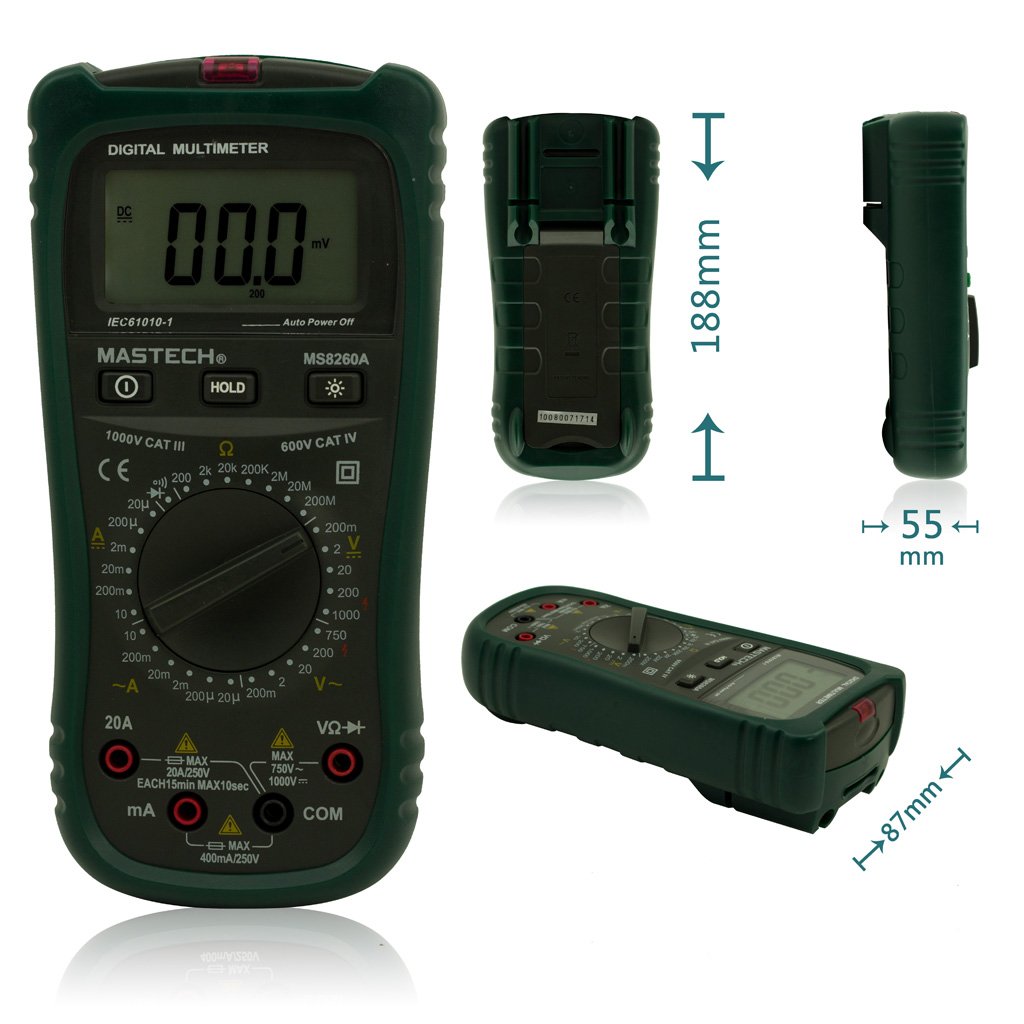
ചിത്രം 1: മുൻഭാഗം View of Mastech MS8260A Digital Multimeter with Dimensions
This image displays the Mastech MS8260A Digital Multimeter from the front, highlighting its LCD screen, rotary function switch, and input terminals. Key dimensions are indicated: 188mm height, 87mm depth, and 55mm width. The display shows '00.0 mV' and 'Auto Power Off' text. The rotary switch is set to 'mV' range. The input jacks are labeled 'VΩHz', 'mA', and 'COM'.
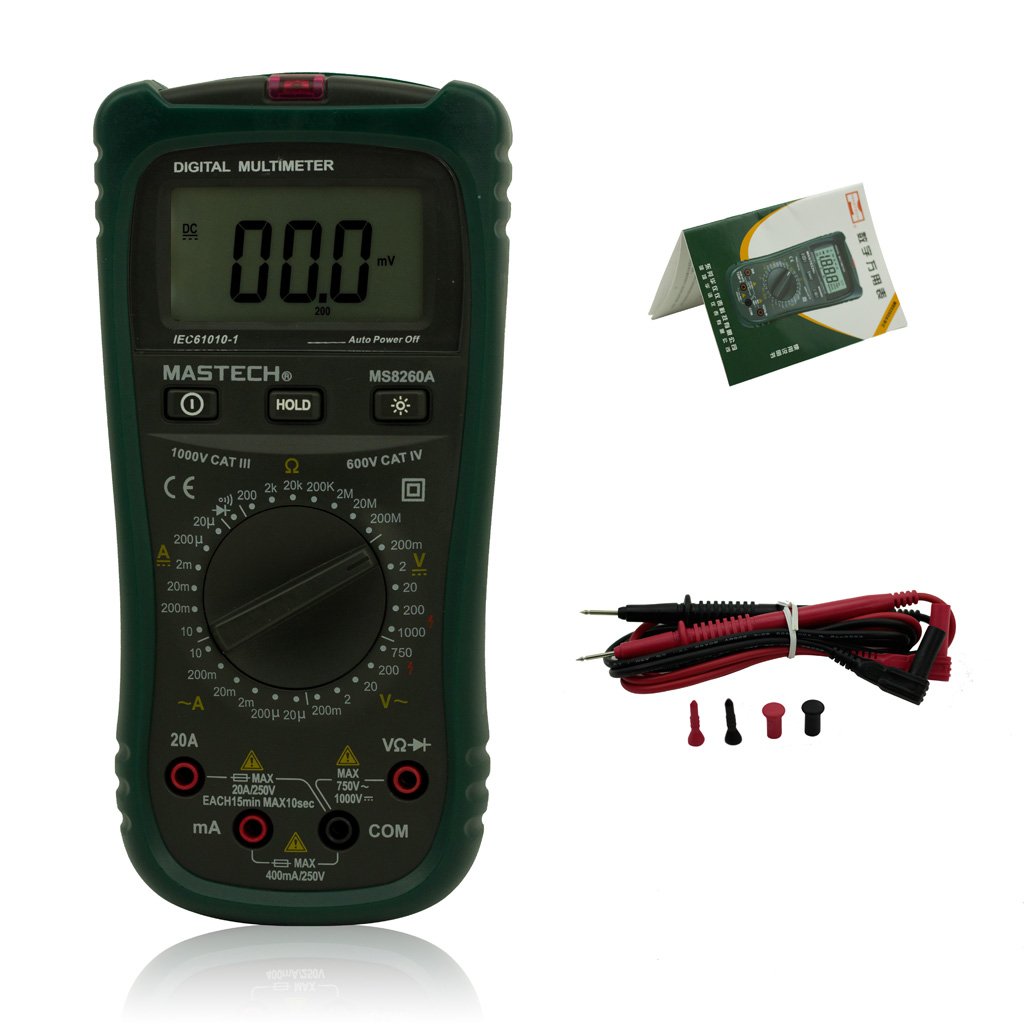
Figure 2: Mastech MS8260A Digital Multimeter and Accessories
This image shows the Mastech MS8260A Digital Multimeter accompanied by its standard accessories. These include a pair of red and black test leads with protective caps, and a printed user manual. The multimeter itself is shown from the front, similar to the main product view.
3.1 പ്രധാന യൂണിറ്റ് സവിശേഷതകൾ
- LCD ഡിസ്പ്ലേ: അളക്കൽ റീഡിംഗുകൾ, യൂണിറ്റുകൾ, പ്രവർത്തന സൂചകങ്ങൾ എന്നിവ കാണിക്കുന്നു.
- റോട്ടറി സ്വിച്ച്: ആവശ്യമുള്ള അളക്കൽ ഫംഗ്ഷനും ശ്രേണിയും തിരഞ്ഞെടുക്കുന്നു.
- ഇൻപുട്ട് ജാക്കുകൾ: Terminals for connecting test leads (VΩHz, mA, COM).
- ഹോൾഡ് ബട്ടൺ: നിലവിലെ ഡിസ്പ്ലേ റീഡിംഗ് മരവിപ്പിക്കുന്നു.
- ബാക്ക്ലൈറ്റ് ബട്ടൺ: Activates the display backlight for improved visibility in low light.
- നോൺ-കോൺടാക്റ്റ് വോളിയംtage (NCV) Sensor: എസി വോള്യം കണ്ടെത്തുന്നുtagനേരിട്ട് ബന്ധപ്പെടാതെ ഇ.
3.2 ഉൾപ്പെടുത്തിയ ആക്സസറികൾ
- ടെസ്റ്റ് ലീഡുകൾ (ചുവപ്പും കറുപ്പും)
- ഉപയോക്തൃ മാനുവൽ
4. പ്രാരംഭ സജ്ജീകരണം
4.1 ബാറ്ററി ഇൻസ്റ്റാളേഷൻ
The Mastech MS8260A Digital Multimeter requires one 9V 6F22 battery for operation. Batteries are not included with the product.
- Ensure the multimeter is turned off and disconnect any test leads.
- യൂണിറ്റിന്റെ പിൻഭാഗത്ത് ബാറ്ററി കമ്പാർട്ട്മെന്റ് കവർ കണ്ടെത്തുക.
- ബാറ്ററി കവർ ഉറപ്പിക്കുന്ന സ്ക്രൂ നീക്കം ചെയ്യാൻ ഒരു സ്ക്രൂഡ്രൈവർ ഉപയോഗിക്കുക.
- കവർ ശ്രദ്ധാപൂർവ്വം നീക്കം ചെയ്യുക.
- Connect a new 9V 6F22 battery to the battery clips, observing correct polarity.
- കമ്പാർട്ട്മെന്റിൽ ബാറ്ററി വയ്ക്കുക.
- ബാറ്ററി കമ്പാർട്ട്മെന്റ് കവർ മാറ്റി സ്ക്രൂ ഉപയോഗിച്ച് സുരക്ഷിതമാക്കുക.
5. പ്രവർത്തന നിർദ്ദേശങ്ങൾ
Before taking any measurements, ensure the test leads are properly connected to the meter and the circuit under test.
5.1 ടെസ്റ്റ് ലീഡുകൾ ബന്ധിപ്പിക്കുന്നു
- എപ്പോഴും ബന്ധിപ്പിക്കുക കറുപ്പ് ടെസ്റ്റ് ലീഡിലേക്ക് നയിക്കുന്നു COM (സാധാരണ) ഇൻപുട്ട് ജാക്ക്.
- വോളിയത്തിന്tage, resistance, diode, continuity, and transistor measurements, connect the ചുവപ്പ് ടെസ്റ്റ് ലീഡിലേക്ക് നയിക്കുന്നു VΩHz ഇൻപുട്ട് ജാക്ക്.
- For current measurements (mA or 20A), connect the ചുവപ്പ് test lead to the appropriate current input jack (mA or 20എ).
5.2 ഫംഗ്ഷൻ തിരഞ്ഞെടുക്കൽ
Turn the rotary switch to the desired measurement function and range. The meter will display the reading on the LCD.
5.2.1 ഡിസി വോളിയംtage അളവ് (V–)
- റോട്ടറി സ്വിച്ച് ആവശ്യമുള്ള ഡിസി വോള്യത്തിലേക്ക് സജ്ജമാക്കുക.tage range (e.g., 200mV, 2V, 20V, 200V, 1000V).
- Connect the test leads in parallel to the circuit or component to be measured.
- വാല്യം വായിക്കുകtagഡിസ്പ്ലേയിലെ ഇ മൂല്യം.
5.2.2 എസി വോള്യംtage അളവ് (V∼)
- റോട്ടറി സ്വിച്ച് ആവശ്യമുള്ള എസി വോള്യത്തിലേക്ക് സജ്ജമാക്കുക.tage range (e.g., 2V, 20V, 200V, 750V).
- എസി വോള്യത്തിന് സമാന്തരമായി ടെസ്റ്റ് ലീഡുകൾ ബന്ധിപ്പിക്കുക.tagഇ ഉറവിടം.
- വാല്യം വായിക്കുകtagഡിസ്പ്ലേയിലെ ഇ മൂല്യം.
5.2.3 DC Current Measurement (A–)
- Set the rotary switch to the desired DC Current range (e.g., 20µA, 200µA, 2mA, 20mA, 200mA, 20A).
- പ്രധാനപ്പെട്ടത്: Disconnect power to the circuit. Break the circuit and connect the meter in series with the load.
- സർക്യൂട്ടിലേക്ക് പവർ പ്രയോഗിക്കുക.
- ഡിസ്പ്ലേയിലെ നിലവിലെ മൂല്യം വായിക്കുക.
5.2.4 AC Current Measurement (A∼)
- Set the rotary switch to the desired AC Current range (e.g., 20µA, 200µA, 2mA, 20mA, 200mA, 20A).
- പ്രധാനപ്പെട്ടത്: Disconnect power to the circuit. Break the circuit and connect the meter in series with the load.
- സർക്യൂട്ടിലേക്ക് പവർ പ്രയോഗിക്കുക.
- ഡിസ്പ്ലേയിലെ നിലവിലെ മൂല്യം വായിക്കുക.
5.2.5 പ്രതിരോധ അളവ് (Ω)
- Set the rotary switch to the desired Resistance range (e.g., 200Ω, 2kΩ, 20kΩ, 200kΩ, 2MΩ, 20MΩ).
- പ്രതിരോധം അളക്കുന്നതിന് മുമ്പ് സർക്യൂട്ട് ഡീ-എനർജൈസ് ചെയ്തിട്ടുണ്ടെന്ന് ഉറപ്പാക്കുക.
- അളക്കേണ്ട ഘടകത്തിലുടനീളം ടെസ്റ്റ് ലീഡുകൾ ബന്ധിപ്പിക്കുക.
- ഡിസ്പ്ലേയിലെ പ്രതിരോധ മൂല്യം വായിക്കുക.
5.2.6 Diode Test (→|)
- Set the rotary switch to the Diode Test position.
- ചുവന്ന ടെസ്റ്റ് ലീഡ് ആനോഡിലേക്കും കറുത്ത ടെസ്റ്റ് ലീഡ് ഡയോഡിന്റെ കാഥോഡിലേക്കും ബന്ധിപ്പിക്കുക.
- ഡിസ്പ്ലേ ഫോർവേഡ് വോളിയം കാണിക്കുംtagഇ ഡ്രോപ്പ് ചെയ്യുക. ലീഡുകൾ റിവേഴ്സ് ചെയ്യുക; നല്ല ഡയോഡിനായി ഡിസ്പ്ലേ 'OL' (ഓപ്പൺ ലൂപ്പ്) കാണിക്കണം.
5.2.7 Continuity Test (♫)
- Set the rotary switch to the Continuity Test position.
- സർക്യൂട്ടിലോ ഘടകത്തിലോ ഉടനീളം ടെസ്റ്റ് ലീഡുകൾ ബന്ധിപ്പിക്കുക.
- പ്രതിരോധം ഏകദേശം 50Ω ൽ താഴെയാണെങ്കിൽ, തുടർച്ചയെ സൂചിപ്പിക്കുന്ന ഒരു ബസർ മുഴങ്ങും.
5.2.8 ട്രാൻസിസ്റ്റർ ടെസ്റ്റ് (hFE)
- റോട്ടറി സ്വിച്ച് hFE സ്ഥാനത്തേക്ക് സജ്ജമാക്കുക.
- Insert the transistor's emitter, base, and collector leads into the appropriate sockets on the meter's hFE test socket.
- The display will show the hFE value (DC current gain).
5.2.9 നോൺ-കോൺടാക്റ്റ് വോളിയംtagഇ (NCV) കണ്ടെത്തൽ
- റോട്ടറി സ്വിച്ച് NCV സ്ഥാനത്തേക്ക് സജ്ജമാക്കുക.
- Move the top front part of the meter (where the NCV sensor is located) close to the conductor suspected of having AC voltage.
- എസി വോള്യം ആണെങ്കിൽtage greater than 110V is detected, the meter will emit an audible beep and the NCV indicator light will illuminate.
6. പരിപാലനം
6.1 വൃത്തിയാക്കൽ
പരസ്യം ഉപയോഗിച്ച് കേസ് തുടയ്ക്കുകamp തുണിയും നേരിയ ഡിറ്റർജന്റും ഉപയോഗിക്കുക. അബ്രാസീവ് വസ്തുക്കളോ ലായകങ്ങളോ ഉപയോഗിക്കരുത്. ഉപയോഗിക്കുന്നതിന് മുമ്പ് മീറ്റർ പൂർണ്ണമായും ഉണങ്ങിയെന്ന് ഉറപ്പാക്കുക.
6.2 ബാറ്ററി മാറ്റിസ്ഥാപിക്കൽ
When the low battery indicator appears on the display, replace the 9V 6F22 battery as described in Section 4.1. Prompt battery replacement ensures accurate measurements and proper meter function.
6.3 ഫ്യൂസ് മാറ്റിസ്ഥാപിക്കൽ
If the meter fails to measure current, the fuse may be blown. Refer to the specifications for the correct fuse type and rating. Fuse replacement should only be performed by qualified personnel.
7. പ്രശ്നപരിഹാരം
- ഡിസ്പ്ലേ ഇല്ല അല്ലെങ്കിൽ മങ്ങിയ ഡിസ്പ്ലേ: ബാറ്ററി ഇൻസ്റ്റാളേഷൻ പരിശോധിച്ച് ആവശ്യമെങ്കിൽ മാറ്റിസ്ഥാപിക്കുക.
- തെറ്റായ വായനകൾ: Ensure test leads are properly connected, the correct function/range is selected, and the battery is not low.
- കറന്റ് അളക്കൽ ഇല്ല: Check the fuse. Ensure the meter is connected in series with the circuit.
- 'OL' (ഓവർലോഡ്) പ്രദർശിപ്പിച്ചിരിക്കുന്നു: The measured value exceeds the selected range. Select a higher range.
8 സ്പെസിഫിക്കേഷനുകൾ
| സ്പെസിഫിക്കേഷൻ | മൂല്യം |
|---|---|
| ബ്രാൻഡ് | മാസ്ടെക് |
| മോഡൽ നമ്പർ | MS8260A |
| അളക്കൽ തരം | ഡിജിറ്റൽ മൾട്ടിമീറ്റർ |
| പവർ ഉറവിടം | 9V 6F22 Battery |
| ഇനത്തിൻ്റെ ഭാരം | 454 ഗ്രാം |
| സർട്ടിഫിക്കേഷൻ | CE |
| ബാറ്ററികൾ ഉൾപ്പെടുത്തിയിട്ടുണ്ട് | ഇല്ല |
9. വാറൻ്റി വിവരങ്ങൾ
Please refer to the warranty card included with your product or contact Mastech customer support for detailed warranty terms and conditions. Warranty coverage typically applies to defects in materials and workmanship under normal use.
10. ഉപഭോക്തൃ പിന്തുണ
For technical assistance, troubleshooting, or service inquiries, please contact Mastech customer support. Refer to the official Mastech website or the product packaging for the most current contact information.
നിങ്ങൾക്ക് സന്ദർശിക്കാം Mastech Store on Amazon കൂടുതൽ ഉൽപ്പന്ന വിവരങ്ങൾക്ക്.


