1. ആമുഖം
This manual provides detailed instructions for the installation, operation, and maintenance of your ZOSI 3K Lite Security Camera System. This system is designed to provide comprehensive surveillance with advanced features such as AI human/vehicle detection, H.265+ video compression, and remote access capabilities. Please read this manual thoroughly before operating the system to ensure proper functionality and safety.
2. പാക്കേജ് ഉള്ളടക്കം
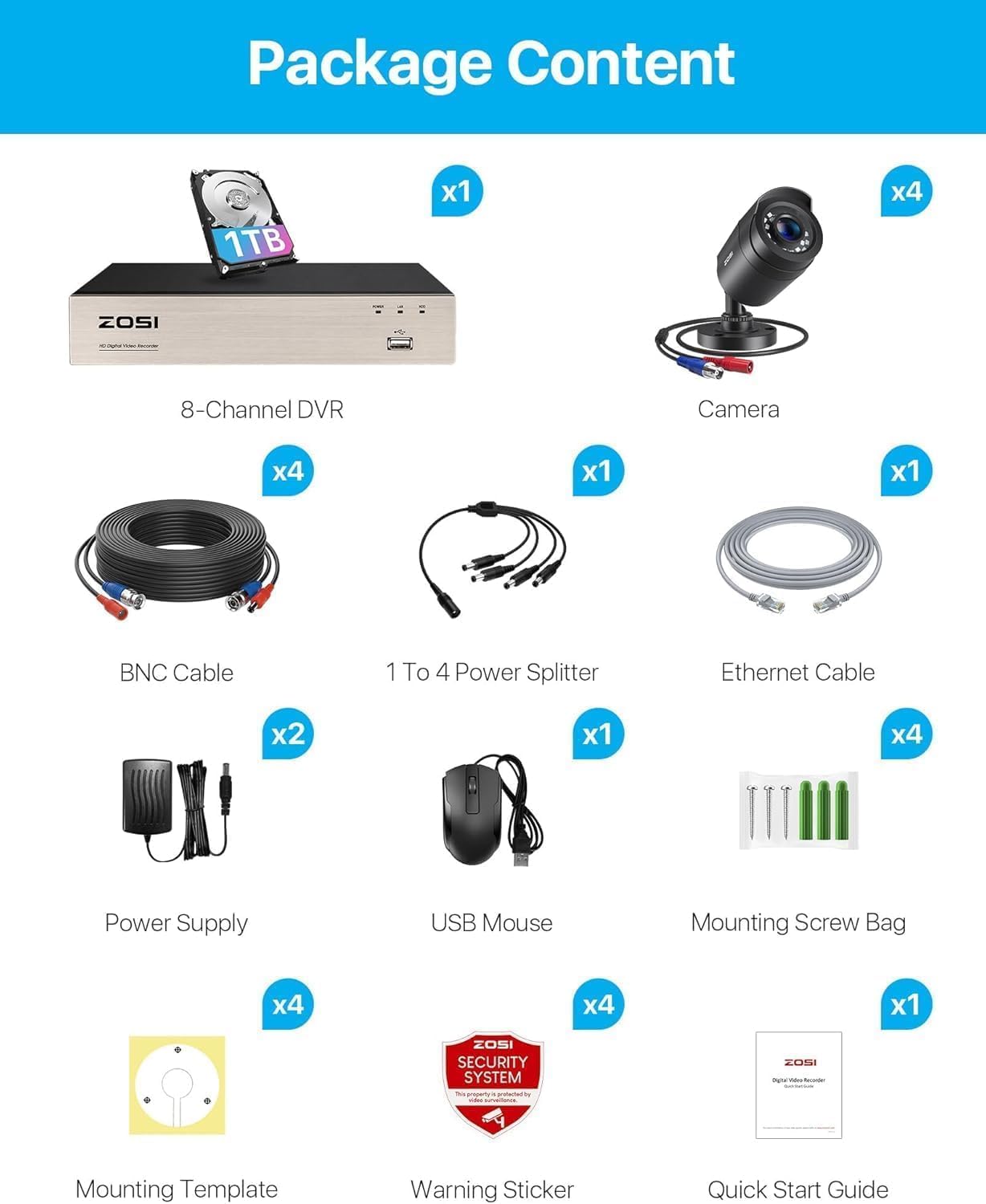
Verify that all items listed below are included in your package. If any items are missing or damaged, please contact ZOSI customer support.
- 1 x H.265+ 8-Channel 3K Lite DVR with 1TB Security Grade Hard Drive
- 4 x HD 1080P Weatherproof Security Cameras
- 1 x 1-to-4 Power Splitter
- 4 x 60ft BNC Video Cables
- 1 x ഇഥർനെറ്റ് കേബിൾ
- 2 x Power Supplies (for DVR and cameras)
- 1 x യുഎസ്ബി മൗസ്
- 4 x മൗണ്ടിംഗ് സ്ക്രൂ ബാഗുകൾ
- 4 x Mounting Templates
- 4 x മുന്നറിയിപ്പ് സ്റ്റിക്കറുകൾ
- 1 x ദ്രുത ആരംഭ ഗൈഡ്
3. സിസ്റ്റം സജ്ജീകരണം
3.1 ഹാർഡ്വെയർ ബന്ധിപ്പിക്കുന്നു
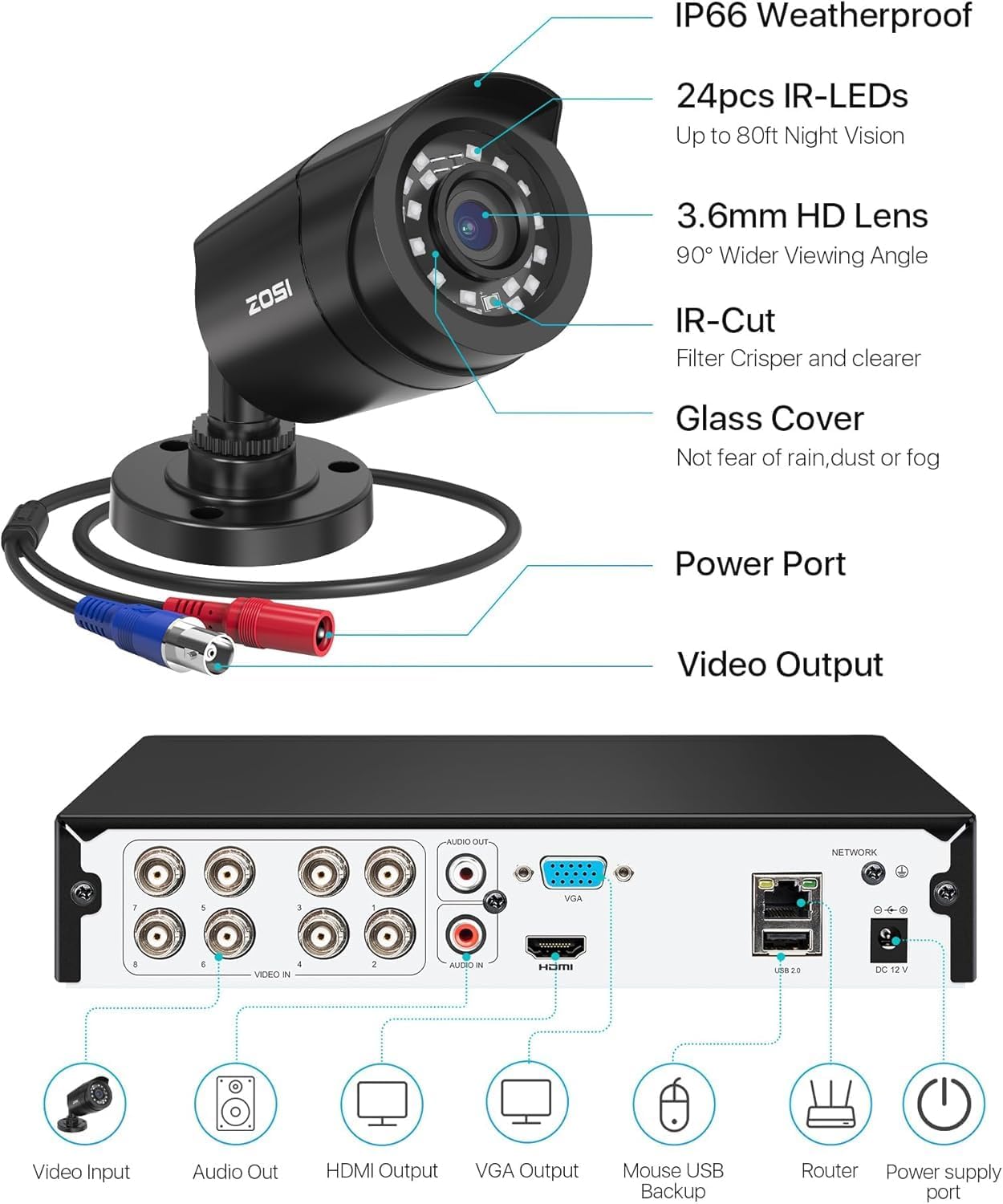
- ക്യാമറകൾ DVR-ലേക്ക് ബന്ധിപ്പിക്കുക: Use the provided BNC cables to connect each camera to the 'VIDEO IN' ports on the back of the DVR.
- ക്യാമറകൾക്ക് പവർ നൽകുക: Connect the cameras to the 1-to-4 power splitter, then connect the splitter to one of the power supplies.
- മോണിറ്ററിലേക്ക് DVR ബന്ധിപ്പിക്കുക: Use an HDMI or VGA cable (not included) to connect the DVR to a monitor or TV.
- Connect DVR to Network: Use the Ethernet cable to connect the DVR to your router for remote access.
- യുഎസ്ബി മൗസ് ബന്ധിപ്പിക്കുക: DVR-ലെ USB പോർട്ടുകളിൽ ഒന്നിലേക്ക് USB മൗസ് പ്ലഗ് ചെയ്യുക.
- Power the DVR: Connect the DVR to its dedicated power supply and plug it into an electrical outlet. The system will power on automatically.
3.2 Initial Configuration & Remote Access
Upon first startup, the DVR will guide you through initial setup steps. It is crucial to set a strong password for your system. For remote access, follow these steps:
- ആപ്പ് ഡൗൺലോഡ് ചെയ്യുക: Download the 'ZOSI Smart' app from the App Store (iOS) or Google Play Store (Android). The 'Zosi View' app is obsolete.
- രജിസ്റ്റർ ചെയ്യുക/ലോഗിൻ ചെയ്യുക: Register a new account or log in to your existing ZOSI account.
- ഉപകരണം ചേർക്കുക: Scan the QR code displayed on your monitor (accessible via the DVR menu) using the ZOSI Smart app to add your DVR. This will provide the 'Super Password' for access.
- PC/Mac Client: ഡെസ്ക്ടോപ്പിന് viewing, download the 'ZOSI AVSS Client' from the official ZOSI webസൈറ്റ്.

3.3 ക്യാമറ ഇൻസ്റ്റാളേഷൻ
The cameras are IP66 weatherproof and suitable for both indoor and outdoor installation. Use the provided mounting screw bags and templates for secure placement.

4. സിസ്റ്റം ഓപ്പറേറ്റിംഗ്
4.1 തത്സമയം View ഒപ്പം പ്ലേബാക്ക്
തത്സമയ ക്യാമറ ഫീഡുകളും റീ-യും ആക്സസ് ചെയ്യുകview രേഖപ്പെടുത്തി footage through the connected monitor, ZOSI Smart app, or AVSS Client. The DVR supports 24/7 continuous recording to the built-in 1TB hard drive, which can be expanded up to 8TB via SATA.

4.2 AI Human/Vehicle Detection
The system utilizes AI to accurately detect human and vehicle movement, reducing false alarms. Configure alert settings to receive notifications via email, app push notifications, or an audible buzzer from the DVR.

4.3 H.265+ വീഡിയോ കംപ്രഷൻ
Advanced H.265+ video compression technology doubles the data compression ratio compared to H.264, maintaining high video quality at lower bit-rates. This maximizes storage space for ultra-long recording periods.

4.4 നൈറ്റ് വിഷൻ
Equipped with 24 IR LEDs, the cameras provide up to 80ft of night vision in total darkness and 130ft in ambient light, ensuring clear images even in low-light conditions.

4.5 Privacy Zones
Configure privacy masks to block out specific areas within the camera's view that you do not wish to record, ensuring personal privacy.

5 സ്പെസിഫിക്കേഷനുകൾ
| ഫീച്ചർ | വിശദാംശങ്ങൾ |
|---|---|
| ബ്രാൻഡ് | സോസി |
| മോഡൽ നമ്പർ | 8WN-211B4S-10-US |
| കണക്റ്റിവിറ്റി ടെക്നോളജി | വയർഡ് |
| വീഡിയോ ക്യാപ്ചർ റെസല്യൂഷൻ | 1080p |
| പ്രത്യേക സവിശേഷതകൾ | App Control, Automatic Overwrite, Human Detection, Motion Sensor |
| ചാനലുകളുടെ എണ്ണം | 8 |
| മെമ്മറി സ്റ്റോറേജ് കപ്പാസിറ്റി | 1 TB (8TB വരെ വികസിപ്പിക്കാവുന്നതാണ്) |
| പവർ ഉറവിടം | കോർഡഡ് ഇലക്ട്രിക് |
| ഓപ്പറേറ്റിംഗ് സിസ്റ്റം | Linux-Based Or Proprietary |
| ശുപാർശ ചെയ്യുന്ന ഉപയോഗങ്ങൾ | Business, Home, Indoor/Outdoor |
| അനുയോജ്യമായ ഉപകരണങ്ങൾ | Laptops, Smartphones, TV, Tablets |
| നൈറ്റ് വിഷൻ റേഞ്ച് | 80 അടി |
| ഫ്രെയിം റേറ്റ് | 60 FPS |
| റെക്കോർഡിംഗ് മോഡ് | പരിപാടി, ഷെഡ്യൂൾ |
| ഹാർഡ്വെയർ ഇന്റർഫേസ് | HDMI, VGA, USB |
| വീഡിയോ ഇൻപുട്ട് | ബിഎൻസി |
| Viewing ആംഗിൾ | 355 ഡിഗ്രി |
6. പരിപാലനം
6.1 വൃത്തിയാക്കൽ
- ക്യാമറ ലെൻസുകൾ പതിവായി മൃദുവായ, ഡി-ക്ലിപ്പർ ഉപയോഗിച്ച് വൃത്തിയാക്കുക.amp വ്യക്തമായ ഇമേജ് ഗുണനിലവാരം ഉറപ്പാക്കാൻ തുണി.
- Wipe down the DVR unit with a dry cloth. Avoid using harsh chemicals or abrasive cleaners.
6.2 സോഫ്റ്റ്വെയർ അപ്ഡേറ്റുകൾ
Periodically check the ZOSI website or the ZOSI Smart app for firmware updates. Keeping your system updated ensures optimal performance, security, and access to new features.
6.3 ഹാർഡ് ഡ്രൈവ് മാനേജ്മെന്റ്
The DVR is configured to automatically overwrite the oldest footage when the 1TB hard drive is full. You can back up important video files to a USB memory stick or external hard drive via the DVR's USB ports.
7. പ്രശ്നപരിഹാരം
This section addresses common issues you might encounter with your ZOSI Security Camera System.
7.1 No Video/Video Loss
- പവർ പരിശോധിക്കുക: Ensure all cameras and the DVR are properly powered. Verify power adapters are securely connected.
- കേബിളുകൾ പരിശോധിക്കുക: Inspect BNC video cables for any damage or loose connections. Re-seat connections if necessary.
- Verify Input: On your monitor/TV, ensure the correct input source (HDMI/VGA) is selected.
7.2 റിമോട്ട് ആക്സസ് പ്രശ്നങ്ങൾ
- നെറ്റ്വർക്ക് കണക്ഷൻ: Confirm the DVR is connected to your router via Ethernet and has internet access. Check network status in DVR settings.
- ആപ്പ് പതിപ്പ്: Ensure you are using the latest 'ZOSI Smart' app. Older versions like 'Zosi View' are no longer supported.
- അക്കൗണ്ട് വിശദാംശങ്ങൾ: Double-check your app login credentials and the 'Super Password' for the DVR.
7.3 മറന്നുപോയ പാസ്വേഡ്
If you forget your DVR password, you may need to use the 'Super Password' feature. This typically involves scanning a QR code on the DVR's monitor using a specific ZOSI utility app (e.g., SPD app mentioned in user reviews) to generate a temporary password. Refer to the Quick Start Guide or ZOSI support for the exact procedure.
8. വാറൻ്റിയും പിന്തുണയും
ZOSI provides after-sales support and services. For technical assistance, product inquiries, or warranty information, please visit the official ZOSI website or contact their support team. Many users report positive experiences with ZOSI's support via Facebook Messenger for prompt assistance.

നിങ്ങൾക്ക് സന്ദർശിക്കാനും കഴിയും ആമസോണിലെ ZOSI സ്റ്റോർ കൂടുതൽ ഉൽപ്പന്ന വിവരങ്ങൾക്കും പിന്തുണാ ഉറവിടങ്ങൾക്കും.


