1. ആമുഖം
Thank you for choosing the Beurer BF 700 Diagnostic Scale. This device is designed to provide comprehensive body analysis, including body weight, body fat, muscle mass, body water, bone mass, resting/active calorie requirements, and BMI calculation. It features Bluetooth technology for seamless data synchronization with the Beurer HealthManager Pro app, allowing for convenient health management and tracking of your progress.
Please read this instruction manual thoroughly before first use to ensure safe and correct operation. Keep this manual for future reference.
2 പ്രധാനപ്പെട്ട സുരക്ഷാ വിവരങ്ങൾ
ഇനിപ്പറയുന്ന സുരക്ഷാ മുൻകരുതലുകൾ എപ്പോഴും നിരീക്ഷിക്കുക:
- This scale is intended for personal use only and is not suitable for commercial or medical purposes.
- Do not use this device if you have a medical implant (e.g., pacemaker). This may affect the function of the implant.
- Pregnant women should not use this scale for body fat analysis, as the results may be inaccurate.
- Place the scale on a firm, level surface to ensure accurate measurements. Avoid carpets or soft surfaces.
- Step onto the scale barefoot and ensure your feet are positioned correctly on the electrodes for body analysis.
- Do not use the scale in wet conditions (e.g., in the shower or on a wet floor) to prevent slipping.
- ശക്തമായ വൈദ്യുതകാന്തിക മണ്ഡലങ്ങളിൽ നിന്ന് സ്കെയിൽ അകറ്റി നിർത്തുക.
- സ്കെയിൽ സ്വയം വേർപെടുത്താനോ നന്നാക്കാനോ ശ്രമിക്കരുത്. അംഗീകൃത സർവീസ് ഉദ്യോഗസ്ഥരെ ബന്ധപ്പെടുക.
- ശ്വാസംമുട്ടൽ അപകടങ്ങൾ തടയാൻ പാക്കേജിംഗ് വസ്തുക്കൾ കുട്ടികളിൽ നിന്ന് അകറ്റി നിർത്തുക.
3. പാക്കേജ് ഉള്ളടക്കം
Please check that all items are included and undamaged upon receipt:
- Beurer BF 700 Diagnostic Scale
- 3 x AAA ബാറ്ററികൾ (ഉൾപ്പെട്ടിരിക്കുന്നു)
- ഇൻസ്ട്രക്ഷൻ മാനുവൽ
4. സജ്ജീകരണം
4.1. ബാറ്ററികൾ ചേർക്കുന്നു
- സ്കെയിലിൻ്റെ അടിഭാഗത്തുള്ള ബാറ്ററി കമ്പാർട്ട്മെൻ്റ് തുറക്കുക.
- Insert the 3 x AAA batteries, ensuring correct polarity (+/-).
- ബാറ്ററി കമ്പാർട്ട്മെൻ്റ് സുരക്ഷിതമായി അടയ്ക്കുക.
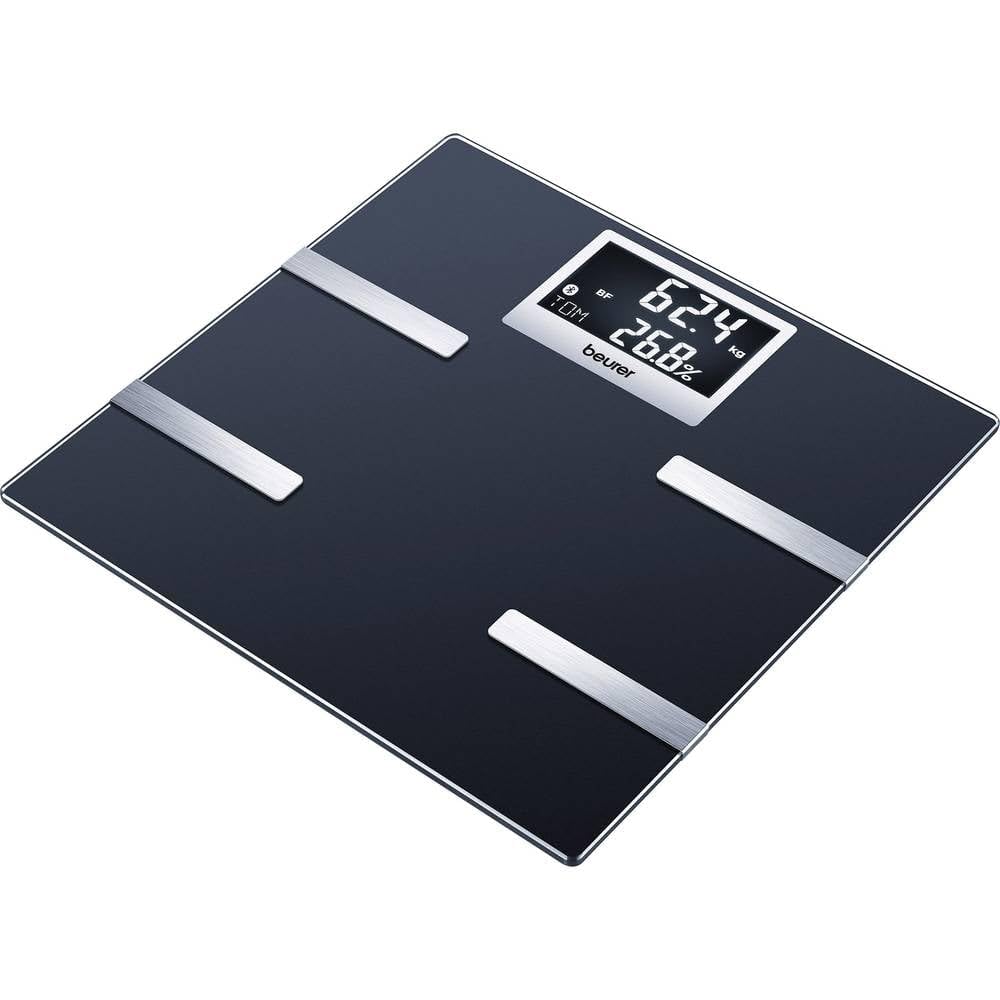
Image 1: Beurer BF 700 Diagnostic Scale. The scale is black with silver electrodes and a digital display.
4.2. Installing the Beurer HealthManager Pro App
- Download the free "Beurer HealthManager Pro" app from your smartphone's app store (Apple App Store or Google Play Store).
- നിങ്ങളുടെ സ്മാർട്ട്ഫോണിൽ ആപ്പ് ഇൻസ്റ്റാൾ ചെയ്യുക.
- Open the app and follow the on-screen instructions to create a user profile അല്ലെങ്കിൽ ലോഗിൻ ചെയ്യുക.
4.3. Pairing the Scale with Your Smartphone
- നിങ്ങളുടെ സ്മാർട്ട്ഫോണിൽ ബ്ലൂടൂത്ത് പ്രവർത്തനക്ഷമമാക്കിയിട്ടുണ്ടെന്ന് ഉറപ്പാക്കുക.
- Open the Beurer HealthManager Pro app.
- In the app, navigate to "My devices" or "Add device".
- Select "Scale" and then "BF 700".
- Step onto the scale briefly to activate it. The scale will display "Bluetooth" or a pairing icon.
- The app will guide you through the pairing process. Once connected, your measurements will automatically synchronize.
Video 1: This video demonstrates the Beurer HealthManager app's capabilities, including how it connects with various Beurer devices like activity trackers, blood pressure monitors, and diagnostic scales (such as the BF 700) via Bluetooth to track and manage health data. It shows the app interface for activity, sleep, weight, blood pressure, and glucose monitoring, highlighting data synchronization and graphical representation of trends.
5. പ്രവർത്തന നിർദ്ദേശങ്ങൾ
5.1. ഒരു അളവ് എടുക്കൽ
- കട്ടിയുള്ളതും പരന്നതുമായ പ്രതലത്തിൽ സ്കെയിൽ സ്ഥാപിക്കുക.
- Step onto the scale barefoot. Ensure your feet are clean and dry, and positioned on the silver electrodes.
- Stand still until the measurement is complete. The display will show your weight, followed by other body analysis values (body fat, body water, muscle mass, bone mass, BMI).
- If the scale is paired with the app, the data will automatically transfer to your user profile in the Beurer HealthManager Pro app.

Image 2: A person's bare feet are shown on the Beurer BF 700 Diagnostic Scale, indicating the correct posture for taking a measurement.
5.2. യൂസർ പ്രോfiles
The Beurer BF 700 supports up to 8 user profiles. The scale automatically recognizes users based on their initial weight and body composition data. For accurate automatic assignment, ensure your initial profile setup in the app is complete.
- To set up a new user, follow the instructions in the Beurer HealthManager Pro app.
- The app allows you to input personal data such as age, height, gender, and activity level, which are crucial for accurate body analysis calculations.
5.3. അളവ് യൂണിറ്റുകൾ
The scale allows you to switch between kilograms (kg), pounds (lb), and stones (st). This setting can typically be adjusted via a button on the underside of the scale or within the Beurer HealthManager Pro app.
6. പരിപാലനവും പരിചരണവും
- വൃത്തിയാക്കൽ: പരസ്യം ഉപയോഗിച്ച് സ്കെയിൽ പതിവായി വൃത്തിയാക്കുകamp cloth and a mild detergent. Do not use abrasive cleaning agents or immerse the scale in water.
- സംഭരണം: തീവ്രമായ താപനിലയിൽ നിന്നും നേരിട്ടുള്ള സൂര്യപ്രകാശത്തിൽ നിന്നും അകന്ന്, വരണ്ട സ്ഥലത്ത് സ്കെയിൽ സൂക്ഷിക്കുക.
- ബാറ്ററി മാറ്റിസ്ഥാപിക്കൽ: Replace all batteries when the low battery indicator appears on the display. Dispose of used batteries according to local regulations.
7. പ്രശ്നപരിഹാരം
| പ്രശ്നം | സാധ്യമായ കാരണം | പരിഹാരം |
|---|---|---|
| "Err" or inaccurate readings | Scale not on a firm, level surface; feet not properly positioned; dirty electrodes; maximum weight exceeded. | Place on a hard, flat surface. Ensure bare feet are centered on electrodes. Clean electrodes. Check weight limit (180 kg). |
| ഒരു ഡിസ്പ്ലേയും / സ്കെയിലും ഓണാകുന്നില്ല | ബാറ്ററികൾ തീർന്നിരിക്കുന്നു അല്ലെങ്കിൽ തെറ്റായി ചേർത്തിരിക്കുന്നു. | ബാറ്ററി പോളാരിറ്റി പരിശോധിക്കുക. ബാറ്ററികൾ മാറ്റിസ്ഥാപിക്കുക. |
| ബ്ലൂടൂത്ത് കണക്ഷൻ പ്രശ്നങ്ങൾ | Bluetooth off on smartphone; app not open; scale not activated; interference. | Ensure Bluetooth is on. Open HealthManager Pro app. Step on scale to activate. Move closer to scale. Restart phone/app. |
| Data not synchronizing to app | No active Bluetooth connection; incorrect user profile selected in app; app issues. | Verify Bluetooth connection. Ensure correct user profile is active in the app. Restart app or phone. |
8 സാങ്കേതിക സവിശേഷതകൾ
- മോഡൽ: BF 700
- ശേഷി: 180 കിലോഗ്രാം (396 പൗണ്ട് / 28 സെന്റ്)
- അളക്കൽ യൂണിറ്റുകൾ: kg/lb/st
- ശരീര വിശകലനം: Body weight, body fat, muscle mass, body water, bone mass, resting/active calorie requirement, BMI
- ഉപയോക്തൃ മെമ്മറി: 8 ഉപയോക്താക്കൾ വരെ
- കണക്റ്റിവിറ്റി: ബ്ലൂടൂത്ത്
- ഡിസ്പ്ലേ: വെളുത്ത ബാക്ക്ലൈറ്റുള്ള എൽസിഡി
- ഊർജ്ജ സ്രോതസ്സ്: 3 x AAA ബാറ്ററികൾ (ഉൾപ്പെട്ടിരിക്കുന്നു)
- അളവുകൾ: ഏകദേശം 11.81 x 11.81 x 9.06 ഇഞ്ച് (30 x 30 x 23 സെ.മീ)
- ഇനത്തിൻ്റെ ഭാരം: ഏകദേശം 4.18 പൗണ്ട് (1.9 കി.ഗ്രാം)
- നിർമ്മാതാവ്: ബ്യൂറർ
9. വാറൻ്റിയും പിന്തുണയും
Beurer GmbH provides a warranty for this product. For detailed warranty conditions and information on how to claim warranty service, please refer to the warranty card included with your product or visit the official Beurer website. For technical support or further assistance, please contact Beurer customer service.
You can find more information and contact details on the official Beurer webസൈറ്റ്: www.beurer.com


