1. ആമുഖം
This manual provides comprehensive instructions for the setup, operation, maintenance, and troubleshooting of your Genius Traveler 9005BT 4-D Bluetooth Mouse. Please read this manual thoroughly before using the device to ensure proper functionality and longevity.
പ്രധാന സവിശേഷതകൾ:
- Precision 1200 dpi BlueEye engine for versatile surface tracking.
- Bluetooth 4-button wireless optical mouse.
- Ergonomic design suitable for both left and right-handed users.
- Turbo Scroll function for rapid document and web പേജ് നാവിഗേഷൻ.
- BlueEye technology allows operation on various surfaces including dusted glass, marble, carpet, and sofa upholstery.
- Compatible with multiple operating systems: Android 3.0+, Windows 7/XP/Vista, and Mac OS X 10.4 or later.
2. പാക്കേജ് ഉള്ളടക്കം
താഴെ ലിസ്റ്റ് ചെയ്തിരിക്കുന്ന എല്ലാ ഇനങ്ങളും നിങ്ങളുടെ ഉൽപ്പന്ന പാക്കേജിൽ ഉണ്ടെന്ന് ഉറപ്പാക്കുക:
- Genius Traveler 9005BT Mouse
- CD driver for mouse 4-D Scroll function
- Two AA Alkaline batteries
- ബഹുഭാഷാ ഉപയോക്തൃ മാനുവൽ
3. സജ്ജീകരണം
3.1. ബാറ്ററി ഇൻസ്റ്റാളേഷൻ
- മൗസിന്റെ അടിഭാഗത്ത് ബാറ്ററി കമ്പാർട്ട്മെന്റ് കവർ കണ്ടെത്തുക.
- കമ്പാർട്ട്മെന്റ് തുറക്കാൻ കവർ പതുക്കെ സ്ലൈഡ് ചെയ്യുകയോ ഉയർത്തുകയോ ചെയ്യുക.
- Insert the two AA Alkaline batteries, ensuring correct polarity (+ and -) as indicated inside the compartment.
- ബാറ്ററി കമ്പാർട്ട്മെന്റ് കവർ സുരക്ഷിതമായി സ്ഥലത്ത് ക്ലിക്ക് ചെയ്യുന്നതുവരെ മാറ്റിസ്ഥാപിക്കുക.
3.2. ബ്ലൂടൂത്ത് ജോടിയാക്കൽ
To connect your Traveler 9005BT mouse to your device:
- Ensure the mouse is powered on. There is typically a power switch on the underside of the mouse.
- Activate Bluetooth on your computer, laptop, or Android device.
- On your device, navigate to the Bluetooth settings and initiate a search for new devices.
- The Genius Traveler 9005BT should appear in the list of available devices. Select it to begin the pairing process.
- Follow any on-screen prompts to complete the pairing. A successful connection will be indicated by a confirmation message on your device.
The mouse supports Bluetooth EDR 2.0 technology, providing a reliable working distance of up to 10 meters. It is compatible with Android 3.0+, Windows 7/XP/Vista, and Mac OS X 10.4 or later.
3.3. Driver Installation (for 4-D Scroll Function)
For optimal use of the 4-D Scroll function, install the provided driver:
- Insert the included CD driver into your computer's optical drive.
- ആവശ്യമായ സോഫ്റ്റ്വെയർ ഇൻസ്റ്റാൾ ചെയ്യാൻ ഓൺ-സ്ക്രീൻ നിർദ്ദേശങ്ങൾ പാലിക്കുക.
- Restart your computer if prompted to ensure the driver is fully installed and recognized.
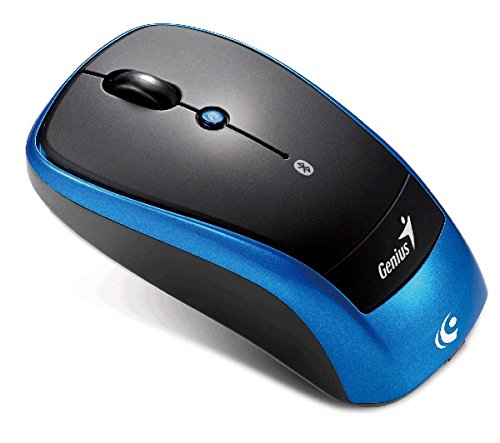
ഒരു ഓവർഹെഡ് view of the Genius Traveler 9005BT 4-D Bluetooth Mouse, showcasing its ergonomic design with a black top surface and blue sides. It features a scroll wheel, left and right click buttons, and a small button for 4-D scroll functionality.
4. മൗസ് പ്രവർത്തിപ്പിക്കൽ
4.1. അടിസ്ഥാന പ്രവർത്തനങ്ങൾ
- ഇടത് ക്ലിക്ക്: Press the left button for primary selection and activation.
- വലത് ക്ലിക്കിൽ: Press the right button to access contextual menus.
- സ്ക്രോൾ വീൽ: Roll the wheel up or down to scroll vertically through documents and web പേജുകൾ.
4.2. 4-D Scroll Function
The Traveler 9005BT features a dedicated 4-D scroll function key. Once the driver is installed, this function allows for more natural and convenient scrolling by simply moving your mouse in the direction you wish to scroll (up, down, left, or right) while holding down the 4-D scroll button.
4.3. Turbo Scroll
Engage the Turbo Scroll feature for hyper-fast navigation through lengthy documents, spreadsheets, and web pages. This function allows you to accelerate scrolling speed, significantly improving efficiency when reviewing extensive content.
4.4. BlueEye Technology
The integrated BlueEye technology enables the mouse to operate on a wide variety of surfaces that traditional optical mice may struggle with. This includes challenging textures such as dusted glass, marble, carpet, and sofa upholstery, providing flexibility in your workspace.
5. പരിപാലനം
5.1. വൃത്തിയാക്കൽ
മികച്ച പ്രകടനവും രൂപഭംഗിയും നിലനിർത്താൻ:
- വൃത്തിയാക്കുന്നതിന് മുമ്പ് മൗസ് ഓഫ് ചെയ്തിട്ടുണ്ടെന്ന് ഉറപ്പാക്കുക.
- പുറംഭാഗങ്ങൾ തുടയ്ക്കാൻ മൃദുവായതും ഉണങ്ങിയതും ലിന്റ് രഹിതവുമായ ഒരു തുണി ഉപയോഗിക്കുക.
- കഠിനമായ അഴുക്കിന്, ചെറുതായി dampവെള്ളം അല്ലെങ്കിൽ നേരിയതും ഉരച്ചിലുകൾ ഇല്ലാത്തതുമായ ഒരു ക്ലീനർ ഉപയോഗിച്ച് തുണി തുടയ്ക്കുക. അമിതമായ ഈർപ്പം ഒഴിവാക്കുക.
- Do not use harsh chemicals, solvents, or abrasive materials, as these can damage the mouse's finish or internal components.
- ട്രാക്കിംഗ് പ്രശ്നങ്ങൾ തടയുന്നതിന് മൗസിന്റെ അടിവശത്തുള്ള ഒപ്റ്റിക്കൽ സെൻസർ ഏരിയ ഒരു കോട്ടൺ സ്വാബ് ഉപയോഗിച്ച് ഇടയ്ക്കിടെ വൃത്തിയാക്കുക.
5.2. ബാറ്ററി മാറ്റിസ്ഥാപിക്കൽ
When the mouse's performance degrades or it stops responding, it may be time to replace the batteries. Follow the battery installation steps outlined in Section 3.1.
6. പ്രശ്നപരിഹാരം
If you encounter issues with your Genius Traveler 9005BT mouse, refer to the following common solutions:
- മൗസ് പ്രതികരിക്കുന്നില്ല:
- മൗസ് ഓണാണെന്ന് ഉറപ്പാക്കുക.
- ആവശ്യമെങ്കിൽ ബാറ്ററികൾ പരിശോധിച്ച് മാറ്റിസ്ഥാപിക്കുക.
- Verify that Bluetooth is enabled on your device and the mouse is paired correctly. Try re-pairing if needed.
- റേഞ്ച് പ്രശ്നങ്ങൾ ഒഴിവാക്കാൻ മൗസ് നിങ്ങളുടെ ഉപകരണത്തിന് അടുത്തേക്ക് നീക്കുക.
- ക്രമരഹിതമായ കഴ്സർ ചലനം:
- മൗസിന്റെ അടിവശത്തുള്ള ഒപ്റ്റിക്കൽ സെൻസർ വൃത്തിയാക്കുക.
- Ensure you are using the mouse on a suitable surface. While BlueEye technology is versatile, extreme surfaces or highly reflective ones can still cause issues.
- Check for any obstructions around the optical sensor.
- 4-D Scroll Function Not Working:
- Confirm that the 4-D scroll driver has been installed correctly from the provided CD.
- ഡ്രൈവർ ഇൻസ്റ്റാൾ ചെയ്തതിനുശേഷം നിങ്ങളുടെ കമ്പ്യൂട്ടർ പുനരാരംഭിക്കുക.
- Bluetooth Disconnections:
- Ensure no other devices are causing Bluetooth interference.
- നിങ്ങളുടെ ഉപകരണത്തിന്റെ ബ്ലൂടൂത്ത് ഡ്രൈവറുകൾ അപ്ഡേറ്റ് ചെയ്യുക.
- നിങ്ങളുടെ ഉപകരണവുമായി മൗസ് വീണ്ടും ജോടിയാക്കുക.
If these steps do not resolve the issue, consult the multi-language user manual included in your package or contact Genius customer support.
7 സ്പെസിഫിക്കേഷനുകൾ
| ഫീച്ചർ | വിശദാംശങ്ങൾ |
|---|---|
| ബ്രാൻഡ് | പ്രതിഭ |
| മോഡൽ നമ്പർ | Traveler 9005BT |
| മൂവ്മെന്റ് ഡിറ്റക്ഷൻ ടെക്നോളജി | Optical (BlueEye) |
| ഡിപിഐ | 1200 ഡിപിഐ |
| കണക്റ്റിവിറ്റി | Bluetooth EDR 2.0 |
| ബട്ടണുകളുടെ എണ്ണം | 4 |
| കൈ ഓറിയൻ്റേഷൻ | ഉഭയകക്ഷി |
| പവർ ഉറവിടം | 2 x AA ആൽക്കലൈൻ ബാറ്ററികൾ (ഉൾപ്പെടുത്തിയിട്ടില്ല) |
| അനുയോജ്യമായ ഓപ്പറേറ്റിംഗ് സിസ്റ്റങ്ങൾ | Windows® 7, Vista, XP / Android 3.0+ / Mac OS X 10.4+ |
| ഹാർഡ്വെയർ പ്ലാറ്റ്ഫോം | ലാപ്ടോപ്പ്, പേഴ്സണൽ കമ്പ്യൂട്ടർ |
8. വാറൻ്റിയും പിന്തുണയും
For warranty information, please refer to the documentation provided with your purchase or contact your retailer. Genius products typically come with a limited warranty. For technical support or further assistance, please consult the multi-language user manual included in your package or visit the official Genius webബന്ധപ്പെടാനുള്ള വിവരങ്ങൾക്കുള്ള സൈറ്റ്.


