1. ആമുഖം
This user manual provides comprehensive instructions for the safe and efficient use of your Sharp LC-60LE660 60-Inch Aquos 1080p 120Hz Smart LED TV. Please read this manual thoroughly before operating the television and retain it for future reference. This television combines a 60-inch full HD display with Smart TV capabilities, offering a high-quality viewing experience and access to various online services.
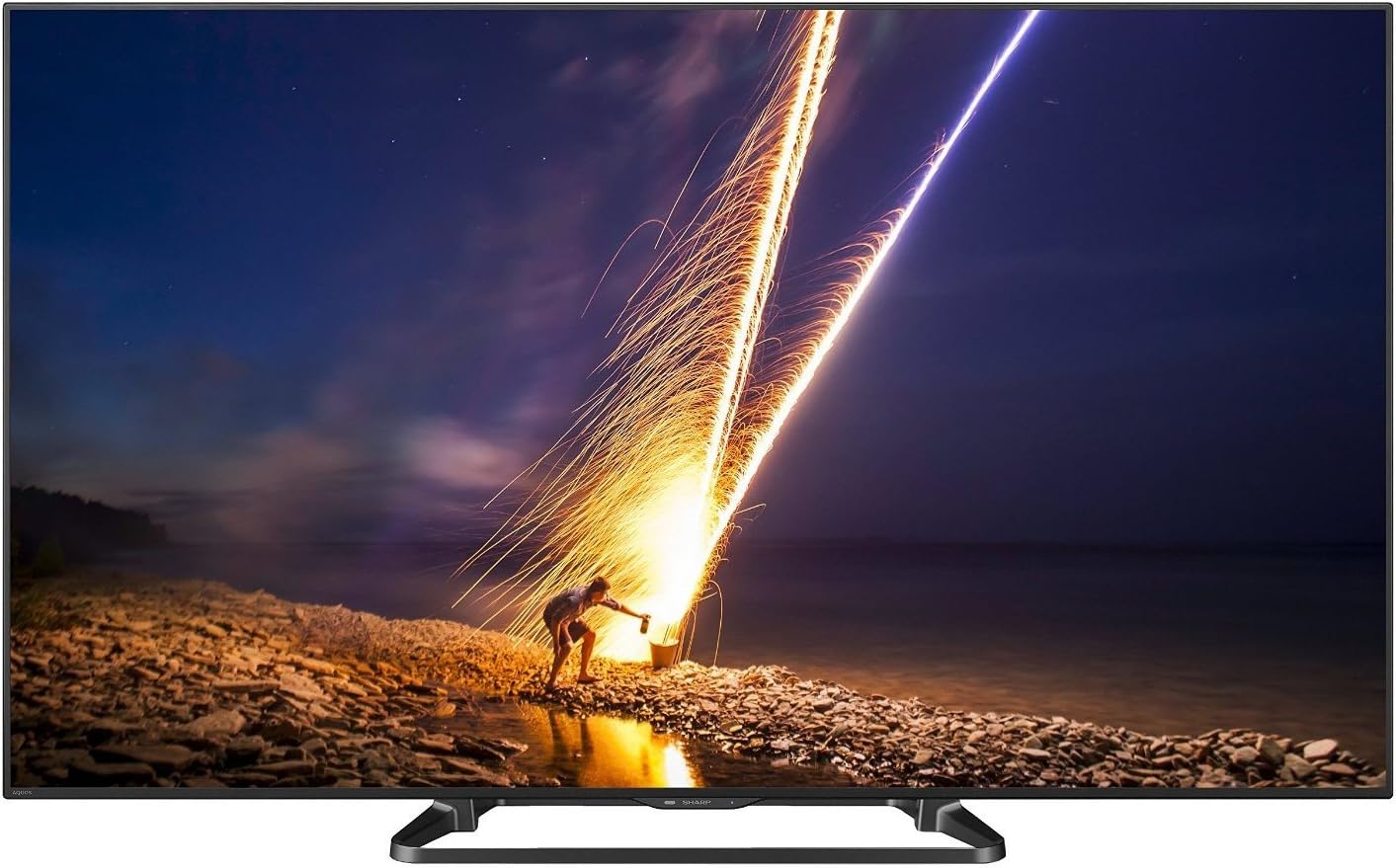
ചിത്രം 1: മുൻഭാഗം view of the Sharp LC-60LE660 Smart LED TV.
2 പ്രധാനപ്പെട്ട സുരക്ഷാ വിവരങ്ങൾ
Please observe the following safety precautions to prevent damage to the television and ensure personal safety.
- പ്ലേസ്മെൻ്റ്: Ensure the television is placed on a stable, level surface or securely mounted to a wall according to manufacturer's instructions. Avoid placing it in direct sunlight or near heat sources.
- വെൻ്റിലേഷൻ: Do not block ventilation openings. Allow adequate space around the television for proper airflow to prevent overheating.
- വൈദ്യുതി വിതരണം: Connect the power cord to an appropriate AC outlet. Do not overload power outlets.
- ദ്രാവക എക്സ്പോഷർ: Keep the television away from water and moisture. Do not expose it to rain or splashes.
- വൃത്തിയാക്കൽ: Unplug the television before cleaning. Use a soft, dry cloth. Do not use liquid cleaners or aerosol cleaners.
- സേവനം: ഈ ഉൽപ്പന്നം സ്വയം സേവിക്കാൻ ശ്രമിക്കരുത്. യോഗ്യതയുള്ള സേവന ഉദ്യോഗസ്ഥർക്ക് എല്ലാ സേവനങ്ങളും റഫർ ചെയ്യുക.
Legal Disclaimer: Must be at least 18 & over to purchase. Purchased items will require a direct signature at the time of delivery.
3. ബോക്സിൽ എന്താണുള്ളത്?
Verify that all items are present upon unpacking your Sharp LC-60LE660 TV:
- Sharp LC-60LE660 60-Inch Aquos 1080p 120Hz Smart LED TV
- യൂണിവേഴ്സൽ റിമോട്ട് കൺട്രോൾ
- പവർ കോർഡ്
- ഉപയോക്തൃ മാനുവൽ (ഈ പ്രമാണം)
- Stand Assembly (if applicable)
4. സജ്ജീകരണം
4.1. Physical Placement and Dimensions
Before setting up your television, consider its dimensions and ensure adequate space for ventilation and viewing. The television weighs approximately 54.2 pounds.
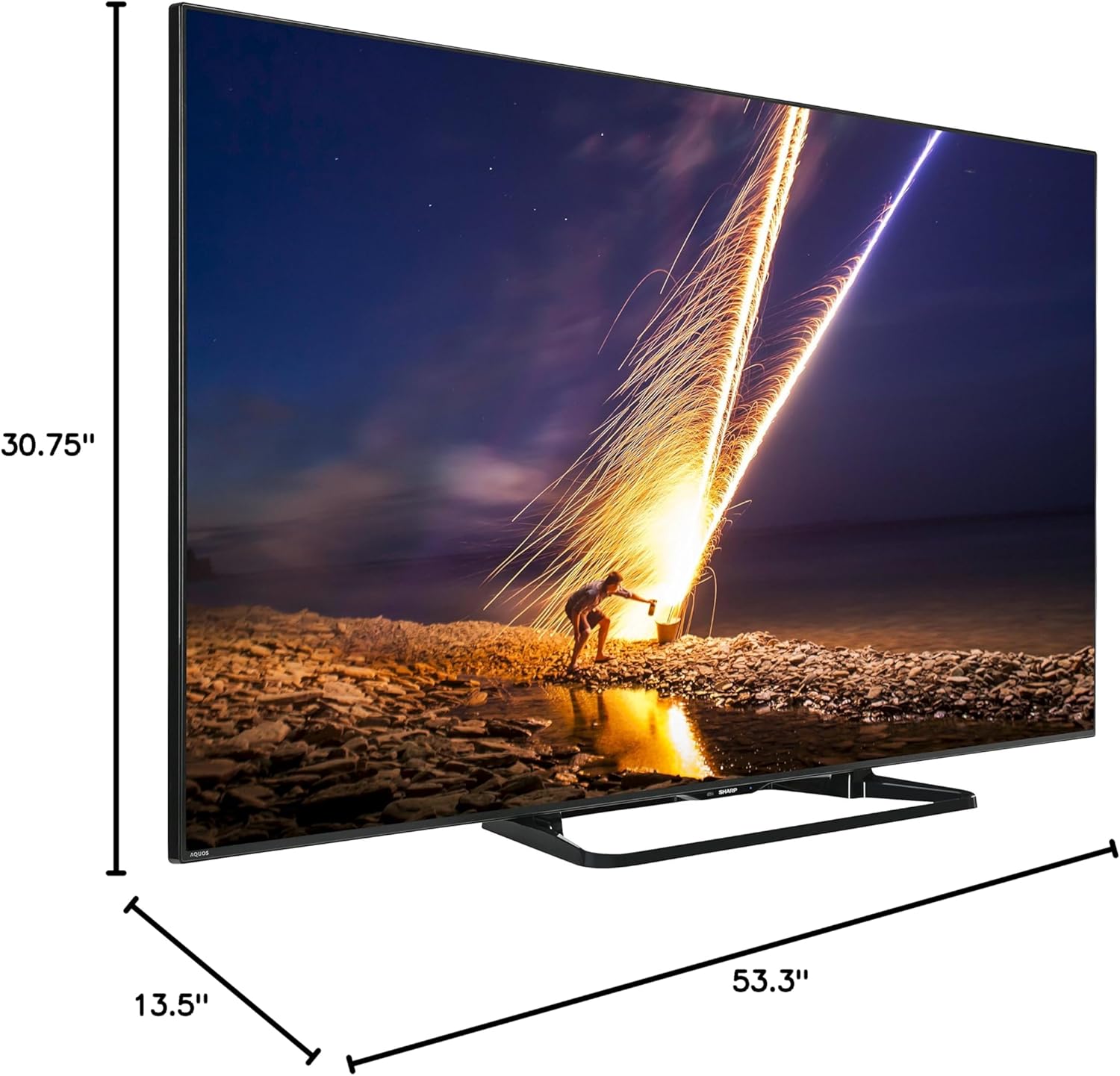
Figure 2: Dimensions of the Sharp LC-60LE660 TV with stand. Width: 53.3 inches, Height: 30.75 inches, Depth: 13.5 inches.
Ensure the TV is placed on a sturdy surface or mounted securely. Leave sufficient space around the TV for heat dissipation.
4.2. ബാഹ്യ ഉപകരണങ്ങൾ ബന്ധിപ്പിക്കുന്നു
The Sharp LC-60LE660 TV offers various ports for connecting external devices such as Blu-ray players, gaming consoles, and sound systems. Refer to the diagram below for port locations.
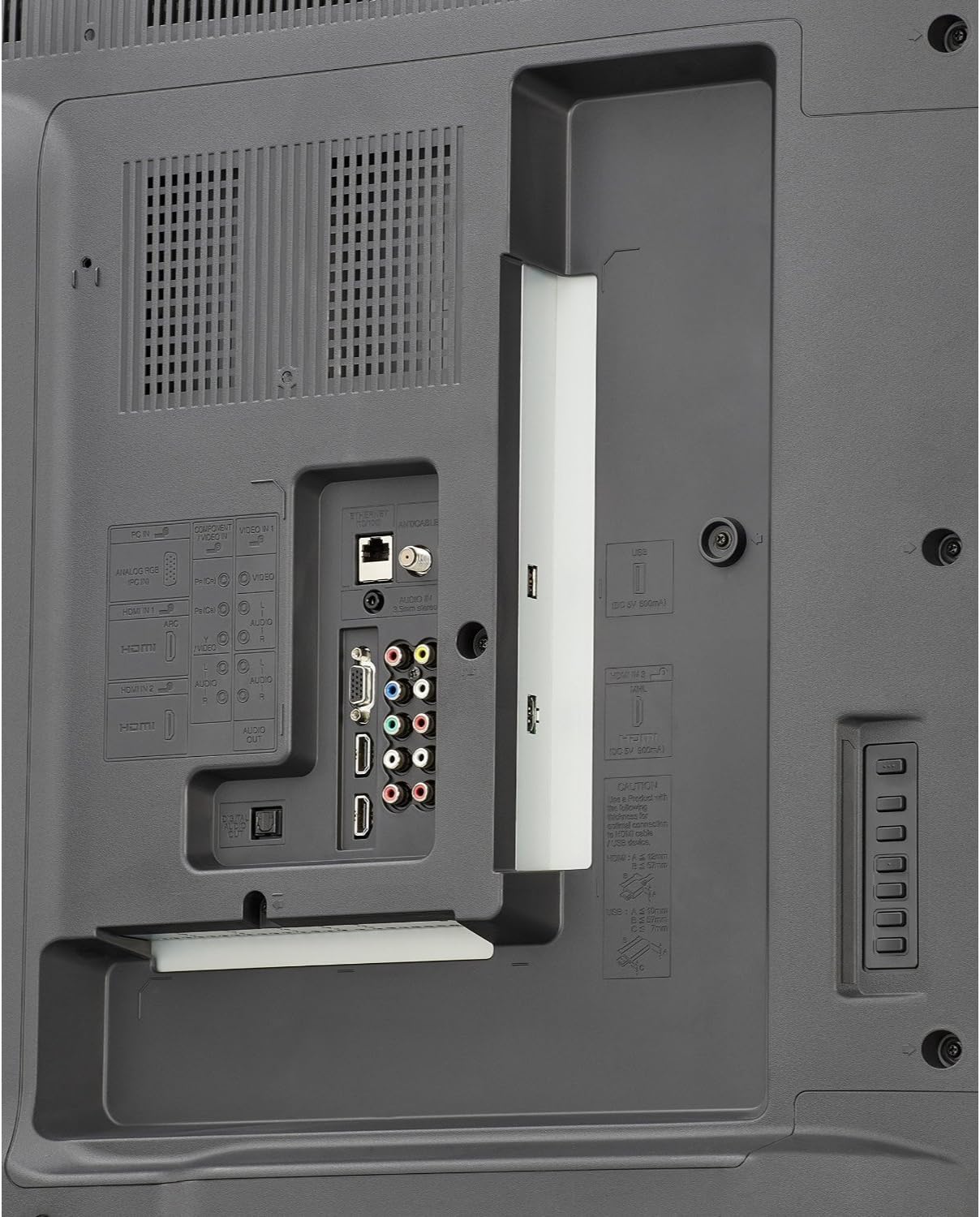
Figure 3: Rear panel connections. Includes multiple HDMI inputs, USB ports, component video input, composite video input, and audio output options.
- എച്ച്ഡിഎംഐ: Connect high-definition devices using HDMI cables. This model features multiple HDMI ports.
- USB: Use USB ports for media playback from USB storage devices or for firmware updates.
- Component/Composite: For older devices, use the component or composite video inputs.
- ഓഡിയോ Outട്ട്: Connect to external audio systems via optical digital audio out or analog audio out.
- Ethernet/Wi-Fi: Connect to your home network via an Ethernet cable or the built-in Wi-Fi for Smart TV features.
4.3. പ്രാരംഭ പവർ ഓണും നെറ്റ്വർക്ക് സജ്ജീകരണവും
- പവർ കോർഡ് ടിവിയിലേക്കും പിന്നീട് ഒരു വാൾ ഔട്ട്ലെറ്റിലേക്കും പ്ലഗ് ചെയ്യുക.
- റിമോട്ട് കൺട്രോളിലോ ടിവിയിലോ പവർ ബട്ടൺ അമർത്തുക.
- Follow the on-screen instructions to select your language, country, and perform an initial channel scan.
- For Smart TV features, connect to your home network. Select your Wi-Fi network from the list and enter the password, or connect an Ethernet cable.
5. പ്രവർത്തന നിർദ്ദേശങ്ങൾ
5.1. അടിസ്ഥാന ടിവി പ്രവർത്തനങ്ങൾ
- പവർ ഓൺ/ഓഫ്: റിമോട്ടിലോ ടിവിയിലോ ഉള്ള പവർ ബട്ടൺ ഉപയോഗിക്കുക.
- ചാനൽ തിരഞ്ഞെടുക്കൽ: റിമോട്ടിലെ CH+/- ബട്ടണുകൾ അല്ലെങ്കിൽ നമ്പർ പാഡ് ഉപയോഗിക്കുക.
- വോളിയം നിയന്ത്രണം: റിമോട്ടിലെ VOL+/- ബട്ടണുകൾ ഉപയോഗിക്കുക.
- ഇൻപുട്ട് തിരഞ്ഞെടുക്കൽ: Press the INPUT button on the remote to switch between connected devices (HDMI, Component, etc.).
5.2. Smart Central Apps
Your Sharp LC-60LE660 TV features Smart Central Apps, providing quick access to popular streaming services and applications via built-in Wi-Fi.

Figure 4: Smart Central Apps interface with icons for Netflix, YouTube, Pandora, and other services.
To access Smart Central Apps:
- നിങ്ങളുടെ ടിവി ഇന്റർനെറ്റുമായി ബന്ധിപ്പിച്ചിട്ടുണ്ടെന്ന് ഉറപ്പാക്കുക.
- Press the "Smart Central" button on your remote control.
- Navigate through the available applications using the arrow keys and select your desired app (e.g., Netflix, YouTube, Pandora, Flickr, Picasa, Facebook).
5.3. ചിത്ര, ശബ്ദ ക്രമീകരണങ്ങൾ
- ചിത്ര മോഡുകൾ: Access the picture settings menu to adjust brightness, contrast, color, sharpness, and select preset picture modes (e.g., Standard, Movie, Game).
- AquoMotion240: This technology enhances clarity during fast-motion scenes. Adjust its settings in the picture menu to suit your preference.
- ശബ്ദ മോഡുകൾ: Adjust audio settings, including bass, treble, and select sound modes (e.g., Standard, Music, Cinema).
5.4. Wallpaper Mode
The Wallpaper mode allows the TV to display art, photos, or a clock when powered off, integrating the television seamlessly into your living space.
- Access the Wallpaper mode settings through the TV's main menu.
- Select your preferred display option (e.g., pre-loaded art, personal photos via USB, or a clock).
6. പരിപാലനം
- സ്ക്രീൻ ക്ലീനിംഗ്: മൃദുവായ, ലിന്റ് രഹിത തുണി ഉപയോഗിച്ച് സ്ക്രീൻ സൌമ്യമായി തുടയ്ക്കുക. കഠിനമായ പാടുകൾക്ക്, ചെറുതായി dampen the cloth with water or a specialized screen cleaner, then wipe dry immediately. Do not apply pressure.
- കാബിനറ്റ് ക്ലീനിംഗ്: മൃദുവായതും ഉണങ്ങിയതുമായ തുണി ഉപയോഗിച്ച് ടിവി കാബിനറ്റ് തുടയ്ക്കുക. അബ്രാസീവ് ക്ലീനറുകളോ ലായകങ്ങളോ ഉപയോഗിക്കുന്നത് ഒഴിവാക്കുക.
- വെൻ്റിലേഷൻ: Periodically check that the ventilation slots on the back of the TV are not obstructed by dust or debris.
7. പ്രശ്നപരിഹാരം
If you encounter issues with your Sharp LC-60LE660 TV, refer to the following common solutions:
| പ്രശ്നം | സാധ്യമായ കാരണം / പരിഹാരം |
|---|---|
| വൈദ്യുതിയില്ല / ടിവി ഓണാകുന്നില്ല | ടിവിയിലേക്കും പ്രവർത്തിക്കുന്ന ഒരു ഇലക്ട്രിക്കൽ ഔട്ട്ലെറ്റിലേക്കും പവർ കോർഡ് സുരക്ഷിതമായി പ്ലഗ് ചെയ്തിട്ടുണ്ടെന്ന് ഉറപ്പാക്കുക. മറ്റൊരു ഔട്ട്ലെറ്റ് പരീക്ഷിക്കുക. |
| ചിത്രമില്ല, പക്ഷേ ശബ്ദം ഉണ്ട് | Check the input source. Ensure external devices are powered on and connected correctly. Adjust brightness/contrast settings. |
| ശബ്ദമില്ല, പക്ഷേ ചിത്രം ഉണ്ട് | Check volume level and mute status. Ensure external audio systems are connected and configured correctly. |
| ചിത്രം വളച്ചൊടിച്ചതോ അവ്യക്തമോ ആണ് | Check cable connections. Adjust picture settings. If using an antenna, check signal strength. |
| TV freezes or reboots unexpectedly | This can sometimes be resolved by a firmware update. Check Sharp's support website for the latest firmware for model LC-60LE660U and follow update instructions. A hard reset (unplugging the TV for a few minutes and plugging it back in) may also resolve temporary issues. |
| Smart features not working / No internet connection | Verify your Wi-Fi or Ethernet connection. Restart your router. Check network settings on the TV. |
ഈ പരിഹാരങ്ങൾ പരീക്ഷിച്ചതിന് ശേഷവും പ്രശ്നം നിലനിൽക്കുകയാണെങ്കിൽ, ദയവായി ഷാർപ്പ് ഉപഭോക്തൃ പിന്തുണയുമായി ബന്ധപ്പെടുക.
8 സ്പെസിഫിക്കേഷനുകൾ
| ഫീച്ചർ | വിശദാംശങ്ങൾ |
|---|---|
| ബ്രാൻഡ് | മൂർച്ചയുള്ള |
| മോഡൽ നമ്പർ | LC-60LE660U |
| സ്ക്രീൻ വലിപ്പം | 60 Inches (60 3/32" diagonal) |
| ഡിസ്പ്ലേ ടെക്നോളജി | എൽഇഡി |
| റെസലൂഷൻ | 1080p (പൂർണ്ണ HD) |
| പുതുക്കിയ നിരക്ക് | 120 Hz (AquoMotion240) |
| ഡൈനാമിക് കോൺട്രാസ്റ്റ് റേഷ്യോ | 4 million : 1 |
| സ്മാർട്ട് ടിവി സവിശേഷതകൾ | Smart Central Apps (Netflix, YouTube, Pandora, Flickr, Picasa, Facebook), Built-in Wi-Fi, Browser |
| കണക്റ്റിവിറ്റി | Wi-Fi, Multiple HDMI, USB, Component, Composite, Ethernet |
| സ്പീക്കർ തരം | ബിൽറ്റ്-ഇൻ |
| ഉൽപ്പന്ന അളവുകൾ (സ്റ്റാൻഡിനൊപ്പം) | 53.3"ആംശം x 30.75"ആംശം x 13.5"ആംശം |
| ഇനത്തിൻ്റെ ഭാരം | 54.2 പൗണ്ട് |
| ഊർജ്ജ കാര്യക്ഷമത | എനർജി സ്റ്റാർ സർട്ടിഫൈഡ് |
9. വാറൻ്റിയും പിന്തുണയും
For warranty information and technical assistance, please refer to the documentation included with your television or visit the official Sharp support webസൈറ്റ്. നിങ്ങൾക്ക് സന്ദർശിക്കാനും കഴിയും ആമസോണിലെ ഷാർപ്പ് സ്റ്റോർ കൂടുതൽ ഉൽപ്പന്ന വിവരങ്ങൾക്കും ഉപഭോക്തൃ പിന്തുണ ഓപ്ഷനുകൾക്കും.

Figure 5: Customer Support information is available for assistance.


