1. ആമുഖം
വാങ്ങിയതിന് നന്ദി.asing the Edifier Prisma Encore 2.1 Bluetooth Audio System. This manual provides detailed instructions for setting up, operating, and maintaining your new audio system. Designed to complement modern PC monitors and notebooks, the Prisma Encore offers versatile connectivity options including auxiliary input and Bluetooth for seamless audio streaming.
Please read this manual thoroughly before use to ensure proper operation and to maximize your listening experience.
2. പാക്കേജ് ഉള്ളടക്കം
Please check the contents of your package. If any items are missing or damaged, contact your local dealer or Edifier customer service.
- Prisma Encore Subwoofer Unit
- ഇടത് സാറ്റലൈറ്റ് സ്പീക്കർ
- വലത് സാറ്റലൈറ്റ് സ്പീക്കർ
- വയർലെസ് റിമോട്ട് കൺട്രോൾ
- പവർ അഡാപ്റ്റർ
- 3.5 എംഎം മുതൽ 3.5 എംഎം വരെ ഓഡിയോ കേബിൾ
- ഉപയോക്തൃ മാനുവൽ (ഈ പ്രമാണം)
3. ഉൽപ്പന്നം കഴിഞ്ഞുview
Familiarize yourself with the components of your Edifier Prisma Encore system.

ചിത്രം 3.1: The complete Edifier Prisma Encore 2.1 Bluetooth Audio System, showcasing the central subwoofer, two satellite speakers, and the wireless remote control. The system features a sleek, modern design in black.

ചിത്രം 3.2: മുകളിൽ view of the Prisma Encore subwoofer, highlighting the elegant lighted power control and touch-sensitive controls for volume adjustment and playback. A green LED indicator is visible at the top.
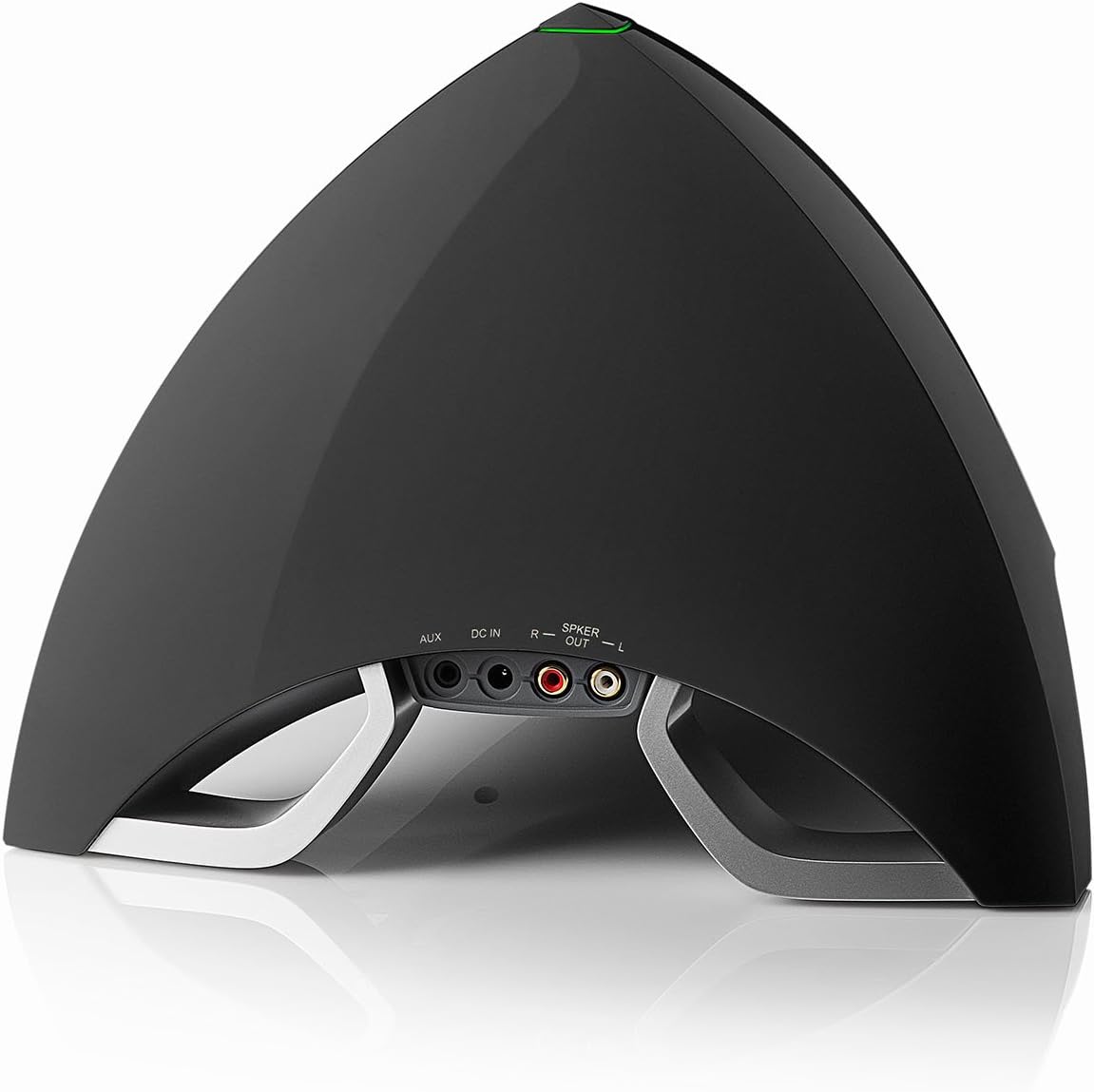
ചിത്രം 3.3: പിൻഭാഗം view of the Prisma Encore subwoofer, displaying the various connection ports including AUX input, DC IN for power, and speaker output terminals (R and L) for the satellite speakers.

ചിത്രം 3.4: Close-up of the compact wireless remote control for the Edifier Prisma Encore system, featuring buttons for power, volume adjustment, and input selection.
4. സജ്ജീകരണം
Follow these steps to set up your Edifier Prisma Encore audio system.
4.1 പ്ലേസ്മെൻ്റ്
- Place the subwoofer on a stable, flat surface, preferably on the floor or a sturdy desk.
- Position the satellite speakers on either side of your listening area, facing towards you for optimal stereo imaging. Ensure they are placed on a stable surface.
4.2 സ്പീക്കറുകൾ ബന്ധിപ്പിക്കുന്നു
- Connect the right satellite speaker cable to the "R" speaker output port on the rear of the subwoofer.
- Connect the left satellite speaker cable to the "L" speaker output port on the rear of the subwoofer.
4.3 ഒരു ഓഡിയോ സ്രോതസ്സിലേക്ക് ബന്ധിപ്പിക്കുന്നു
The Prisma Encore offers two main ways to connect to an audio source: Bluetooth and Auxiliary (AUX) input.
4.3.1 ബ്ലൂടൂത്ത് കണക്ഷൻ
- Ensure the Prisma Encore is powered on.
- Press the Bluetooth button on the remote control or the touch control on the subwoofer to select Bluetooth input. The LED indicator on the subwoofer will flash blue, indicating it is in pairing mode.
- On your audio device (smartphone, tablet, computer), enable Bluetooth and search for new devices.
- Select "EDIFIER PRISMA ENCORE" from the list of available devices.
- Once paired, the LED indicator on the subwoofer will turn solid blue. You can now play audio through the system.
4.3.2 Auxiliary (AUX) Input Connection
- Using the provided 3.5mm to 3.5mm audio cable, connect one end to the AUX input port on the rear of the subwoofer.
- Connect the other end of the cable to the headphone jack or audio output port of your audio device (e.g., computer, TV, MP3 player).
- Press the AUX button on the remote control or the touch control on the subwoofer to select AUX input. The LED indicator will turn green.

ചിത്രം 4.1: Connection diagram illustrating how to connect the satellite speakers, power adapter, and audio source (via AUX or Bluetooth) to the Edifier Prisma Encore subwoofer.
4.4 ബന്ധിപ്പിക്കുന്ന പവർ
- Connect the power adapter to the "DC IN" port on the rear of the subwoofer.
- ഒരു മതിൽ ഔട്ട്ലെറ്റിലേക്ക് പവർ അഡാപ്റ്റർ പ്ലഗ് ചെയ്യുക.
- സിസ്റ്റം ഇപ്പോൾ പ്രവർത്തനത്തിന് തയ്യാറാണ്.
5. പ്രവർത്തന നിർദ്ദേശങ്ങൾ
5.1 പവർ ഓൺ/ഓഫ്
- To power on the system, press the power button on the wireless remote control or the touch-sensitive power control on top of the subwoofer.
- To power off the system, press the power button again.
5.2 വോളിയം നിയന്ത്രണം
- റിമോട്ട് കൺട്രോൾ ഉപയോഗിക്കുന്നത്: Press the "+" button to increase volume and the "-" button to decrease volume.
- Using Subwoofer Touch Controls: Swipe your finger along the touch-sensitive strip on top of the subwoofer to adjust volume.
5.3 ഇൻപുട്ട് തിരഞ്ഞെടുക്കൽ
- Press the input selection button (often labeled with a source icon or "M" for Mode) on the remote control or the touch control on the subwoofer to switch between Bluetooth and AUX input modes.
- The LED indicator on the subwoofer will change color to indicate the selected input:
- നീല: ബ്ലൂടൂത്ത് ഇൻപുട്ട്
- പച്ച: AUX ഇൻപുട്ട്
5.4 Bluetooth Playback Controls (when in Bluetooth mode)
- പ്ലേ/താൽക്കാലികമായി നിർത്തുക: Press the play/pause button on the remote control or the touch control on the subwoofer.
- അടുത്ത ട്രാക്ക്: Press the next track button on the remote control.
- മുമ്പത്തെ ട്രാക്ക്: Press the previous track button on the remote control.
6. പരിപാലനം
Proper care will ensure the longevity and optimal performance of your Edifier Prisma Encore system.
- വൃത്തിയാക്കൽ: Use a soft, dry cloth to clean the surfaces of the speakers and subwoofer. Do not use liquid cleaners or aerosol sprays directly on the unit.
- പ്ലേസ്മെൻ്റ്: സിസ്റ്റം നേരിട്ട് സൂര്യപ്രകാശം ഏൽക്കുന്നിടത്തോ, താപ സ്രോതസ്സുകൾക്ക് സമീപമോ, ഉയർന്ന ആർദ്രതയോ പൊടിയോ ഉള്ള സ്ഥലങ്ങളിലോ സ്ഥാപിക്കുന്നത് ഒഴിവാക്കുക.
- വെൻ്റിലേഷൻ: സബ് വൂഫറിന് ചുറ്റും ആവശ്യത്തിന് വായുസഞ്ചാരം ഉറപ്പാക്കുക, അങ്ങനെ അമിതമായി ചൂടാകുന്നത് തടയുക. വെന്റിലേഷൻ ദ്വാരങ്ങളൊന്നും തടയരുത്.
- പവർ ഓഫ്: If the system will not be used for an extended period, unplug it from the power outlet.
7. പ്രശ്നപരിഹാരം
If you encounter any issues with your Edifier Prisma Encore system, please refer to the following common problems and solutions.
| പ്രശ്നം | സാധ്യമായ കാരണം | പരിഹാരം |
|---|---|---|
| ശബ്ദമില്ല |
|
|
| ബ്ലൂടൂത്ത് കണക്ഷൻ പരാജയപ്പെടുന്നു |
|
|
| വികലമായ ശബ്ദം |
|
|
| റിമോട്ട് കൺട്രോൾ പ്രവർത്തിക്കുന്നില്ല |
|
|
8 സ്പെസിഫിക്കേഷനുകൾ
Detailed technical specifications for the Edifier Prisma Encore 2.1 Bluetooth Audio System.
- മോഡൽ നമ്പർ: e3360BT
- സ്പീക്കർ തരം: Subwoofer (2.1 system)
- കണക്റ്റിവിറ്റി ടെക്നോളജി: Wireless (Bluetooth), Wired (AUX)
- ഓഡിയോ putട്ട്പുട്ട് മോഡ്: സ്റ്റീരിയോ
- സ്പീക്കർ പരമാവധി ഔട്ട്പുട്ട് പവർ: 64 വാട്ട്സ്
- ശുപാർശ ചെയ്യുന്ന ഉപയോഗങ്ങൾ: സംഗീതം
- അനുയോജ്യമായ ഉപകരണങ്ങൾ: Smartphone, Computer, Tablet, MP3 Player, TV
- കൺട്രോളർ തരം: Battery Powered (Remote Control)
- നിറം: കറുപ്പ്
- ഉൾപ്പെടുത്തിയ ഘടകങ്ങൾ: വയർലെസ് റിമോട്ട്
- ഇനത്തിൻ്റെ ഭാരം: ഏകദേശം 11 പൗണ്ട് (4.99 കി.ഗ്രാം)
- ഉൽപ്പന്ന അളവുകൾ (L x W x H): 46.81 x 25.5 x 35.61 സെ.മീ (18.43 x 10.04 x 14.02 ഇഞ്ച്)
- ഊർജ്ജ സ്രോതസ്സ്: Battery Powered (for remote), AC Powered (for main unit via adapter)
- ബാറ്ററികൾ: 1 Lithium Ion battery required (included for remote)
- മൗണ്ടിംഗ് തരം: ടേബിൾടോപ്പ്
- നിർമ്മാതാവ്: Edifier USA
- ആദ്യം ലഭ്യമായ തീയതി: നവംബർ 15, 2014
9. വാറൻ്റിയും പിന്തുണയും
For warranty information and technical support, please refer to the warranty card included with your product or visit the official Edifier website. You can also contact Edifier customer service directly for assistance with product registration, troubleshooting, or service inquiries.
Edifier Official Webസൈറ്റ്: www.edifier.com


