1. ആമുഖവും അവസാനവുംview
This manual provides comprehensive instructions for the installation, operation, and maintenance of your SPYCLOPS SPY-MINIDOMEW2P CCD Mini Dome Camera. Designed for indoor surveillance, this camera offers reliable monitoring with its CCD sensor and 720p video resolution. Please read this manual thoroughly before using the product to ensure proper setup and functionality.
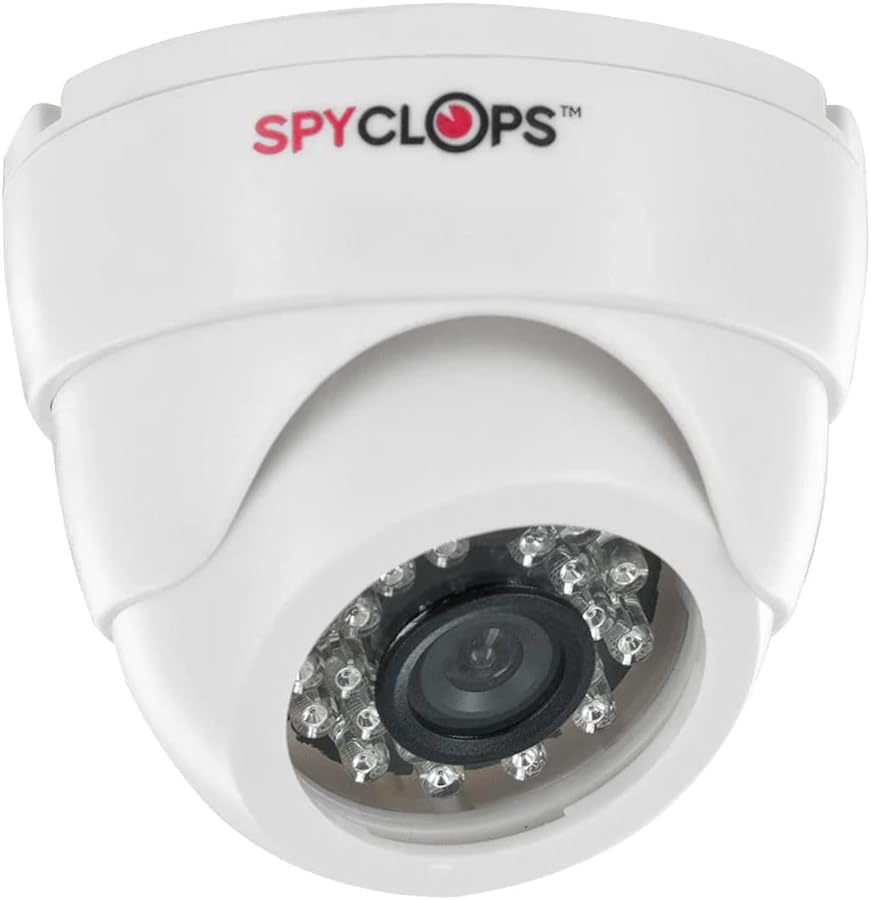
Figure 1: SPYCLOPS SPY-MINIDOMEW2P CCD Mini Dome Camera
The SPY-MINIDOMEW2P is a compact, white plastic dome camera featuring a CCD photo sensor for clear image capture. It supports Wi-Fi for wireless communication and is designed for wall mounting in various indoor environments such as offices, kitchens, living rooms, and classrooms. Its IP54 rating indicates protection against dust ingress and splashing water, making it suitable for typical indoor conditions.
2. ഉൽപ്പന്ന സവിശേഷതകൾ
- വീഡിയോ മിഴിവ്: 720p for clear video capture.
- ഫോട്ടോ സെൻസർ ടെക്നോളജി: CCD (Charge-Coupled Device) for enhanced image quality.
- വയർലെസ് കണക്റ്റിവിറ്റി: Wi-Fi for network integration and Bluetooth for specific accessory connections.
- ഇൻഡോർ ഉപയോഗം: Specifically designed for indoor surveillance applications.
- ഫോം ഘടകം: Discreet dome design.
- മൗണ്ടിംഗ്: Wall mountable for flexible placement.
- ഊർജ്ജ സ്രോതസ്സ്: AC/DC compatible for versatile power options.
- സംരക്ഷണ റേറ്റിംഗ്: IP54, offering protection against dust and splashing water.
- മെറ്റീരിയൽ: മോടിയുള്ള പ്ലാസ്റ്റിക് നിർമ്മാണം.
- പ്രത്യേക സവിശേഷത: Portable design for ease of relocation within indoor spaces.
3. പാക്കേജ് ഉള്ളടക്കം
ഇൻസ്റ്റാളേഷനുമായി മുന്നോട്ടുപോകുന്നതിനുമുമ്പ് എല്ലാ ഇനങ്ങളും പാക്കേജിൽ ഉണ്ടെന്ന് ദയവായി പരിശോധിക്കുക:
- SPYCLOPS SPY-MINIDOMEW2P CCD Mini Dome Camera
- മൗണ്ടിംഗ് ഹാർഡ്വെയർ (സ്ക്രൂകൾ, വാൾ ആങ്കറുകൾ)
- പവർ അഡാപ്റ്റർ (AC/DC)
- ഉപയോക്തൃ മാനുവൽ (ഈ പ്രമാണം)
If any items are missing or damaged, please contact your retailer or SPYCLOPS customer support.
4. സജ്ജീകരണവും ഇൻസ്റ്റാളേഷനും
4.1 ഒരു സ്ഥലം തിരഞ്ഞെടുക്കുന്നു
Select an indoor location that provides the desired viewing angle and is within range of your Wi-Fi network. Ensure the surface is suitable for wall mounting. Avoid placing the camera near heat sources, direct sunlight, or areas with high humidity.
4.2 ക്യാമറ മൗണ്ടിംഗ്
- Carefully unpack the camera and mounting hardware.
- Position the camera at the desired mounting location on a wall.
- Mark the drill holes using the camera's base as a template.
- Drill pilot holes at the marked positions. Insert wall anchors if necessary.
- നൽകിയിരിക്കുന്ന സ്ക്രൂകൾ ഉപയോഗിച്ച് ക്യാമറ ബേസ് ഭിത്തിയിൽ ഉറപ്പിക്കുക.
- ആവശ്യമുള്ള നിരീക്ഷണ മേഖല ഉൾക്കൊള്ളുന്നതിനായി ക്യാമറയുടെ ആംഗിൾ ക്രമീകരിക്കുക.
4.3 പവർ കണക്ഷൻ
Connect the provided power adapter to the camera's power input port. Plug the adapter into a standard AC power outlet. Ensure the power source is stable and meets the camera's requirements.
4.4 നെറ്റ്വർക്ക് കോൺഫിഗറേഷൻ (വൈ-ഫൈ)
- Once powered on, the camera will enter setup mode (indicated by an LED status light, refer to camera's LED guide if available).
- Download the official SPYCLOPS surveillance application on your smartphone or tablet (check product packaging or manufacturer's webആപ്പ് വിശദാംശങ്ങൾക്കായി സൈറ്റ്).
- Follow the in-app instructions to add your new camera. This typically involves scanning a QR code on the camera or connecting to a temporary Wi-Fi hotspot created by the camera.
- Select your home/office Wi-Fi network and enter the password when prompted.
- Wait for the camera to connect to your network. The LED status light will change to indicate a successful connection.
5. ക്യാമറ പ്രവർത്തിപ്പിക്കുക
5.1 Accessing Live Feed
Open the SPYCLOPS surveillance application on your device. Select your camera from the device list to view the live video feed. You can monitor your designated area in real-time.
5.2 റെക്കോർഡിംഗും പ്ലേബാക്കും
The application typically allows for manual recording of video footage. Depending on the camera's features and app settings, you may also configure motion-activated recording. Recorded footage can be accessed and played back through the app's history or gallery section.
5.3 ക്യാമറ ക്രമീകരണങ്ങൾ
Within the application, you can adjust various camera settings, including video resolution (if multiple options are available), motion detection sensitivity, notification preferences, and potentially other advanced features. Refer to the in-app help or the manufacturer's website for detailed explanations of each setting.
6. പരിപാലനം
6.1 വൃത്തിയാക്കൽ
To maintain optimal performance, regularly clean the camera lens and body. Use a soft, dry, lint-free cloth to wipe away dust. For stubborn smudges on the lens, slightly dampen the cloth with a lens cleaning solution. Do not use harsh chemicals or abrasive materials, as they can damage the plastic and lens coating.
6.2 ഫേംവെയർ അപ്ഡേറ്റുകൾ
Periodically check the SPYCLOPS application or manufacturer's website for available firmware updates. Keeping your camera's firmware up-to-date ensures you have the latest features, security patches, and performance improvements. Follow the provided instructions carefully when performing updates.
6.3 പരിസ്ഥിതി പരിഗണനകൾ
The SPY-MINIDOMEW2P is designed for indoor use. Avoid exposing the camera to extreme temperatures, direct water spray, or high humidity, as this can damage internal components. Ensure proper ventilation around the camera if installed in an enclosed space.
7. പ്രശ്നപരിഹാരം
If you encounter issues with your SPYCLOPS SPY-MINIDOMEW2P camera, refer to the following common problems and solutions:
- ശക്തിയില്ല:
- Ensure the power adapter is securely plugged into both the camera and a working electrical outlet.
- മറ്റൊരു ഉപകരണം പ്ലഗ് ഇൻ ചെയ്ത് ഔട്ട്ലെറ്റിലേക്ക് വൈദ്യുതി ലഭിക്കുന്നുണ്ടോയെന്ന് പരിശോധിക്കുക.
- No Video Feed / Offline:
- Verify that your Wi-Fi router is on and functioning correctly.
- Check the camera's LED status light for network connection status (refer to camera's LED guide).
- പവർ അഡാപ്റ്റർ അൺപ്ലഗ് ചെയ്ത് വീണ്ടും പ്ലഗ് ചെയ്തുകൊണ്ട് ക്യാമറ പുനരാരംഭിക്കുക.
- Ensure the camera is within range of your Wi-Fi router. Obstacles like thick walls can weaken the signal.
- If the issue persists, try re-configuring the network connection through the app.
- മോശം ചിത്രത്തിന്റെ ഗുണനിലവാരം:
- മൃദുവായതും ലിനില്ലാത്തതുമായ തുണി ഉപയോഗിച്ച് ക്യാമറ ലെൻസ് വൃത്തിയാക്കുക.
- ലെൻസിന് മുന്നിൽ തടസ്സങ്ങളൊന്നുമില്ലെന്ന് ഉറപ്പാക്കുക.
- Check lighting conditions in the surveillance area.
- Verify the video resolution setting in the app.
- App Not Connecting to Camera:
- Ensure your smartphone/tablet is connected to the same Wi-Fi network as the camera.
- Update the SPYCLOPS app to the latest version.
- നിങ്ങളുടെ സ്മാർട്ട്ഫോൺ/ടാബ്ലെറ്റ് പുനരാരംഭിക്കുക.
For issues not covered here, or if troubleshooting steps do not resolve the problem, please contact SPYCLOPS customer support.
8 സ്പെസിഫിക്കേഷനുകൾ
| ഫീച്ചർ | സ്പെസിഫിക്കേഷൻ |
|---|---|
| മോഡൽ നമ്പർ | SPY-MINIDOMEW2P |
| ബ്രാൻഡ് | സ്പൈക്ലോപ്സ് |
| നിറം | വെള്ള |
| മെറ്റീരിയൽ | പ്ലാസ്റ്റിക് |
| ഫോം ഫാക്ടർ | താഴികക്കുടം |
| ഫോട്ടോ സെൻസർ ടെക്നോളജി | സിസിഡി |
| വീഡിയോ ക്യാപ്ചർ റെസല്യൂഷൻ | 720p |
| വീഡിയോ ക്യാപ്ചർ ഫോർമാറ്റ് | MPEG-4 |
| വയർലെസ് കമ്മ്യൂണിക്കേഷൻ ടെക്നോളജി | വൈഫൈ |
| കണക്റ്റിവിറ്റി പ്രോട്ടോക്കോൾ | ബ്ലൂടൂത്ത് |
| മൗണ്ടിംഗ് തരം | മതിൽ മൗണ്ട് |
| ഇൻഡോർ/ഔട്ട്ഡോർ ഉപയോഗം | ഇൻഡോർ |
| ഉൽപ്പന്നത്തിനുള്ള ശുപാർശിത ഉപയോഗങ്ങൾ | ഇൻഡോർ സുരക്ഷ |
| പവർ ഉറവിടം | എസി/ഡിസി |
| അന്താരാഷ്ട്ര സംരക്ഷണ റേറ്റിംഗ് | IP54 |
| ഇനത്തിൻ്റെ ഭാരം | 10.6 പൗണ്ട് |
| ആദ്യ തീയതി ലഭ്യമാണ് | ഒക്ടോബർ 10, 2014 |
9. വാറൻ്റിയും പിന്തുണയും
Specific warranty details for the SPYCLOPS SPY-MINIDOMEW2P camera are not provided within this manual. Please refer to the product packaging, the original purchase documentation, or the official SPYCLOPS webസമഗ്രമായ വാറന്റി വിവരങ്ങൾക്കായി സൈറ്റ്.
For technical support, product inquiries, or assistance with troubleshooting beyond the scope of this manual, please visit the SPYCLOPS official website or contact their customer service department using the contact information provided with your product or on their webസൈറ്റ്.


