ഉൽപ്പന്നം കഴിഞ്ഞുview
The PORTER-CABLE PC60THP 6-Amp Hand Planer is designed for smooth and efficient material removal in various woodworking applications. Its robust 6-Amp motor delivers up to 16,500 RPM for clean cuts in hard materials. Key features include dual-side dust extraction, a depth adjustment knob with 10 positive steps, and an 11.5-inch cast aluminum shoe for enhanced control and finish quality.
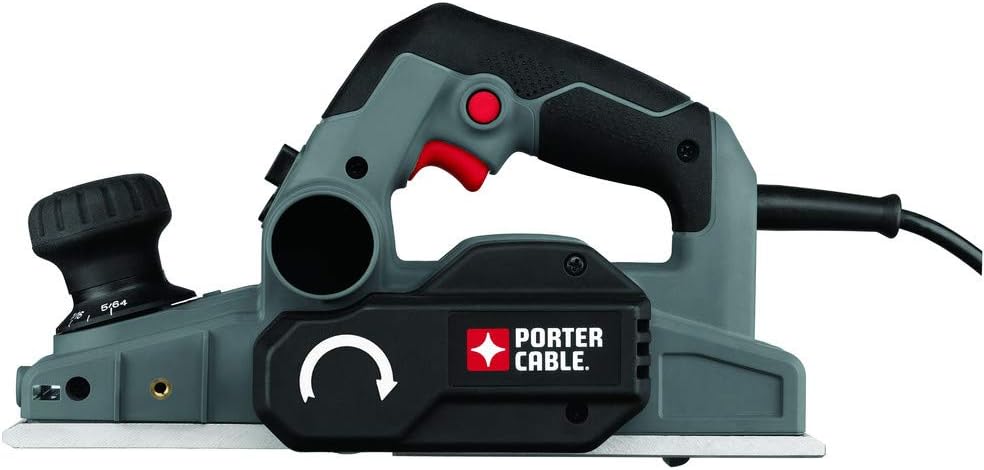
Image: The PORTER-CABLE PC60THP 6-Amp Hand Planer, showcasing its ergonomic design and dust collection port.
പ്രധാനപ്പെട്ട സുരക്ഷാ വിവരങ്ങൾ
WARNING: Read all safety warnings and instructions before operating this power tool. Failure to follow the warnings and instructions may result in electric shock, fire, and/or serious injury.
- എപ്പോഴും കണ്ണ് സംരക്ഷണവും കേൾവി സംരക്ഷണവും ധരിക്കുക.
- മുറിക്കുന്ന ഭാഗത്തുനിന്നും ബ്ലേഡിൽ നിന്നും കൈകൾ അകറ്റി നിർത്തുക.
- വർക്ക്പീസ് സുരക്ഷിതമാണെന്ന് ഉറപ്പാക്കുകamped before planing.
- എന്തെങ്കിലും ക്രമീകരണങ്ങൾ വരുത്തുന്നതിനോ, ആക്സസറികൾ മാറ്റുന്നതിനോ, ഉപകരണം സൂക്ഷിക്കുന്നതിനോ മുമ്പ് പവർ സ്രോതസ്സിൽ നിന്ന് പവർ പ്ലഗ് വിച്ഛേദിക്കുക.
- ജോലിസ്ഥലം വൃത്തിയുള്ളതും നല്ല വെളിച്ചമുള്ളതുമായി സൂക്ഷിക്കുക. അലങ്കോലമായതോ ഇരുണ്ടതോ ആയ പ്രദേശങ്ങൾ അപകടങ്ങൾ ക്ഷണിച്ചുവരുത്തുന്നു.
- തീപിടിക്കുന്ന ദ്രാവകങ്ങൾ, വാതകങ്ങൾ, പൊടി എന്നിവയുടെ സാന്നിധ്യം പോലെ സ്ഫോടനാത്മക അന്തരീക്ഷത്തിൽ പവർ ടൂളുകൾ പ്രവർത്തിപ്പിക്കരുത്.
സജ്ജീകരണവും അസംബ്ലിയും
1. Attaching the Dust Bag
The planer features a dual-side dust extractor. Attach the included dust bag to either of the dust ports. Ensure the bag is securely fastened to collect wood shavings and maintain a cleaner work area. The direction of dust expulsion can be adjusted via a switch on the tool.
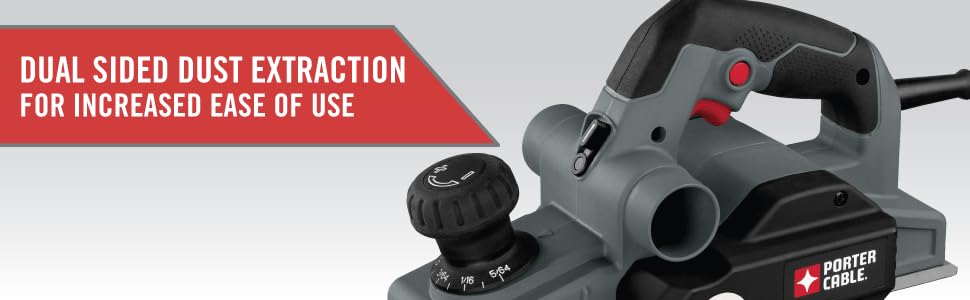
Image: The planer highlighting its dual-sided dust extraction system for user convenience.
2. Adjusting Cutting Depth
The planer is equipped with an overmold depth knob offering 10 positive steps for precise depth control. Rotate the knob to select the desired cutting depth. For initial passes, it is recommended to start with a shallower depth and gradually increase as needed.

Image: Close-up of the depth adjustment knob, showing the various settings for precise material removal.
3. Safety Foot Stand
The planer features an automatic foot stand that deploys when the tool is lifted from the workpiece. This prevents the blades from contacting the work surface or workbench when not in use, protecting both the blades and the surface.
പ്രവർത്തന നിർദ്ദേശങ്ങൾ
1. General Planing Technique
Ensure the workpiece is stable. Place the front shoe of the planer flat on the workpiece, ensuring the blades are not touching. Start the planer, then slowly and steadily move it forward across the material. Apply even pressure throughout the pass. For best results, make multiple shallow passes rather than one deep pass.
2. Using Chamfering Grooves
The front shoe of the planer includes three chamfering grooves. These grooves allow for easy and consistent chamfering of edges. Select the appropriate groove size for your desired chamfer and guide the tool along the edge of the workpiece.
3. Trigger Lock Feature
For extended use, the planer includes a trigger lock button. Press the trigger to start the tool, then press the lock button to keep the tool running without continuously holding the trigger. To release, simply press the trigger again.
4. Operational Demonstration
Video: An official demonstration of the PORTER-CABLE PC60THP Hand Planer in use, showcasing അതിന്റെ സവിശേഷതകളും പ്രവർത്തനവും.
മെയിൻ്റനൻസ്
1. വൃത്തിയാക്കൽ
Regularly empty the dust bag and clean the dust ports to ensure efficient dust extraction. Use a soft brush or compressed air to remove any accumulated sawdust from the tool's vents and moving parts. Ensure the tool is unplugged before cleaning.
2. Blade Inspection and Replacement
Inspect the planer blades regularly for sharpness and damage. Dull or chipped blades can lead to poor finish quality and increased strain on the motor. The blades are replaceable; refer to the full product manual for detailed instructions on how to safely replace them. Always use genuine PORTER-CABLE replacement blades.
3. ജനറൽ കെയർ
Store the planer in a dry, clean environment. Avoid exposing it to moisture or extreme temperatures. Periodically check all screws and fasteners for tightness and tighten as necessary.
ട്രബിൾഷൂട്ടിംഗ്
If you encounter issues with your PORTER-CABLE PC60THP Hand Planer, consider the following common solutions:
- ഉപകരണം ആരംഭിക്കുന്നില്ല: Check if the power cord is securely plugged in. Ensure the trigger lock is disengaged. Verify power supply.
- മോശം കട്ടിംഗ് പ്രകടനം: Inspect blades for dullness or damage and replace if necessary. Ensure the cutting depth is set correctly.
- അമിതമായ പൊടി: Empty the dust bag. Clear any blockages in the dust ports. Ensure the dust bag is properly attached.
- Uneven planing: Ensure the workpiece is stable and flat. Check for debris on the planer's shoe. Adjust planing technique for even pressure.
For more complex issues, please refer to the detailed troubleshooting section in the complete user manual or contact PORTER-CABLE customer support.
സാങ്കേതിക സവിശേഷതകൾ
| ഫീച്ചർ | സ്പെസിഫിക്കേഷൻ |
|---|---|
| ബ്രാൻഡ് | പോർട്ടർ-കേബിൾ |
| മോഡൽ നമ്പർ | PC60THP |
| Ampഉന്മേഷം | 6 Amps |
| പരമാവധി റൊട്ടേഷണൽ സ്പീഡ് | 16500 ആർപിഎം |
| കട്ടിംഗ് ഡെപ്ത് | 0.47 Inches (Max Rabbit Depth) |
| ഉൽപ്പന്ന അളവുകൾ | 14.63"L x 7.75"W x 8.25"H |
| ഇനത്തിൻ്റെ ഭാരം | 8.19 പൗണ്ട് |
| പവർ ഉറവിടം | കോർഡഡ് ഇലക്ട്രിക് |
| ഉൾപ്പെടുത്തിയ ഘടകങ്ങൾ | 2 Carbide Cutting Blades, Wrench, Dust bag |
വാറൻ്റി വിവരങ്ങൾ
This PORTER-CABLE product comes with a 3 വർഷത്തെ പരിമിതമായ നിർമ്മാതാവിന്റെ വാറന്റി. This warranty covers defects in material or workmanship. For full details regarding warranty coverage, limitations, and how to make a claim, please refer to the official warranty document included with your product or visit the PORTER-CABLE webസൈറ്റ്.
ഉപഭോക്തൃ പിന്തുണ
For technical assistance, replacement parts, or service information, please contact PORTER-CABLE customer support. You can typically find contact details on the official PORTER-CABLE webസൈറ്റ് അല്ലെങ്കിൽ പൂർണ്ണ ഉൽപ്പന്ന മാനുവലിൽ.
ഓൺലൈൻ ഉറവിടങ്ങൾ: ഉദ്യോഗസ്ഥനെ സന്ദർശിക്കുക PORTER-CABLE Store on Amazon കൂടുതൽ ഉൽപ്പന്ന വിവരങ്ങൾക്കും അനുബന്ധ ഉപകരണങ്ങൾക്കും.


