ആമുഖം
ലോജിടെക് 980-000910 ബ്ലൂടൂത്ത് ഓഡിയോ അഡാപ്റ്റർ, സ്മാർട്ട്ഫോണുകൾ, ടാബ്ലെറ്റുകൾ തുടങ്ങിയ നിങ്ങളുടെ ബ്ലൂടൂത്ത് പ്രവർത്തനക്ഷമമാക്കിയ ഉപകരണങ്ങളിൽ നിന്ന് RCA അല്ലെങ്കിൽ 3.5mm ഇൻപുട്ടുകൾ ഉള്ള ഏത് സ്പീക്കർ സിസ്റ്റത്തിലേക്കും വയർലെസ് ആയി ഓഡിയോ സ്ട്രീം ചെയ്യാൻ നിങ്ങളെ അനുവദിക്കുന്നു. നിങ്ങളുടെ നിലവിലുള്ള ഹോം സ്റ്റീരിയോ സിസ്റ്റം, കമ്പ്യൂട്ടർ സ്പീക്കറുകൾ അല്ലെങ്കിൽ AV റിസീവർ എന്നിവയിലൂടെ നിങ്ങളുടെ ഡിജിറ്റൽ സംഗീതം ആസ്വദിക്കാൻ ഈ കോംപാക്റ്റ് അഡാപ്റ്റർ സൗകര്യപ്രദമായ ഒരു മാർഗം നൽകുന്നു.

ചിത്രം: മുൻഭാഗം view ലോജിടെക് ബ്ലൂടൂത്ത് ഓഡിയോ അഡാപ്റ്ററിന്റെ, ഷോക്asing അതിന്റെ ഒതുക്കമുള്ള ഡിസൈൻ, നീല തിളക്കമുള്ള പ്രമുഖ ബ്ലൂടൂത്ത് ജോടിയാക്കൽ ബട്ടൺ, വശത്ത് ലോജിടെക് ലോഗോ.
പാക്കേജ് ഉള്ളടക്കം
പാക്കേജിൽ എല്ലാ ഇനങ്ങളും ഉണ്ടെന്ന് ഉറപ്പാക്കുക:
- ലോജിടെക് ബ്ലൂടൂത്ത് ഓഡിയോ അഡാപ്റ്റർ (മോഡൽ: 980-000910)
- RCA മുതൽ 3.5 mm ഓഡിയോ കേബിൾ വരെ
- പവർ കേബിൾ
- ഉപയോക്തൃ ഡോക്യുമെൻ്റേഷൻ
സജ്ജമാക്കുക
1. നിങ്ങളുടെ ഓഡിയോ സിസ്റ്റത്തിലേക്ക് അഡാപ്റ്റർ ബന്ധിപ്പിക്കുക
ലോജിടെക് ബ്ലൂടൂത്ത് ഓഡിയോ അഡാപ്റ്ററിന് RCA അല്ലെങ്കിൽ 3.5mm (AUX) ഇൻപുട്ടുകൾ ഉപയോഗിച്ച് നിങ്ങളുടെ സ്പീക്കറുകളിലേക്കോ ഓഡിയോ സിസ്റ്റത്തിലേക്കോ കണക്റ്റുചെയ്യാനാകും.
- നിങ്ങളുടെ കണക്ഷൻ തരം തിരഞ്ഞെടുക്കുക:
- RCA ഇൻപുട്ടുകൾക്ക് (ചുവപ്പും വെള്ളയും പോർട്ടുകൾ), നൽകിയിരിക്കുന്ന RCA മുതൽ 3.5mm കേബിൾ ഉപയോഗിക്കുക. RCA അറ്റങ്ങൾ നിങ്ങളുടെ ഓഡിയോ സിസ്റ്റത്തിലേക്കും 3.5mm അറ്റം ബ്ലൂടൂത്ത് ഓഡിയോ അഡാപ്റ്ററിലെ AUX ഇൻപുട്ടിലേക്കും ബന്ധിപ്പിക്കുക.
- 3.5mm (AUX) ഇൻപുട്ടുകൾക്ക്, നിങ്ങളുടെ ഓഡിയോ സിസ്റ്റം ബ്ലൂടൂത്ത് ഓഡിയോ അഡാപ്റ്ററിലെ AUX ഇൻപുട്ടിലേക്ക് ബന്ധിപ്പിക്കുന്നതിന് ഒരു സാധാരണ 3.5mm ഓഡിയോ കേബിൾ (ഉൾപ്പെടുത്തിയിട്ടില്ല) ഉപയോഗിക്കുക.
- പവറിലേക്ക് ബന്ധിപ്പിക്കുക: നൽകിയിരിക്കുന്ന പവർ കേബിൾ അഡാപ്റ്ററിലേക്കും തുടർന്ന് ഒരു എസി പവർ സ്രോതസ്സിലേക്കും പ്ലഗ് ചെയ്യുക. അഡാപ്റ്റർ യാന്ത്രികമായി പവർ ഓൺ ആകും.
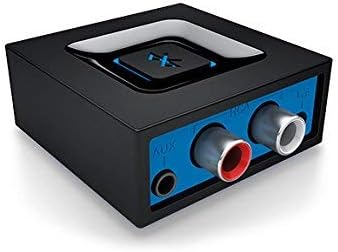
ചിത്രം: പിൻഭാഗം view അഡാപ്റ്ററിന്റെ, വിവിധ ഓഡിയോ സിസ്റ്റങ്ങളിലേക്ക് കണക്റ്റുചെയ്യുന്നതിനുള്ള AUX (3.5mm), RCA ഇൻപുട്ട് പോർട്ടുകൾ ഹൈലൈറ്റ് ചെയ്യുന്നു.
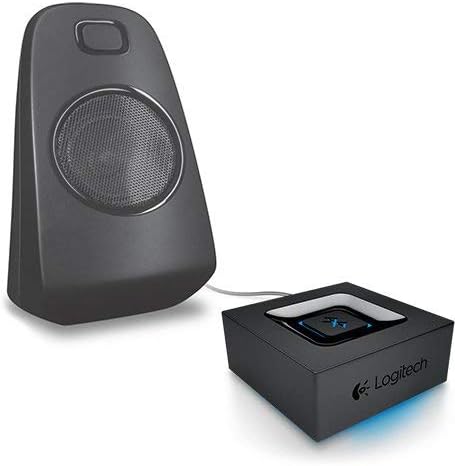
ചിത്രം: ഒരു സ്പീക്കറിന് അടുത്തായി സ്ഥാപിച്ചിരിക്കുന്ന അഡാപ്റ്റർ, ഒരു ഓഡിയോ ഔട്ട്പുട്ട് ഉപകരണവുമായി അഡാപ്റ്റർ ബന്ധിപ്പിച്ചിരിക്കുന്ന ഒരു സാധാരണ സജ്ജീകരണത്തെ ചിത്രീകരിക്കുന്നു.
2. നിങ്ങളുടെ ബ്ലൂടൂത്ത് ഉപകരണം ജോടിയാക്കുക
അഡാപ്റ്റർ ഓൺ ചെയ്ത് നിങ്ങളുടെ ഓഡിയോ സിസ്റ്റവുമായി ബന്ധിപ്പിച്ചുകഴിഞ്ഞാൽ, നിങ്ങളുടെ ബ്ലൂടൂത്ത്-സജ്ജീകരിച്ച ഉപകരണം ജോടിയാക്കാം.
- നിങ്ങളുടെ ഓഡിയോ സിസ്റ്റം ഓണാക്കി ശരിയായ ഇൻപുട്ട് ഉറവിടത്തിലേക്ക് സജ്ജമാക്കിയിട്ടുണ്ടെന്ന് ഉറപ്പാക്കുക (ഉദാ. AUX, RCA).
- ലോജിടെക് ബ്ലൂടൂത്ത് ഓഡിയോ അഡാപ്റ്ററിൽ, മുകളിൽ സ്ഥിതിചെയ്യുന്ന വലിയ ബ്ലൂടൂത്ത് പെയറിംഗ് ബട്ടൺ അമർത്തുക. നീല ഇൻഡിക്കേറ്റർ ലൈറ്റ് ജോടിയാക്കൽ മോഡിലാണെന്ന് സൂചിപ്പിക്കുന്ന തരത്തിൽ വേഗത്തിൽ മിന്നിമറയാൻ തുടങ്ങും.
- നിങ്ങളുടെ സ്മാർട്ട്ഫോണിലോ, ടാബ്ലെറ്റിലോ, അല്ലെങ്കിൽ മറ്റ് ബ്ലൂടൂത്ത് പ്രവർത്തനക്ഷമമാക്കിയ ഉപകരണത്തിലോ, ബ്ലൂടൂത്ത് ക്രമീകരണങ്ങളിലേക്ക് പോയി ബ്ലൂടൂത്ത് പ്രവർത്തനക്ഷമമാക്കുക.
- ലഭ്യമായ ഉപകരണങ്ങൾക്കായി സ്കാൻ ചെയ്യുക. ലിസ്റ്റിൽ "ലോജിടെക് ബ്ലൂടൂത്ത് അഡാപ്റ്റർ" അല്ലെങ്കിൽ സമാനമായ ഒരു പേര് ദൃശ്യമാകുന്നത് നിങ്ങൾ കാണും.
- കണക്റ്റ് ചെയ്യേണ്ട അഡാപ്റ്റർ ലിസ്റ്റിൽ നിന്ന് തിരഞ്ഞെടുക്കുക. കണക്റ്റ് ചെയ്തുകഴിഞ്ഞാൽ, അഡാപ്റ്ററിലെ നീല ഇൻഡിക്കേറ്റർ ലൈറ്റ് ദൃഢമായി പ്രകാശിക്കും, നിങ്ങളുടെ സ്പീക്കറുകളിലൂടെ ഒരു സ്ഥിരീകരണ ടോൺ കേൾക്കും.
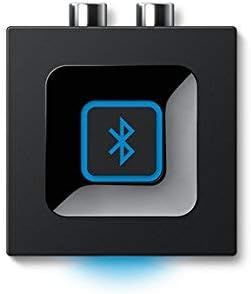
ചിത്രം: മുകളിൽ നിന്ന് താഴേക്ക് view അഡാപ്റ്ററിന്റെ, ജോടിയാക്കാൻ ഉപയോഗിക്കുന്ന വലിയ, മധ്യഭാഗത്തെ ബ്ലൂടൂത്ത് ബട്ടണിനെ ഊന്നിപ്പറയുന്നു.

ചിത്രം: അഡാപ്റ്ററിലെ ബ്ലൂടൂത്ത് ജോടിയാക്കൽ ബട്ടൺ അമർത്തുന്ന ഒരു കൈ, വൺ-പുഷ് ജോടിയാക്കൽ പ്രവർത്തനം കാണിക്കുന്നു.
അഡാപ്റ്റർ പ്രവർത്തിപ്പിക്കുന്നു
യാന്ത്രിക പുനഃസംയോജനം
ജോടിയാക്കിക്കഴിഞ്ഞാൽ, നിങ്ങളുടെ ഉപകരണം ലോജിടെക് ബ്ലൂടൂത്ത് ഓഡിയോ അഡാപ്റ്റർ പരിധിക്കുള്ളിലായിരിക്കുമ്പോൾ (15 മീറ്റർ അല്ലെങ്കിൽ 49.21 അടി കാഴ്ച രേഖ വരെ) യാന്ത്രികമായി വീണ്ടും കണക്റ്റുചെയ്യപ്പെടും, കൂടാതെ നിങ്ങളുടെ ഉപകരണത്തിൽ ബ്ലൂടൂത്ത് പ്രവർത്തനക്ഷമമാക്കുകയും ചെയ്യും.
മൾട്ടിപോയിൻ്റ് ബ്ലൂടൂത്ത്
മൾട്ടിപോയിന്റ് ബ്ലൂടൂത്തിനെ പിന്തുണയ്ക്കുന്ന ഈ അഡാപ്റ്റർ, സ്മാർട്ട്ഫോണും ടാബ്ലെറ്റും പോലുള്ള രണ്ട് ബ്ലൂടൂത്ത്-സജ്ജീകരിച്ച ഉപകരണങ്ങൾ ഒരേസമയം ജോടിയാക്കാൻ നിങ്ങളെ അനുവദിക്കുന്നു. ഓരോ തവണയും വീണ്ടും ജോടിയാക്കാതെ തന്നെ വയർലെസ് ആയി ഓഡിയോ സ്ട്രീം ചെയ്യുന്നതിന് നിങ്ങൾക്ക് ഈ ഉപകരണങ്ങൾക്കിടയിൽ മാറാം. ഒരു ഉപകരണത്തിൽ ഓഡിയോ താൽക്കാലികമായി നിർത്തി മറ്റൊന്നിൽ പ്ലേ ചെയ്യാൻ ആരംഭിക്കുക.
മെയിൻ്റനൻസ്
നിങ്ങളുടെ ലോജിടെക് ബ്ലൂടൂത്ത് ഓഡിയോ അഡാപ്റ്ററിന്റെ ദീർഘായുസ്സും ഒപ്റ്റിമൽ പ്രകടനവും ഉറപ്പാക്കാൻ, ഈ ലളിതമായ അറ്റകുറ്റപ്പണി മാർഗ്ഗനിർദ്ദേശങ്ങൾ പാലിക്കുക:
- വൃത്തിയാക്കൽ: അഡാപ്റ്ററിന്റെ പുറംഭാഗം വൃത്തിയാക്കാൻ മൃദുവായതും ഉണങ്ങിയതുമായ തുണി ഉപയോഗിക്കുക. ലിക്വിഡ് ക്ലീനറുകളോ എയറോസോളുകളോ ഉപയോഗിക്കരുത്, കാരണം അവ ഉപകരണത്തിന് കേടുവരുത്തും.
- സംഭരണം: ദീർഘനേരം ഉപയോഗിക്കാത്തപ്പോൾ നേരിട്ടുള്ള സൂര്യപ്രകാശത്തിൽ നിന്നും കടുത്ത താപനിലയിൽ നിന്നും അകന്ന് തണുത്തതും വരണ്ടതുമായ സ്ഥലത്ത് അഡാപ്റ്റർ സൂക്ഷിക്കുക.
- കൈകാര്യം ചെയ്യൽ: അഡാപ്റ്റർ താഴെയിടുകയോ ശക്തമായ ആഘാതങ്ങൾക്ക് വിധേയമാക്കുകയോ ചെയ്യുന്നത് ഒഴിവാക്കുക.
- വെൻ്റിലേഷൻ: അഡാപ്റ്റർ അമിതമായി ചൂടാകുന്നത് തടയാൻ മതിയായ വായുസഞ്ചാരമുള്ള സ്ഥലത്ത് സ്ഥാപിച്ചിട്ടുണ്ടെന്ന് ഉറപ്പാക്കുക.
ട്രബിൾഷൂട്ടിംഗ്
നിങ്ങളുടെ ലോജിടെക് ബ്ലൂടൂത്ത് ഓഡിയോ അഡാപ്റ്ററിൽ പ്രശ്നങ്ങൾ നേരിടുകയാണെങ്കിൽ, ഇനിപ്പറയുന്ന ട്രബിൾഷൂട്ടിംഗ് ഘട്ടങ്ങൾ പരീക്ഷിക്കുക:
- ഓഡിയോ ഇല്ല:
- നിങ്ങളുടെ ഓഡിയോ സിസ്റ്റത്തിന്റെ ഇൻപുട്ടിലേക്ക് (RCA അല്ലെങ്കിൽ 3.5mm) അഡാപ്റ്റർ ശരിയായി ബന്ധിപ്പിച്ചിട്ടുണ്ടെന്ന് ഉറപ്പാക്കുക.
- നിങ്ങളുടെ ഓഡിയോ സിസ്റ്റം ഓണാക്കിയിട്ടുണ്ടെന്നും ശരിയായ ഇൻപുട്ട് ഉറവിടത്തിലേക്ക് സജ്ജീകരിച്ചിട്ടുണ്ടെന്നും ഉറപ്പാക്കുക.
- നിങ്ങളുടെ സ്ട്രീമിംഗ് ഉപകരണത്തിലും ഓഡിയോ സിസ്റ്റത്തിലും വോളിയം ലെവലുകൾ പരിശോധിക്കുക.
- ഉപകരണം ജോടിയാക്കാൻ കഴിയില്ല:
- അഡാപ്റ്ററിന്റെ ബ്ലൂടൂത്ത് ബട്ടൺ അമർത്തിയിട്ടുണ്ടെന്നും ഇൻഡിക്കേറ്റർ ലൈറ്റ് വേഗത്തിൽ മിന്നുന്നുണ്ടെന്നും ഉറപ്പാക്കുക (ജോടിയാക്കൽ മോഡ്).
- നിങ്ങളുടെ സ്ട്രീമിംഗ് ഉപകരണത്തിൽ ബ്ലൂടൂത്ത് പ്രവർത്തനക്ഷമമാക്കിയിട്ടുണ്ടെന്നും അത് 15 മീറ്റർ പരിധിക്കുള്ളിലാണെന്നും ഉറപ്പാക്കുക.
- നിങ്ങളുടെ സ്ട്രീമിംഗ് ഉപകരണത്തിൽ ബ്ലൂടൂത്ത് ഓഫാക്കി ഓണാക്കാൻ ശ്രമിക്കുക, അല്ലെങ്കിൽ ഉപകരണം പുനരാരംഭിക്കുക.
- മുമ്പ് ജോടിയാക്കിയിട്ടുണ്ടെങ്കിൽ, നിങ്ങളുടെ സ്ട്രീമിംഗ് ഉപകരണത്തിന്റെ ബ്ലൂടൂത്ത് ക്രമീകരണങ്ങളിൽ ഉപകരണം "മറന്ന്" വീണ്ടും ജോടിയാക്കാൻ ശ്രമിക്കുക.
- ഇടവിട്ടുള്ള കണക്ഷൻ/മോശം ഓഡിയോ നിലവാരം:
- നിങ്ങളുടെ സ്ട്രീമിംഗ് ഉപകരണത്തിനും അഡാപ്റ്ററിനും ഇടയിലുള്ള ദൂരം കുറയ്ക്കുക.
- ബ്ലൂടൂത്ത് സിഗ്നലിനെ തടസ്സപ്പെടുത്തുന്ന ഏതൊരു തടസ്സവും (ഭിത്തികൾ, വലിയ ലോഹ വസ്തുക്കൾ) നീക്കം ചെയ്യുക.
- തടസ്സമുണ്ടാക്കുന്ന മറ്റ് വയർലെസ് ഉപകരണങ്ങൾക്ക് സമീപം അഡാപ്റ്റർ വയ്ക്കുന്നത് ഒഴിവാക്കുക (ഉദാ: വൈ-ഫൈ റൂട്ടറുകൾ, കോർഡ്ലെസ് ഫോണുകൾ).
സ്പെസിഫിക്കേഷനുകൾ
| ഫീച്ചർ | വിശദാംശങ്ങൾ |
|---|---|
| ഉൽപ്പന്ന അളവുകൾ | 1.97 x 1.97 x 0.91 ഇഞ്ച് (50.8 x 22.32 x 57.15 മിമി) |
| ഇനത്തിൻ്റെ ഭാരം | 1.2 ഔൺസ് (34 ഗ്രാം) |
| മോഡൽ നമ്പർ | 980-000910 |
| ബ്രാൻഡ് | ലോജിടെക് |
| ഹാർഡ്വെയർ ഇന്റർഫേസ് | ബ്ലൂടൂത്ത് |
| നിറം | കറുപ്പ് |
| അനുയോജ്യമായ ഉപകരണങ്ങൾ | ഡെസ്ക്ടോപ്പ്, ലാപ്ടോപ്പ്, സ്മാർട്ട്ഫോണുകൾ, ടാബ്ലെറ്റുകൾ (ബ്ലൂടൂത്തോടുകൂടിയത്) |
| ഡാറ്റ ലിങ്ക് പ്രോട്ടോക്കോൾ | ബ്ലൂടൂത്ത് |
| ഡാറ്റ കൈമാറ്റ നിരക്ക് | സെക്കൻഡിൽ 980 മെഗാബൈറ്റുകൾ |
| വയർലെസ് ശ്രേണി | 49.21 അടി (15 മീറ്റർ) വരെ കാഴ്ച രേഖ |
| ഇൻപുട്ടുകൾ | ആർസിഎ, 3.5 എംഎം (AUX) |
| ഫീച്ചറുകൾ | മൾട്ടിപോയിന്റ് ബ്ലൂടൂത്ത്, വൺ-പുഷ് പെയറിംഗ്, ഓട്ടോമാറ്റിക് റീകണക്ഷൻ |
| യു.പി.സി | 088564682115 |
വാറൻ്റി വിവരങ്ങൾ
ലോജിടെക് 980-000910 ബ്ലൂടൂത്ത് ഓഡിയോ അഡാപ്റ്റർ ഒരു 1-വർഷ പരിമിതമായ ഹാർഡ്വെയർ വാറൻ്റി വാങ്ങിയ തീയതി മുതൽ. സാധാരണ ഉപയോഗത്തിലുള്ള മെറ്റീരിയലുകളിലെയും വർക്ക്മാൻഷിപ്പുകളിലെയും വൈകല്യങ്ങൾ ഈ വാറന്റി ഉൾക്കൊള്ളുന്നു. പൂർണ്ണ നിബന്ധനകൾക്കും വ്യവസ്ഥകൾക്കും, ദയവായി ഔദ്യോഗിക ലോജിടെക് വാറന്റി നയം പരിശോധിക്കുകയോ ഉപഭോക്തൃ പിന്തുണയുമായി ബന്ധപ്പെടുകയോ ചെയ്യുക.
പിന്തുണ
കൂടുതൽ സഹായത്തിനോ, സാങ്കേതിക പിന്തുണയ്ക്കോ, അല്ലെങ്കിൽ view പതിവായി ചോദിക്കുന്ന ചോദ്യങ്ങൾ, ദയവായി ഔദ്യോഗിക ലോജിടെക് പിന്തുണ സന്ദർശിക്കുക. webസൈറ്റിൽ ബന്ധപ്പെടുക അല്ലെങ്കിൽ അവരുടെ ഉപഭോക്തൃ സേവനവുമായി ബന്ധപ്പെടുക. കൂടുതൽ വിവരങ്ങൾ നിങ്ങൾക്ക് ഇവിടെയും കണ്ടെത്താനാകും ആമസോണിലെ ലോജിടെക് സ്റ്റോർ.


