1. ആമുഖം
This manual provides essential instructions for the safe and effective operation of your Mastech MY61 Digital Multimeter. The MY61 is a portable, battery-powered digital multimeter designed for measuring DC and AC voltage, DC and AC current, resistance, capacitance, diode, and transistor (hFE) parameters. It features a 2000-count display, data hold function, and auto power-off for energy conservation. Please read this manual thoroughly before use to ensure proper operation and to prevent potential hazards.

ചിത്രം 1.1: മുൻഭാഗം view of the Mastech MY61 Digital Multimeter, showing the display, rotary switch, and input jacks.
2 സുരക്ഷാ വിവരങ്ങൾ
മീറ്ററിന്റെ സുരക്ഷിതമായ പ്രവർത്തനവും സേവനവും ഉറപ്പാക്കാൻ, ഈ നിർദ്ദേശങ്ങൾ പാലിക്കുക. ഈ മുന്നറിയിപ്പുകൾ പാലിക്കുന്നതിൽ പരാജയപ്പെടുന്നത് ഗുരുതരമായ പരിക്കോ മരണമോ ഉണ്ടാക്കാം.
- Always read the manual: Before using the multimeter, carefully read and understand all safety warnings and operating instructions.
- വൈദ്യുത ഷോക്ക് അപകടം: Be extremely cautious when working with voltag30V AC RMS, 42V പീക്ക്, അല്ലെങ്കിൽ 60V DC എന്നിവയ്ക്ക് മുകളിലുള്ള es. ഈ വോള്യങ്ങൾtagഒരു ഷോക്ക് അപകടമാണ്.
- Inspect Test Leads: Before each use, inspect the test leads for damaged insulation or exposed metal. Replace damaged leads immediately.
- Do Not Operate if Damaged: മീറ്റർ കേടായതായി തോന്നുകയോ കേസ് തുറന്നിരിക്കുകയോ ചെയ്താൽ അത് ഉപയോഗിക്കരുത്.
- Correct Input Terminals: Always connect the test leads to the correct input terminals for the measurement function selected.
- Select Correct Function and Range: Ensure the rotary switch is set to the appropriate function and range before making any measurement.
- ഓവർലോഡ് സംരക്ഷണം: The meter is equipped with full function overload protection. However, avoid exceeding the maximum input values specified in the specifications section.
- ബാറ്ററി മാറ്റിസ്ഥാപിക്കൽ: To avoid electrical shock, remove all inputs before opening the battery compartment or case. Replace the battery when the low battery indicator appears.
- പ്രവർത്തന അന്തരീക്ഷം: സ്ഫോടനാത്മകമായ വാതകം, നീരാവി അല്ലെങ്കിൽ പൊടി നിറഞ്ഞ പരിതസ്ഥിതികളിൽ മീറ്റർ പ്രവർത്തിപ്പിക്കരുത്.

ചിത്രം 2.1: പിന്നിലേക്ക് view of the Mastech MY61 Digital Multimeter, showing the kickstand and a warning label regarding electrical shock and the need to read the manual for safety.
3. പാക്കേജ് ഉള്ളടക്കം
പാക്കേജ് തുറക്കുമ്പോൾ, താഴെ പട്ടികപ്പെടുത്തിയിരിക്കുന്ന എല്ലാ ഇനങ്ങളും നിലവിലുണ്ടെന്നും കേടുപാടുകൾ സംഭവിച്ചിട്ടില്ലെന്നും ദയവായി പരിശോധിക്കുക:
- 1 x Mastech MY61 Digital Multimeter
- 1 x ടെസ്റ്റ് ലീഡുകളുടെ ജോഡി (ചുവപ്പും കറുപ്പും)
- 1 x ഇംഗ്ലീഷ് ഇൻസ്ട്രക്ഷൻ മാനുവൽ

Image 3.1: Contents of the Mastech MY61 package, including the multimeter, test leads, and instruction manual.
4. ഉൽപ്പന്നം കഴിഞ്ഞുview
The Mastech MY61 Digital Multimeter features a robust design with clear markings for ease of use. Key components include:
- LCD ഡിസ്പ്ലേ: വ്യക്തമായ വായനയ്ക്കായി 2000 എണ്ണം ഡിജിറ്റൽ ഡിസ്പ്ലേ.
- റോട്ടറി സ്വിച്ച്: Used to select measurement functions and ranges.
- ഫംഗ്ഷൻ ബട്ടണുകൾ: Includes 'HOLD' for data retention and 'ON/OFF' for power control.
- ഇൻപുട്ട് ജാക്കുകൾ:
- COM ജാക്ക്: എല്ലാ അളവുകൾക്കുമുള്ള പൊതു ടെർമിനൽ (കറുത്ത ടെസ്റ്റ് ലെഡ്).
- VΩmA Jack: വോളിയത്തിനായുള്ള ഇൻപുട്ട്tage, resistance, capacitance, diode, hFE, and current measurements up to 200mA (red test lead).
- 20A ജാക്ക്: Input for high current measurements up to 20A (red test lead).
- hFE സോക്കറ്റ്: For transistor testing.
- കിക്ക്സ്റ്റാൻഡ്: Integrated stand on the back for convenient viewing ആംഗിൾ.

ചിത്രം 4.1: കോണാകൃതിയിലുള്ള മുൻഭാഗം view of the Mastech MY61, highlighting the display and control layout.

Image 4.2: Close-up of the Mastech MY61's rotary switch, function buttons, and LCD display.

ചിത്രം 4.3: വശം view of the Mastech MY61 with its integrated kickstand extended for desktop use.
5. സജ്ജീകരണം
5.1 ബാറ്ററി ഇൻസ്റ്റാളേഷൻ
The Mastech MY61 requires one 9V (6F22) battery for operation. The battery is not included in the package.
- Ensure the multimeter is powered off and disconnect all test leads from the input jacks.
- മീറ്ററിന്റെ പിൻഭാഗത്ത് ബാറ്ററി കമ്പാർട്ട്മെന്റ് കവർ കണ്ടെത്തുക.
- Use a screwdriver to loosen the screw securing the battery cover, then remove the cover.
- Connect a new 9V battery to the battery clip, observing correct polarity.
- ബാറ്ററി കമ്പാർട്ടുമെന്റിൽ വയ്ക്കുക, കവർ മാറ്റി സ്ക്രൂ ഉപയോഗിച്ച് ഉറപ്പിക്കുക.
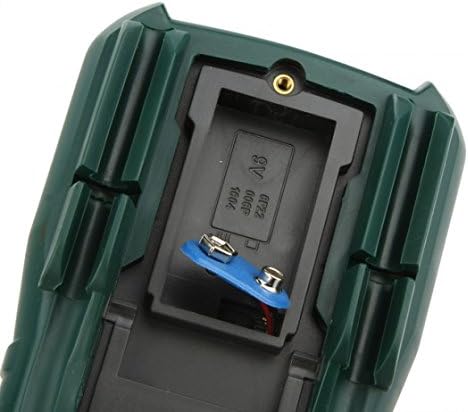
ചിത്രം 5.1: View of the battery compartment on the Mastech MY61, showing where the 9V battery is installed.
5.2 ടെസ്റ്റ് ലീഡുകൾ ബന്ധിപ്പിക്കുന്നു
Always connect the black test lead to the COM (Common) jack. The red test lead connection depends on the measurement function:
- വാല്യംtage, Resistance, Capacitance, Diode, hFE, and current up to 200mA, connect the red test lead to the വാംമ ജാക്ക്.
- For current measurements between 200mA and 20A, connect the red test lead to the 20എ ജാക്ക്.

Image 5.2: Test leads properly connected to the Mastech MY61 Digital Multimeter's input jacks.
6. പ്രവർത്തന നിർദ്ദേശങ്ങൾ
6.1 Power ON/OFF and Data Hold
- പവർ ഓൺ: Press the red 'ON/OFF' button to turn the meter on.
- പവർ ഓഫ്: Press the red 'ON/OFF' button again to turn the meter off. The meter also features an auto power-off function to conserve battery life.
- ഡാറ്റ ഹോൾഡ്: Press the yellow 'HOLD' button to freeze the current reading on the display. Press it again to release the hold function.
6.2 ഡിസി വോളിയംtagഇ അളവ്
- Connect the black test lead to the COM jack and the red test lead to the VΩmA jack.
- റോട്ടറി സ്വിച്ച് ആവശ്യമുള്ള ഡിസി വോള്യത്തിലേക്ക് സജ്ജമാക്കുക.tage range (V—). If the voltage is unknown, start with the highest range (1000V) and decrease as needed.
- ടെസ്റ്റ് പ്രോബുകൾ പരിശോധനയിലുള്ള സർക്യൂട്ടിനോ ഘടകത്തിനോ സമാന്തരമായി ബന്ധിപ്പിക്കുക.
- വാല്യം വായിക്കുകtagഎൽസിഡി ഡിസ്പ്ലേയിലെ ഇ മൂല്യം.
6.3 എസി വോള്യംtagഇ അളവ്
- Connect the black test lead to the COM jack and the red test lead to the VΩmA jack.
- റോട്ടറി സ്വിച്ച് ആവശ്യമുള്ള എസി വോള്യത്തിലേക്ക് സജ്ജമാക്കുക.tage range (V∼). If the voltage is unknown, start with the highest range (750V) and decrease as needed.
- ടെസ്റ്റ് പ്രോബുകൾ പരിശോധനയിലുള്ള സർക്യൂട്ടിനോ ഘടകത്തിനോ സമാന്തരമായി ബന്ധിപ്പിക്കുക.
- വാല്യം വായിക്കുകtagഎൽസിഡി ഡിസ്പ്ലേയിലെ ഇ മൂല്യം.
6.4 ഡിസി കറന്റ് അളവ്
- പ്രധാനപ്പെട്ടത്: Current measurements require the meter to be connected in series with the circuit. Ensure the circuit is de-energized before connecting the meter.
- Connect the black test lead to the COM jack. For currents up to 200mA, connect the red test lead to the VΩmA jack. For currents up to 20A, connect the red test lead to the 20A jack.
- Set the rotary switch to the desired DC Current range (A— or mA—). Start with the highest range if the current is unknown.
- Open the circuit where the current is to be measured and connect the test probes in series.
- സർക്യൂട്ടിലേക്ക് വൈദ്യുതി എത്തിച്ച് എൽസിഡി ഡിസ്പ്ലേയിൽ കറന്റ് മൂല്യം വായിക്കുക.
6.5 എസി കറന്റ് അളക്കൽ
- പ്രധാനപ്പെട്ടത്: Current measurements require the meter to be connected in series with the circuit. Ensure the circuit is de-energized before connecting the meter.
- Connect the black test lead to the COM jack. For currents up to 200mA, connect the red test lead to the VΩmA jack. For currents up to 20A, connect the red test lead to the 20A jack.
- Set the rotary switch to the desired AC Current range (A∼ or mA∼). Start with the highest range if the current is unknown.
- Open the circuit where the current is to be measured and connect the test probes in series.
- സർക്യൂട്ടിലേക്ക് വൈദ്യുതി എത്തിച്ച് എൽസിഡി ഡിസ്പ്ലേയിൽ കറന്റ് മൂല്യം വായിക്കുക.
6.6 പ്രതിരോധം അളക്കൽ
- പ്രതിരോധം അളക്കുന്നതിന് മുമ്പ് സർക്യൂട്ട് അല്ലെങ്കിൽ ഘടകം ഡീ-എനർജൈസ് ചെയ്തിട്ടുണ്ടെന്ന് ഉറപ്പാക്കുക.
- Connect the black test lead to the COM jack and the red test lead to the VΩmA jack.
- Set the rotary switch to the desired Resistance range (Ω). Start with a higher range if the resistance is unknown.
- അളക്കേണ്ട ഘടകത്തിലുടനീളം ടെസ്റ്റ് പ്രോബുകൾ ബന്ധിപ്പിക്കുക.
- എൽസിഡി ഡിസ്പ്ലേയിൽ പ്രതിരോധ മൂല്യം വായിക്കുക.
6.7 ശേഷി അളക്കൽ
- മീറ്ററിന് കേടുപാടുകൾ സംഭവിക്കാതിരിക്കാൻ അളക്കുന്നതിന് മുമ്പ് കപ്പാസിറ്റർ പൂർണ്ണമായും ഡിസ്ചാർജ് ചെയ്തിട്ടുണ്ടെന്ന് ഉറപ്പാക്കുക.
- Connect the black test lead to the COM jack and the red test lead to the VΩmA jack.
- Set the rotary switch to the desired Capacitance range (F).
- കപ്പാസിറ്ററിലുടനീളം ടെസ്റ്റ് പ്രോബുകൾ ബന്ധിപ്പിക്കുക.
- എൽസിഡി ഡിസ്പ്ലേയിലെ കപ്പാസിറ്റൻസ് മൂല്യം വായിക്കുക.
6.8 ഡയോഡ് ടെസ്റ്റ്
- സർക്യൂട്ടിൽ നിന്ന് ഡയോഡ് വിച്ഛേദിക്കപ്പെട്ടിട്ടുണ്ടെന്ന് ഉറപ്പാക്കുക.
- Connect the black test lead to the COM jack and the red test lead to the VΩmA jack.
- Set the rotary switch to the Diode Test position (→|).
- ചുവന്ന പ്രോബ് ഡയോഡിന്റെ ആനോഡിലേക്കും കറുത്ത പ്രോബ് ഡയോഡിന്റെ കാഥോഡിലേക്കും ബന്ധിപ്പിക്കുക. ഡിസ്പ്ലേ ഫോർവേഡ് വോള്യം കാണിക്കും.tagഇ ഡ്രോപ്പ്.
- Reverse the probes. The display should show 'OL' (Open Loop) for a good diode.
6.9 Transistor (hFE) Test
- റോട്ടറി സ്വിച്ച് hFE സ്ഥാനത്തേക്ക് സജ്ജമാക്കുക.
- Identify if the transistor is NPN or PNP.
- Insert the transistor leads (Emitter, Base, Collector) into the corresponding holes in the hFE socket on the meter, ensuring correct type (NPN/PNP) and pinout.
- Read the hFE value (DC current gain) on the LCD display.
6.10 തുടർച്ച പരിശോധന
- സർക്യൂട്ട് അല്ലെങ്കിൽ ഘടകം ഡീ-എനർജൈസ്ഡ് ആണെന്ന് ഉറപ്പാക്കുക.
- Connect the black test lead to the COM jack and the red test lead to the VΩmA jack.
- Set the rotary switch to the Continuity Test position (♫).
- Connect the test probes across the component or circuit path.
- If continuity exists (resistance below approximately 50Ω), the built-in buzzer will sound. The display will show the resistance value.
7. പരിപാലനം
7.1 വൃത്തിയാക്കൽ
മീറ്റർ പരസ്യം ഉപയോഗിച്ച് തുടയ്ക്കുകamp തുണിയും നേരിയ ഡിറ്റർജന്റും ഉപയോഗിക്കുക. അബ്രാസീവ് വസ്തുക്കളോ ലായകങ്ങളോ ഉപയോഗിക്കരുത്. ഉപയോഗിക്കുന്നതിന് മുമ്പ് മീറ്റർ പൂർണ്ണമായും ഉണങ്ങിയെന്ന് ഉറപ്പാക്കുക.
7.2 ബാറ്ററി മാറ്റിസ്ഥാപിക്കൽ
ഡിസ്പ്ലേയിൽ ബാറ്ററി കുറവാണെന്ന് കാണിക്കുമ്പോൾ, സെക്ഷൻ 5.1-ൽ വിവരിച്ചിരിക്കുന്നതുപോലെ 9V ബാറ്ററി മാറ്റിസ്ഥാപിക്കുക. എല്ലായ്പ്പോഴും പുതിയ 9V (6F22) ബാറ്ററി ഉപയോഗിക്കുക.
7.3 ഫ്യൂസ് മാറ്റിസ്ഥാപിക്കൽ
The MY61 multimeter is equipped with internal fuses to protect against overcurrent. If the current measurement function fails, the fuse may need replacement. Fuse replacement should only be performed by qualified personnel. Refer to the specifications for fuse ratings. To access the fuse, the entire back case of the meter must be opened, which requires removing the battery compartment cover and additional screws. Always disconnect test leads and power before opening the case.
8. പ്രശ്നപരിഹാരം
If your Mastech MY61 Digital Multimeter is not functioning as expected, refer to the following common issues and solutions:
- ഡിസ്പ്ലേ ഇല്ല അല്ലെങ്കിൽ മങ്ങിയ ഡിസ്പ്ലേ:
- Check if the meter is powered on.
- Replace the 9V battery if it is low or depleted.
- തെറ്റായ വായനകൾ:
- Ensure the rotary switch is set to the correct function and range for the measurement.
- Verify that the test leads are connected to the correct input jacks.
- Check for proper contact between the test probes and the circuit/component.
- Ensure the circuit or component is de-energized for resistance and capacitance measurements.
- കറന്റ് അളക്കൽ പ്രവർത്തിക്കുന്നില്ല:
- Check if the test leads are connected to the correct current input jack (VΩmA for mA, 20A for A).
- The internal fuse for current measurement may be blown. Refer to Section 7.3 for fuse replacement information.
- 'OL' (Overload) Displayed:
- The measured value exceeds the selected range. Switch to a higher range.
- For resistance, 'OL' can indicate an open circuit.
9 സ്പെസിഫിക്കേഷനുകൾ
| ഫംഗ്ഷൻ | പരിധി | കൃത്യത |
|---|---|---|
| ഡിസി വോളിയംtage | 200mV, 2V, 20V, 200V | ±(0.5%+2) |
| 1000V | ±(0.8%+2) | |
| എസി വോളിയംtage | 200 മി | ±(1.2%+3) |
| 2 വി, 20 വി, 200 വി | ±(0.8%+3) | |
| 750V | ±(1.2%+3) | |
| ഡിസി കറൻ്റ് | 2mA, 20mA, 200mA | ±(1.2%+3) |
| 20എ | ±(2.0%+5) | |
| എസി കറന്റ് | 2mA, 20mA, 200mA | ±(1.8%+5) |
| 20എ | ±(3.0%+5) | |
| പ്രതിരോധം | 200Ω, 2kΩ, 20kΩ, 200kΩ, 2MΩ | ±(0.8%+3) |
| 20MΩ | ±(1.0%+2) | |
| 200MΩ | ±(6.0%+10) | |
| കപ്പാസിറ്റൻസ് | 20nF, 200nF, 2µF, 20µF | ±(4.0%+3) |
| 200µF | ±(6.0%+10) |
പൊതു സ്വഭാവസവിശേഷതകൾ:
- ഡിസ്പ്ലേ: 2000 കൗണ്ട്സ് എൽസിഡി
- ഡാറ്റ ഹോൾഡ്: അതെ
- ഓട്ടോ പവർ ഓഫ്: അതെ
- ഡയോഡ് ടെസ്റ്റ്: അതെ
- Transistor (hFE) Test: അതെ
- തുടർച്ച പരിശോധന: അതെ
- ഓവർലോഡ് സംരക്ഷണം: പൂർണ്ണ പ്രവർത്തനം
- ശക്തി: 1 x 9V (6F22) Battery (not included)
- നിറം: കടും പച്ച
- പ്രവർത്തന താപനില: 0°C മുതൽ 40°C വരെ (32°F മുതൽ 104°F വരെ)
- സംഭരണ താപനില: -10°C മുതൽ 50°C വരെ (14°F മുതൽ 122°F വരെ)
- അളവുകൾ: ഏകദേശം 140mm x 70mm x 35mm (5.5in x 2.7in x 1.4in)
- ഭാരം: Approximately 200g (7.05 oz) without battery
10. വാറൻ്റിയും പിന്തുണയും
For warranty information and technical support, please refer to the warranty card included with your product or contact Mastech customer service through their official webസൈറ്റ്. ഏതെങ്കിലും വാറന്റി ക്ലെയിമുകൾക്ക് വാങ്ങിയതിന്റെ തെളിവായി നിങ്ങളുടെ വാങ്ങൽ രസീത് സൂക്ഷിക്കുക.


