1. ആമുഖം
The ULTRICS Digital Multimeter is a compact and versatile tool designed for both commercial and home use. It functions as a voltmeter, ammeter, and ohmmeter, capable of testing continuity, AC/DC voltage, diode, transistor HFE, and car batteries. This manual provides essential information for the safe and effective operation, maintenance, and troubleshooting of your multimeter.

Image 1.1: The ULTRICS Digital Multimeter, including the main unit, test leads, and a 9V battery.
2 സുരക്ഷാ വിവരങ്ങൾ
Always adhere to the following safety precautions to prevent personal injury or damage to the multimeter:
- ഒരു ശ്രേണിയിലും പരമാവധി ഇൻപുട്ട് മൂല്യങ്ങൾ കവിയരുത്.
- Ensure the test leads are properly connected and the rotary switch is set to the correct range before making measurements.
- Avoid touching the metal tips of the test leads when connected to a circuit.
- Do not use the multimeter if it appears damaged or if the test leads are frayed.
- Always disconnect power to the circuit before measuring resistance, continuity, or diodes.
- കൃത്യമായ റീഡിംഗുകൾ ഉറപ്പാക്കാൻ ബാറ്ററി കുറവാണെന്ന് സൂചകം ദൃശ്യമാകുമ്പോൾ ബാറ്ററി മാറ്റിസ്ഥാപിക്കുക.
3. ഉൽപ്പന്നം കഴിഞ്ഞുview
Familiarize yourself with the components and features of your ULTRICS Digital Multimeter:
- LCD ബാക്ക്ലിറ്റ് ഡിസ്പ്ലേ: Provides clear digital readings, visible in low light conditions.
- റോട്ടറി സ്വിച്ച്: Used to select the desired measurement function (e.g., Voltage, കറന്റ്, റെസിസ്റ്റൻസ്).
- Test Lead Jacks: Input terminals for connecting the test leads (COM, VΩmA, 10ADC).
- ഡാറ്റ ഹോൾഡ് ബട്ടൺ: Freezes the current reading on the display for easy note-taking.
- ബാക്ക്ലൈറ്റ് ബട്ടൺ: ഡിസ്പ്ലേ ബാക്ക്ലൈറ്റ് സജീവമാക്കുന്നു.
- ബിൽറ്റ്-ഇൻ കിക്ക്സ്റ്റാൻഡ്: Allows the multimeter to stand upright for convenient viewing.
- Removable Rubber Casing: Provides protection against splashes and minor impacts.
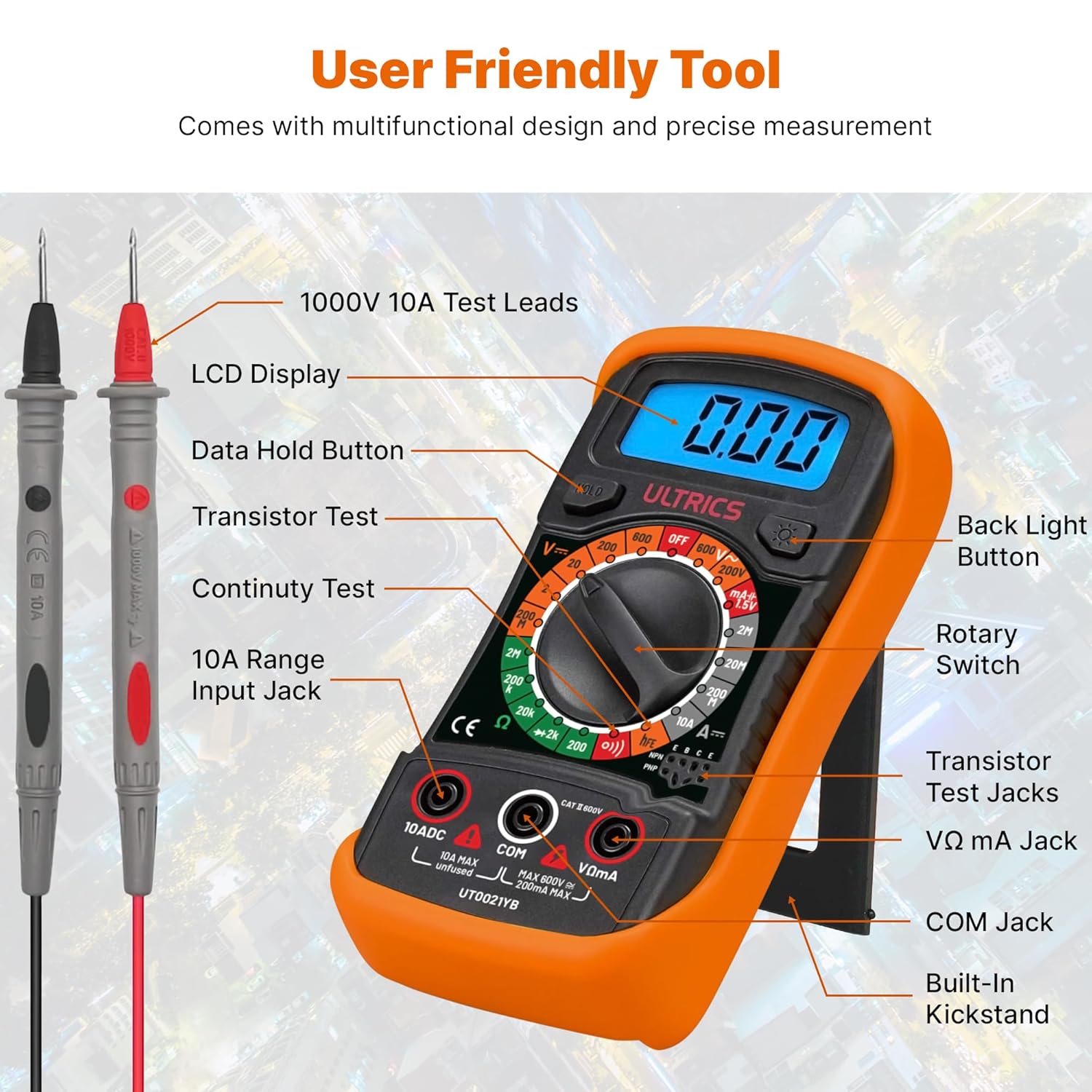
Image 3.1: Detailed diagram showing the various parts of the multimeter, including the LCD display, rotary switch, test lead jacks, and buttons.

ചിത്രം 3.2: ഒരു ക്ലോസപ്പ് view highlighting the backlit LCD screen and the retractable kickstand for improved usability.
4. സജ്ജീകരണം
Before first use, or when the low battery indicator appears, install or replace the 9V battery.
- ബാറ്ററി ഇൻസ്റ്റാളേഷൻ: Locate the battery compartment on the back of the multimeter. Use a screwdriver to open the cover. Insert a 9V battery, observing the correct polarity. Close the cover securely.
- ടെസ്റ്റ് ലീഡുകൾ ബന്ധിപ്പിക്കുന്നു: Insert the black test lead into the 'COM' (Common) jack. Insert the red test lead into the 'VΩmA' jack for voltage, resistance, and small current measurements. For high current (up to 10A), insert the red lead into the '10ADC' jack.
5. പ്രവർത്തന നിർദ്ദേശങ്ങൾ
This multimeter offers a range of measurement capabilities. Always ensure the correct function is selected and leads are connected appropriately.

Image 5.1: Visual representation of the multimeter's multi-functional capabilities, including AC/DC Voltage, Current, Resistance, Continuity, Diode, Capacity, and Transistor testing.
- എസി/ഡിസി വോളിയം അളക്കുന്നുtage:
റോട്ടറി സ്വിച്ച് 'V~' ആയി സജ്ജമാക്കുക (AC വോളിയംtage) അല്ലെങ്കിൽ 'V-' (DC Voltage) range. Connect the test leads in parallel to the circuit or component being measured. Read the value on the LCD. - DC കറന്റ് അളക്കുന്നു:
Set the rotary switch to the 'A-' (DC Current) range. Ensure the red lead is in the appropriate current jack (VΩmA for mA, 10ADC for 10A). Connect the multimeter in series with the circuit. Read the value on the LCD. - Measuring Resistance (Ω):
Set the rotary switch to the 'Ω' (Resistance) range. Ensure the circuit is de-energized. Connect the test leads across the component. Read the value on the LCD. - തുടർച്ച പരിശോധന:
Set the rotary switch to the continuity symbol (speaker icon). Connect the test leads across the circuit or component. An audible beep indicates continuity (low resistance). - ഡയോഡ് ടെസ്റ്റ്:
Set the rotary switch to the diode symbol. Connect the red lead to the anode and the black lead to the cathode of the diode. The display will show the forward voltagഇ ഡ്രോപ്പ് ചെയ്യുക. ഓപ്പൺ സർക്യൂട്ട് പരിശോധിക്കാൻ ലീഡുകൾ റിവേഴ്സ് ചെയ്യുക. - Transistor HFE Test:
Set the rotary switch to the 'hFE' range. Insert the transistor's emitter, base, and collector leads into the corresponding sockets on the multimeter. The display will show the transistor's HFE value. - ബാറ്ററി ടെസ്റ്റ്:
Set the rotary switch to the '1.5V' or '9V' battery test range. Connect the test leads to the battery terminals (red to positive, black to negative). The display will show the battery voltage.

Image 5.2: Demonstrates the 'Hold' button function, which allows users to freeze the displayed reading for convenient note-taking or collaboration.

ചിത്രം 5.3: ഉദാamples of the multimeter being used for various tests, including AC/DC Voltage, DC Current, Battery, and Continuity measurements.

Image 5.4: Illustrates the versatile usability of the multimeter across different scenarios such as car battery testing, appliance repair, laboratory work, and general DIY projects.
6. പരിപാലനം
ശരിയായ അറ്റകുറ്റപ്പണി നിങ്ങളുടെ മൾട്ടിമീറ്ററിന്റെ ദീർഘായുസ്സും കൃത്യതയും ഉറപ്പാക്കുന്നു.
- വൃത്തിയാക്കൽ: പരസ്യം ഉപയോഗിച്ച് മൾട്ടിമീറ്റർ തുടയ്ക്കുകamp തുണി. ഉരച്ചിലുകളുള്ള ക്ലീനറുകളോ ലായകങ്ങളോ ഉപയോഗിക്കരുത്.
- ബാറ്ററി മാറ്റിസ്ഥാപിക്കൽ: Replace the 9V battery promptly when the low battery indicator appears. Remove the battery if the multimeter will not be used for an extended period.
- സംഭരണം: Store the multimeter in a cool, dry place, away from direct sunlight and extreme temperatures.
7. പ്രശ്നപരിഹാരം
നിങ്ങളുടെ മൾട്ടിമീറ്ററിൽ പ്രശ്നങ്ങൾ നേരിടുകയാണെങ്കിൽ, ഇനിപ്പറയുന്ന പൊതുവായ പ്രശ്നങ്ങളും പരിഹാരങ്ങളും പരിശോധിക്കുക:
| പ്രശ്നം | സാധ്യമായ കാരണം | പരിഹാരം |
|---|---|---|
| ഡിസ്പ്ലേ ഇല്ല അല്ലെങ്കിൽ മങ്ങിയ ഡിസ്പ്ലേ | നിർജ്ജീവമായ അല്ലെങ്കിൽ കുറഞ്ഞ ബാറ്ററി | 9 വി ബാറ്ററി മാറ്റിസ്ഥാപിക്കുക. |
| തെറ്റായ വായനകൾ | Incorrect function selected, poor lead connection, or battery low. | Verify rotary switch setting, ensure leads are firmly connected, replace battery if needed. |
| കണ്ടിന്യുറ്റി ബീപ്പ് ഇല്ല | ഓപ്പൺ സർക്യൂട്ട് അല്ലെങ്കിൽ ഉയർന്ന പ്രതിരോധം. | Check the circuit for breaks or high resistance points. |
| Overload indication ('OL') | Measurement exceeds selected range. | Select a higher range or ensure the input is within the multimeter's limits. |
8 സ്പെസിഫിക്കേഷനുകൾ
Detailed technical specifications for the ULTRICS Digital Multimeter:
| ഫീച്ചർ | സ്പെസിഫിക്കേഷൻ |
|---|---|
| മോഡൽ നമ്പർ | UT0021YB |
| അളവുകൾ | 14.6 x 10 x 5 സെ.മീ |
| ഇനത്തിൻ്റെ ഭാരം | 240 ഗ്രാം |
| പവർ ഉറവിടം | Battery Powered (9V battery included) |
| മാക്സ് വോളിയംtage | 1000 വോൾട്ട് |
| മെറ്റീരിയൽ | പ്ലാസ്റ്റിക് |
| പ്രത്യേക സവിശേഷതകൾ | ഡിസി വോളിയംtage Range, AC Voltage, Diode Check, Battery Check, Transistor HFE Check, Overload Protection on all ranges, Low Battery Voltage Indication, Data Hold Function, Removable Thick rubber casing, Fold-out stand |
| സർട്ടിഫിക്കേഷനുകൾ | CE, UKCA |
9. വാറൻ്റിയും പിന്തുണയും
The ULTRICS Digital Multimeter comes with a 12-month warranty from the date of purchase. This warranty covers manufacturing defects and ensures reliable performance under normal use. For technical support, warranty claims, or any inquiries, please contact ULTRICS customer service through the retailer's platform or the official ULTRICS webസൈറ്റ്. വാറന്റി സാധൂകരണത്തിനായി നിങ്ങളുടെ വാങ്ങലിന്റെ തെളിവ് സൂക്ഷിക്കുക.


