1. ആമുഖം
വാങ്ങിയതിന് നന്ദി.asing the QFX SBX-1518BTL 2-Way Bluetooth Cabinet Speaker. This manual provides essential information for the safe and efficient operation of your speaker. Please read it thoroughly before use and retain it for future reference.
The SBX-1518BTL is a versatile audio system featuring Bluetooth streaming, USB/SD/FM playback and recording, a 5-band graphic equalizer, and multiple input/output options for various audio sources and connectivity needs.
2. സുരക്ഷാ നിർദ്ദേശങ്ങൾ
- ഊർജ്ജ സ്രോതസ്സ്: Ensure the speaker is connected to a power source that matches the voltagഇ യൂണിറ്റിൽ വ്യക്തമാക്കിയിട്ടുണ്ട്.
- വെൻ്റിലേഷൻ: Do not block ventilation openings. Maintain adequate space around the speaker for proper airflow.
- ജലവും ഈർപ്പവും: Do not expose the speaker to rain, moisture, or liquids. This product is not waterproof.
- താപ സ്രോതസ്സുകൾ: റേഡിയേറ്ററുകൾ, ഹീറ്റ് രജിസ്റ്ററുകൾ, സ്റ്റൗകൾ അല്ലെങ്കിൽ താപം ഉൽപ്പാദിപ്പിക്കുന്ന മറ്റ് ഉപകരണങ്ങൾ പോലുള്ള താപ സ്രോതസ്സുകളിൽ നിന്ന് സ്പീക്കറിനെ അകറ്റി നിർത്തുക.
- വൃത്തിയാക്കൽ: വൃത്തിയാക്കുന്നതിന് മുമ്പ് പവർ ഔട്ട്ലെറ്റിൽ നിന്ന് സ്പീക്കർ ഊരിമാറ്റുക. വൃത്തിയാക്കാൻ ഉണങ്ങിയ തുണി ഉപയോഗിക്കുക.
- സേവനം: ഈ ഉൽപ്പന്നം സ്വയം സേവിക്കാൻ ശ്രമിക്കരുത്. യോഗ്യതയുള്ള സേവന ഉദ്യോഗസ്ഥർക്ക് എല്ലാ സേവനങ്ങളും റഫർ ചെയ്യുക.
- പ്ലേസ്മെൻ്റ്: വീഴാതിരിക്കാൻ സ്പീക്കർ ഒരു സ്ഥിരതയുള്ളതും പരന്നതുമായ പ്രതലത്തിൽ വയ്ക്കുക.
- വോളിയം: കേൾവിക്ക് കേടുപാടുകൾ സംഭവിക്കാതിരിക്കാൻ ഉയർന്ന ശബ്ദത്തിൽ ദീർഘനേരം കേൾക്കുന്നത് ഒഴിവാക്കുക.
3. പാക്കേജ് ഉള്ളടക്കം
താഴെ പട്ടികപ്പെടുത്തിയിരിക്കുന്ന എല്ലാ ഇനങ്ങളും നിങ്ങളുടെ പാക്കേജിൽ ഉൾപ്പെടുത്തിയിട്ടുണ്ടോയെന്ന് ദയവായി പരിശോധിക്കുക:
- QFX SBX-1518BTL Cabinet Speaker
- റിമോട്ട് കൺട്രോൾ
- പവർ കോർഡ്
- നിർദ്ദേശ മാനുവൽ (ഈ പ്രമാണം)
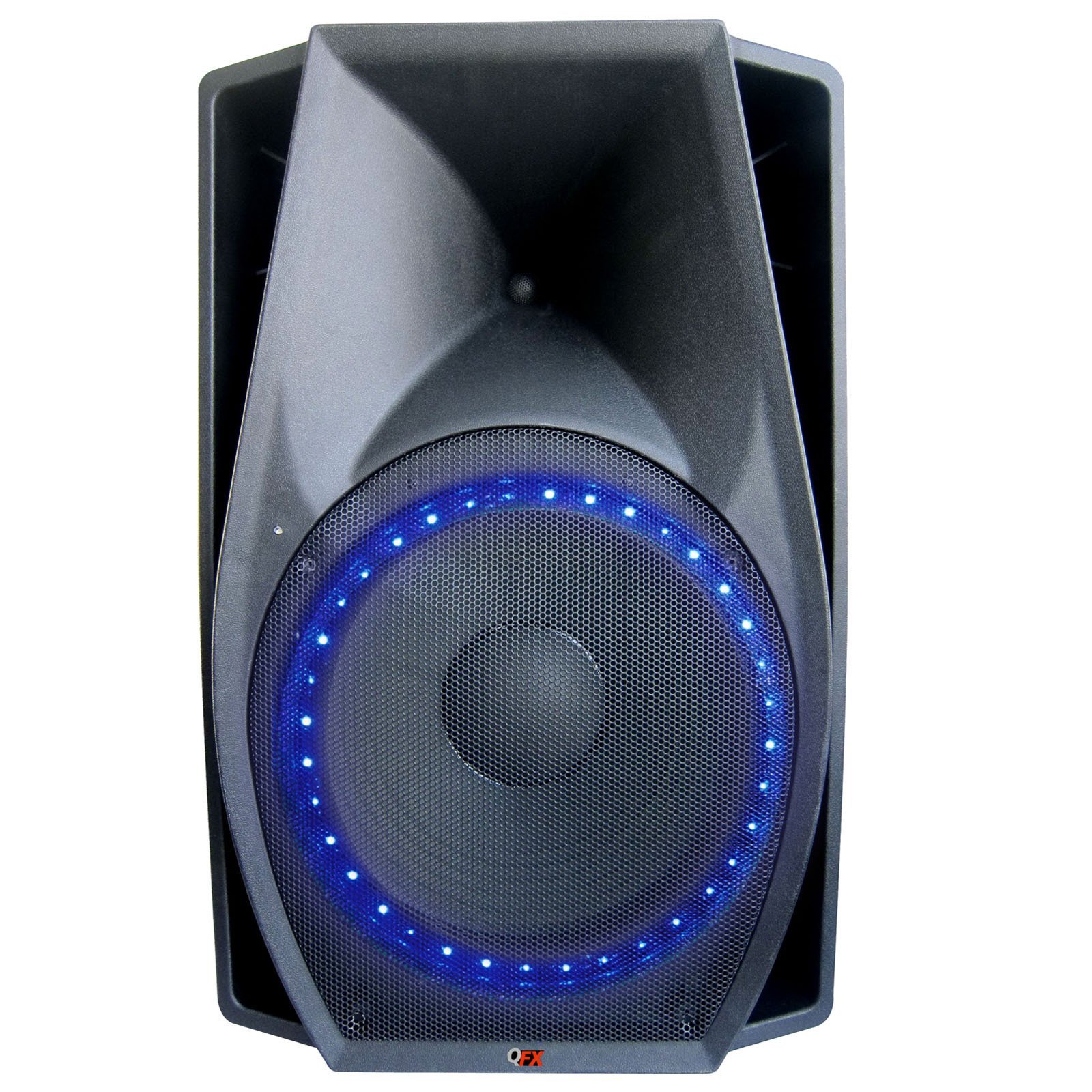
Image 1: QFX SBX-1518BTL Cabinet Speaker and included remote control. The speaker features a large 15-inch woofer and control panel on the front.
4. സജ്ജീകരണം
4.1 ഫിസിക്കൽ പ്ലേസ്മെന്റ്
Place the speaker on a stable, flat surface. Ensure there is enough space around the unit for proper ventilation. Avoid placing it in direct sunlight or near heat sources.
4.2 പവർ കണക്ഷൻ
- Connect the provided power cord to the AC IN port on the back of the speaker.
- Plug the other end of the power cord into a standard wall outlet (AC 120V/60Hz or as specified on the unit).
4.3 പ്രാരംഭ പവർ ഓൺ
Locate the POWER switch on the speaker (usually on the rear or control panel). Flip the switch to the "ON" position. The display (if available) will illuminate, indicating the unit is powered on.
5. പ്രവർത്തന നിർദ്ദേശങ്ങൾ
5.1 കൺട്രോൾ പാനൽ ഓവർview
The control panel, typically located on the front or top of the speaker, includes various buttons and knobs for controlling functions. Common controls include:
- മോഡ് ബട്ടൺ: Switches between input sources (Bluetooth, USB, SD, FM, AUX).
- പ്ലേ/പോസ് ബട്ടൺ: Controls playback for media.
- PREVIOUS/NEXT Buttons: Navigates tracks or FM stations.
- മാസ്റ്റർ വോളിയം നോബ്: മൊത്തത്തിലുള്ള ശബ്ദ ഔട്ട്പുട്ട് നില ക്രമീകരിക്കുന്നു.
- MIC VOLUME Knob: മൈക്രോഫോൺ ഇൻപുട്ട് വോളിയം ക്രമീകരിക്കുന്നു.
- ECHO നോബ്: മൈക്രോഫോൺ ഇൻപുട്ടിനായി എക്കോ ഇഫക്റ്റ് ക്രമീകരിക്കുന്നു.
- 5-ബാൻഡ് ഗ്രാഫിക് ഇക്വലൈസർ: Sliders to adjust specific frequency ranges.
5.2 ബ്ലൂടൂത്ത് ജോടിയാക്കൽ
- സ്പീക്കറിൽ പവർ.
- അമർത്തുക മോഡ് button until "BLUETOOTH" or "BT" appears on the display. The speaker will enter pairing mode, indicated by a flashing Bluetooth icon or audible prompt.
- നിങ്ങളുടെ മൊബൈൽ ഉപകരണത്തിൽ (സ്മാർട്ട്ഫോൺ, ടാബ്ലെറ്റ് മുതലായവ), ബ്ലൂടൂത്ത് പ്രവർത്തനക്ഷമമാക്കി ലഭ്യമായ ഉപകരണങ്ങൾക്കായി തിരയുക.
- Select "QFX SBX-1518BTL" or a similar name from the list of devices.
- Once paired, the speaker will emit a confirmation sound, and the Bluetooth indicator will stop flashing. You can now play audio from your device through the speaker.
5.3 USB/SD പ്ലേബാക്കും റെക്കോർഡിംഗും
- Insert a USB flash drive or SD card into the corresponding slot on the control panel.
- അമർത്തുക മോഡ് button to select "USB" or "SD" mode. The speaker will automatically begin playing audio fileഉപകരണത്തിൽ നിന്ന് എസ്.
- ഉപയോഗിക്കുക പ്ലേ/താൽക്കാലികമായി നിർത്തുക ഒപ്പം മുമ്പത്തെ അടുത്തത് പ്ലേബാക്ക് നിയന്ത്രിക്കുന്നതിനുള്ള ബട്ടണുകൾ.
- റെക്കോർഡിംഗ്: While in USB/SD mode, if a microphone is connected, you may have a dedicated "REC" button to start recording audio directly to the USB/SD device. Consult the specific button layout on your unit.
5.4 എഫ്എം റേഡിയോ പ്രവർത്തനം
- അമർത്തുക മോഡ് "FM" മോഡ് തിരഞ്ഞെടുക്കാൻ ബട്ടൺ.
- അമർത്തിപ്പിടിക്കുക പ്ലേ/താൽക്കാലികമായി നിർത്തുക button to initiate an automatic scan for FM stations. The speaker will scan and save available stations.
- ഉപയോഗിക്കുക മുമ്പത്തെ അടുത്തത് buttons to navigate through the saved FM stations.
5.5 AUX ഇൻപുട്ട്
- ഒരു 3.5mm ഓഡിയോ കേബിൾ ഉപയോഗിച്ച് ഒരു ബാഹ്യ ഓഡിയോ ഉപകരണം (ഉദാ: MP3 പ്ലെയർ, ലാപ്ടോപ്പ്) AUX IN പോർട്ടിലേക്ക് ബന്ധിപ്പിക്കുക.
- അമർത്തുക മോഡ് "AUX" മോഡ് തിരഞ്ഞെടുക്കാൻ ബട്ടൺ.
- നിങ്ങളുടെ ബാഹ്യ ഉപകരണത്തിൽ നിന്ന് പ്ലേബാക്കും ശബ്ദവും നിയന്ത്രിക്കുക.
5.6 മൈക്രോഫോൺ ഇൻപുട്ട്
- Connect a microphone to the MIC IN port.
- ക്രമീകരിക്കുക എംഐസി വോളിയം knob to control the microphone's output level.
- ഉപയോഗിക്കുക ECHO knob to add an echo effect to the microphone's sound.
5.7 5-Band Graphic Equalizer
The 5-band graphic equalizer allows you to fine-tune the audio output. Each slider corresponds to a specific frequency range. Move the sliders up to boost that frequency or down to cut it, customizing the sound to your preference.
5.8 വിദൂര നിയന്ത്രണം
The included remote control provides convenient access to most functions from a distance. Point the remote directly at the speaker's IR receiver. Functions typically include power, mode selection, volume control, track navigation, and equalizer presets.
6. പരിപാലനം
6.1 വൃത്തിയാക്കൽ
Before cleaning, ensure the speaker is powered off and unplugged from the wall outlet. Use a soft, dry cloth to wipe the exterior surfaces. Do not use abrasive cleaners, waxes, or solvents as they may damage the finish.
6.2 സംഭരണം
If storing the speaker for an extended period, unplug it from the power source and store it in a cool, dry place, away from direct sunlight and extreme temperatures. It is recommended to keep the original packaging for protection during storage.
7. പ്രശ്നപരിഹാരം
| പ്രശ്നം | സാധ്യമായ കാരണം | പരിഹാരം |
|---|---|---|
| ശക്തിയില്ല | Power cord not connected; Power switch off; Outlet not working. | പവർ കോർഡ് സുരക്ഷിതമായി ബന്ധിപ്പിച്ചിട്ടുണ്ടെന്ന് ഉറപ്പാക്കുക. പവർ സ്വിച്ച് ഓണാക്കുക. മറ്റൊരു ഉപകരണം ഉപയോഗിച്ച് ഔട്ട്ലെറ്റ് പരിശോധിക്കുക. |
| ശബ്ദമില്ല | Volume too low; Incorrect input mode; Audio cable loose/faulty; Bluetooth not connected. | Increase master volume. Select correct input mode. Check audio cable connections. Re-pair Bluetooth device. |
| ബ്ലൂടൂത്ത് ജോടിയാക്കൽ പരാജയപ്പെടുന്നു | സ്പീക്കർ ജോടിയാക്കൽ മോഡിൽ ഇല്ല; ഉപകരണം വളരെ അകലെയാണ്; ഇടപെടൽ; ഉപകരണം ഇതിനകം മറ്റൊരു സ്പീക്കറുമായി ജോടിയാക്കി. | Ensure speaker is in Bluetooth pairing mode. Move device closer. Turn off other Bluetooth devices. Disconnect from other speakers. |
| USB/SD പ്ലേ ചെയ്യുന്നില്ല | Incorrect mode; Unsupported file ഫോർമാറ്റ്; കേടായത് files; USB/SD card not inserted correctly. | Select USB/SD mode. Ensure files are supported (e.g., MP3). Check card insertion. Try another USB/SD card. |
| റിമോട്ട് കൺട്രോൾ പ്രവർത്തിക്കുന്നില്ല | Batteries dead/incorrectly inserted; Obstruction; Remote too far/not aimed correctly. | Replace batteries. Check battery polarity. Remove obstructions. Aim remote directly at IR receiver. |
8 സ്പെസിഫിക്കേഷനുകൾ
| മോഡലിൻ്റെ പേര്: | SBX-1518BTL |
| സ്പീക്കർ തരം: | 2-Way Cabinet Speaker, Woofer |
| കണക്റ്റിവിറ്റി ടെക്നോളജി: | Bluetooth, Auxiliary, USB, Wired, Wireless |
| വയർലെസ് കമ്മ്യൂണിക്കേഷൻ: | ബ്ലൂടൂത്ത് |
| സ്പീക്കർ വലിപ്പം: | 15 ഇഞ്ച് (വൂഫർ) |
| സ്പീക്കർ പരമാവധി ഔട്ട്പുട്ട് പവർ: | 300 വാട്ട്സ് (RMS) |
| ഓഡിയോ putട്ട്പുട്ട് മോഡ്: | സ്റ്റീരിയോ |
| നിയന്ത്രണ രീതി: | റിമോട്ട് |
| ഉൾപ്പെടുത്തിയ ഘടകങ്ങൾ: | റിമോട്ട് കൺട്രോൾ |
| ഊർജ്ജ സ്രോതസ്സ്: | കോർഡഡ് ഇലക്ട്രിക് |
| ഉൽപ്പന്ന അളവുകൾ: | 78.74 x 53.34 x 50.8 സെ.മീ |
| നിറം: | കറുപ്പ് |
| നിർമ്മാതാവ്: | ക്യുഎഫ്എക്സ് |
9. വാറൻ്റിയും പിന്തുണയും
QFX products are designed and manufactured to the highest quality standards. For information regarding warranty coverage, please refer to the warranty card included with your product or visit the official QFX website. For technical support or service inquiries, please contact QFX customer service through their official channels.
Please note: Warranty terms and support availability may vary by region.


