1. ഉൽപ്പന്നം കഴിഞ്ഞുview
The COMTEC ZERO 500M is a high-sensitivity GPS mirror type radar detector designed to enhance driving awareness by providing alerts for various traffic control devices and regulations. It integrates advanced GPS and radar detection technologies into a sleek, rearview mirror form factor.
പ്രധാന സവിശേഷതകളിൽ ഇവ ഉൾപ്പെടുന്നു:
- Mobile Speed Enforcement Support: Detects and alerts for mobile small-scale speed enforcement devices.
- Roundabout (Circular Intersection) Alerts: Provides warnings for roundabouts to assist with navigation and safety.
- 'Zone 30' Regulation Compatibility: Alerts drivers when entering areas designated with a 30 km/h speed limit.
- Multi-Satellite GPS Reception: Supports GPS, GLONASS, Michibiki (QZSS), and GAGAN satellite systems for improved positioning accuracy and speed.
- OBD2 Connection Capability: Allows connection to the vehicle's OBD2 port (optional adapter required) to display up to 74 types of vehicle information and maintain accurate vehicle position even in areas with poor GPS signal, such as tunnels.
- Half-Mirror Design: The LCD display can be turned ON or OFF. When OFF, the unit functions as a full rearview mirror. Special mirror processing enhances night visibility.
- Automatic LCD Rotation: The display automatically rotates 180 degrees, allowing flexible installation for both left-hand and right-hand drive vehicles.
- Free GPS Data Updates: Monthly free updates for GPS data are available.
2. സജ്ജീകരണവും ഇൻസ്റ്റാളേഷനും
Follow these steps to properly install your COMTEC ZERO 500M radar detector:
- യൂണിറ്റ് ഘടിപ്പിക്കുന്നു: Securely attach the ZERO 500M to your vehicle's existing rearview mirror using the provided mounting clips. Ensure it is firmly in place to prevent shaking during driving.
- പവർ കണക്ഷൻ: Connect the provided power cord to the unit and then to your vehicle's 12V power outlet (e.g., cigarette lighter socket). Route the cable carefully to avoid obstructing your view അല്ലെങ്കിൽ വാഹന നിയന്ത്രണങ്ങളിൽ ഇടപെടൽ.
- Optional OBD2 Connection: If you wish to utilize the OBD2 features, connect the optional OBD2 adapter (sold separately) to your vehicle's OBD2 port and then to the ZERO 500M. Refer to the OBD2 adapter's compatibility chart on the manufacturer's website to ensure your vehicle is supported.
- Adjusting Display Orientation: The unit features an automatic LCD rotation function. If the display appears upside down after installation, simply rotate the main unit 180 degrees, and the display will adjust automatically. This allows for flexible mounting in various vehicle types, including left-hand drive vehicles.

Image: The COMTEC ZERO 500M unit installed on a rearview mirror, displaying various vehicle metrics and radar scan information.

Image: Illustration demonstrating the automatic 180-degree rotation of the LCD display, allowing for flexible mounting regardless of the unit's physical orientation.
3. പ്രവർത്തന നിർദ്ദേശങ്ങൾ
The ZERO 500M offers various display modes and alert functions to assist you during driving.
3.1. പവർ ഓൺ/ഓഫ്
The unit will power on automatically when the vehicle's ignition is turned on and power is supplied. It will power off when the ignition is turned off.
3.2. LCD Display Modes
The unit supports three main display patterns, with up to 74 display items available when connected via OBD2:
- Main/Mini Meter: Divides the screen to show main information and a mini meter.
- 3-Meter Display: Shows three items in a meter format.
- Text List: Displays information as a list of text.
You can select your preferred display items and patterns through the unit's menu settings.

Image: Various selectable standby screens, including Main/Mini Meter, 3-Meter Display, and Text List, illustrating the flexibility in information presentation.
3.3. Half-Mirror Functionality
The LCD display can be toggled ON or OFF. When the LCD is OFF, the unit functions as a full rearview mirror, providing an unobstructed view. This can be useful for reducing visual distractions or for personal preference.
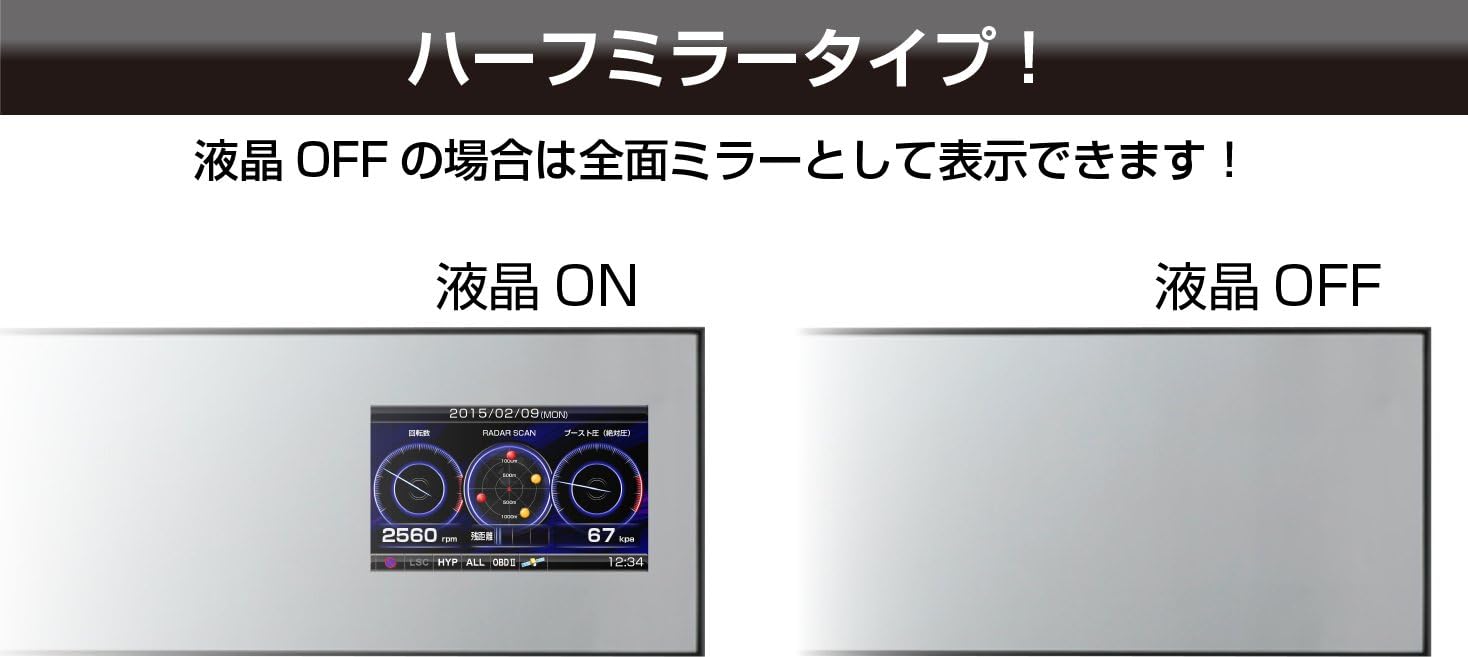
Image: A comparison showing the unit with the LCD display ON (left) and OFF (right), demonstrating its functionality as a full mirror when the display is off.
3.4. Alert Functions
The ZERO 500M provides timely alerts for various situations:
- GPS Point Alerts: Alerts for fixed-point speed cameras, mobile speed enforcement zones, roundabouts, and 'Zone 30' areas.
- Radar Detection: Detects radar signals from speed enforcement devices.
- യാന്ത്രിക മോഡ്: Automatically switches detection modes between general roads and expressways to minimize unnecessary alerts.
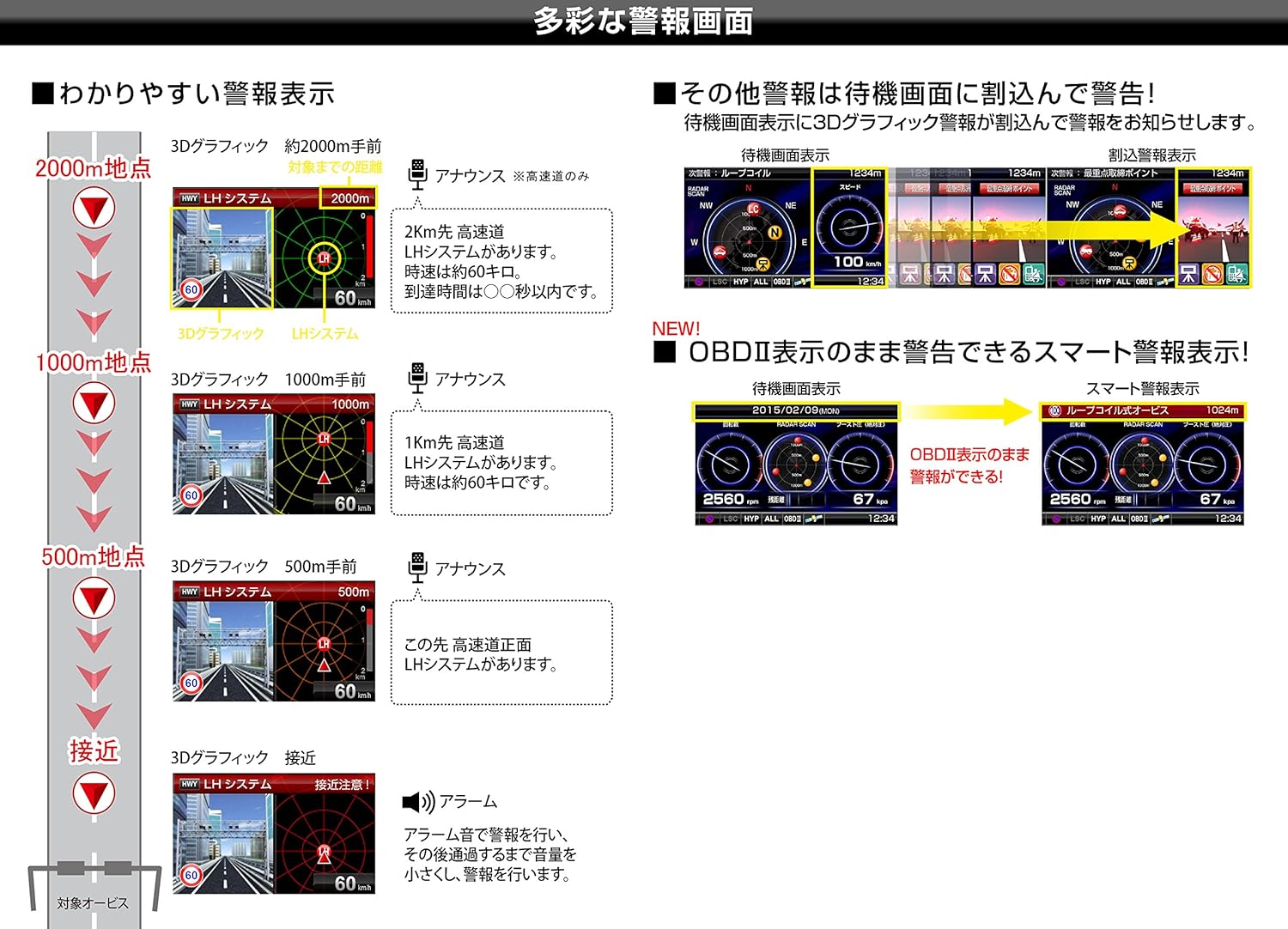
ചിത്രം: ഉദാamples of diverse warning screens, including 3D graphic displays for approaching enforcement points at 2000m, 1000m, 500m, and close proximity, along with smart warning displays for OBD2 information.
3.5. Radar Cancel Point Detection
The unit can automatically identify locations that frequently trigger false radar alarms (e.g., automatic doors). You can register these as 'radar cancel points'. When you pass a registered point again, the alarm will be muted to prevent unnecessary alerts.
3.6. Opposing Lane Radar Cancel Function
When radar waves from opposing lane speed enforcement devices or H-systems are detected, the unit automatically recognizes them as opposing lane radar and mutes the alert.
4. പരിപാലനം
To ensure optimal performance and longevity of your COMTEC ZERO 500M, follow these maintenance guidelines:
- GPS Data Updates: Regularly update the GPS data. COMTEC provides free monthly updates. Visit the official COMTEC website to download the latest data and follow the instructions for updating your device. Keeping the data current ensures accurate alerts for new enforcement points and regulations.
- വൃത്തിയാക്കൽ: Use a soft, dry cloth to clean the unit's screen and body. Avoid using abrasive cleaners, solvents, or chemical sprays, as these can damage the display or casing. For stubborn smudges, lightly dampവെള്ളം കൊണ്ട് തുണി.
- സംഭരണം: ദീർഘനേരം ഉപയോഗിക്കാത്തപ്പോൾ, നേരിട്ടുള്ള സൂര്യപ്രകാശത്തിൽ നിന്നും കടുത്ത താപനിലയിൽ നിന്നും അകന്ന് തണുത്തതും വരണ്ടതുമായ സ്ഥലത്ത് യൂണിറ്റ് സൂക്ഷിക്കുക.
5. പ്രശ്നപരിഹാരം
If you encounter issues with your COMTEC ZERO 500M, refer to the following common problems and solutions:
- യൂണിറ്റ് പവർ ഓൺ ആകുന്നില്ല:
- Check if the power cord is securely connected to both the unit and the vehicle's 12V power outlet.
- വാഹനത്തിന്റെ ഇഗ്നിഷൻ ഓണാണെന്ന് ഉറപ്പാക്കുക.
- Verify that the 12V power outlet is functioning correctly (e.g., by testing with another device).
- പതിവ് തെറ്റായ അലാറങ്ങൾ:
- ഉപയോഗിക്കുക Radar Cancel Point Detection feature to register locations with recurring false alarms.
- Ensure the unit is in ഓട്ടോ മോഡ്, which helps differentiate between general roads and expressways to reduce unnecessary alerts.
- Check for any nearby devices that might emit similar frequencies (e.g., automatic doors, other vehicle accessories).
- GPS Signal Not Acquired or Lost Frequently:
- യൂണിറ്റിന് വ്യക്തമായ ഒരു രേഖ ഉണ്ടെന്ന് ഉറപ്പാക്കുക view ആകാശത്തിന്റെ ദൃശ്യം. ഉയരമുള്ള കെട്ടിടങ്ങൾ, തുരങ്കങ്ങൾ, അല്ലെങ്കിൽ ഇടതൂർന്ന ഇലകൾ പോലുള്ള തടസ്സങ്ങൾ GPS സ്വീകരണത്തെ തടസ്സപ്പെടുത്തിയേക്കാം.
- Verify that the GPS data is up-to-date. Perform a free monthly update from the COMTEC webസൈറ്റ്.
- If connected via OBD2, the unit should maintain vehicle position even with temporary GPS signal loss.
- Display Text is Difficult to Read:
- Adjust the display brightness through the unit's settings.
- Experiment with different display modes (Main/Mini Meter, 3-Meter Display, Text List) to find one that is most readable for you.
- Mirror Shakes or Vibrates During Driving:
- Ensure the mounting clips are securely fastened to your rearview കണ്ണാടി.
- Check if the rearview mirror itself is stable.
If the problem persists after attempting these solutions, please contact COMTEC customer support.
6 സ്പെസിഫിക്കേഷനുകൾ
| ഫീച്ചർ | സ്പെസിഫിക്കേഷൻ |
|---|---|
| നിർമ്മാതാവ് | കോംടെക് |
| മോഡലിൻ്റെ പേര് | ZERO 500M |
| ഉൽപ്പന്ന അളവുകൾ (D x W x H) | 1.78 x 30 x 8 സെ.മീ (18 x 300 x 80 മിമി) |
| ഉൽപ്പന്ന ഭാരം | 335 ഗ്രാം |
| വാല്യംtage | 12 വോൾട്ട് |
| ഫ്രീക്വൻസി ബാൻഡ് | 34.7 GHz |
| ഡിസ്പ്ലേ തരം | 3.0 ഇഞ്ച് ടിഎഫ്ടി എൽസിഡി |
| പവർ ഉറവിടം | പവർ കോർഡ് തരം |
| GPS Data Updates | Free monthly updates |
| Reception Bands | 18 ബാൻഡുകൾ |
| Enforcement Point Data | Over 39,000 points |
| സെൻസറുകൾ | ജി-സെൻസർ |
| OBD2 Compatibility | Yes (optional adapter required, vehicle specific) |
7. വാറൻ്റി വിവരങ്ങൾ
For detailed warranty information regarding your COMTEC ZERO 500M, please refer to the warranty card included with your product or visit the official COMTEC webസൈറ്റ്. വാറന്റി നിബന്ധനകളും വ്യവസ്ഥകളും പ്രദേശത്തിനും വാങ്ങൽ തീയതിക്കും അനുസരിച്ച് വ്യത്യാസപ്പെടാം.
8. ഉപഭോക്തൃ പിന്തുണ
If you require further assistance, have questions about your product, or need technical support, please contact COMTEC customer service. Contact details can typically be found on the official COMTEC webസൈറ്റ് അല്ലെങ്കിൽ ഉൽപ്പന്ന പാക്കേജിംഗിൽ.
ഓൺലൈൻ ഉറവിടങ്ങൾക്ക്, സന്ദർശിക്കുക Official COMTEC Store or the manufacturer's main webസൈറ്റ്.


