1. ആമുഖം
The KitSound Cayman 2.1 Wireless Bluetooth Speaker System combines powerful audio performance with a modern design, offering versatile connectivity options for an enhanced listening experience. This manual provides detailed instructions for setting up, operating, and maintaining your speaker system.
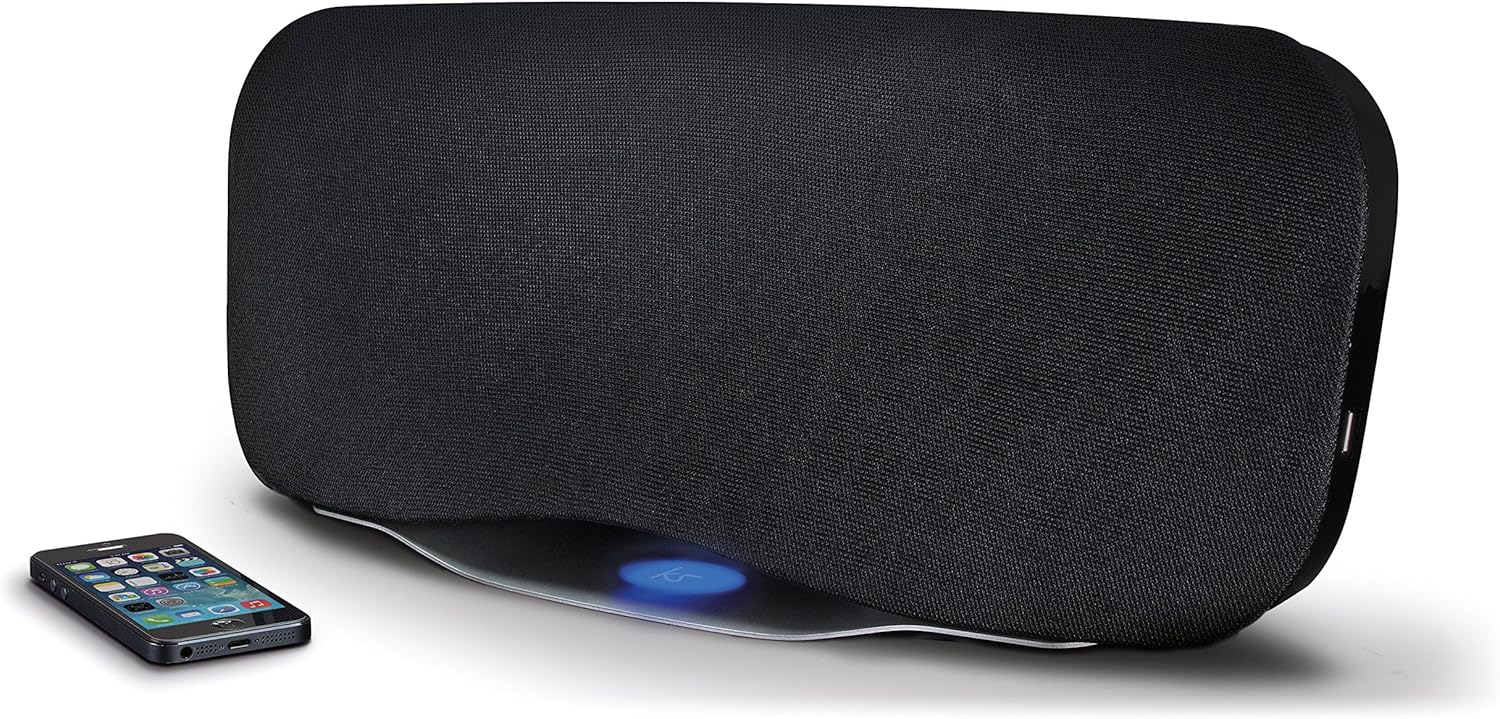
Image 1.1: The KitSound Cayman 2.1 speaker system shown with a smartphone, highlighting its sleek design and wireless connectivity.
2. പാക്കേജ് ഉള്ളടക്കം
താഴെ പറയുന്ന ഇനങ്ങൾക്കായി ബോക്സ് ചെക്ക് ചെയ്യുക:
- KS Cayman 2.1 Wireless Bluetooth Speaker with EU Plug
- വിദൂര നിയന്ത്രണം
- 3.5 എംഎം ഓഡിയോ കേബിൾ
- ഇൻസ്ട്രക്ഷൻ മാനുവൽ (ഈ പ്രമാണം)

Image 2.1: The retail packaging for the KitSound Cayman 2.1 Wireless Bluetooth Speaker System, indicating the included components.
3. ഉൽപ്പന്നം കഴിഞ്ഞുview
3.1 മുന്നിലും മുകളിലും View

ചിത്രം 3.1: മുൻഭാഗം view of the KitSound Cayman 2.1 speaker, showing the speaker grille and the included remote control.
3.2 പിൻ പാനലും കണക്ഷനുകളും

ചിത്രം 3.2: പിൻഭാഗം view of the speaker system, illustrating the various input ports and power connection.
പിൻ പാനലിൽ സാധാരണയായി ഇവ ഉൾപ്പെടുന്നു:
- പവർ ഇൻപുട്ട്
- 3.5mm Audio Input (AUX)
- USB ചാർജിംഗ് പോർട്ട്
3.3 വിദൂര നിയന്ത്രണം

ചിത്രം 3.3: വിശദമായത് view of the remote control, showing buttons for power, pairing, mode selection, volume, track control, and sound modes (Balanced/Boost).
The remote control allows you to manage power, volume, playback, and sound modes from a distance. Key buttons include:
- പവർ ബട്ടൺ: സ്പീക്കർ ഓൺ/ഓഫ് ചെയ്യുന്നു.
- ജോടി ബട്ടൺ: ബ്ലൂടൂത്ത് ജോടിയാക്കൽ മോഡ് ആരംഭിക്കുന്നു.
- മോഡ് ബട്ടൺ: Switches between input sources (Bluetooth, AUX).
- വോളിയം കൂട്ടുക/താഴ്ത്തുക: സ്പീക്കർ വോളിയം ക്രമീകരിക്കുന്നു.
- ട്രാക്ക് നിയന്ത്രണം: Skips tracks forward/backward (Bluetooth mode).
- പ്ലേ/താൽക്കാലികമായി നിർത്തുക/വിളിക്കുക: Controls playback and manages calls (Bluetooth mode).
- Balanced/Boost: Selects between different sound profiles.
4. സജ്ജീകരണം
4.1 പവർ കണക്ഷൻ
- Place the KitSound Cayman speaker on a stable, flat surface.
- Connect the power cable to the power input port on the rear of the speaker.
- Plug the other end of the power cable into a suitable EU power outlet.
- Press the power button on the speaker or remote control to turn it on.
4.2 പ്രാരംഭ പ്ലേസ്മെന്റ്
For optimal sound performance, position the speaker in a central location within the room. When used as a soundbar, place it directly below your television.
5. പ്രവർത്തന നിർദ്ദേശങ്ങൾ
5.1 ബ്ലൂടൂത്ത് ജോടിയാക്കൽ
- സ്പീക്കർ ഓണാണെന്ന് ഉറപ്പാക്കുക.
- അമർത്തുക മോഡ് button on the remote control or speaker until the Bluetooth indicator light flashes, indicating pairing mode.
- On your smartphone, tablet, or MP3 device, enable Bluetooth and search for available devices.
- തിരഞ്ഞെടുക്കുക "KS Cayman" ഉപകരണങ്ങളുടെ പട്ടികയിൽ നിന്ന്.
- ജോടിയാക്കിക്കഴിഞ്ഞാൽ, ബ്ലൂടൂത്ത് ഇൻഡിക്കേറ്റർ ലൈറ്റ് ദൃഢമാകും, നിങ്ങൾ ഒരു സ്ഥിരീകരണ ടോൺ കേൾക്കും.
- നിങ്ങളുടെ ഉപകരണത്തിൽ നിന്ന് സ്പീക്കറിലേക്ക് ഇപ്പോൾ വയർലെസ് ആയി ഓഡിയോ സ്ട്രീം ചെയ്യാൻ കഴിയും.
5.2 NFC (Near Field Communication) Pairing
For devices with NFC capability:
- Ensure NFC is enabled on your device and the speaker is powered on.
- Gently tap your NFC-enabled device against the NFC logo on the top of the KitSound Cayman speaker.
- Your device will automatically connect to the speaker via Bluetooth.
- A confirmation tone will sound upon successful connection.
5.3 വയർഡ് കണക്ഷൻ (AUX)
To connect devices without Bluetooth or NFC:
- Connect one end of the supplied 3.5mm audio cable to the ഓക്സ് ഇൻ port on the rear of the speaker.
- Connect the other end of the 3.5mm audio cable to the headphone jack or audio output of your device (e.g., TV, MP3 player).
- അമർത്തുക മോഡ് button on the remote control or speaker to select the AUX input.
- നിങ്ങളുടെ കണക്റ്റ് ചെയ്ത ഉപകരണത്തിൽ നിന്ന് സ്പീക്കറിലൂടെ ഓഡിയോ ഇപ്പോൾ പ്ലേ ചെയ്യും.
5.4 Using as a Soundbar
The KitSound Cayman can function as a soundbar for your television:
- Place the speaker (540mm wide) directly under your TV.
- Connect your TV's audio output to the speaker's ഓക്സ് ഇൻ port using the 3.5mm audio cable.
- Select the AUX input mode on the speaker.
- Adjust the volume using the remote control or the TV's volume controls.
5.5 യുഎസ്ബി ചാർജിംഗ് പോർട്ട്
The integrated USB port on the rear of the speaker can be used to charge compatible devices (e.g., smartphones, tablets) while the speaker is powered on.
5.6 സൗണ്ട് മോഡുകൾ
The remote control features buttons to switch between different sound profiles:
- സമതുലിതമായ: Provides a neutral and well-rounded audio experience.
- ബൂസ്റ്റ്: Enhances bass and treble for a more dynamic sound.
6. പരിപാലനം
- വൃത്തിയാക്കൽ: സ്പീക്കറിന്റെ പുറംഭാഗം വൃത്തിയാക്കാൻ മൃദുവായതും ഉണങ്ങിയതുമായ തുണി ഉപയോഗിക്കുക. ദ്രാവക ക്ലീനറുകളോ ഉരച്ചിലുകളുള്ള വസ്തുക്കളോ ഉപയോഗിക്കരുത്.
- സംഭരണം: ദീർഘനേരം ഉപയോഗിക്കാത്തപ്പോൾ, നേരിട്ടുള്ള സൂര്യപ്രകാശത്തിൽ നിന്നും കടുത്ത താപനിലയിൽ നിന്നും മാറി തണുത്തതും വരണ്ടതുമായ സ്ഥലത്ത് സ്പീക്കർ സൂക്ഷിക്കുക.
- ഈർപ്പം ഒഴിവാക്കുക: Do not expose the speaker to water or excessive humidity, as it is not waterproof.
- വെൻ്റിലേഷൻ: അമിതമായി ചൂടാകുന്നത് തടയാൻ സ്പീക്കറിന്റെ വെന്റിലേഷൻ ഓപ്പണിംഗുകൾ അടഞ്ഞിട്ടില്ലെന്ന് ഉറപ്പാക്കുക.
7. പ്രശ്നപരിഹാരം
| പ്രശ്നം | സാധ്യമായ കാരണം | പരിഹാരം |
|---|---|---|
| ശക്തിയില്ല | പവർ കേബിൾ ബന്ധിപ്പിച്ചിട്ടില്ല അല്ലെങ്കിൽ പവർ ഔട്ട്ലെറ്റ് സജീവമല്ല. | Ensure the power cable is securely connected to both the speaker and a working power outlet. Check the power switch. |
| ശബ്ദമില്ല (ബ്ലൂടൂത്ത്) | Speaker not paired, volume too low, or incorrect input mode. | Re-pair the Bluetooth device. Increase speaker and device volume. Ensure the speaker is in Bluetooth mode. |
| No sound (AUX) | Cable not connected properly, incorrect input mode, or device volume too low. | Check 3.5mm audio cable connections. Ensure the speaker is in AUX mode. Increase volume on both speaker and connected device. |
| റിമോട്ട് കൺട്രോൾ പ്രവർത്തിക്കുന്നില്ല | Batteries depleted or obstruction between remote and speaker. | Replace remote control batteries. Ensure a clear line of sight between the remote and the speaker's sensor. |
| മോശം ബ്ലൂടൂത്ത് കണക്ഷൻ | Device too far from speaker, interference, or obstacles. | Move the device closer to the speaker (within 10 meters). Remove any obstacles. Avoid placing near other wireless devices. |
8 സ്പെസിഫിക്കേഷനുകൾ
| Rട്ട്പുട്ട് RMS | 50W |
| ഫ്രീക്വൻസി പ്രതികരണം | 40Hz - 15KHz |
| ബ്ലൂടൂത്ത് പതിപ്പ് | V4.0 EDR |
| ബ്ലൂടൂത്ത് ശ്രേണി | 10 മീറ്റർ വരെ |
| കണക്റ്റിവിറ്റി ടെക്നോളജി | Auxiliary, Bluetooth, NFC, USB |
| നിയന്ത്രണ രീതി | റിമോട്ട് |
| പവർ ഉറവിടം | Electric component with cord (EU Power Plug) |
| ഉൽപ്പന്ന അളവുകൾ | 54.5 x 21.5 x 17.5 സെ.മീ |
| ഇനത്തിൻ്റെ ഭാരം | 3.85 കി.ഗ്രാം |
| മോഡൽ നമ്പർ | KSCAYMEU |
9. വാറൻ്റിയും പിന്തുണയും
For warranty information and technical support, please refer to the documentation provided with your purchase or visit the official KitSound webസൈറ്റ്. ഏതെങ്കിലും വാറന്റി ക്ലെയിമുകൾക്ക് നിങ്ങളുടെ വാങ്ങലിന്റെ തെളിവ് സൂക്ഷിക്കുക.
Manufacturer: Kondor Limited


