ആമുഖം
Welcome to your One For All URC-3021BG1 Universal Remote Control. This manual provides instructions for setting up, operating, and maintaining your remote control. This device is designed to control various home entertainment components, including VCRs, DVD players, PVR/DVRs, Cable Boxes, and Satellite receivers, utilizing UEI Technology.
പാക്കേജ് ഉള്ളടക്കം
- One For All URC-3021BG1 Universal Remote Control
- ഉപയോക്തൃ മാനുവൽ (ഈ പ്രമാണം)
സജ്ജമാക്കുക
1. ബാറ്ററികൾ ഇൻസ്റ്റാൾ ചെയ്യുന്നു
Before using your remote control, install two new AAA alkaline batteries (not included).
- വിദൂര നിയന്ത്രണത്തിന്റെ പിൻഭാഗത്ത് ബാറ്ററി കമ്പാർട്ട്മെന്റ് കവർ തുറക്കുക.
- കമ്പാർട്ടുമെന്റിനുള്ളിൽ സൂചിപ്പിച്ചിരിക്കുന്നതുപോലെ ശരിയായ പോളാരിറ്റി (+ ഉം - ഉം) ഉറപ്പാക്കിക്കൊണ്ട് രണ്ട് AAA ബാറ്ററികൾ ഇടുക.
- ബാറ്ററി കമ്പാർട്ട്മെൻ്റ് കവർ സുരക്ഷിതമായി അടയ്ക്കുക.
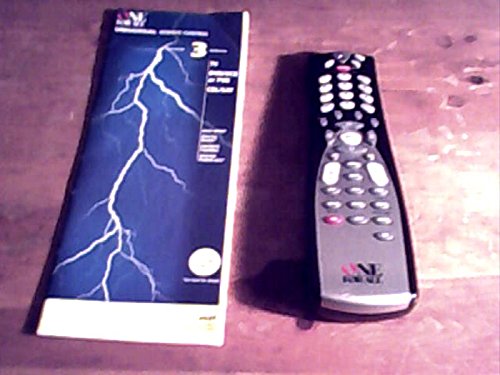
Image: The One For All URC-3021BG1 remote control, showing the rear battery compartment.
2. Programming Your Remote Control
The URC-3021BG1 can be programmed to control up to four devices. Follow these steps to program each device:
- ഉപകരണ തരം തിരിച്ചറിയുക: Press the device button (e.g., VCR, DVD, CBL/SAT) on the remote that corresponds to the device you wish to control. The indicator light for that device will illuminate.
- സജ്ജീകരണ മോഡ് നൽകുക: Press and hold the "SETUP" button until the indicator light blinks twice.
- കോഡ് നൽകുക: Refer to the code list provided with your remote (or search online for "One For All URC-3021BG1 codes") and enter the 4-digit code for your device's brand.
- പരീക്ഷണ നിയന്ത്രണം: Point the remote at your device and press the "POWER" button. If the device turns off, the code is correct. If not, try the next code for your brand or repeat the process with a different code.
- ക്രമീകരണങ്ങൾ സംരക്ഷിക്കുക: Once the device responds correctly, press the "SETUP" button again to save the code. The indicator light will blink twice.
നുറുങ്ങ്: If your device does not respond after trying all codes for its brand, use the Code Search method described in the advanced programming section (not covered in this basic manual).
നിങ്ങളുടെ റിമോട്ട് കൺട്രോൾ പ്രവർത്തിപ്പിക്കുന്നു
Once programmed, your URC-3021BG1 remote control functions like your original device remotes.
- ഉപകരണ തിരഞ്ഞെടുപ്പ്: Press the corresponding device button (VCR, DVD, CBL/SAT) to select the device you want to control. The indicator light will show which device is active.
- അടിസ്ഥാന പ്രവർത്തനങ്ങൾ: Use the standard buttons for Power, Volume Up/Down, Channel Up/Down, Play, Pause, Stop, Rewind, Fast Forward, and Number Pad for direct channel entry.
- മെനു നാവിഗേഷൻ: Use the directional arrows and "OK" button to navigate menus on your selected device.
മെയിൻ്റനൻസ്
നിങ്ങളുടെ റിമോട്ട് കൺട്രോളിന്റെ ഒപ്റ്റിമൽ പ്രകടനവും ദീർഘായുസ്സും ഉറപ്പാക്കാൻ:
- വൃത്തിയാക്കൽ: മൃദുവായതും ഉണങ്ങിയതുമായ തുണി ഉപയോഗിച്ച് റിമോട്ട് തുടയ്ക്കുക. ലിക്വിഡ് ക്ലീനറുകളോ ഉരച്ചിലുകളുള്ള വസ്തുക്കളോ ഉപയോഗിക്കരുത്.
- ബാറ്ററി മാറ്റിസ്ഥാപിക്കൽ: Replace batteries when the remote's indicator light becomes dim or the remote stops responding. Always replace both batteries at the same time.
- സംഭരണം: നേരിട്ടുള്ള സൂര്യപ്രകാശത്തിൽ നിന്നും കടുത്ത താപനിലയിൽ നിന്നും മാറി തണുത്തതും വരണ്ടതുമായ സ്ഥലത്ത് റിമോട്ട് സൂക്ഷിക്കുക.
ട്രബിൾഷൂട്ടിംഗ്
| പ്രശ്നം | പരിഹാരം |
|---|---|
| ഉപകരണം റിമോട്ട് പ്രവർത്തിപ്പിക്കുന്നില്ല. | Ensure fresh batteries are installed correctly. Verify the correct device button is selected. Reprogram the remote with the correct code for your device. Ensure there are no obstructions between the remote and the device. |
| ചില ബട്ടണുകൾ പ്രവർത്തിക്കുന്നില്ല. | This may indicate an incorrect or incomplete programming code. Try reprogramming the device with a different code from the code list. |
| Indicator light does not blink. | ബാറ്ററികൾ മാറ്റിസ്ഥാപിക്കുക. പ്രശ്നം നിലനിൽക്കുകയാണെങ്കിൽ, ഉപഭോക്തൃ പിന്തുണയുമായി ബന്ധപ്പെടുക. |
സ്പെസിഫിക്കേഷനുകൾ
- മോഡൽ: URC-3021BG1
- ബ്രാൻഡ്: എല്ലാവർക്കും വേണ്ടി ഒന്ന്
- അനുയോജ്യമായ ഉപകരണങ്ങൾ: VCR, DVD, PVR/DVR, Cable Boxes, Satellite Receivers
- കണക്റ്റിവിറ്റി ടെക്നോളജി: ഇൻഫ്രാറെഡ്
- കൺട്രോളർ തരം: ബട്ടൺ നിയന്ത്രണം
- ഊർജ്ജ സ്രോതസ്സ്: 2 x AAA ബാറ്ററികൾ (ഉൾപ്പെടുത്തിയിട്ടില്ല)
- പ്രത്യേക സവിശേഷത: എർഗണോമിക് ഡിസൈൻ
- സാങ്കേതികവിദ്യ: UEI Technology
വാറൻ്റി വിവരങ്ങൾ
One For All products are designed and manufactured to high quality standards. For specific warranty details, please refer to the warranty card included with your purchase or visit the official One For All webസൈറ്റ്. വാറന്റി ക്ലെയിമുകൾക്കായി നിങ്ങളുടെ വാങ്ങലിന്റെ തെളിവ് സൂക്ഷിക്കുക.
ഉപഭോക്തൃ പിന്തുണ
For further assistance, programming codes, or troubleshooting not covered in this manual, please visit the ആമസോണിൽ എല്ലാവർക്കും ഒരു സ്റ്റോർ or the official One For All support webസൈറ്റ്.


