ആമുഖം
This manual provides detailed instructions for the installation, operation, and maintenance of your VTech CS6919-26 DECT 6.0 Cordless Phone System. This system includes two full-duplex handsets and a base unit, designed for reliable communication. Please read this manual thoroughly to ensure proper use and to take full advantage of all available features.
പാക്കേജ് ഉള്ളടക്കം
Before beginning installation, verify that your package contains the following items:
- VTech CS6919-26 Base Unit
- രണ്ട് (2) കോർഡ്ലെസ് ഹാൻഡ്സെറ്റുകൾ
- Two (2) Handset Chargers
- Two (2) Power Adapters for Base Unit and Charger
- Two (2) Rechargeable Battery Packs
- ഒരു (1) ടെലിഫോൺ ലൈൻ കോർഡ്
- വാൾ മൗണ്ട് ബ്രാക്കറ്റ് (ഓപ്ഷണൽ)
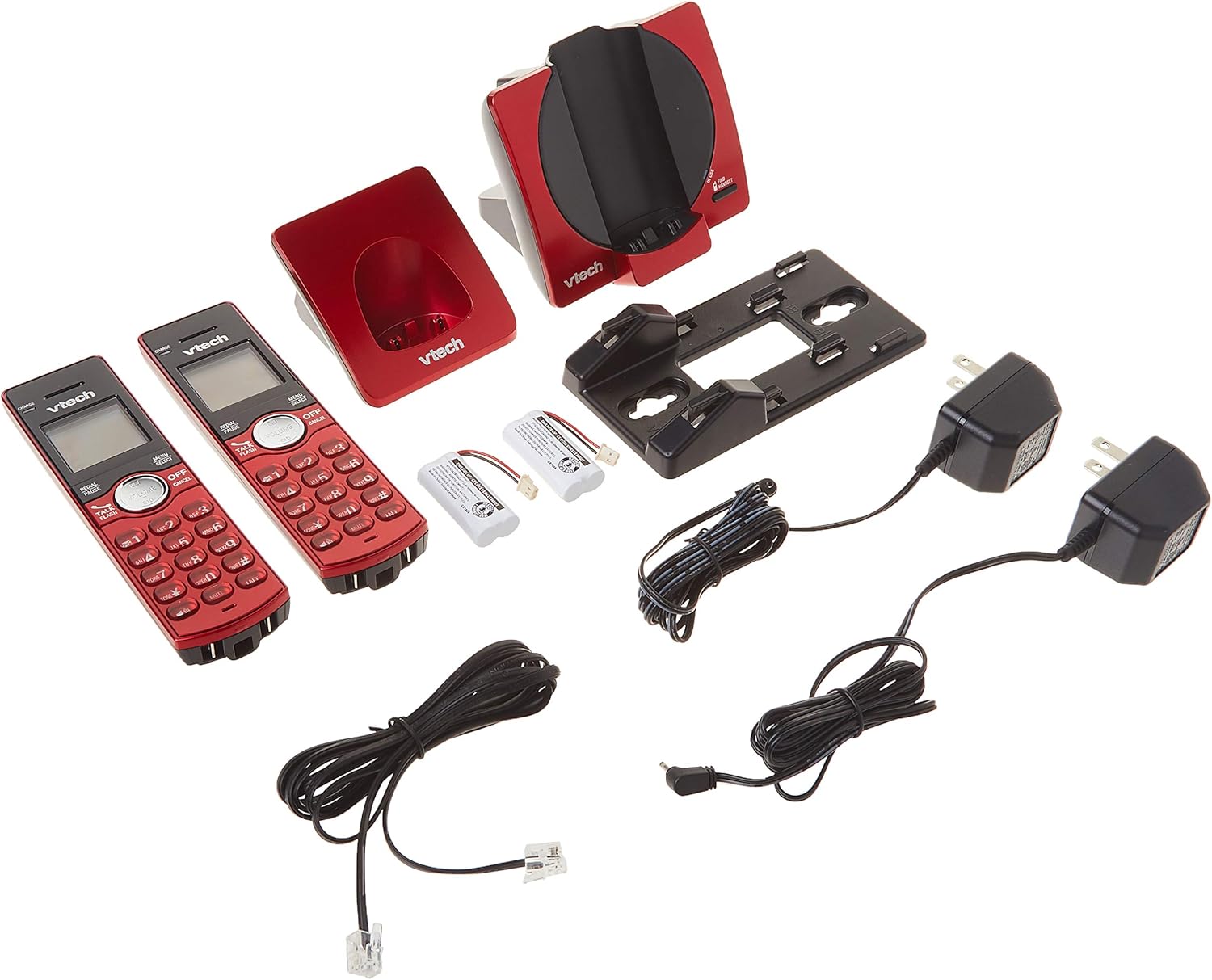
Image: All components of the VTech CS6919-26 Cordless Phone System, including the base unit, two handsets, two chargers, power adapters, battery packs, and telephone line cord.
സജ്ജമാക്കുക
1. ബാറ്ററി ഇൻസ്റ്റാളേഷൻ
- ഓരോ ഹാൻഡ്സെറ്റിന്റെയും പിൻഭാഗത്തുള്ള ബാറ്ററി കമ്പാർട്ട്മെന്റ് കവർ തുറക്കുക.
- കമ്പാർട്ടുമെന്റിനുള്ളിലെ ജാക്കിലേക്ക് ബാറ്ററി പായ്ക്ക് പ്ലഗ് സുരക്ഷിതമായി ബന്ധിപ്പിക്കുക.
- Place the battery pack with the label facing up, as indicated.
- ബാറ്ററി കമ്പാർട്ട്മെൻ്റ് കവർ മാറ്റിസ്ഥാപിക്കുക.
2. ബേസ് യൂണിറ്റും ചാർജർ കണക്ഷനും
- ടെലിഫോൺ ലൈൻ കോഡിന്റെ ഒരറ്റം ബേസ് യൂണിറ്റിന്റെ പിൻഭാഗത്തുള്ള ടെൽ ലൈൻ ജാക്കിലേക്ക് പ്ലഗ് ചെയ്യുക.
- ടെലിഫോൺ ലൈൻ കോഡിന്റെ മറ്റേ അറ്റം ഒരു ടെലിഫോൺ വാൾ ജാക്കിൽ പ്ലഗ് ചെയ്യുക.
- ബേസ് യൂണിറ്റിന്റെ പവർ അഡാപ്റ്ററിന്റെ ചെറിയ അറ്റം ബേസ് യൂണിറ്റിന്റെ പിൻഭാഗത്തുള്ള പവർ ജാക്കിലേക്ക് പ്ലഗ് ചെയ്യുക.
- ബേസ് യൂണിറ്റ് പവർ അഡാപ്റ്ററിന്റെ വലിയ അറ്റം ഒരു വാൾ സ്വിച്ച് ഉപയോഗിച്ച് നിയന്ത്രിക്കാത്ത ഒരു ഇലക്ട്രിക്കൽ ഔട്ട്ലെറ്റിലേക്ക് പ്ലഗ് ചെയ്യുക.
- For each handset charger, plug the small end of its power adapter into the POWER jack on the back of the charger.
- Plug the large end of each charger power adapter into an electrical outlet not controlled by a wall switch.

ചിത്രം: പിൻഭാഗം view of the VTech CS6919-26 handsets and base unit, illustrating the battery compartments and connection ports for power and telephone line.
3. പ്രാരംഭ ചാർജിംഗ്
Place each handset face forward in its respective base unit or charger. The CHARGE light on the handset will illuminate, indicating proper charging. Allow the handsets to charge for at least 16 hours before initial use to ensure optimal battery performance.

Image: Two VTech CS6919-26 cordless handsets, red in color, resting in their charging cradles. The handsets feature a black display and keypad with red buttons.
4. ഹാൻഡ്സെറ്റ് രജിസ്ട്രേഷൻ
The handsets included in this package are pre-registered to the base unit. If a handset becomes unregistered or if you purchase additional handsets (up to 5 total), refer to the full user manual for registration procedures.
5. വാൾ മൗണ്ടിംഗ് (ഓപ്ഷണൽ)
The base unit is designed to be table-mountable or wall-mountable. Use the included wall mount bracket and follow the instructions provided in the full user manual for secure wall installation.
പ്രവർത്തന നിർദ്ദേശങ്ങൾ
കോളുകൾ ചെയ്യലും സ്വീകരിക്കലും
- ഒരു കോൾ ചെയ്യാൻ: അമർത്തുക സംസാരിക്കുക / ഫ്ലാഷ് ചെയ്യുക or any dial key, then dial the phone number.
- ഒരു കോളിന് ഉത്തരം നൽകാൻ: ഫോൺ റിംഗ് ചെയ്യുമ്പോൾ, അമർത്തുക സംസാരിക്കുക / ഫ്ലാഷ് ചെയ്യുക or any dial key.
- ഒരു കോൾ അവസാനിപ്പിക്കാൻ: അമർത്തുക ഓഫ്/റദ്ദാക്കുക അല്ലെങ്കിൽ ഹാൻഡ്സെറ്റ് ചാർജറിൽ വയ്ക്കുക.
ഫുൾ-ഡ്യൂപ്ലെക്സ് ഹാൻഡ്സെറ്റ് സ്പീക്കർഫോൺ
ഒരു കോളിനിടയിൽ സ്പീക്കർഫോൺ സജീവമാക്കാൻ, സ്പീക്കർ button. This allows both parties to speak and be heard simultaneously, enhancing conversation clarity.
കോളർ ഐഡി/കോൾ വെയ്റ്റിംഗ്
The handset display shows the caller's name and number (if available) for incoming calls. The system stores up to 30 caller ID entries. If you subscribe to call waiting, you will hear a tone when another call comes in while you are on the phone. Press ഫ്ലാഷ് കോളുകൾക്കിടയിൽ മാറാൻ.
ഫോൺബുക്ക് ഡയറക്ടറി
Store up to 50 names and numbers in the phonebook directory for quick dialing. Access the phonebook by pressing മെനു/തിരഞ്ഞെടുക്കുക ഫോൺബുക്ക് ഓപ്ഷനിലേക്ക് നാവിഗേറ്റ് ചെയ്യുക.
ഇന്റർകോം ബിറ്റ്വീൻ ഹാൻഡ്സെറ്റുകൾ
To initiate an intercom call between two handsets, press INT ഒരു ഹാൻഡ്സെറ്റിൽ വിളിച്ച് വിളിക്കാൻ ആഗ്രഹിക്കുന്ന ഹാൻഡ്സെറ്റ് തിരഞ്ഞെടുക്കുക.
കോൺഫറൻസ് കോളുകൾ
The system supports conferencing between an outside line and up to two cordless handsets. Refer to the full user manual for detailed instructions on setting up a three-way conference call.
വീണ്ടും ഡയൽ ചെയ്ത് മ്യൂട്ട് ചെയ്യുക
- വീണ്ടും ഡയൽ ചെയ്യുക: അമർത്തുക റീഡയൽ/പോസ് വരെ view അവസാനം ഡയൽ ചെയ്ത 10 നമ്പറുകൾ. അമർത്തുക സംസാരിക്കുക / ഫ്ലാഷ് ചെയ്യുക തിരഞ്ഞെടുത്ത ഒരു നമ്പർ ഡയൽ ചെയ്യാൻ.
- നിശബ്ദമാക്കുക: ഒരു കോൾ സമയത്ത്, അമർത്തുക നിശബ്ദമാക്കുക/ഇല്ലാതാക്കുക to temporarily silence your microphone. Press it again to unmute.
വോളിയം നിയന്ത്രണം
Adjust the earpiece or speakerphone volume during a call by pressing the വോളിയം buttons on the side of the handset.
നിശബ്ദ മോഡ്
Activate Quiet Mode to silence all ringers for a set period. This feature is useful for uninterrupted rest. Access this setting through the handset menu.
കോൾ ബ്ലോക്ക്
Block unwanted numbers from ringing your phone. You can add numbers to the call block list through the handset menu.
ഇക്കോ മോഡ്
The system features ECO mode power-conserving technology, which automatically adjusts power consumption for optimal battery life and energy efficiency.
മെയിൻ്റനൻസ്
വൃത്തിയാക്കൽ
Clean the phone and charger surfaces with a soft, slightly damp തുണി. ക്ലീനിംഗ് സ്പ്രേകളോ കഠിനമായ രാസവസ്തുക്കളോ ഉപയോഗിക്കരുത്, കാരണം അവ ഫിനിഷിനോ ഇലക്ട്രിക്കൽ ഘടകങ്ങൾക്കോ കേടുവരുത്തും.
ബാറ്ററി കെയർ
To maintain optimal battery life, fully charge the handsets regularly. If the phone will not be used for an extended period, remove the batteries from the handsets.
ട്രബിൾഷൂട്ടിംഗ്
If you experience issues with your phone system, try the following basic troubleshooting steps:
- ഡയൽ ടോൺ ഇല്ല: Ensure the telephone line cord is securely plugged into both the base unit and the wall jack. Check that the base unit power adapter is properly connected to a working electrical outlet.
- Cannot Make/Receive Calls: Verify that the handset batteries are charged. Ensure the handset is within range of the base unit. Check if the telephone line is active.
- മോശം ശബ്ദ നിലവാരം: Move closer to the base unit. Check for interference from other electronic devices (e.g., Wi-Fi routers, microwaves).
- ഹാൻഡ്സെറ്റ് ചാർജ് ചെയ്യുന്നില്ല: Ensure the handset is correctly seated in the charger. Check that the charger's power adapter is plugged into a working outlet. Clean the charging contacts on both the handset and charger.
- ഡിസ്പ്ലേ ശൂന്യമാണ്: Charge the handset battery. If the issue persists, the battery may need replacement.
For more detailed troubleshooting, refer to the comprehensive user manual or VTech's customer support resources.
സ്പെസിഫിക്കേഷനുകൾ
| മോഡൽ നമ്പർ | CS6919-26 |
| സാങ്കേതികവിദ്യ | DECT 6.0 ഡിജിറ്റൽ ടെക്നോളജി |
| Handsets Included | 2 (5 വരെ വികസിപ്പിക്കാവുന്നതാണ്) |
| അളവുകൾ (അടിസ്ഥാന യൂണിറ്റ്) | ഏകദേശം 4.49 x 7.09 x 5.98 ഇഞ്ച് |
| ഇനത്തിൻ്റെ ഭാരം | ഏകദേശം 1.65 പൗണ്ട് |
| മെറ്റീരിയൽ | പ്ലാസ്റ്റിക് |
| പവർ ഉറവിടം | കോർഡഡ് ഇലക്ട്രിക് |
| ബാറ്ററി തരം | Product Specific Rechargeable Batteries (included) |
| കോളർ ഐഡി മെമ്മറി | 30 കോളുകൾ |
| ഫോൺബുക്ക് ഡയറക്ടറി | 50 പേരുകളും നമ്പറുകളും |
വാറൻ്റി വിവരങ്ങൾ
Specific warranty details for the VTech CS6919-26 Cordless Phone System are typically included with the product packaging or available on the official VTech website. Please refer to these resources for information regarding warranty coverage, terms, and conditions.
പിന്തുണ
For further assistance, technical support, or to access additional resources such as FAQs and detailed user guides, please visit the official VTech support website or contact their customer service department. Contact information can usually be found in the product packaging or on the VTech webസൈറ്റ്.


