1. ആമുഖം
This manual provides comprehensive instructions for the installation, operation, and maintenance of the L-com PR175B16BLK 16-Port 1U BNC Patch Panel. Please read this manual thoroughly before using the product to ensure proper functionality and safety.
2. ഉൽപ്പന്നം കഴിഞ്ഞുview
The L-com PR175B16BLK is a 1U rack-mountable BNC patch panel designed for efficient management and routing of coaxial signals. It features 16 BNC ports, providing a centralized connection point for various BNC-terminated devices within a rack environment. This panel is ideal for applications requiring organized and flexible BNC signal distribution.
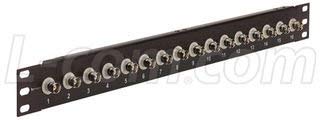
ചിത്രം 1: ഫ്രണ്ട് view of the L-com PR175B16BLK 16-Port 1U BNC Patch Panel. This image displays the front view of the L-com PR175B16BLK 16-Port 1U BNC Patch Panel. It features sixteen BNC connectors arranged horizontally across a black 1U rack-mountable chassis. Each port is numbered from 1 to 16 for easy identification. The panel is designed for efficient cable management and signal routing in rack environments.
3. സജ്ജീകരണവും ഇൻസ്റ്റാളേഷനും
Follow these steps for proper installation of the BNC patch panel:
- അൺപാക്ക് ചെയ്യുന്നു: Carefully remove the patch panel from its packaging. Inspect for any signs of damage during transit.
- റാക്ക് മൗണ്ടിംഗ്: The PR175B16BLK is a 1U rack-mountable unit. Align the mounting holes on the patch panel with the corresponding holes on your standard 19-inch equipment rack. Secure the panel using appropriate rack screws (not included) on both sides.
- കേബിൾ കണക്ഷൻ: Connect your BNC-terminated coaxial cables to the desired ports on the front of the patch panel. Ensure each BNC connector is fully inserted and twisted clockwise until it locks securely into place.
- കേബിൾ മാനേജുമെന്റ്: Utilize proper cable management techniques (e.g., cable ties, cable management panels) to organize connected cables and prevent strain on the connectors.
4. പ്രവർത്തന നിർദ്ദേശങ്ങൾ
The L-com PR175B16BLK patch panel operates passively, facilitating signal routing without requiring external power. Its primary function is to provide a convenient and organized interface for BNC connections.
- കണക്റ്റിംഗ് കേബിളുകൾ: To connect a BNC cable, align the connector with the port, push it in, and twist clockwise until it clicks into place.
- കേബിളുകൾ വിച്ഛേദിക്കുന്നു: To disconnect, twist the BNC connector counter-clockwise and pull it straight out from the port.
- സിഗ്നൽ റൂട്ടിംഗ്: Use the numbered ports to clearly identify and manage your BNC signal paths.
5. പരിപാലനം
Regular maintenance ensures optimal performance and longevity of your patch panel.
- വൃത്തിയാക്കൽ: Periodically clean the exterior of the patch panel with a soft, dry, lint-free cloth. Avoid using abrasive cleaners or solvents.
- പരിശോധന: Routinely inspect all BNC connectors for signs of wear, corrosion, or damage. Ensure all cables are securely connected.
- പരിസ്ഥിതി വ്യവസ്ഥകൾ: Ensure the patch panel is operated within a stable environment, free from excessive dust, moisture, and extreme temperatures.
6. പ്രശ്നപരിഹാരം
If you encounter issues with signal transmission, consider the following troubleshooting steps:
- സിഗ്നൽ ഇല്ല/ഇടവിട്ടുള്ള സിഗ്നൽ:
- Verify that all BNC cables are securely connected to both the patch panel and the connected devices.
- Inspect cables for damage (e.g., kinks, cuts, loose connectors).
- Test cables individually if possible to isolate a faulty cable.
- Ensure the source device is transmitting a signal and the receiving device is properly configured.
- അയഞ്ഞ കണക്ഷനുകൾ: Re-seat any BNC connectors that appear loose. Ensure they are twisted clockwise until fully locked.
7 സ്പെസിഫിക്കേഷനുകൾ
| ഫീച്ചർ | സ്പെസിഫിക്കേഷൻ |
|---|---|
| മോഡൽ നമ്പർ | PR175B16BLK |
| ബ്രാൻഡ് | എൽ-കോം |
| കണക്റ്റർ തരം | BNC Patch Panel |
| തുറമുഖങ്ങളുടെ എണ്ണം | 16 |
| Rack Unit Height | 1U |
| നിർമ്മാതാവ് | L-COM |
| ആദ്യ തീയതി ലഭ്യമാണ് | ജൂലൈ 15, 2015 |
8. വാറൻ്റിയും പിന്തുണയും
Warranty information for the L-com PR175B16BLK patch panel is typically provided by the manufacturer at the time of purchase or can be found on the official L-com website. For technical support, product inquiries, or warranty claims, please contact L-com directly through their official support channels.
L-com Contact Information: Please refer to the official L-com webസൈറ്റ് (www.l-com.com എന്ന വെബ്സൈറ്റ്) ഏറ്റവും പുതിയ കോൺടാക്റ്റ് വിശദാംശങ്ങൾക്കും പിന്തുണാ ഉറവിടങ്ങൾക്കും.


