1. ആമുഖം
This manual provides comprehensive instructions for the Axis Communications 5506-231 T8415 Wireless Installation Tool Camera. This device is designed to assist in the efficient and accurate installation of network cameras, offering features such as Power over Ethernet (PoE) and Wi-Fi connectivity for streamlined setup and configuration.
ശരിയായ ഉപയോഗം ഉറപ്പാക്കാനും കേടുപാടുകൾ തടയാനും ഉപകരണം പ്രവർത്തിപ്പിക്കുന്നതിന് മുമ്പ് ദയവായി ഈ മാനുവൽ നന്നായി വായിക്കുക.
2 സുരക്ഷാ വിവരങ്ങൾ
- Ensure the device is used in a dry environment. Avoid exposure to water or excessive humidity.
- ഉപകരണം തുറക്കാനോ പരിഷ്ക്കരിക്കാനോ ശ്രമിക്കരുത്. എല്ലാ സേവനങ്ങളും യോഗ്യതയുള്ള ഉദ്യോഗസ്ഥർക്ക് റഫർ ചെയ്യുക.
- Use only the specified power adapter for charging the device.
- ഉയർന്ന താപനിലയിൽ നിന്നും നേരിട്ടുള്ള സൂര്യപ്രകാശത്തിൽ നിന്നും ഉപകരണം അകറ്റി നിർത്തുക.
- Dispose of the device and its components according to local environmental regulations.
3. പാക്കേജ് ഉള്ളടക്കം
പാക്കേജിൽ എല്ലാ ഇനങ്ങളും ഉണ്ടെന്ന് ഉറപ്പാക്കുക:
- Axis Communications 5506-231 T8415 Wireless Installation Tool Camera
- പവർ അഡാപ്റ്റർ (കോർഡഡ് ഇലക്ട്രിക്)
- ഇഥർനെറ്റ് കേബിൾ
- ദ്രുത ആരംഭ ഗൈഡ്
- Other Networking Devices (as specified by manufacturer)
4. ഉൽപ്പന്നം കഴിഞ്ഞുview
The Axis T8415 is a portable tool designed for efficient camera installation. It features a robust design with various ports and indicators for easy operation.
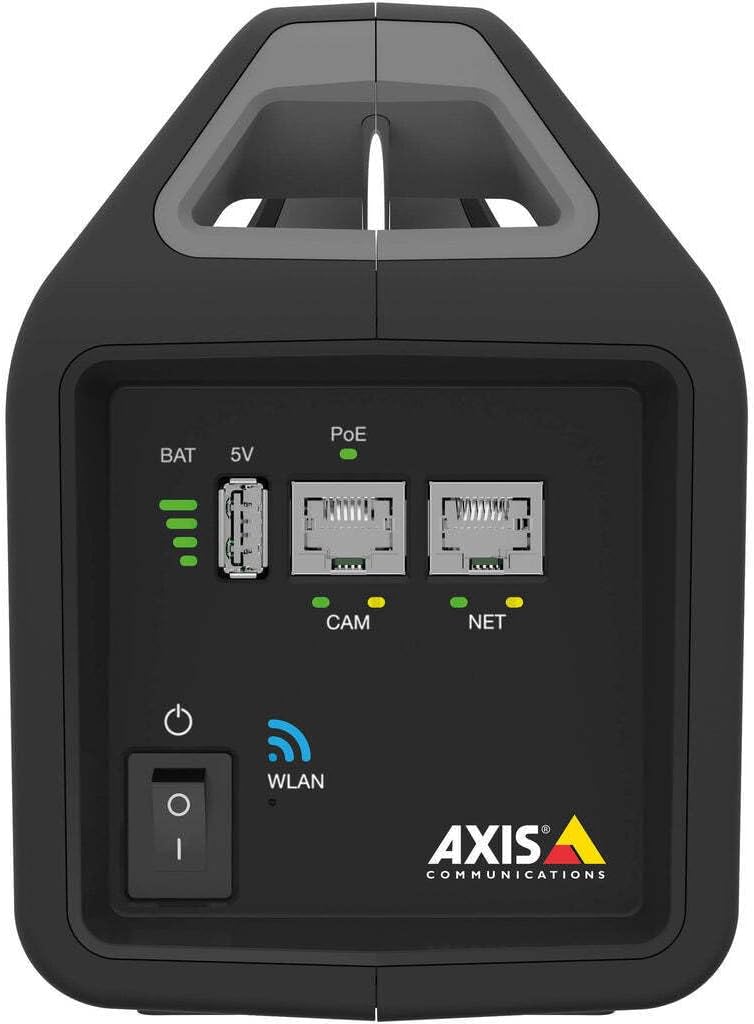
ചിത്രം 4.1: മുൻവശത്തെ പാനൽ മുകളിൽview. This image displays the front of the Axis T8415 tool, highlighting the battery charge level indicator, a 5V USB output port, two Power over Ethernet (PoE) enabled Ethernet ports labeled 'CAM' (for camera connection) and 'NET' (for network connection), the main power button, and a WLAN status indicator light. The Axis Communications logo is visible at the bottom right.

ചിത്രം 4.2: വശം View. This image shows the side profile of the Axis T8415 Wireless Installation Tool Camera, emphasizing its integrated handle for portability and its compact, rugged casing.
പ്രധാന ഘടകങ്ങൾ:
- Battery Indicator (BAT): നിലവിലെ ബാറ്ററി ചാർജ് നില പ്രദർശിപ്പിക്കുന്നു.
- 5V USB Port: Provides 5V power output for compatible devices.
- PoE Ports (CAM/NET): Ethernet ports with Power over Ethernet capabilities. 'CAM' is for connecting the camera, 'NET' for connecting to the network.
- പവർ ബട്ടൺ: ഉപകരണം ഓണാക്കുകയോ ഓഫാക്കുകയോ ചെയ്യുന്നു.
- WLAN Indicator: Shows the status of the wireless local area network connection.
5. സജ്ജീകരണം
5.1 പ്രാരംഭ ചാർജിംഗ്
- നൽകിയിരിക്കുന്ന പവർ അഡാപ്റ്റർ ഉപകരണത്തിലെ ചാർജിംഗ് പോർട്ടുമായി ബന്ധിപ്പിക്കുക.
- അനുയോജ്യമായ ഒരു ഇലക്ട്രിക്കൽ ഔട്ട്ലെറ്റിലേക്ക് പവർ അഡാപ്റ്റർ പ്ലഗ് ചെയ്യുക.
- Allow the device to charge fully until the battery indicator shows a full charge.
5.2 പവർ ഓൺ/ഓഫ്
- To power on, press and hold the power button until the indicators light up.
- To power off, press and hold the power button until the indicators turn off.
5.3 ഒരു ക്യാമറ ബന്ധിപ്പിക്കൽ
- Ensure the installation tool is powered on.
- Connect an Ethernet cable from the camera to the 'CAM' PoE port on the installation tool.
- The tool will provide power to the camera via PoE, and a connection will be established.
5.4 നെറ്റ്വർക്ക് കണക്ഷൻ
- For a wired network connection, connect an Ethernet cable from the network source to the 'NET' PoE port.
- For wireless connectivity, ensure the WLAN indicator is active. Access the tool's web interface (if available) or use a dedicated mobile application to configure Wi-Fi settings.
6. പ്രവർത്തന നിർദ്ദേശങ്ങൾ
6.1 ക്യാമറ കോൺഫിഗറേഷൻ
Once a camera is connected to the 'CAM' port, you can access its configuration interface through a connected laptop or mobile device. The installation tool acts as a bridge, providing power and network access to the camera.
- Connect your laptop to the 'NET' port or connect wirelessly to the tool's Wi-Fi network.
- എ തുറക്കുക web browser and navigate to the camera's default IP address or use the manufacturer's discovery tool.
- Configure camera settings such as IP address, video resolution, and network parameters.
6.2 പവർ ഓവർ ഇതർനെറ്റ് (PoE) പ്രവർത്തനം
The tool provides PoE to connected cameras, simplifying installation by eliminating the need for separate power cables at the camera location. The PoE indicator will illuminate when power is being supplied.
6.3 Wireless Connectivity (WLAN)
The integrated WLAN allows for wireless connection to the tool, enabling configuration and monitoring from a mobile device or laptop without direct cable connection to the 'NET' port. Refer to the tool's specific documentation or mobile app for WLAN setup details.
7. പരിപാലനം
7.1 വൃത്തിയാക്കൽ
- മൃദുവായതും ഉണങ്ങിയതുമായ തുണി ഉപയോഗിച്ച് ഉപകരണത്തിന്റെ പുറംഭാഗം തുടയ്ക്കുക.
- ലിക്വിഡ് ക്ലീനറുകളോ ഉരച്ചിലുകളുള്ള വസ്തുക്കളോ ഉപയോഗിക്കരുത്.
7.2 ബാറ്ററി കെയർ
- ബാറ്ററിയുടെ ആരോഗ്യം നിലനിർത്താൻ, ഉപകരണം പതിവായി ഉപയോഗിക്കുന്നില്ലെങ്കിൽ പോലും, ബാറ്ററി പതിവായി ചാർജ് ചെയ്യുക.
- ബാറ്ററി ഇടയ്ക്കിടെ പൂർണ്ണമായും ഡിസ്ചാർജ് ചെയ്യുന്നത് ഒഴിവാക്കുക.
8. പ്രശ്നപരിഹാരം
| പ്രശ്നം | സാധ്യമായ കാരണം | പരിഹാരം |
|---|---|---|
| ഉപകരണം പവർ ഓണാക്കുന്നില്ല. | കുറഞ്ഞതോ തീർന്നതോ ആയ ബാറ്ററി. | പവർ അഡാപ്റ്റർ ബന്ധിപ്പിച്ച് ഉപകരണം ചാർജ് ചെയ്യുക. |
| Camera not receiving power via PoE. | Incorrect cable connection; camera not PoE compatible; tool malfunction. | Ensure cable is securely connected to 'CAM' port. Verify camera supports PoE. Contact support if issue persists. |
| Cannot connect to the tool's Wi-Fi. | WLAN disabled; incorrect Wi-Fi settings. | Check WLAN indicator. Reconfigure Wi-Fi settings via the tool's interface or app. |
9 സ്പെസിഫിക്കേഷനുകൾ
| ഫീച്ചർ | വിശദാംശങ്ങൾ |
|---|---|
| മോഡലിൻ്റെ പേര് | 5506-231 |
| ബ്രാൻഡ് | ആക്സിസ് കമ്മ്യൂണിക്കേഷൻസ് |
| കണക്റ്റിവിറ്റി ടെക്നോളജി | വയർലെസ് |
| കണക്റ്റിവിറ്റി പ്രോട്ടോക്കോൾ | വൈഫൈ |
| പവർ ഉറവിടം | കോർഡഡ് ഇലക്ട്രിക് |
| വാല്യംtage | 12 വോൾട്ട് |
| വാട്ട്tage | 30 വാട്ട്സ് |
| ഇനത്തിന്റെ അളവുകൾ (L x W x H) | 5.9 x 3.9 x 8.1 ഇഞ്ച് |
| ഇനത്തിൻ്റെ ഭാരം | 4.85 പൗണ്ട് |
| ഇൻഡോർ/ഔട്ട്ഡോർ ഉപയോഗം | ഇൻഡോർ |
| അന്താരാഷ്ട്ര സംരക്ഷണ റേറ്റിംഗ് | IP65 |
| ഉൾപ്പെടുത്തിയ ഘടകങ്ങൾ | Other Networking Devices |
10. വാറൻ്റിയും പിന്തുണയും
Axis Communications products are covered by a limited warranty. For detailed warranty information, please refer to the official Axis Communications webസൈറ്റ് അല്ലെങ്കിൽ നിങ്ങളുടെ ഉൽപ്പന്നത്തിൽ ഉൾപ്പെടുത്തിയിരിക്കുന്ന വാറന്റി കാർഡ്.
For technical support, product registration, or to download the latest firmware and documentation, visit the official Axis Communications support portal. Contact information for customer service can also be found on their webസൈറ്റ്.
Webസൈറ്റ്: www.axis.com
11. റെഗുലേറ്ററി കംപ്ലയൻസ്
This device complies with relevant regulatory standards for electronic equipment. For specific compliance information, including FCC, CE, and other regional certifications, please refer to the product documentation available on the Axis Communications webസൈറ്റ്.
Changes or modifications not expressly approved by Axis Communications could void the user's authority to operate the equipment.


