ആമുഖം
The Peavey PV 10 AT is a versatile 10-channel compact mixer designed for both live and recording applications. It features high-quality mic preamps, Bluetooth wireless input, digital effects, Antares Auto-Tune, and USB connectivity for streaming and playback. This manual provides detailed instructions for setting up, operating, maintaining, and troubleshooting your PV 10 AT mixer.

ചിത്രം 1: കോണാകൃതിയിലുള്ളത് view of the Peavey PV 10 AT Compact Mixer, showcasing its various controls and inputs.
സജ്ജമാക്കുക
1 അൺപാക്കിംഗും പ്രാരംഭ പരിശോധനയും
Carefully remove the mixer from its packaging. Inspect the unit for any signs of damage that may have occurred during shipping. Retain the packaging for future transport or storage.
2. പവർ ബന്ധിപ്പിക്കുന്നു
Connect the provided 15V/1.0A DC power adapter to the 'DC IN' port on the rear panel of the mixer. Plug the adapter into a suitable power outlet. Press the 'POWER' button to turn on the mixer.
3. ഇൻപുട്ടുകൾ ബന്ധിപ്പിക്കുന്നു
The PV 10 AT offers various input options:
- Microphones/Line Sources (Channels 1-4): Use XLR or 1/4" TRS/TS cables to connect microphones or line-level instruments to the combo jacks. Channels 1-4 also feature 'DIRECT OUT' 1/4" jacks for sending individual channel signals to a recording interface or secondary console.
- സ്റ്റീരിയോ ഇൻപുട്ട് (ചാനലുകൾ 5/6): Connect stereo line-level devices using a 3.5mm stereo jack or two 1/4" TS jacks (L/R).
- USB A Playback (Channels 7/8): MP3 അടങ്ങിയ യുഎസ്ബി ഫ്ലാഷ് ഡ്രൈവ് ചേർക്കുക files into the 'USB A' port. Use the 'MEDIA SELECT' controls to navigate and play tracks.
- Bluetooth (Channels 7/8): Activate Bluetooth by pressing the 'ON/OFF' button next to the Bluetooth indicator. Pair your smart device to stream audio wirelessly.
- സ്റ്റീരിയോ ഇൻപുട്ട് (ചാനലുകൾ 9/10): Connect additional stereo line-level devices using two 1/4" TS jacks (L/R).
4. ഔട്ട്പുട്ടുകൾ ബന്ധിപ്പിക്കുന്നു
The mixer provides several output options:
- പ്രധാന p ട്ട്പുട്ടുകൾ: നിങ്ങളുടെ പ്രധാന സ്പീക്കറുകളോ പവറോ ബന്ധിപ്പിക്കുക amplifier using XLR or 1/4" TRS/TS cables.
- ഓക്സ് അയയ്ക്കുക: Use the 'AUX SEND' XLR output to send a monitor mix or external effects.
- Control Room Outputs (A/B): Connect studio monitors or a headphone amplifier to the RCA (L/R) outputs for monitoring. The A/B SELECT button allows switching between two sets of monitors.
- USB B (Computer): Connect the 'USB B' port to your computer for streaming the main mix to a Digital Audio Workstation (DAW) or for receiving audio from the computer for monitoring.
- ഹെഡ്ഫോൺ ഔട്ട്പുട്ട്: Connect headphones to the 1/4" stereo jack for private monitoring.
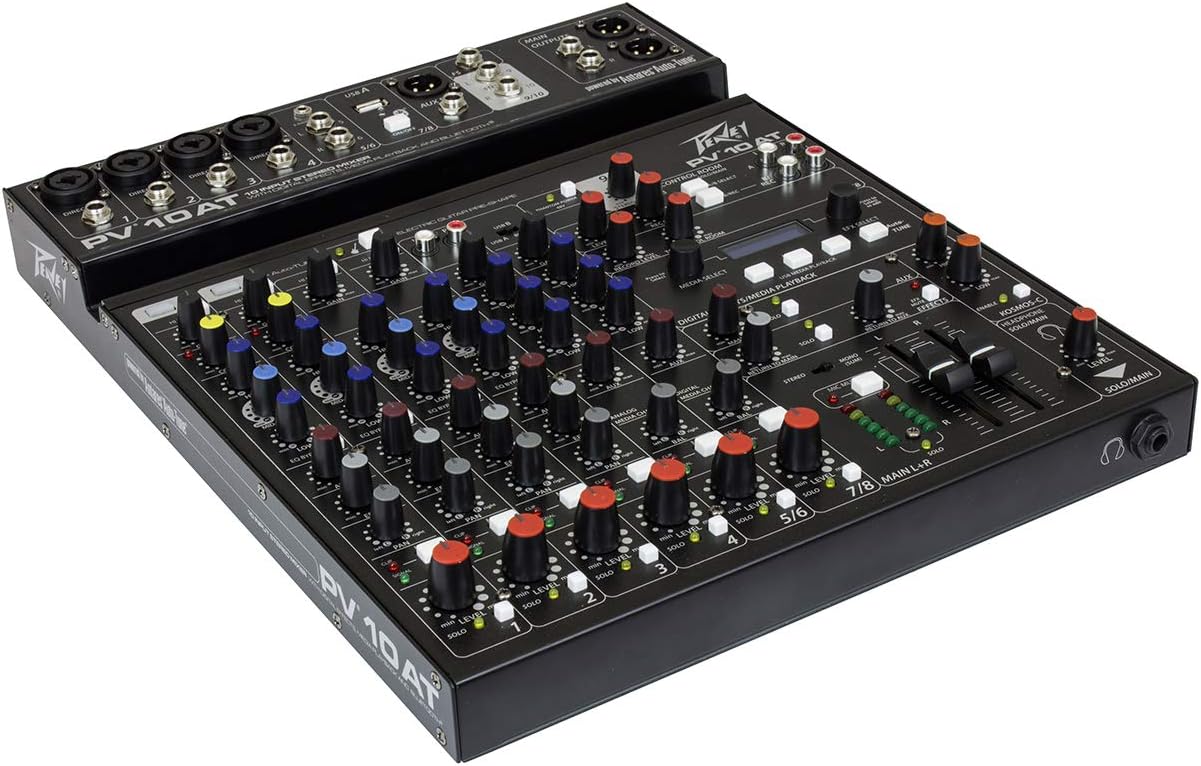
Figure 2: Rear panel connections of the Peavey PV 10 AT, including XLR/1/4" combo inputs, direct outs, stereo inputs, USB A, Aux Send, Stereo In, Main Outputs, and USB B.
മിക്സർ പ്രവർത്തിപ്പിക്കുന്നു
1. ചാനൽ നിയന്ത്രണങ്ങൾ (ചാനലുകൾ 1-4)
- Hi Pass: അനാവശ്യമായ ലോ-ഫ്രീക്വൻസി റംബിൾ നീക്കം ചെയ്യുന്നതിനായി ഒരു ഹൈ-പാസ് ഫിൽട്ടർ സജീവമാക്കുന്നു.
- നേട്ടം: Adjusts the input sensitivity for the connected microphone or instrument.
- കോമ്പ് (കംപ്രസ്സർ): (Channels 1 & 2 only) Controls the amount of compression applied to the input signal, helping to smooth out dynamics and prevent clipping. A red LED indicates when the compressor is active.
- High, Mid-Morph, Low (3-Band EQ): Adjusts the high, mid, and low frequencies of the channel. The Mid-Morph control allows for dynamic adjustment of the mid-frequency range, acting as a low-mid cut or a high-mid boost depending on the setting.
- EQ ബൈപാസ്: Bypasses the equalizer section for a direct comparison of the EQ'd and un-EQ'd signal.
- ഓക്സ്: Controls the level of the channel's signal sent to the Aux Send output.
- ഇഎഫ്എക്സ്: Controls the level of the channel's signal sent to the internal digital effects processor.
- പാൻ: ചാനലിന്റെ സിഗ്നലിന്റെ സ്റ്റീരിയോ സ്ഥാനം ക്രമീകരിക്കുന്നു (ഇടത്തുനിന്ന് വലത്തോട്ട്).
- നിശബ്ദമാക്കുക: Mutes the channel's audio output.
- Clip/Signal LEDs: The green 'SIGNAL' LED indicates signal presence, while the red 'CLIP' LED warns of signal overload. Adjust gain to prevent clipping.
- സോളോ: Isolates the channel's signal for monitoring through headphones or control room outputs without affecting the main mix.
- നില: Adjusts the overall output level of the channel to the main mix.
2. Electric Guitar Pre-Shape (Channel 4)
Channel 4 includes a dedicated 'ELECTRIC GUITAR PRE-SHAPE' switch. Activating this switch optimizes the input impedance for direct connection of an electric guitar, providing a suitable tone without needing an external DI box or ampജീവൻ.
3. ഫാന്റം പവർ (48V)
The 'PHANTOM POWER 48V' button activates 48V phantom power for condenser microphones connected to channels 1-4. Ensure condenser microphones are connected before activating phantom power.
4. Media Playback (Channels 7/8)
The media section allows playback from a USB A drive or via Bluetooth. Use the 'MEDIA SELECT' rotary encoder to browse folders and tracks on a USB drive. The Play/Pause and Skip buttons control playback. The 'USB A / Bluetooth' button switches between these two sources.
5. ഡിജിറ്റൽ ഇഫക്റ്റുകൾ
The PV 10 AT features a built-in digital effects processor. Use the 'EFX SELECT' rotary encoder to choose from various effects (e.g., reverb, delay). Some effects allow parameter editing (e.g., delay time) by pressing the 'EFX SELECT' knob.
6. Antares Auto-Tune (Channels 1 & 2)
The 'Auto-Tune' button (channels 1 & 2) activates the Antares Auto-Tune feature. Use the 'EFX SELECT' knob to choose the desired key for Auto-Tune, ensuring vocal performances remain in pitch with the music. This feature can be toggled on/off via an optional footswitch connected to the 'FS' jack.
7. Kosmos-C Enhancement
The 'KOSMOS-C' button activates Peavey's proprietary audio enhancement technology. This circuitry processes the low and high frequencies to create a fuller, more defined sound, enhancing the apparent bass and clarity without increasing overall volume.
8. Control Room and Recording
The 'CONTROL ROOM' section allows for flexible monitoring and recording:
- A/B Select: Switches between two sets of control room monitors.
- Level A/B: Adjusts the output level for the selected control room monitors.
- B/REC: When engaged, the 'B' control room output becomes a dedicated record output, allowing you to send the main mix to an external recording device.
- Rec Level: Controls the level of the signal sent to the record output.
- Record Level to Control Room: Adjusts the level of the recorded signal returning from your computer (via USB B) to your control room monitors.
9. പ്രധാന ഔട്ട്പുട്ടുകൾ
The main mix is controlled by the 'MAIN L+R' faders. The LED meter bridge provides visual feedback of the main output levels. The 'MONO (SUM)' button sums the stereo main output to mono.
10. ഹെഡ്ഫോൺ ഔട്ട്പുട്ട്
The 'HEADPHONE SOLO/MAIN' knob adjusts the volume for the headphone output. The 'SOLO/MAIN' button allows you to switch between monitoring the soloed channels or the main mix.
വീഡിയോ 1: വിശദമായ ഒരു അവലോകനംview of the Peavey PV10AT Mixer, covering its features, inputs, outputs, and controls. This video is provided by Guitar Interactive (Seller).
മെയിൻ്റനൻസ്
To ensure the longevity and optimal performance of your Peavey PV 10 AT mixer, follow these maintenance guidelines:
- വൃത്തിയാക്കൽ: Regularly wipe the mixer's surface with a soft, dry cloth. Avoid using abrasive cleaners, solvents, or waxes, as these can damage the finish and controls.
- പൊടി സംരക്ഷണം: When not in use, cover the mixer with a dust cover to prevent dust and debris from accumulating on the controls and internal components.
- സംഭരണം: Store the mixer in a cool, dry place away from direct sunlight, extreme temperatures, and high humidity. If transporting, use appropriate protective casing.
- കേബിൾ കെയർ: Always use high-quality cables and ensure they are properly connected and disconnected. Avoid pulling on cables or subjecting them to excessive strain, which can damage the connectors and internal wiring.
- വെൻ്റിലേഷൻ: Ensure adequate ventilation around the mixer to prevent overheating. Do not block any ventilation openings.
ട്രബിൾഷൂട്ടിംഗ്
If you encounter issues with your Peavey PV 10 AT mixer, refer to the following common problems and solutions:
- സൗണ്ട് ഔട്ട്പുട്ട് ഇല്ല:
- എല്ലാ പവർ കണക്ഷനുകളും പരിശോധിച്ച് മിക്സർ ഓണാക്കിയിട്ടുണ്ടെന്ന് ഉറപ്പാക്കുക.
- ഇൻപുട്ട് ഉറവിടങ്ങൾ ശരിയായി ബന്ധിപ്പിച്ചിട്ടുണ്ടെന്നും സജീവമാണെന്നും ഉറപ്പാക്കുക.
- Ensure channel 'Mute' buttons are disengaged and 'Level' knobs/faders are raised.
- Check main output faders and control room levels.
- Confirm that connected speakers or amplifiers are powered on and functioning correctly.
- വക്രീകരണം അല്ലെങ്കിൽ ക്ലിപ്പിംഗ്:
- Reduce the 'Gain' control on the input channel.
- If the 'CLIP' LED is flashing, the input signal is too hot. Lower the source volume or the channel gain.
- Engage the compressor on channels 1 & 2 to manage dynamic peaks.
- ഫീഡ്ബാക്ക്:
- മൈക്രോഫോൺ ഗെയിൻ കുറയ്ക്കുക അല്ലെങ്കിൽ സ്പീക്കറുകളിൽ നിന്ന് മൈക്രോഫോണുകൾ അകലേക്ക് മാറ്റുക.
- Use the 'Hi Pass' filter on microphone channels.
- Adjust the EQ to cut problematic frequencies (often mid-range).
- ബ്ലൂടൂത്ത് കണക്റ്റിവിറ്റി പ്രശ്നങ്ങൾ:
- Ensure the Bluetooth 'ON/OFF' button is engaged and the indicator is flashing (pairing mode) or solid (connected).
- Check your smart device's Bluetooth settings and ensure it's discoverable.
- Move the device closer to the mixer to improve signal strength.
- USB Recording/Playback Problems:
- For USB A playback, ensure the USB drive is formatted correctly and contains compatible MP3 files.
- For USB B recording, verify that your computer recognizes the mixer as an audio device and that your DAW settings are correct.
- Check the 'Record Level' and 'Record Level to Control Room' knobs for proper signal routing.
സ്പെസിഫിക്കേഷനുകൾ
| ഫീച്ചർ | വിശദാംശങ്ങൾ |
|---|---|
| ഇനത്തിൻ്റെ ഭാരം | 9.46 പൗണ്ട് |
| ഉൽപ്പന്ന അളവുകൾ | 16.14 x 16.54 x 3.54 ഇഞ്ച് |
| ഇനം മോഡൽ നമ്പർ | PV10AT |
| വർണ്ണ നാമം | കറുപ്പ് |
| മെറ്റീരിയൽ തരം | സ്റ്റെയിൻലെസ്സ് സ്റ്റീൽ |
| പവർ ഉറവിടം | കോർഡഡ് ഇലക്ട്രിക് |
| ചാനലുകളുടെ എണ്ണം | 10 (4 mic/line, 2 stereo line, 2 USB/Bluetooth, 2 stereo in) |
| കണക്റ്റിവിറ്റി ടെക്നോളജി | ബ്ലൂടൂത്ത്, യുഎസ്ബി |
| ഫാന്റം പവർ | 48V |
| ഇഫക്റ്റുകൾ | Digital effects with LCD display, Antares Auto-Tune |
| ചാനലിലെ EQ | 3-band with Mid-Morph |
വാറൻ്റി വിവരങ്ങൾ
Peavey Electronics Corporation warrants this product against defects in material and workmanship for a period of one (1) year from the date of original purchase. This warranty is valid only if the product is purchased from an authorized Peavey dealer and the original sales receipt is retained as proof of purchase. The warranty does not cover damage resulting from accident, misuse, abuse, neglect, unauthorized modification, or improper installation or operation. For full warranty terms and conditions, please refer to the official Peavey webസൈറ്റ് അല്ലെങ്കിൽ ഉപഭോക്തൃ പിന്തുണയുമായി ബന്ധപ്പെടുക.
ഉപഭോക്തൃ പിന്തുണ
For technical assistance, service, or further information regarding your Peavey PV 10 AT mixer, please contact Peavey Customer Support. You can find contact details, FAQs, and additional resources on the official Peavey website. Please have your product model number (PV10AT) and proof of purchase ready when contacting support.


