1. ആമുഖം
This manual provides essential instructions for the installation, operation, and maintenance of the Cisco DS-C9124-K9 MDS 9124 24-Port Fabric Switch. Please read this manual thoroughly before using the device to ensure proper functionality and safety.
2 സുരക്ഷാ വിവരങ്ങൾ
പ്രധാനപ്പെട്ട സുരക്ഷാ നിർദ്ദേശങ്ങൾ:
- ഉപകരണത്തിന് ശരിയായ ഗ്രൗണ്ടിംഗ് ഉറപ്പാക്കുക.
- Do not operate the switch in wet or humid conditions.
- ഏതെങ്കിലും അറ്റകുറ്റപ്പണികൾ അല്ലെങ്കിൽ ഇൻസ്റ്റാളേഷൻ നടപടിക്രമങ്ങൾ നടത്തുന്നതിന് മുമ്പ് വൈദ്യുതി വിച്ഛേദിക്കുക.
- This unit is suitable for an IT power system connection of max 230 V Phase-Phase.
- Observe all warning labels on the device.

ചിത്ര വിവരണം: A close-up of a warning label on the switch, indicating "Class 1 Laser" and stating that "This unit is suitable for an IT power system connection of max 230 V Phase-Phase."
3. ഉൽപ്പന്നം കഴിഞ്ഞുview
The Cisco DS-C9124-K9 MDS 9124 is a 24-port Multilayer Fabric Switch designed for high-performance storage area networks (SANs).
3.1 ഫ്രണ്ട് പാനൽ
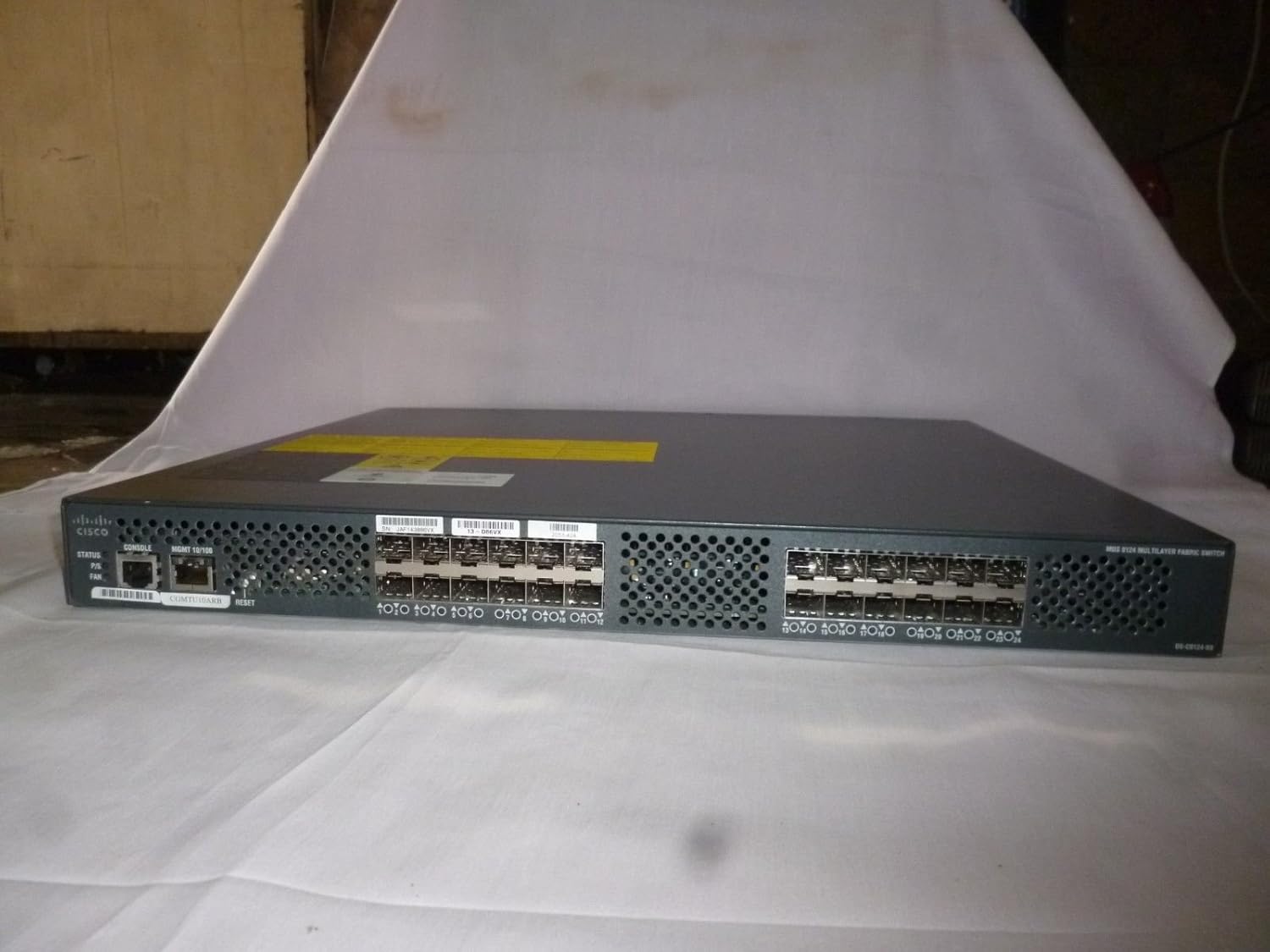
ചിത്ര വിവരണം: ഒരു ഫുൾ ഫ്രണ്ട് view of the Cisco DS-C9124-K9 switch, showing the 24 SFP ports, console port, management port, status LEDs, and reset button on the left side. The right side shows the 24 SFP ports.
- 24 എസ്എഫ്പി പോർട്ടുകൾ: For fiber channel connectivity.
- കൺസോൾ പോർട്ട്: RJ-45 serial console for local management.
- MGMT 10/100 Port: RJ-45 Ethernet port for out-of-band management.
- നില LED-കൾ: Indicators for power, system status, and fan operation.
- റീസെറ്റ് ബട്ടൺ: For restarting the device.

ചിത്ര വിവരണം: A close-up of the left side of the switch's front panel, highlighting the CONSOLE port, MGMT 10/100 port, STATUS, P/S (Power Supply), and FAN LEDs, along with the RESET button.

ചിത്ര വിവരണം: ഒരു ക്ലോസപ്പ് view of the 24 SFP (Small Form-Factor Pluggable) ports on the front panel of the switch, labeled 1 through 24.

ചിത്ര വിവരണം: എ വിശദമായി view of the first 12 SFP ports (1-12) on the front panel of the Cisco switch, showing the empty slots for transceivers.
3.2 പിൻ പാനൽ

ചിത്ര വിവരണം: പൂർണ്ണ പിൻഭാഗം view of the Cisco DS-C9124-K9 switch, displaying the power input module with an AC inlet and power switch, along with multiple fan exhaust vents.
- പവർ ഇൻപുട്ട്: AC power connector with an on/off switch.
- ഫാൻ മൊഡ്യൂളുകൾ: Integrated cooling fans for heat dissipation.

ചിത്ര വിവരണം: A close-up of the power input module on the rear panel, showing the AC power inlet, the power switch, and the "DS-C24-300AC" label, along with input/output OK LEDs.
4. സജ്ജീകരണവും ഇൻസ്റ്റാളേഷനും
Follow these steps to properly install your Cisco DS-C9124-K9 switch.
- അൺപാക്ക് ചെയ്യുന്നു: പാക്കേജിംഗിൽ നിന്ന് സ്വിച്ച് ശ്രദ്ധാപൂർവ്വം നീക്കം ചെയ്യുക. എന്തെങ്കിലും ഭൗതിക കേടുപാടുകൾ ഉണ്ടോ എന്ന് പരിശോധിക്കുക.
- മൗണ്ടിംഗ്: The switch can be rack-mounted. Secure it using appropriate rack-mounting hardware (not included). Ensure adequate airflow around the unit.
- പവർ കണക്ഷൻ:
- Connect the provided AC power cord to the power input on the rear panel.
- പവർ കോർഡിന്റെ മറ്റേ അറ്റം ഗ്രൗണ്ടഡ് ഇലക്ട്രിക്കൽ ഔട്ട്ലെറ്റിലേക്ക് പ്ലഗ് ചെയ്യുക.
- Ensure the power switch on the rear panel is in the OFF position before connecting.
- നെറ്റ്വർക്ക് കണക്ഷനുകൾ:
- Insert SFP transceivers into the desired fiber channel ports on the front panel.
- Connect fiber optic cables from your SAN devices to the SFP transceivers.
- For management, connect an Ethernet cable from your management workstation to the MGMT 10/100 port.
- For console access, connect a serial cable from your workstation to the CONSOLE port.
- പവർ ഓൺ: Flip the power switch on the rear panel to the ON position. Observe the STATUS LEDs on the front panel.
5. പ്രവർത്തന നിർദ്ദേശങ്ങൾ
Once the switch is powered on and connected, you can begin configuration and operation.
- പ്രാരംഭ കോൺഫിഗറേഷൻ: Access the switch via the console port or the management Ethernet port using a terminal emulator (e.g., PuTTY) and the appropriate IP address. Refer to Cisco documentation for detailed command-line interface (CLI) configuration.
- മോണിറ്ററിംഗ് സ്റ്റാറ്റസ്: The front panel LEDs provide a quick visual status:
- സ്റ്റാറ്റസ്: Indicates overall system health.
- P/S: വൈദ്യുതി വിതരണ നില സൂചിപ്പിക്കുന്നു.
- ഫാൻ: Indicates fan operation status.
- Port Activity: Each SFP port typically has an LED to indicate link status and activity.
6. പരിപാലനം
പതിവ് അറ്റകുറ്റപ്പണികൾ നിങ്ങളുടെ സ്വിച്ചിന്റെ മികച്ച പ്രകടനവും ദീർഘായുസ്സും ഉറപ്പാക്കുന്നു.
- വൃത്തിയാക്കൽ: Periodically clean the exterior of the switch with a soft, dry cloth. Ensure ventilation openings are free from dust and debris. Do not use liquid cleaners.
- ഫേംവെയർ അപ്ഡേറ്റുകൾ: സിസ്കോ പിന്തുണ പതിവായി പരിശോധിക്കുക website for the latest firmware updates. Follow Cisco's instructions for firmware upgrade procedures.
- പരിസ്ഥിതി നിയന്ത്രണം: Maintain the operating environment within specified temperature and humidity ranges to prevent overheating and component damage.
7. പ്രശ്നപരിഹാരം
നിങ്ങൾ നേരിട്ടേക്കാവുന്ന പൊതുവായ പ്രശ്നങ്ങൾക്കുള്ള പരിഹാരങ്ങൾ ഈ വിഭാഗം നൽകുന്നു.
| പ്രശ്നം | സാധ്യമായ കാരണം | പരിഹാരം |
|---|---|---|
| സ്വിച്ച് ഓണാക്കുന്നില്ല. | No power, faulty power cord, power switch off. | Check power cord connection, ensure power outlet is active, verify power switch is ON. |
| No link light on SFP port. | Faulty SFP transceiver, incorrect fiber cable, remote device off. | Verify SFP transceiver is properly seated, check fiber cable integrity, ensure connected device is powered on and configured. |
| Cannot access management interface. | തെറ്റായ IP വിലാസം, നെറ്റ്വർക്ക് കേബിൾ പ്രശ്നം, ഫയർവാൾ. | Verify IP configuration, check Ethernet cable, temporarily disable local firewall for testing. Try console access. |
8 സ്പെസിഫിക്കേഷനുകൾ
Technical specifications for the Cisco DS-C9124-K9 MDS 9124 24-Port Fabric Switch.
- മോഡൽ: DS-C9124-K9
- തുറമുഖങ്ങൾ: 24 x SFP Fiber Channel ports
- മാനേജ്മെൻ്റ് പോർട്ടുകൾ: 1 x Console (RJ-45), 1 x MGMT 10/100 (RJ-45)
- പവർ ഇൻപുട്ട്: 100-240 VAC, 4-2 A, 50-60 Hz (as seen on power supply label DS-C24-300AC)
- നിർമ്മാതാവ്: സിസ്കോ സിസ്റ്റംസ് - എന്റർപ്രൈസ്
- ASIN: B011YZLTO0
- ആദ്യം ലഭ്യമായ തീയതി: ജൂലൈ 18, 2015
- സീരിയൽ നമ്പർ എക്സിampLe: JAF143886VX
- ഭാഗം നമ്പർ ExampLe: 68-2714-06 D0
- Product ID ExampLe: DS-C9124-K9 V04

ചിത്ര വിവരണം: A close-up of a product label on the switch, displaying manufacturing date (2010-09), "MADE IN CHINA", a barcode, part number "68-2714-06 D0", and product ID "DS-C9124-K9 V04".
9. വാറൻ്റിയും പിന്തുണയും
For warranty information and technical support, please refer to the official Cisco website or contact Cisco customer service directly. Keep your purchase receipt and product serial number (e.g., JAF143886VX) readily available when seeking support.
ചിത്ര വിവരണം: A close-up of a product label on the switch, showing a serial number (SN: JAF143886VX) and other identification codes.