1. ആമുഖം
വാങ്ങിയതിന് നന്ദി.asing the RCA DEDE-240M4 24-inch HD LED Television. This manual provides essential information for the safe and efficient operation of your new television. Please read this manual thoroughly before using the product and retain it for future reference.
2 സുരക്ഷാ വിവരങ്ങൾ
- ഇലക്ട്രിക്കൽ സുരക്ഷ: Do not expose the television to rain or moisture to prevent fire or electric shock. Ensure the power cord is not damaged or pinched.
- വെൻ്റിലേഷൻ: Ensure adequate ventilation around the television. Do not block ventilation openings. Avoid placing the TV on soft surfaces like carpets or blankets.
- പ്ലേസ്മെൻ്റ്: Place the television on a stable, level surface. Avoid direct sunlight, heat sources, and excessive dust.
- വൃത്തിയാക്കൽ: Unplug the television before cleaning. Use a soft, dry cloth. Do not use liquid cleaners or aerosol cleaners.
- ബാറ്ററികൾ: ഉപയോഗിച്ച ബാറ്ററികൾ ഉത്തരവാദിത്തത്തോടെ സംസ്കരിക്കുക. പഴയതും പുതിയതുമായ ബാറ്ററികളോ വ്യത്യസ്ത തരം ബാറ്ററികളോ കൂട്ടിക്കലർത്തരുത്.
3. പാക്കേജ് ഉള്ളടക്കം
പാക്കേജിൽ എല്ലാ ഇനങ്ങളും ഉണ്ടോ എന്ന് ദയവായി പരിശോധിക്കുക:
- RCA DEDE-240M4 24-inch HD LED Television
- റിമോട്ട് കൺട്രോൾ
- പവർ കോർഡ്
- ടിവി സ്റ്റാൻഡ് (ബേസും സ്ക്രൂകളും)
- റിമോട്ട് കൺട്രോളിനുള്ള AAA ബാറ്ററികൾ (2)
- ഉപയോക്തൃ മാനുവൽ (ഈ പ്രമാണം)
4. ഉൽപ്പന്നം കഴിഞ്ഞുview
4.1 പിൻ പാനൽ കണക്ഷനുകൾ
The rear panel of your television provides various ports for connecting external devices. Refer to the image below for a visual guide.

Image 1: Rear panel connections of the RCA DEDE-240M4 television. From left to right, ports include USB, L/R Audio Input, Video/Y/Pb/Pr Component Input, HDMI/MHL, VGA, PC/Audio Input, Earphone, ANT (Antenna), and Coaxial Digital Audio Out.
- USB: മീഡിയ പ്ലേ ചെയ്യുന്നതിന് USB സംഭരണ ഉപകരണങ്ങൾ ബന്ധിപ്പിക്കുന്നതിന് files (JPEG, MP3, Movie).
- INPUT (L/R, VIDEO/Y/Pb/Pr): Analog audio and video inputs for older devices.
- HDMI/MHL: High-Definition Multimedia Interface inputs for digital audio and video. MHL (Mobile High-Definition Link) support allows connecting compatible mobile devices. There are 3 HDMI inputs.
- VGA (PC INPUT): ഒരു കമ്പ്യൂട്ടർ ബന്ധിപ്പിക്കുന്നതിന്.
- PC/AUDIO INPUT: Audio input for PC connection.
- ഇയർഫോൺ: ഹെഡ്ഫോണുകൾ ബന്ധിപ്പിക്കുന്നതിന്.
- എ.എൻ.ടി (ആന്റിന): For connecting an external antenna or cable TV signal.
- COAXIAL (DIGITAL AUDIO OUT): For connecting to a digital audio receiver or sound system.
4.2 വിദൂര നിയന്ത്രണം
The remote control allows you to operate your television from a distance. Insert the two AAA batteries provided, ensuring correct polarity.
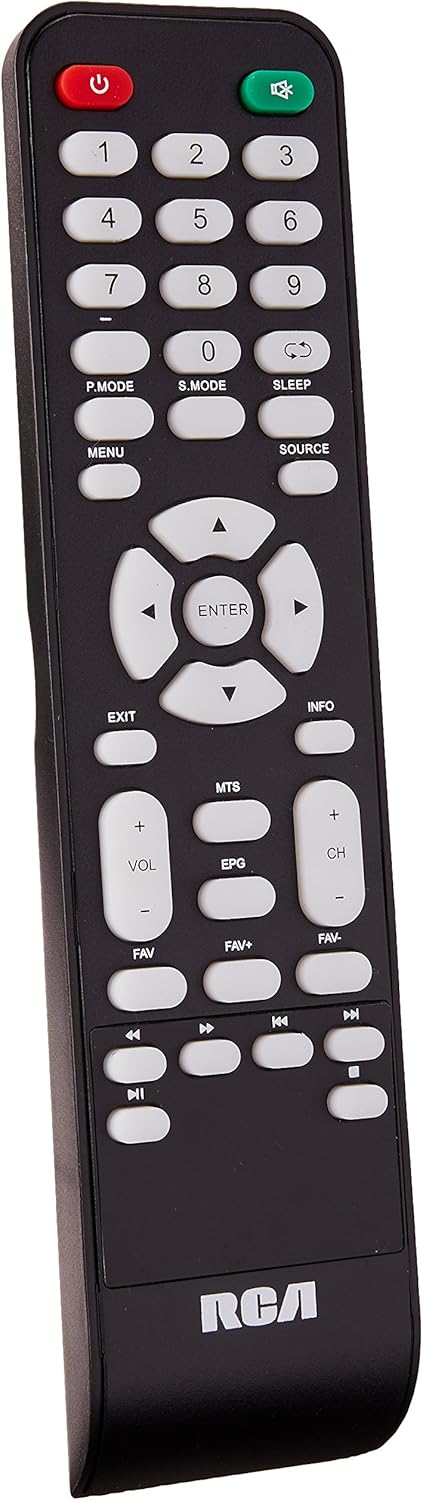
Image 2: Remote control for the RCA DEDE-240M4 television. Key buttons include Power, Number Pad, P.MODE, S.MODE, SLEEP, MENU, SOURCE, EXIT, INFO, directional arrows with ENTER, VOL+/-, CH+/-, MTS, EPG, FAV, FAV+, FAV-, and media playback controls.
- പവർ (ചുവപ്പ്): ടിവി ഓണാക്കുകയോ ഓഫാക്കുകയോ ചെയ്യുന്നു.
- നമ്പർ ബട്ടണുകൾ (0-9): നേരിട്ടുള്ള ചാനൽ തിരഞ്ഞെടുപ്പിനായി.
- പി. മോഡ്: Picture Mode selection.
- എസ്. മോഡ്: Sound Mode selection.
- ഉറക്കം: സ്ലീപ്പ് ടൈമർ സജ്ജമാക്കുന്നു.
- മെനു: പ്രധാന മെനുവിൽ പ്രവേശിക്കുന്നു.
- ഉറവിടം: Selects the input source (HDMI, AV, USB, TV).
- പുറത്ത്: നിലവിലെ മെനുവിൽ നിന്നോ പ്രവർത്തനത്തിൽ നിന്നോ പുറത്തുകടക്കുന്നു.
- വിവരം: പ്രോഗ്രാം വിവരങ്ങൾ പ്രദർശിപ്പിക്കുന്നു.
- Directional Arrows (Up/Down/Left/Right) & ENTER: മെനുകളിലൂടെ നാവിഗേറ്റ് ചെയ്ത് തിരഞ്ഞെടുപ്പുകൾ സ്ഥിരീകരിക്കുന്നു.
- VOL +/-: വോളിയം ലെവൽ ക്രമീകരിക്കുന്നു.
- CH +/-: ചാനലുകൾ മാറ്റുന്നു.
- MTS: Multi-channel Television Sound (SAP/Stereo).
- EPG: Electronic Program Guide (for digital channels).
- FAV / FAV+ / FAV-: Accesses and navigates favorite channels.
- മീഡിയ പ്ലേബാക്ക് നിയന്ത്രണങ്ങൾ: Play, Pause, Stop, Fast Forward, Rewind, Next/Previous Track (for USB media).
5. സജ്ജീകരണം
5.1 സ്റ്റാൻഡ് അറ്റാച്ചുചെയ്യുന്നു
- സ്ക്രീൻ കേടുപാടുകൾ സംഭവിക്കാതിരിക്കാൻ ടിവി മുഖം മൃദുവായതും വൃത്തിയുള്ളതുമായ ഒരു പ്രതലത്തിൽ ശ്രദ്ധാപൂർവ്വം വയ്ക്കുക.
- ടിവിയുടെ അടിയിലുള്ള മൗണ്ടിംഗ് ദ്വാരങ്ങൾ ഉപയോഗിച്ച് സ്റ്റാൻഡ് ബേസ് വിന്യസിക്കുക.
- നൽകിയിരിക്കുന്ന സ്ക്രൂകൾ ഉപയോഗിച്ച് സ്റ്റാൻഡ് ഉറപ്പിക്കുക. അമിതമായി മുറുക്കരുത്.
- സ്ഥിരതയുള്ള പ്രതലത്തിൽ ടിവി കുത്തനെ വയ്ക്കുക.
5.2 ബാഹ്യ ഉപകരണങ്ങൾ ബന്ധിപ്പിക്കുന്നു
Ensure the TV and all devices are powered off before making any connections.
- ആന്റിന/കേബിൾ: Connect an RF coaxial cable from your antenna or cable wall outlet to the ANT input on the TV.
- HDMI Devices (e.g., Blu-ray player, game console): Connect an HDMI cable from the device's HDMI output to any of the HDMI inputs on the TV.
- USB ഉപകരണങ്ങൾ: Insert a USB flash drive into the USB port for media playback.
- പിസി കണക്ഷൻ: Connect a VGA cable from your computer's VGA output to the TV's VGA input. Connect an audio cable from your computer's audio output to the TV's PC/AUDIO INPUT.
- ഓഡിയോ സിസ്റ്റം: For digital audio, connect a coaxial digital audio cable from the TV's COAXIAL output to your audio receiver. For headphones, use the EARPHONE jack.
5.3 പവർ ചെയ്യുന്നു
- Connect the power cord to the TV's power input, then plug the other end into a wall outlet.
- Press the POWER button on the remote control or on the TV itself.
- ഭാഷാ തിരഞ്ഞെടുപ്പും ചാനൽ സ്കാനിംഗും ഉൾപ്പെടെയുള്ള പ്രാരംഭ സജ്ജീകരണത്തിനായി ഓൺ-സ്ക്രീൻ നിർദ്ദേശങ്ങൾ പാലിക്കുക.
6. പ്രവർത്തിക്കുന്നു
6.1 അടിസ്ഥാന പ്രവർത്തനങ്ങൾ
- പവർ ഓൺ/ഓഫ്: Press the POWER button on the remote or TV.
- വോളിയം ക്രമീകരണം: Use VOL +/- buttons on the remote.
- ചാനൽ തിരഞ്ഞെടുക്കൽ: Use CH +/- buttons or the number pad on the remote.
- ഇൻപുട്ട് ഉറവിട തിരഞ്ഞെടുപ്പ്: Press the SOURCE button on the remote to cycle through available inputs (TV, HDMI1, HDMI2, HDMI3, AV, PC, USB). Press ENTER to confirm.
6.2 മെനു നാവിഗേഷൻ
Press the MENU button to access the main menu. Use the directional arrows to navigate through options and ENTER to select. Use EXIT to close the menu.
6.3 യുഎസ്ബി മീഡിയ പ്ലേബാക്ക്
Insert a USB flash drive into the USB port. The TV should automatically detect the device and prompt you to open the media browser. If not, select the USB source using the SOURCE button. You can play JPEG images, MP3 audio, and various video formats.
7. പരിപാലനം
- സ്ക്രീൻ ക്ലീനിംഗ്: മൃദുവായ, ലിന്റ് രഹിത തുണി ഉപയോഗിച്ച് സ്ക്രീൻ സൌമ്യമായി തുടയ്ക്കുക. കഠിനമായ പാടുകൾക്ക്, ചെറുതായി dampവെള്ളം അല്ലെങ്കിൽ ഒരു പ്രത്യേക സ്ക്രീൻ ക്ലീനർ ഉപയോഗിച്ച് തുണി വൃത്തിയാക്കുക (തുണിയിൽ പ്രയോഗിക്കുക, സ്ക്രീനിൽ നേരിട്ട് പ്രയോഗിക്കരുത്).
- കാബിനറ്റ് ക്ലീനിംഗ്: മൃദുവായതും ഉണങ്ങിയതുമായ തുണി ഉപയോഗിച്ച് ടിവി കാബിനറ്റ് തുടയ്ക്കുക.
- സംഭരണം: If storing the TV for an extended period, unplug it, remove batteries from the remote, and cover it to protect from dust.
8. പ്രശ്നപരിഹാരം
| പ്രശ്നം | സാധ്യമായ പരിഹാരം |
|---|---|
| ശക്തിയില്ല | പവർ കോർഡ് ടിവിയിലും വാൾ ഔട്ട്ലെറ്റിലും സുരക്ഷിതമായി പ്ലഗ് ചെയ്തിട്ടുണ്ടെന്ന് ഉറപ്പാക്കുക. ഔട്ട്ലെറ്റ് പ്രവർത്തിക്കുന്നുണ്ടോയെന്ന് പരിശോധിക്കുക. |
| ചിത്രമില്ല, പക്ഷേ ശബ്ദം ഉണ്ട് | ഇൻപുട്ട് ഉറവിട തിരഞ്ഞെടുപ്പ് പരിശോധിക്കുക. ബാഹ്യ ഉപകരണങ്ങൾ ഓണാക്കിയിട്ടുണ്ടെന്നും ശരിയായി ബന്ധിപ്പിച്ചിട്ടുണ്ടെന്നും ഉറപ്പാക്കുക. |
| ശബ്ദമില്ല, പക്ഷേ ചിത്രം ഉണ്ട് | വോളിയം ലെവൽ പരിശോധിച്ച് ടിവി മ്യൂട്ട് ചെയ്തിട്ടില്ലെന്ന് ഉറപ്പാക്കുക. ബാഹ്യ ഉപകരണങ്ങൾക്കായി ഓഡിയോ കേബിൾ കണക്ഷനുകൾ പരിശോധിക്കുക. |
| റിമോട്ട് കൺട്രോൾ പ്രവർത്തിക്കുന്നില്ല | Replace the batteries with new AAA batteries, ensuring correct polarity. Ensure there are no obstructions between the remote and the TV's IR sensor. |
| "സിഗ്നൽ ഇല്ല" എന്ന സന്ദേശം | Verify the correct input source is selected. Check antenna/cable connection or external device connections. Perform a channel scan if using an antenna. |
9 സ്പെസിഫിക്കേഷനുകൾ
| ഫീച്ചർ | സ്പെസിഫിക്കേഷൻ |
|---|---|
| മോഡൽ | DEDE-240M4 |
| സ്ക്രീൻ വലിപ്പം | 24 ഇഞ്ച് |
| ഡിസ്പ്ലേ ടെക്നോളജി | LED (LCD Type) |
| റെസലൂഷൻ | 720p (Maximum) |
| വീക്ഷണാനുപാതം | 16:9 |
| കണക്റ്റിവിറ്റി | 3x HDMI, 1x USB, 1x RF Antenna, 1x PC (VGA), 1x PC Audio In, 1x Component (Video/Y/Pb/Pr), 1x L/R Audio In, 1x Coaxial Digital Audio Out, 1x Earphone Out |
| മൗണ്ടിംഗ് തരം | ടേബിൾ മൗണ്ട് |
| അളവുകൾ (സ്റ്റാൻഡിനൊപ്പം) | 62.5 x 9.4 x 40 സെ.മീ (ഏകദേശം) |
| ഭാരം | 4.6 കി.ഗ്രാം (ഏകദേശം) |
| ബാറ്ററികൾ ആവശ്യമാണ് | 2 AAA (ഉൾപ്പെടുത്തിയിരിക്കുന്നു) |
10. വാറൻ്റിയും പിന്തുണയും
വാറന്റി വിവരങ്ങൾക്കും സാങ്കേതിക പിന്തുണയ്ക്കും, ദയവായി നിങ്ങളുടെ ഉൽപ്പന്നത്തിനൊപ്പം ഉൾപ്പെടുത്തിയിരിക്കുന്ന വാറന്റി കാർഡ് പരിശോധിക്കുക അല്ലെങ്കിൽ ഔദ്യോഗിക RCA സന്ദർശിക്കുക. webസൈറ്റ്. ഏതെങ്കിലും വാറന്റി ക്ലെയിമുകൾക്ക് വാങ്ങിയതിന്റെ തെളിവായി നിങ്ങളുടെ വാങ്ങൽ രസീത് സൂക്ഷിക്കുക.