1. ആമുഖം
This manual provides essential instructions for the safe and efficient operation of your Brother DCP-T700W Color Ink Tank Wi-Fi Multifunction Printer. This device is designed for printing, scanning, and copying, featuring an integrated refillable ink tank system and wireless connectivity. Please read this manual thoroughly before using the printer and keep it for future reference.
2 സുരക്ഷാ വിവരങ്ങൾ
പ്രിന്ററിന് പരിക്കേൽക്കുകയോ കേടുപാടുകൾ സംഭവിക്കുകയോ ചെയ്യാതിരിക്കാൻ ഇനിപ്പറയുന്ന സുരക്ഷാ മുൻകരുതലുകൾ പാലിക്കുക:
- പ്രിന്റർ എപ്പോഴും ഒരു ഗ്രൗണ്ടഡ് പവർ ഔട്ട്ലെറ്റിലേക്ക് ബന്ധിപ്പിക്കുക.
- Do not place the printer in areas with excessive dust, humidity, or direct sunlight.
- പ്രിൻ്റർ വെള്ളത്തിൽ നിന്നോ മറ്റ് ദ്രാവകങ്ങളിൽ നിന്നോ അകറ്റി നിർത്തുക.
- പ്രിന്റർ സ്വയം സർവീസ് ചെയ്യാൻ ശ്രമിക്കരുത്. എല്ലാ സർവീസിംഗും യോഗ്യതയുള്ള ഉദ്യോഗസ്ഥർക്ക് റഫർ ചെയ്യുക.
- Use only Brother-recommended ink and paper to ensure optimal performance and prevent damage.
3. ഉൽപ്പന്നം കഴിഞ്ഞുview
Familiarize yourself with the main components of your Brother DCP-T700W printer.
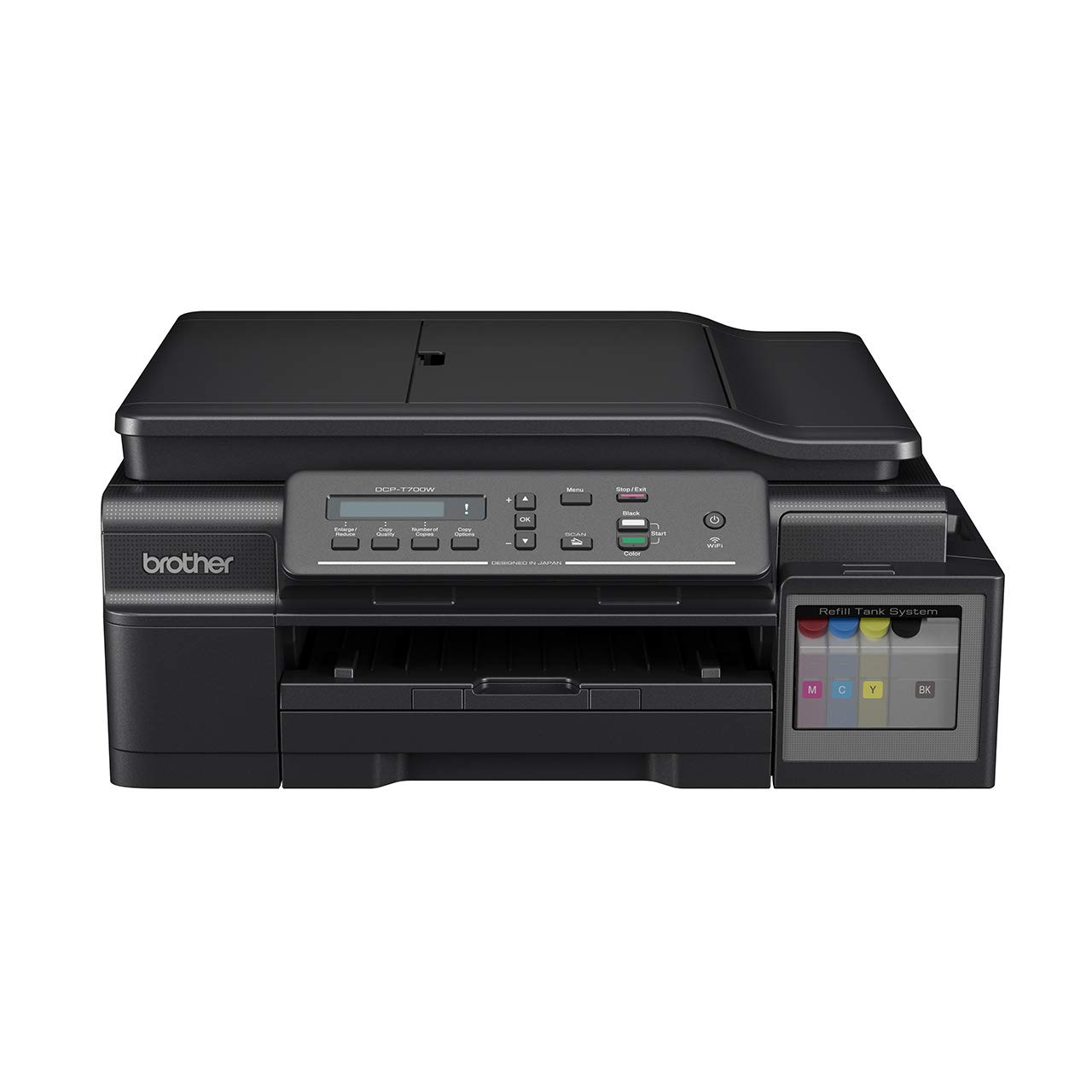
ചിത്രം 3.1: ഫ്രണ്ട് view of the Brother DCP-T700W printer, showing the control panel, paper output tray, and integrated ink tank system on the right side.

ചിത്രം 3.2: കോണാകൃതിയിലുള്ളത് view of the Brother DCP-T700W, highlighting the Automatic Document Feeder (ADF) tray in an open position, ready for scanning or copying multiple documents.
നിയന്ത്രണ പാനൽ
The control panel allows you to operate the printer's functions. It typically includes:
- LCD ഡിസ്പ്ലേ: സ്റ്റാറ്റസ് സന്ദേശങ്ങളും മെനു ഓപ്ഷനുകളും കാണിക്കുന്നു.
- മെനു ബട്ടണുകൾ: Navigate through settings.
- Start Buttons: Initiate print, copy, or scan jobs (Color/Mono).
- Stop/Exit Button: Cancel operations or exit menus.
- Wi-Fi ബട്ടൺ: Manage wireless network connection.
4. സജ്ജീകരണം
4.1 അൺപാക്കിംഗും പ്ലേസ്മെന്റും
- പ്രിന്റർ അതിന്റെ പാക്കേജിംഗിൽ നിന്ന് നീക്കം ചെയ്യുക, എല്ലാ സംരക്ഷണ ടേപ്പുകളും വസ്തുക്കളും നീക്കം ചെയ്യുക.
- പ്രിന്റർ ആവശ്യത്തിന് വായുസഞ്ചാരമുള്ള ഒരു സ്ഥിരതയുള്ള, പരന്ന പ്രതലത്തിൽ സ്ഥാപിക്കുക.
- പേപ്പർ ലോഡുചെയ്യുന്നതിനും ഔട്ട്പുട്ടിനും പ്രിന്ററിന് ചുറ്റും മതിയായ ഇടമുണ്ടെന്ന് ഉറപ്പാക്കുക.
4.2 മഷി ടാങ്കുകൾ നിറയ്ക്കൽ
The DCP-T700W features an integrated ink tank system. Follow these steps to fill the tanks:
- Open the ink tank cover located on the right side of the printer.
- മഷി കുപ്പിയുടെ അടപ്പ് അതത് നിറത്തിലേക്ക് (കറുപ്പ്, സിയാൻ, മജന്ത, മഞ്ഞ) അഴിക്കുക.
- Carefully pour the ink into the correct tank, ensuring not to overfill.
- മഷി ടാങ്ക് കവർ സുരക്ഷിതമായി അടയ്ക്കുക.
- Perform an initial ink charge as instructed by the printer's display or setup guide.
കുറിപ്പ്: Use genuine Brother ink bottles to prevent damage and ensure print quality.
4.3 സോഫ്റ്റ്വെയറും ഡ്രൈവറും ഇൻസ്റ്റാൾ ചെയ്യൽ
- Insert the installation CD-ROM into your computer's drive, or download the latest drivers and software from the official Brother support webസൈറ്റ്.
- ഇൻസ്റ്റാളേഷൻ പൂർത്തിയാക്കാൻ ഓൺ-സ്ക്രീൻ നിർദ്ദേശങ്ങൾ പാലിക്കുക.
- During installation, you will be prompted to choose your connection type (USB or Wireless).
4.4 Connecting to a Network (Wi-Fi)
To connect your printer to a wireless network:
- അമർത്തുക വൈഫൈ നിയന്ത്രണ പാനലിലെ ബട്ടൺ.
- നാവിഗേറ്റ് ചെയ്യുക നെറ്റ്വർക്ക് settings using the menu buttons.
- തിരഞ്ഞെടുക്കുക WLAN തുടർന്ന് സെറ്റപ്പ് വിസാർഡ്.
- The printer will search for available networks. Select your network (SSID) from the list.
- Enter your network password (network key) using the control panel buttons.
- Confirm the connection. The Wi-Fi indicator light will illuminate when connected.
Alternatively, you can use the WPS (Wi-Fi Protected Setup) method if your router supports it.
5. പ്രവർത്തന നിർദ്ദേശങ്ങൾ
5.1 പേപ്പർ ലോഡ് ചെയ്യുന്നു
- Open the paper tray and extend it if necessary.
- Load paper print-side down. Adjust the paper guides to fit the paper size.
- പേപ്പർ ട്രേ അടയ്ക്കുക.
The printer supports various paper types and sizes, including A4. Refer to specifications for details.
5.2 പ്രമാണങ്ങൾ അച്ചടിക്കൽ
- നിങ്ങളുടെ കമ്പ്യൂട്ടറിൽ നിന്ന്, നിങ്ങൾ പ്രിന്റ് ചെയ്യാൻ ആഗ്രഹിക്കുന്ന പ്രമാണം തുറക്കുക.
- തിരഞ്ഞെടുക്കുക അച്ചടിക്കുക ആപ്ലിക്കേഷന്റെ മെനുവിൽ നിന്ന്.
- Choose your Brother DCP-T700W printer.
- Adjust print settings such as paper size, orientation, color/monochrome, and duplex printing (if desired).
- ക്ലിക്ക് ചെയ്യുക അച്ചടിക്കുക.
For mobile printing, use the Brother iPrint&Scan app or other compatible mobile printing services.
5.3 പ്രമാണങ്ങൾ സ്കാൻ ചെയ്യുന്നു
ഫ്ലാറ്റ്ബെഡ് സ്കാനർ അല്ലെങ്കിൽ ഓട്ടോമാറ്റിക് ഡോക്യുമെന്റ് ഫീഡർ (ADF) ഉപയോഗിച്ച് നിങ്ങൾക്ക് പ്രമാണങ്ങൾ സ്കാൻ ചെയ്യാൻ കഴിയും.
Using the Flatbed Scanner:
- സ്കാനർ കവർ ഉയർത്തുക.
- Place the document face-down on the scanner glass, aligning it with the guide marks.
- സ്കാനർ കവർ അടയ്ക്കുക.
- Initiate the scan from your computer using the Brother ControlCenter software or directly from the printer's control panel.
ഓട്ടോമാറ്റിക് ഡോക്യുമെന്റ് ഫീഡർ (ADF) ഉപയോഗിക്കുന്നു:
- Load documents face-up into the ADF tray. Adjust the paper guides.
- Ensure documents are free of staples or clips.
- Initiate the scan from your computer or the printer's control panel.
5.4 പ്രമാണങ്ങൾ പകർത്തൽ
- പ്രമാണം ഫ്ലാറ്റ്ബെഡ് സ്കാനറിലോ ADF-ലോ വയ്ക്കുക.
- പ്രിന്ററിന്റെ നിയന്ത്രണ പാനലിൽ, അമർത്തുക പകർത്തുക ബട്ടൺ.
- Use the arrow keys to select the number of copies and adjust settings like quality or zoom.
- അമർത്തുക ആരംഭിക്കുക (Color or Mono) button to begin copying.
6. പരിപാലനം
6.1 മഷി നിലകൾ പരിശോധിച്ച് വീണ്ടും നിറയ്ക്കൽ
Regularly check the ink levels in the transparent ink tanks. When a tank is low, refill it promptly to avoid print quality issues or damage to the print head. Refer to Section 4.2 for ink refilling instructions.
6.2 പ്രിന്റർ വൃത്തിയാക്കുന്നു
- പുറം: Wipe the exterior of the printer with a soft, lint-free cloth. Do not use abrasive cleaners or solvents.
- സ്കാനർ ഗ്ലാസ്: Clean the scanner glass with a soft, dry cloth. For stubborn marks, use a small amount of glass cleaner applied to the cloth (not directly to the glass).
- പ്രിന്റ് ഹെഡ്: If print quality deteriorates (e.g., streaks, missing colors), perform a print head cleaning cycle from the printer's maintenance menu or through the printer driver on your computer.
7. പ്രശ്നപരിഹാരം
This section addresses common issues you might encounter. For more detailed troubleshooting, refer to the Brother support webസൈറ്റ്.
7.1 പ്രിന്റ് ഗുണനിലവാര പ്രശ്നങ്ങൾ
- വരകൾ അല്ലെങ്കിൽ മങ്ങിയ പ്രിന്റുകൾ: Check ink levels and perform a print head cleaning. Ensure you are using appropriate paper settings.
- തെറ്റായ നിറങ്ങൾ: Verify that the correct ink colors are in their respective tanks. Perform a print head alignment.
- ശൂന്യമായ പേജുകൾ: Check ink levels. Ensure the print head is not clogged.
7.2 പേപ്പർ ജാം
- പ്രിൻ്റർ ഓഫാക്കി അൺപ്ലഗ് ചെയ്യുക.
- എല്ലാ കവറുകളും ശ്രദ്ധാപൂർവ്വം തുറന്ന്, കടലാസ് പാതയുടെ ദിശയിലേക്ക് സൌമ്യമായി വലിച്ചുകൊണ്ട്, കുടുങ്ങിയ പേപ്പർ നീക്കം ചെയ്യുക.
- ചെറിയ കടലാസ് കഷ്ണങ്ങൾ ഉള്ളിൽ അവശേഷിക്കുന്നില്ലെന്ന് ഉറപ്പാക്കുക.
- Close all covers, plug in, and turn on the printer.
7.3 കണക്റ്റിവിറ്റി പ്രശ്നങ്ങൾ
- വൈഫൈ വിച്ഛേദിക്കൽ: Check your router and printer's Wi-Fi status. Re-establish the connection using the setup wizard. Ensure the printer is within range of your wireless router.
- യുഎസ്ബി കണക്ഷൻ കണ്ടെത്തിയില്ല: USB കേബിൾ പ്രിന്ററിലേക്കും കമ്പ്യൂട്ടറിലേക്കും സുരക്ഷിതമായി ബന്ധിപ്പിച്ചിട്ടുണ്ടെന്ന് ഉറപ്പാക്കുക. മറ്റൊരു USB പോർട്ട് അല്ലെങ്കിൽ കേബിൾ പരീക്ഷിക്കുക.
7.4 Automatic Document Feeder (ADF) Issues
- Paper Misfeeds/Jams: Ensure documents are loaded correctly, face-up, and within the paper guides. Remove any staples or clips.
- Skewed Scans: Clean the ADF rollers. Ensure documents are not wrinkled or damaged.
8 സ്പെസിഫിക്കേഷനുകൾ
| ഫീച്ചർ | വിശദാംശങ്ങൾ |
|---|---|
| മോഡൽ | DCP-T700W |
| പ്രവർത്തനങ്ങൾ | പ്രിന്റ് ചെയ്യുക, സ്കാൻ ചെയ്യുക, പകർത്തുക |
| പ്രിൻ്റിംഗ് ടെക്നോളജി | ഇങ്ക്ജെറ്റ് |
| കണക്റ്റിവിറ്റി | USB 2.0, Wi-Fi (802.11a) |
| പരമാവധി പ്രിന്റ് റെസല്യൂഷൻ (നിറം) | 1200 ഡിപിഐ |
| പരമാവധി പ്രിന്റ് റെസല്യൂഷൻ (കറുപ്പും വെളുപ്പും) | 1200 ഡിപിഐ |
| പരമാവധി പ്രിന്റ് വേഗത (മോണോക്രോം) | 27 പി.പി.എം |
| പരമാവധി പ്രിന്റ് വേഗത (നിറം) | 10 പി.പി.എം |
| ഡ്യൂപ്ലക്സ് പ്രിൻ്റിംഗ് | ഓട്ടോമാറ്റിക് |
| സ്കാനർ തരം | ഷീറ്റ്ഫെഡ് (ADF) |
| പരമാവധി മീഡിയ വലുപ്പം | A4 |
| മഷി നിറങ്ങൾ | കറുപ്പ്, സിയാൻ, മജന്ത, മഞ്ഞ |
| ഇനത്തിന്റെ അളവുകൾ (LxWxH) | 38 x 43.5 x 19.5 സെ.മീ |
| ഇനത്തിൻ്റെ ഭാരം | 9.84 കി.ഗ്രാം |
| വൈദ്യുതി ഉപഭോഗം | 700 വാട്ട്സ് (പരമാവധി) |
| പ്രത്യേക ഫീച്ചർ | എനർജി സ്റ്റാർ സർട്ടിഫൈഡ് |
9. വാറൻ്റിയും പിന്തുണയും
9.1 വാറൻ്റി വിവരങ്ങൾ
The Brother DCP-T700W printer comes with a 1 വർഷത്തെ നിർമ്മാതാവിന്റെ വാറന്റി. This warranty covers defects in materials and workmanship under normal use. Please retain your proof of purchase for warranty claims. The warranty is applicable as per the manufacturer's terms and conditions.
9.2 ഉപഭോക്തൃ പിന്തുണ
For technical assistance, driver downloads, FAQs, or to locate a service center, please visit the official Brother support website. You can also find contact information for customer service in your region on their webസൈറ്റ്.
സഹോദര പിന്തുണ Webസൈറ്റ്: www.brother.com/support


