ആമുഖം
This manual provides essential information for the safe and efficient operation of your Truper 1500 W Power Inverter, Model INCO-1500. Please read all instructions carefully before use and retain this manual for future reference.
സുരക്ഷാ നിർദ്ദേശങ്ങൾ
മുന്നറിയിപ്പ്: Failure to follow these safety instructions may result in electric shock, fire, and/or serious injury.
- ഇൻവെർട്ടർ തുറക്കരുത് casing. ഉള്ളിൽ ഉപയോക്തൃ-സേവനയോഗ്യമായ ഭാഗങ്ങളൊന്നുമില്ല.
- വെള്ളം, ഈർപ്പം, കത്തുന്ന വസ്തുക്കൾ എന്നിവയിൽ നിന്ന് ഇൻവെർട്ടർ അകറ്റി നിർത്തുക.
- അമിതമായി ചൂടാകുന്നത് തടയാൻ ഇൻവെർട്ടറിന് ചുറ്റും മതിയായ വായുസഞ്ചാരം ഉറപ്പാക്കുക.
- ഇൻവെർട്ടർ 12V DC പവർ സ്രോതസ്സിലേക്ക് മാത്രം ബന്ധിപ്പിക്കുക.
- Do not exceed the inverter's rated power output of 1500W.
- Always connect the inverter to the battery terminals correctly: positive to positive, negative to negative.
- ഉപയോഗത്തിലില്ലാത്തപ്പോൾ പവർ സ്രോതസ്സിൽ നിന്ന് ഇൻവെർട്ടർ വിച്ഛേദിക്കുക.
- ഇൻവെർട്ടറിൽ നിന്ന് കുട്ടികളെ അകറ്റി നിർത്തുക.
ഉൽപ്പന്നം കഴിഞ്ഞുview
Familiarize yourself with the components of your Truper 1500 W Power Inverter.
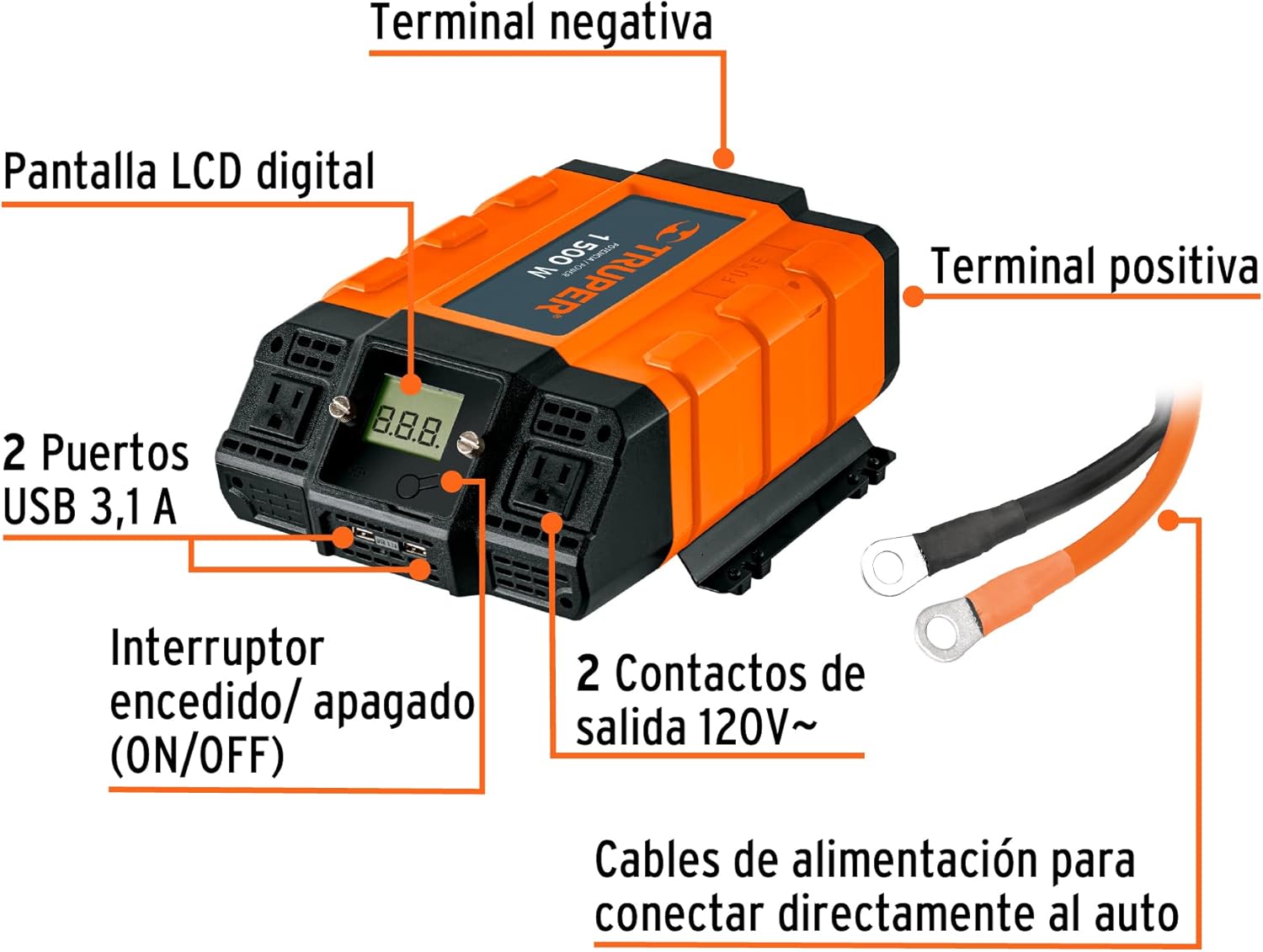
ചിത്രം 1: ഫ്രണ്ട് view of the Truper 1500 W Power Inverter showing its main components. These include the Digital LCD Display, ON/OFF Switch, two USB 3.1A Ports, two 120V~ AC Outlets, Positive Terminal, and Negative Terminal. Power cables for direct car connection are also shown.
- ഡിജിറ്റൽ എൽസിഡി ഡിസ്പ്ലേ: Shows output voltagഇ, ഇൻപുട്ട് വോളിയംtage, പിശക് കോഡുകൾ.
- ഓൺ/ഓഫ് സ്വിച്ച്: ഇൻവെർട്ടറിലേക്കുള്ള പവർ നിയന്ത്രിക്കുന്നു.
- USB 3.1A Ports: യുഎസ്ബിയിൽ പ്രവർത്തിക്കുന്ന ഉപകരണങ്ങൾ ചാർജ് ചെയ്യുന്നതിന്.
- 120V~ AC Outlets: Standard household outlets for AC appliances.
- പോസിറ്റീവ് ടെർമിനൽ: Red terminal for positive battery connection.
- നെഗറ്റീവ് ടെർമിനൽ: Black terminal for negative battery connection.
- പവർ കേബിളുകൾ: Heavy-duty cables for connecting the inverter directly to a 12V car battery.
സജ്ജമാക്കുക
നിങ്ങളുടെ പവർ ഇൻവെർട്ടർ ശരിയായി സജ്ജീകരിക്കാൻ ഈ ഘട്ടങ്ങൾ പാലിക്കുക:
- ഇൻവെർട്ടറിന്റെ ഓൺ/ഓഫ് സ്വിച്ച് "ഓഫ്" സ്ഥാനത്താണെന്ന് ഉറപ്പാക്കുക.
- Connect the red (positive) power cable to the inverter's positive terminal and then to the positive terminal of your 12V battery.
- Connect the black (negative) power cable to the inverter's negative terminal and then to the negative terminal of your 12V battery.
- എല്ലാ കണക്ഷനുകളും സുരക്ഷിതവും ഇറുകിയതുമാണെന്ന് ഉറപ്പാക്കുക.
- Place the inverter in a well-ventilated area, away from direct sunlight, heat, or moisture.

ചിത്രം 2: Connection diagram illustrating how to connect the power inverter to a 12V battery and then to a device (e.g., a portable tool). The diagram shows the machine/device connected to the inverter, and the inverter connected to the battery.
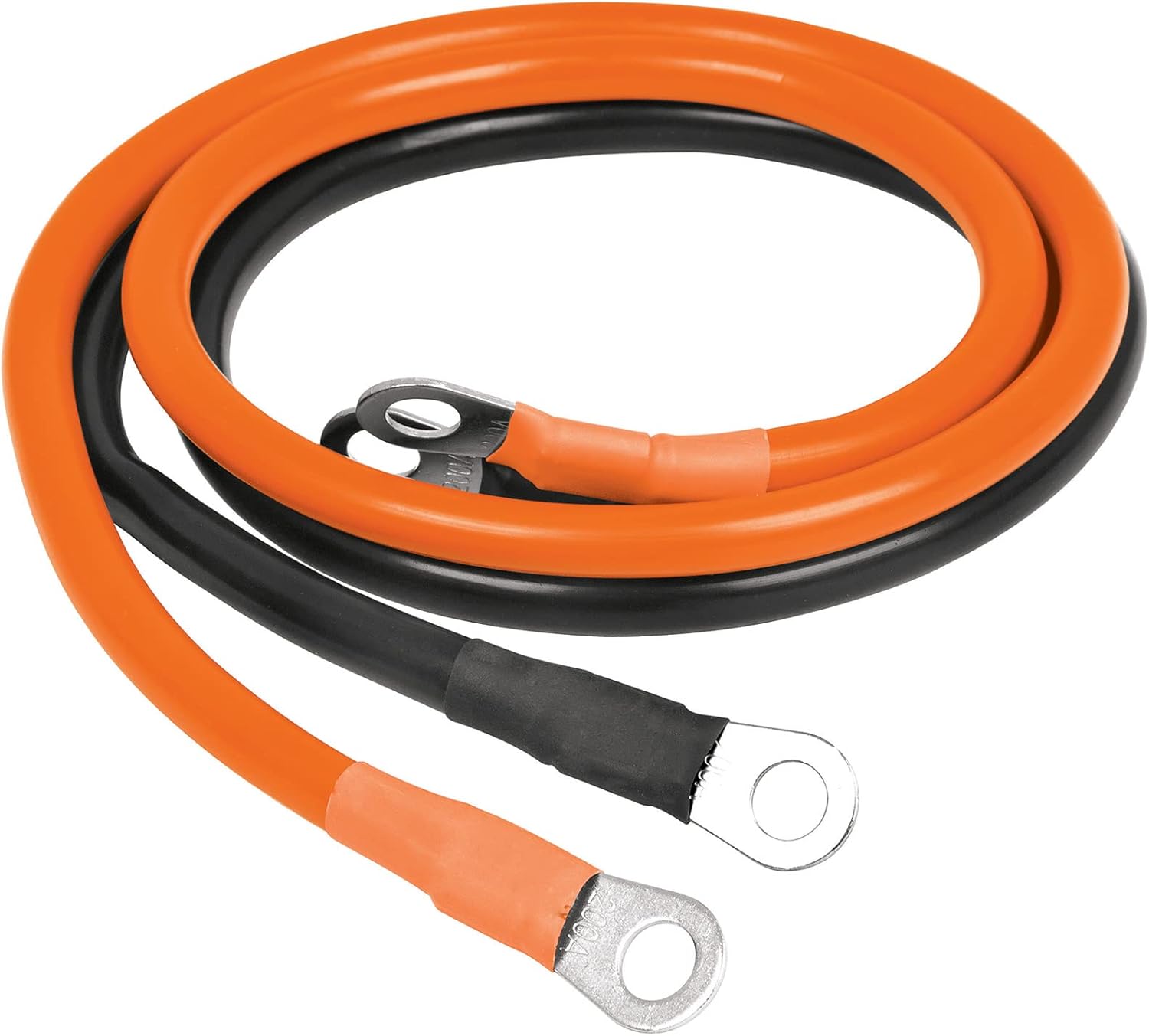
ചിത്രം 3: ഒരു ക്ലോസപ്പ് view of the orange and black power cables, which are 85 cm long, used for connecting the inverter to a battery. These cables feature ring terminals for secure attachment.
പ്രവർത്തന നിർദ്ദേശങ്ങൾ
Once the inverter is properly set up:
- Turn the inverter's ON/OFF switch to the "ON" position. The LCD display will illuminate, showing the input voltagഇ, ഔട്ട്പുട്ട് വോളിയംtage.
- Plug your AC appliance into one of the 120V~ AC outlets or your USB device into a USB port.
- Ensure the total power consumption of all connected devices does not exceed 1500W.
- When finished, turn the inverter's ON/OFF switch to the "OFF" position and disconnect your devices.
The Truper 1500 W Power Inverter is suitable for powering various electronic devices and portable tools:

ചിത്രം 4: വിഷ്വൽ എക്സ്amples of common applications for the power inverter, including charging cell phones and tablets, powering video game consoles, operating portable tools, running other electronic equipment, and charging laptops.
മെയിൻ്റനൻസ്
- ഇൻവെർട്ടർ വൃത്തിയായും പൊടിയും അവശിഷ്ടങ്ങളും ഇല്ലാതെയും സൂക്ഷിക്കുക. വൃത്തിയാക്കാൻ ഉണങ്ങിയ തുണി ഉപയോഗിക്കുക.
- Regularly check the battery connections for tightness and corrosion.
- Store the inverter in a cool, dry place when not in use.
- വെന്റിലേഷൻ ഓപ്പണിംഗുകൾ തടഞ്ഞിട്ടില്ലെന്ന് ഉറപ്പാക്കുക.
ട്രബിൾഷൂട്ടിംഗ്
| പ്രശ്നം | സാധ്യമായ കാരണം | പരിഹാരം |
|---|---|---|
| പവർ ഔട്ട്പുട്ട് ഇല്ല | Inverter switch is OFF; Loose battery connection; Low battery voltage; Overload. | Turn switch ON; Check and tighten connections; Recharge battery; Reduce load. |
| ഓവർഹീറ്റ് ഷട്ട്ഡൗൺ | മോശം വായുസഞ്ചാരം; അമിതമായ ലോഡ്. | Ensure clear ventilation; Reduce load; Allow to cool. |
| കുറഞ്ഞ ബാറ്ററി അലാറം | ബാറ്ററി വോളിയംtagഇ വളരെ കുറവാണ്. | ബാറ്ററി റീചാർജ് ചെയ്യുക അല്ലെങ്കിൽ മാറ്റിസ്ഥാപിക്കുക. |
സ്പെസിഫിക്കേഷനുകൾ
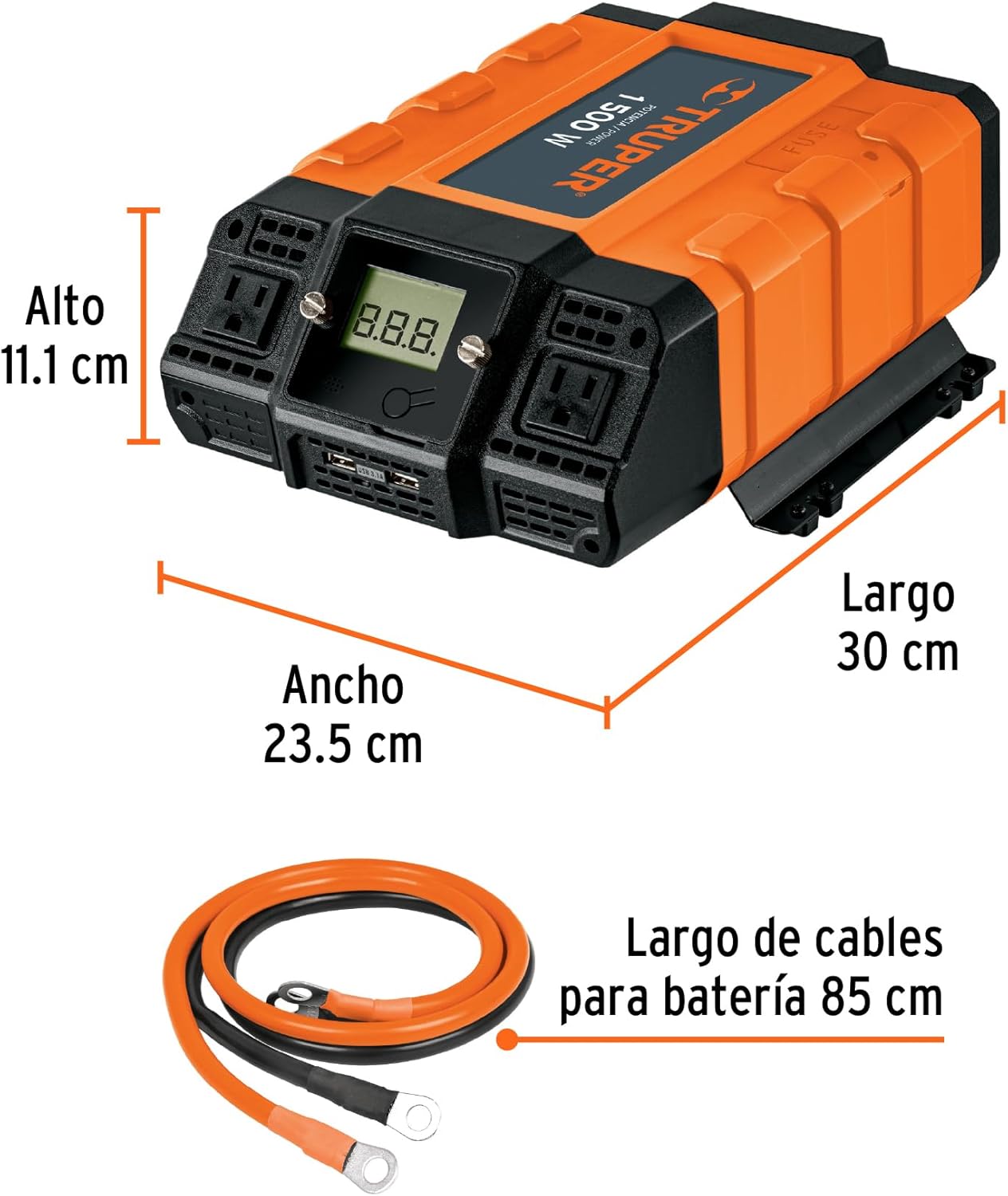
ചിത്രം 5: വശം view of the Truper 1500 W Power Inverter with its physical dimensions indicated: Length 30 cm, Width 23.5 cm, Height 11.1 cm.
- മോഡൽ: INCO-1500
- തുടർച്ചയായ ശക്തി: 1500 W
- ഇൻപുട്ട് വോളിയംtage: 12V DC
- Putട്ട്പുട്ട് വോളിയംtage: 120V എസി
- USB ഔട്ട്പുട്ട്: 3.1A (Total for 2 ports)
- അളവുകൾ (L x W x H): ഏകദേശം 30 സെ.മീ x 23.5 സെ.മീ x 11.1 സെ.മീ (11.8 ഇഞ്ച് x 9.25 ഇഞ്ച് x 4.37 ഇഞ്ച്)
- ഭാരം: ഏകദേശം 3.1 കി.ഗ്രാം (6.82 പൗണ്ട്)
വാറൻ്റിയും പിന്തുണയും
Truper products are manufactured to high-quality standards. For warranty information or technical support, please refer to the contact details provided with your purchase or visit the official Truper webസൈറ്റ്. വാറന്റി ക്ലെയിമുകൾക്കായി നിങ്ങളുടെ വാങ്ങലിന്റെ തെളിവ് സൂക്ഷിക്കുക.