1. ആമുഖം
Thank you for choosing the Morphy Richards Chef Xpress 400I Induction Cooker. This manual provides essential information for the safe and efficient operation, maintenance, and troubleshooting of your new appliance. Please read it thoroughly before first use and keep it for future reference.
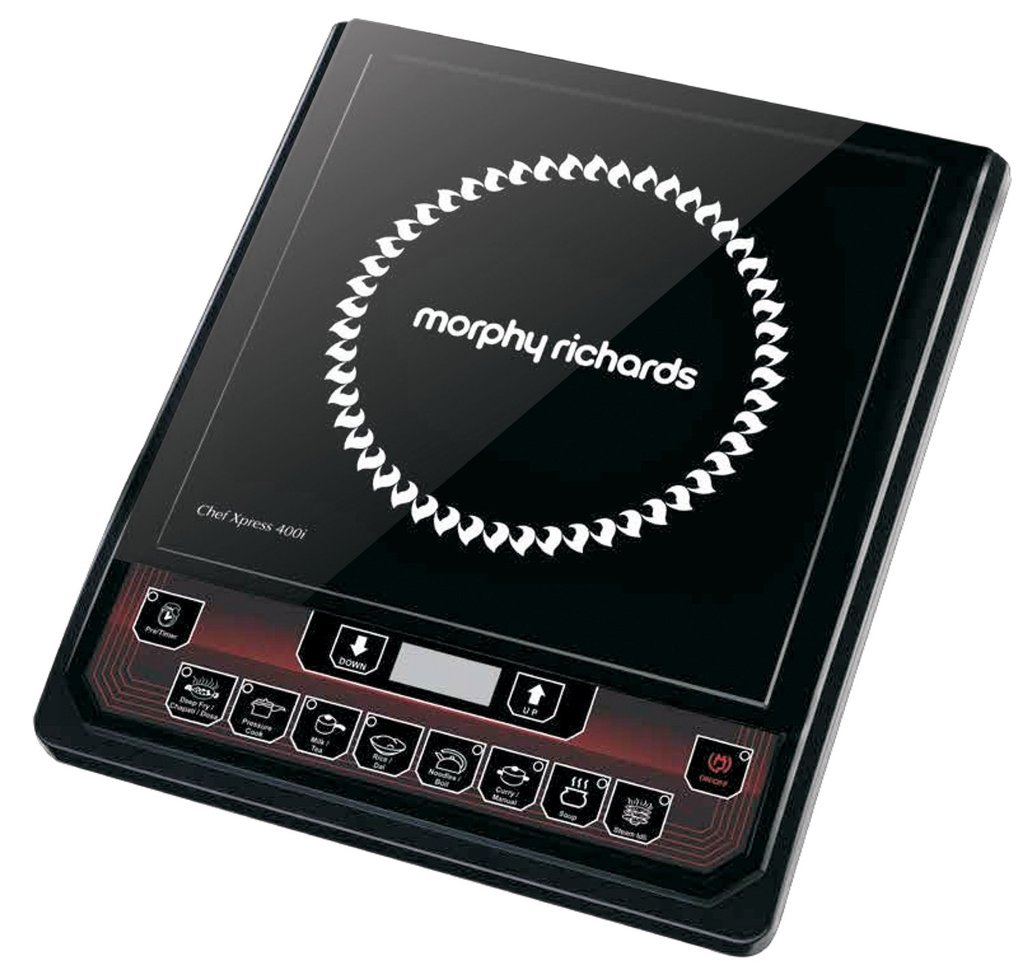
ചിത്രം 1: Morphy Richards Chef Xpress 400I Induction Cooker. This image shows the sleek black design of the induction cooktop with its control panel.
2. പ്രധാന സുരക്ഷാ നിർദ്ദേശങ്ങൾ
തീ, വൈദ്യുതാഘാതം, പരിക്കുകൾ എന്നിവ കുറയ്ക്കുന്നതിന് വൈദ്യുത ഉപകരണങ്ങൾ ഉപയോഗിക്കുമ്പോൾ എല്ലായ്പ്പോഴും അടിസ്ഥാന സുരക്ഷാ മുൻകരുതലുകൾ പാലിക്കുക.
- ഉപകരണം പ്രവർത്തിപ്പിക്കുന്നതിന് മുമ്പ് എല്ലാ നിർദ്ദേശങ്ങളും ശ്രദ്ധാപൂർവ്വം വായിക്കുക.
- അപ്ലയൻസ്, ചരട്, പ്ലഗ് എന്നിവ വെള്ളത്തിലോ മറ്റ് ദ്രാവകങ്ങളിലോ മുക്കരുത്.
- ഉപകരണം കുട്ടികൾക്ക് ലഭ്യമാകാതെ സൂക്ഷിക്കുക.
- വോളിയം ഉറപ്പാക്കുകtagഉപകരണത്തിൽ സൂചിപ്പിച്ചിരിക്കുന്ന ഇ നിങ്ങളുടെ പ്രാദേശിക മെയിൻ വോളിയവുമായി യോജിക്കുന്നുtagബന്ധിപ്പിക്കുന്നതിന് മുമ്പ് ഇ.
- കേടായ ചരടോ പ്ലഗോ ഉപയോഗിച്ച് ഉപകരണം പ്രവർത്തിപ്പിക്കരുത്.
- ഇൻഡക്ഷൻ-അനുയോജ്യമായ കുക്ക്വെയർ മാത്രം ഉപയോഗിക്കുക.
- Do not place metallic objects like knives, forks, spoons, or lids on the induction surface as they can become hot.
- Allow sufficient ventilation around the appliance during use.
- ഉപയോഗത്തിലില്ലാത്ത സമയത്തും വൃത്തിയാക്കുന്നതിനുമുമ്പ് out ട്ട്ലെറ്റിൽ നിന്ന് ഉപകരണം അൺപ്ലഗ് ചെയ്യുക.
- ഉപകരണം സ്വയം നന്നാക്കാൻ ശ്രമിക്കരുത്. യോഗ്യതയുള്ള സേവന ഉദ്യോഗസ്ഥരെ ബന്ധപ്പെടുക.
3. ഉൽപ്പന്ന ഘടകങ്ങൾ
The Morphy Richards Chef Xpress 400I Induction Cooker package includes:
- 1 Unit Induction Cooker
- ഉപയോക്തൃ മാനുവൽ (ഈ പ്രമാണം)
4. സജ്ജീകരണം
- അൺപാക്ക് ചെയ്യുന്നു: Carefully remove the induction cooker from its packaging. Retain the packaging for future storage or transport.
- പ്ലേസ്മെൻ്റ്: Place the induction cooker on a stable, flat, heat-resistant surface. Ensure there is adequate space (at least 10-15 cm) around the appliance for proper ventilation. Do not place it near heat sources or on metallic surfaces.
- പവർ കണക്ഷൻ: പവർ കോർഡ് ഒരു ഗ്രൗണ്ടഡ് ഇലക്ട്രിക്കൽ ഔട്ട്ലെറ്റിലേക്ക് പ്ലഗ് ചെയ്യുക. ഔട്ട്ലെറ്റ് വോളിയം ഉറപ്പാക്കുകtage matches the appliance's requirements (220-240V AC, 50Hz).
- കുക്ക്വെയർ: Use only induction-compatible cookware. These typically have a flat bottom and are made of magnetic materials like cast iron or stainless steel. A magnet will stick to the bottom of compatible cookware.
5. പ്രവർത്തന നിർദ്ദേശങ്ങൾ
The Morphy Richards Chef Xpress 400I features a user-friendly control panel with a knob for power adjustment.
- പവർ ഓൺ: Place an induction-compatible pot or pan centrally on the cooking surface. Plug the appliance into the power outlet. The display will illuminate.
- Select Power/Temperature: Turn the control knob to select the desired power level or temperature setting. The 400I model typically offers various pre-set cooking functions or a manual power adjustment up to 1400 Watts.
- പാചകം: The induction cooker will begin heating the cookware. The cooking surface itself does not generate heat directly but heats the cookware through electromagnetic induction.
- ക്രമീകരണങ്ങൾ ക്രമീകരിക്കുക: Adjust the power level as needed during cooking by turning the control knob.
- പവർ ഓഫ്: After cooking, turn the control knob to the 'OFF' position or press the power button (if available) to switch off the appliance. Remove the cookware. The fan may continue to run for a short period to cool down internal components.
- അൺപ്ലഗ്: Unplug the appliance from the mains socket when not in use.
കുറിപ്പ്: The induction cooker will automatically shut off if no compatible cookware is detected or if the cookware is removed from the surface.
6. പരിചരണവും പരിപാലനവും
Proper care ensures the longevity and optimal performance of your induction cooker.
- വൃത്തിയാക്കൽ:
- അപ്ലയൻസ് എല്ലായ്പ്പോഴും അൺപ്ലഗ് ചെയ്ത് വൃത്തിയാക്കുന്നതിന് മുമ്പ് പൂർണ്ണമായും തണുക്കാൻ അനുവദിക്കുക.
- സെറാമിക് ഗ്ലാസ് പ്രതലം മൃദുവായ, ഡി-ടച്ച് ഉപയോഗിച്ച് തുടയ്ക്കുക.amp തുണിയും നേരിയ ഡിറ്റർജന്റും. കഠിനമായ കറകൾക്ക്, സെറാമിക് കുക്ക്ടോപ്പുകൾക്കായി പ്രത്യേകം രൂപകൽപ്പന ചെയ്ത ഒരു നോൺ-അബ്രസീവ് ക്ലീനർ ഉപയോഗിക്കുക.
- Do not use abrasive pads, harsh chemicals, or steel wool, as these can scratch the surface.
- Clean the exterior body with a soft, damp തുണി.
- ആന്തരിക ഘടകങ്ങളിലേക്ക് വെള്ളം കയറുന്നില്ലെന്ന് ഉറപ്പാക്കുക.
- സംഭരണം: Store the induction cooker in a dry, cool place when not in use. Protect it from dust and moisture.
- വെൻ്റിലേഷൻ: Keep the air inlet and outlet vents clear of obstructions to ensure proper airflow and prevent overheating.
7. പ്രശ്നപരിഹാരം
ഉപഭോക്തൃ സേവനവുമായി ബന്ധപ്പെടുന്നതിന് മുമ്പ്, ഇനിപ്പറയുന്ന പൊതുവായ പ്രശ്നങ്ങളും പരിഹാരങ്ങളും പരിശോധിക്കുക:
| പ്രശ്നം | സാധ്യമായ കാരണം | പരിഹാരം |
|---|---|---|
| ഉപകരണം ഓണാക്കുന്നില്ല. | വൈദ്യുതി ഇല്ല; പ്ലഗ് അയഞ്ഞിരിക്കുന്നു; വൈദ്യുതി ഇല്ലtage. | Check power cord connection; check household fuse/circuit breaker; try another outlet. |
| പാചക പാത്രങ്ങൾ ചൂടാക്കുന്നില്ല. | Cookware is not induction-compatible; cookware is too small or too large; cookware not centered. | Use induction-compatible cookware; ensure cookware base covers at least 80% of the cooking zone; center the cookware. |
| ഡിസ്പ്ലേ ഒരു പിശക് കോഡ് കാണിക്കുന്നു. | Specific error (e.g., overheating, sensor fault). | Refer to the specific error code in the full manual (if available) or contact customer support. Often, unplugging and replugging after a few minutes can reset the unit. |
| വലിയ ഫാൻ ശബ്ദം. | Normal operation for cooling; obstructed vents. | This is normal. Ensure vents are not blocked. |
8 സ്പെസിഫിക്കേഷനുകൾ
- മോഡൽ: Chef Xpress 400I
- ഇനം മോഡൽ നമ്പർ: 820017
- ബ്രാൻഡ്: മോർഫി റിച്ചാർഡ്സ്
- വാട്ട്tage: 1400 വാട്ട്സ്
- ഊർജ്ജ സ്രോതസ്സ്: ഇലക്ട്രിക്
- നിയന്ത്രണ തരം: നോബ്
- നിറം: കറുപ്പ്
- ഉൽപ്പന്ന അളവുകൾ: 40.5D x 31W x 10.5H സെന്റീമീറ്ററുകൾ
- ഇനത്തിൻ്റെ ഭാരം: 2 കിലോ 280 ഗ്രാം (ഏകദേശം 5.03 പൗണ്ട്)
- ഉൾപ്പെടുത്തിയ ഘടകങ്ങൾ: 1 Unit Induction Cooker
- മാതൃരാജ്യം: ഇന്ത്യ
9. വാറണ്ടിയും ഉപഭോക്തൃ പിന്തുണയും
For warranty claims, service, or technical assistance, please contact Morphy Richards customer support.
- ഹെൽപ്പ്ലൈൻ നമ്പർ: 18-13-5963
- വാറൻ്റി വിവരങ്ങൾ: A 6-month extended warranty may be applicable on this product for purchases made between 1st Oct-21 to 3rd Nov-21. To avail this, please register the product on the Product Registration section of the morphyrichardsindia website between 1st Oct-21 to 7th Dec-21. Terms and Conditions apply. Standard warranty details should be available with your purchase documentation.
- നിർമ്മാതാവ്: Canabara Industries Private Limited
- ഇറക്കുമതിക്കാരൻ: Imported and Marketed by Bajaj Electricals Ltd 45/47, Veer Nariman Road, Mumbai, 400001