1. ആമുഖം
This manual provides essential information for the setup, operation, and maintenance of your Proscan PLDED3280A 32-Inch 720p LED TV. Please read this manual thoroughly before operating your television and retain it for future reference.
പ്രധാന സവിശേഷതകൾ:
- 32-Inch LED HD TV with Built-in ATSC Tuner
- Multiple Connectivity Options: HDMI, VGA, YPbPr, AV Audio/Video, PC Audio, Headphone, Coaxial Out, RF
- 60Hz Refresh Rate for smooth motion
- 16:9 Aspect Ratio for widescreen viewing
- Slim Bezel Design for a modern aesthetic
2. ബോക്സിൽ എന്താണുള്ളത്?
പാക്കേജ് തുറക്കുമ്പോൾ, എല്ലാ ഇനങ്ങളും ഉണ്ടെന്ന് ഉറപ്പാക്കുക:
- Proscan PLDED3280A 32-Inch 720p LED TV
- റിമോട്ട് കൺട്രോൾ
- ടിവി സ്റ്റാൻഡ് (2 കഷണങ്ങൾ)
- ഉപയോക്തൃ മാനുവൽ (ഈ പ്രമാണം)

Figure 2.1: Proscan PLDED3280A 32-Inch 720p LED TV.
3. സജ്ജീകരണം
3.1 സ്റ്റാൻഡ് അറ്റാച്ചുചെയ്യുന്നു
- പോറലുകൾ ഉണ്ടാകാതിരിക്കാൻ ടിവി സ്ക്രീൻ-ഡൗൺ മൃദുവായതും വൃത്തിയുള്ളതുമായ ഒരു പ്രതലത്തിൽ ശ്രദ്ധാപൂർവ്വം വയ്ക്കുക.
- ടിവിയുടെ അടിയിലുള്ള മൗണ്ടിംഗ് ദ്വാരങ്ങളുമായി സ്റ്റാൻഡ് പീസുകൾ വിന്യസിക്കുക.
- നൽകിയിരിക്കുന്ന സ്ക്രൂകൾ ഉപയോഗിച്ച് സ്റ്റാൻഡ് ഉറപ്പിക്കുക. അമിതമായി മുറുക്കരുത്.
3.2 ബന്ധിപ്പിക്കുന്ന പവർ
ടിവിയുടെ പിൻഭാഗത്തുള്ള AC IN പോർട്ടിലേക്ക് പവർ കോർഡ് പ്ലഗ് ചെയ്യുക, തുടർന്ന് മറ്റേ അറ്റം ഒരു സാധാരണ ഇലക്ട്രിക്കൽ ഔട്ട്ലെറ്റിലേക്ക് (AC 120V, 60Hz) പ്ലഗ് ചെയ്യുക.
3.3 ബാഹ്യ ഉപകരണങ്ങൾ ബന്ധിപ്പിക്കുന്നു
Your Proscan TV offers various input ports for connecting external devices such as cable boxes, DVD/Blu-ray players, gaming consoles, and computers.
- എച്ച്ഡിഎംഐ: For high-definition audio and video. Connect up to three HDMI devices.
- വി.ജി.എ: For connecting a PC.
- YPbPr (Component): For analog high-definition video.
- എവി (കോമ്പോസിറ്റ്): For standard definition video and stereo audio.
- RF (ആന്റിന/കേബിൾ): ഒരു ആന്റിന അല്ലെങ്കിൽ കേബിൾ ടിവി ഫീഡ് ബന്ധിപ്പിക്കുന്നതിന്.
- പിസി ഓഡിയോ: For audio input from a PC.
- ഹെഡ്ഫോൺ: ഹെഡ്ഫോണുകൾ ബന്ധിപ്പിക്കുന്നതിന്.
- Coaxial Out: ഡിജിറ്റൽ ഓഡിയോ ഔട്ട്പുട്ടിനായി.
Ensure all cables are securely connected to the correct ports on both the TV and the external device.
4. ടിവി പ്രവർത്തിപ്പിക്കൽ
4.1 പവർ ഓൺ/ഓഫ്
അമർത്തുക പവർ button on the remote control or the power button on the side of the TV to turn the television on or off. A blue indicator light on the front of the TV signifies it is powered on.
4.2 ഇൻപുട്ട് ഉറവിട തിരഞ്ഞെടുപ്പ്
ബന്ധിപ്പിച്ച ഉപകരണങ്ങൾക്കിടയിൽ മാറാൻ, ഇൻപുട്ട് button on the remote control or the side of the TV. A menu will appear on screen, allowing you to select from available inputs such as TV, AV, Component, HDMI1, HDMI2, HDMI3, PC, or USB Media Player.
4.3 വോളിയം നിയന്ത്രണം
ഉപയോഗിക്കുക VOL+ ഒപ്പം വോൾ- buttons on the remote control or the side of the TV to adjust the volume level. A volume bar with a numerical indicator will appear on the screen.
4.4 ചാനൽ തിരഞ്ഞെടുക്കൽ
If an antenna or cable is connected to the RF input, use the CH+ ഒപ്പം CH- buttons on the remote control or the side of the TV to change channels.
4.5 മെനു നാവിഗേഷൻ
അമർത്തുക മെനു button on the remote control or the side of the TV to access the on-screen display (OSD) menu. Use the arrow buttons to navigate through options and the OK or പ്രവേശിക്കുക തിരഞ്ഞെടുക്കലുകൾ സ്ഥിരീകരിക്കുന്നതിനുള്ള ബട്ടൺ.
5. പരിപാലനം
Proper care ensures the longevity of your Proscan TV:
- സ്ക്രീൻ വൃത്തിയാക്കൽ: മൃദുവായ, ലിന്റ് രഹിത തുണി ഉപയോഗിച്ച് സ്ക്രീൻ സൌമ്യമായി തുടയ്ക്കുക. കഠിനമായ പാടുകൾക്ക്, ചെറുതായി dampവെള്ളം അല്ലെങ്കിൽ ഒരു പ്രത്യേക സ്ക്രീൻ ക്ലീനർ ഉപയോഗിച്ച് തുണി വൃത്തിയാക്കുക. കഠിനമായ രാസവസ്തുക്കളോ ഉരച്ചിലുകളോ ഉള്ള വസ്തുക്കൾ ഒഴിവാക്കുക.
- കാബിനറ്റ് വൃത്തിയാക്കൽ: ടിവി കാബിനറ്റ് വൃത്തിയാക്കാൻ മൃദുവായതും ഉണങ്ങിയതുമായ തുണി ഉപയോഗിക്കുക.
- വെൻ്റിലേഷൻ: ടിവിക്ക് ചുറ്റും മതിയായ വായുസഞ്ചാരം ഉറപ്പാക്കുക. വെന്റിലേഷൻ ദ്വാരങ്ങൾ അടയ്ക്കരുത്.
- പവർ കോർഡ്: പവർ കോർഡിന് എന്തെങ്കിലും കേടുപാടുകൾ സംഭവിച്ചിട്ടുണ്ടോ എന്ന് പതിവായി പരിശോധിക്കുക. കേടുപാടുകൾ സംഭവിച്ചാൽ ഉടൻ തന്നെ അത് മാറ്റിസ്ഥാപിക്കുക.
- സംഭരണം: If storing the TV for an extended period, disconnect it from power and store it in a cool, dry place.
6. പ്രശ്നപരിഹാരം
ഉപഭോക്തൃ പിന്തുണയുമായി ബന്ധപ്പെടുന്നതിന് മുമ്പ്, പൊതുവായ പ്രശ്നങ്ങൾക്ക് ഇനിപ്പറയുന്ന പരിഹാരങ്ങൾ പരീക്ഷിക്കുക:
| പ്രശ്നം | സാധ്യമായ കാരണം / പരിഹാരം |
|---|---|
| പവർ ഇല്ല | Ensure the power cord is securely plugged into both the TV and the outlet. Check if the outlet is working. |
| ചിത്രമില്ല / സിഗ്നലില്ല | Verify the correct input source is selected (e.g., HDMI1, AV). Check all cable connections between the TV and external devices. |
| ശബ്ദമില്ല | Check the volume level and ensure the TV is not muted. Verify audio cable connections. |
| റിമോട്ട് കൺട്രോൾ പ്രവർത്തിക്കുന്നില്ല | റിമോട്ട് കൺട്രോളിലെ ബാറ്ററികൾ മാറ്റിസ്ഥാപിക്കുക. റിമോട്ടിനും ടിവിയുടെ ഐആർ സെൻസറിനും ഇടയിൽ തടസ്സങ്ങളൊന്നുമില്ലെന്ന് ഉറപ്പാക്കുക. |
| മോശം ചിത്ര നിലവാരം | ചിത്ര ക്രമീകരണങ്ങൾ (തെളിച്ചം, ദൃശ്യതീവ്രത, നിറം) ക്രമീകരിക്കുക. ഇൻപുട്ട് ഉറവിടം ഉയർന്ന നിലവാരമുള്ള സിഗ്നൽ നൽകുന്നുണ്ടെന്ന് ഉറപ്പാക്കുക. |
7 സ്പെസിഫിക്കേഷനുകൾ
| ഫീച്ചർ | വിശദാംശങ്ങൾ |
|---|---|
| ബ്രാൻഡ് | പ്രോസ്കാൻ |
| മോഡൽ നമ്പർ | PLDED3280A |
| സ്ക്രീൻ വലിപ്പം | 32 ഇഞ്ച് |
| ഡിസ്പ്ലേ ടെക്നോളജി | എൽഇഡി |
| റെസലൂഷൻ | 720p |
| പുതുക്കിയ നിരക്ക് | 60Hz |
| വീക്ഷണാനുപാതം | 16:9 |
| കണക്റ്റിവിറ്റി ടെക്നോളജി | HDMI, VGA, YPbPr, AV, PC Audio, Headphone, Coaxial Out, RF |
| ഇനത്തിൻ്റെ ഭാരം | 13.7 പൗണ്ട് |
| ഉൽപ്പന്ന അളവുകൾ | 8"D x 28.8"W x 19.1"H |
| നിറം | കറുപ്പ് |
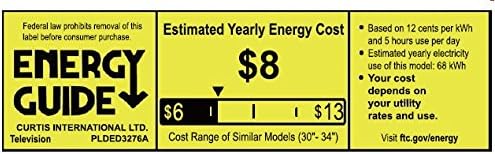
Figure 7.1: Estimated Yearly Energy Cost for similar models.
8. വാറൻ്റിയും പിന്തുണയും
For detailed warranty information and customer support, please refer to the official Proscan website or the full User Manual PDF.
നിങ്ങൾക്ക് പൂർണ്ണമായ ഉപയോക്തൃ മാനുവൽ (PDF) ഡൗൺലോഡ് ചെയ്യാം. ഇവിടെ.
കൂടുതൽ സഹായത്തിന്, സന്ദർശിക്കുക PROSCAN Store on Amazon.


