ആമുഖം
This manual provides detailed instructions for the installation, operation, and maintenance of your Zmodo ZH-IXU1D-WAC 720p HD Wi-Fi EZCam Camera. This device is designed for home monitoring, offering high-definition video, two-way audio, and remote access capabilities via Wi-Fi. Please read this manual thoroughly before using the product to ensure proper setup and functionality.
പാക്കേജ് ഉള്ളടക്കം
Verify that all items listed below are present in your package. If any items are missing or damaged, please contact Zmodo customer support.
- Zmodo ZH-IXU1D-WAC EZCam Camera
- പവർ അഡാപ്റ്റർ
- മൗണ്ടിംഗ് കിറ്റ് (സ്ക്രൂകളും വാൾ ആങ്കറുകളും)
- ദ്രുത ആരംഭ ഗൈഡ് (പൂർണ്ണ വിവരങ്ങൾക്ക് ഈ മാനുവൽ കാണുക)

ചിത്രം: മുൻഭാഗം view of the Zmodo ZH-IXU1D-WAC EZCam Camera. The camera is white with a prominent black circular lens housing at the top, featuring the Zmodo logo printed below it. The camera is mounted on a white adjustable stand.
സജ്ജമാക്കുക
1. ക്യാമറ ഓൺ ചെയ്യുക
- ക്യാമറയുടെ പവർ ഇൻപുട്ട് പോർട്ടിലേക്ക് പവർ അഡാപ്റ്റർ ബന്ധിപ്പിക്കുക.
- പവർ അഡാപ്റ്റർ ഒരു സാധാരണ ഇലക്ട്രിക്കൽ ഔട്ട്ലെറ്റിലേക്ക് പ്ലഗ് ചെയ്യുക.
- Wait for the camera's indicator light to flash, indicating it is ready for setup.
2. Downloading the Zsight App
The Zsight mobile application is required to set up and manage your EZCam. It is compatible with Android devices.
- ഇതിനായി തിരയുക "Zsight" in your device's app store.
- ആപ്ലിക്കേഷൻ ഡൗൺലോഡ് ചെയ്ത് ഇൻസ്റ്റാൾ ചെയ്യുക.
- ഒരു പുതിയ അക്കൗണ്ട് സൃഷ്ടിക്കുക അല്ലെങ്കിൽ നിങ്ങൾക്ക് ഇതിനകം ഒന്ന് ഉണ്ടെങ്കിൽ ലോഗിൻ ചെയ്യുക.
3. Wi-Fi-ലേക്ക് ബന്ധിപ്പിക്കുന്നു
നിങ്ങളുടെ ക്യാമറ നിങ്ങളുടെ വീട്ടിലെ വൈഫൈ നെറ്റ്വർക്കിലേക്ക് ബന്ധിപ്പിക്കാൻ ആപ്പിലെ നിർദ്ദേശങ്ങൾ പാലിക്കുക.
- Open the Zsight app and tap the "+" icon to add a new device.
- Select "EZCam" or the appropriate camera model.
- Follow the on-screen prompts to enter your Wi-Fi network details. The app will guide you through the pairing process, which may involve scanning a QR code or using an audio pairing method.
- Once connected, the camera's indicator light will change to a solid color (refer to app for specific status).
4. ക്യാമറ മൌണ്ട് ചെയ്യുന്നു (ഓപ്ഷണൽ)
The EZCam can be placed on a flat surface or mounted to a wall or ceiling. The camera's adjustable stand allows for flexible positioning.
- വ്യക്തമായ ഒരു സ്ഥലം തിരഞ്ഞെടുക്കുക. view ശക്തമായ വൈ-ഫൈ സിഗ്നലും.
- Use the provided mounting kit to secure the camera base to the desired surface.
- ആവശ്യമുള്ള നിരീക്ഷണ മേഖല ഉൾക്കൊള്ളുന്നതിനായി ക്യാമറയുടെ ആംഗിൾ ക്രമീകരിക്കുക.
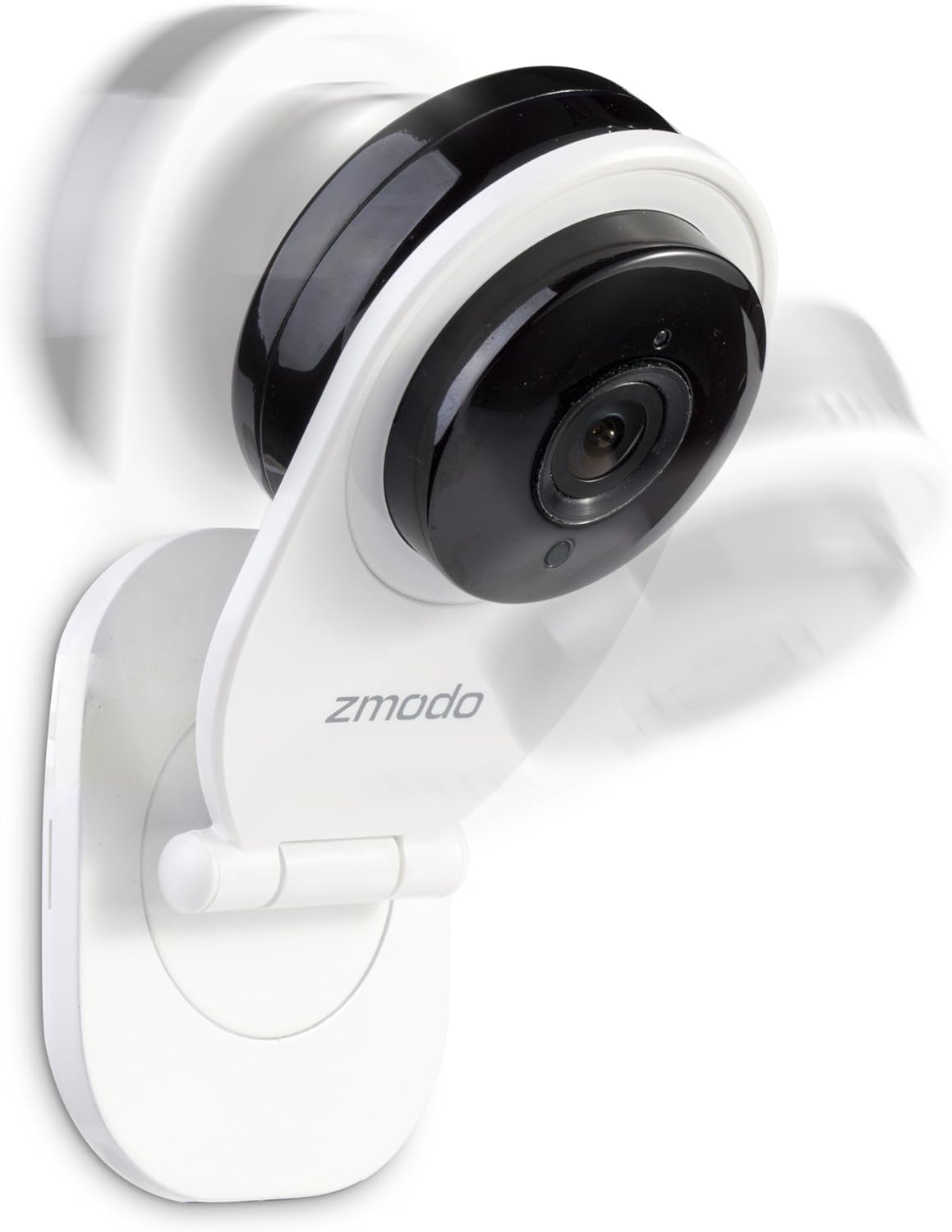
ചിത്രം: വശം view of the Zmodo EZCam camera. The image illustrates the camera's adjustable stand, allowing the camera head to pivot. Motion blur around the camera head suggests its rotational capability for optimal viewകോണുകൾ.

ചിത്രം: മറ്റൊരു വശം view of the Zmodo EZCam camera, further demonstrating its adjustable mounting and viewing angle. The camera head is tilted, and motion blur indicates its flexibility in positioning.
5. Installing a Micro SD Card (Optional)
To enable local recording, insert a micro SD card (not included) into the camera's designated slot.
- Locate the micro SD card slot on the camera (usually on the side or back).
- Gently insert the micro SD card until it clicks into place.
- Format the SD card via the Zsight app settings for optimal performance.
ക്യാമറ പ്രവർത്തിപ്പിക്കുന്നത്
തത്സമയം View
Access real-time video feed from your camera through the Zsight app.
- Open the Zsight app.
- Tap on your EZCam from the device list to view ലൈവ് ഫീഡ്.
ടു-വേ ഓഡിയോ
ബിൽറ്റ്-ഇൻ മൈക്രോഫോണും സ്പീക്കറും ഉപയോഗിച്ച് ക്യാമറയിലൂടെ ആശയവിനിമയം നടത്തുക.
- ലൈവിൽ ആയിരിക്കുമ്പോൾ view, സംസാരിക്കാൻ മൈക്രോഫോൺ ഐക്കണിൽ ടാപ്പ് ചെയ്യുക.
- ക്യാമറയുടെ സ്ഥാനത്ത് നിന്ന് ഓഡിയോ കേൾക്കാൻ സ്പീക്കർ ഐക്കണിൽ ടാപ്പ് ചെയ്യുക.
മോഷൻ ഡിറ്റക്ഷൻ അലേർട്ടുകൾ
Receive notifications on your smartphone when motion is detected.
- Enable motion detection in the camera settings within the Zsight app.
- Adjust sensitivity and alert schedules as needed.
നൈറ്റ് വിഷൻ
The camera automatically switches to night vision mode in low-light conditions, providing clear video up to 30 feet.
- Ensure the camera lens is unobstructed for optimal night vision performance.
Local Recording (Micro SD Card)
If a micro SD card is installed and formatted, the camera can record video locally.
- Configure recording settings (e.g., continuous, motion-triggered) in the Zsight app.
- റെക്കോർഡ് ചെയ്ത foo ആക്സസ് ചെയ്യുകtage through the app's playback feature.
മെയിൻ്റനൻസ്
ക്യാമറ വൃത്തിയാക്കുന്നു
To maintain optimal image quality, keep the camera lens clean.
- Gently wipe the lens with a soft, lint-free cloth.
- ലെൻസിൽ മാന്തികുഴിയുണ്ടാക്കുന്ന കഠിനമായ രാസവസ്തുക്കളോ ഉരച്ചിലുകളോ ഉപയോഗിക്കുന്നത് ഒഴിവാക്കുക.
ഫേംവെയർ അപ്ഡേറ്റുകൾ
Periodically check the Zsight app for available firmware updates to ensure your camera has the latest features and security enhancements.
- Follow the in-app instructions to perform any recommended updates.
ട്രബിൾഷൂട്ടിംഗ്
If you encounter issues with your Zmodo EZCam, refer to the following common solutions:
- ക്യാമറ വൈഫൈയിലേക്ക് കണക്റ്റ് ചെയ്യുന്നില്ല:
- നിങ്ങളുടെ വൈഫൈ നെറ്റ്വർക്ക് 2.4GHz ആണെന്ന് ഉറപ്പാക്കുക (5GHz പിന്തുണയ്ക്കുന്നില്ല).
- ആപ്പിൽ വൈഫൈ പാസ്വേഡ് ശരിയായി നൽകിയിട്ടുണ്ടെന്ന് ഉറപ്പാക്കുക.
- ക്യാമറ നിങ്ങളുടെ വൈഫൈ റൂട്ടറിന് അടുത്തേക്ക് നീക്കുക.
- നിങ്ങളുടെ റൂട്ടറും ക്യാമറയും പുനരാരംഭിക്കുക.
- മോശം വീഡിയോ നിലവാരം:
- Check your Wi-Fi signal strength in the camera's location.
- ക്യാമറ ലെൻസ് വൃത്തിയാക്കുക.
- Ensure adequate lighting for optimal daytime video.
- മോഷൻ ഡിറ്റക്ഷൻ അലേർട്ടുകൾ ഇല്ല:
- Verify motion detection is enabled in the Zsight app settings.
- Check alert schedules and sensitivity settings.
- Ensure the app has notification permissions on your smartphone.
- Micro SD Card Not Recording:
- Ensure the SD card is properly inserted.
- Format the SD card through the Zsight app.
- Check if the SD card is full or corrupted. Try a different compatible SD card.
For further assistance, please contact Zmodo customer support.
സ്പെസിഫിക്കേഷനുകൾ
| ഫീച്ചർ | വിശദാംശങ്ങൾ |
|---|---|
| മോഡൽ | ZH-IXU1D-WAC |
| വീഡിയോ ക്യാപ്ചർ റെസല്യൂഷൻ | 720p HD |
| കണക്റ്റിവിറ്റി ടെക്നോളജി | വയർലെസ് (വൈ-ഫൈ) |
| പവർ ഉറവിടം | കോർഡഡ് ഇലക്ട്രിക് |
| നൈറ്റ് വിഷൻ റേഞ്ച് | 30 അടി വരെ |
| Viewing ആംഗിൾ | 105 ഡിഗ്രി |
| ടു-വേ ഓഡിയോ | Yes (Built-in mic and speaker) |
| പ്രാദേശിക സംഭരണം | മൈക്രോ എസ്ഡി കാർഡ് സ്ലോട്ട് (കാർഡ് ഉൾപ്പെടുത്തിയിട്ടില്ല) |
| മോഷൻ ഡിറ്റക്ഷൻ | Yes (Alerts to smartphone) |
| അനുയോജ്യമായ ഉപകരണങ്ങൾ | സ്മാർട്ട്ഫോൺ (Android) |
| അളവുകൾ (L x W x H) | 4.25 x 2.75 x 7.25 ഇഞ്ച് |
| ഇനത്തിൻ്റെ ഭാരം | 14.4 ഔൺസ് |
| IP റേറ്റിംഗ് | IP54 |
വാറൻ്റിയും പിന്തുണയും
For warranty information and technical support, please refer to the official Zmodo webസൈറ്റിൽ ബന്ധപ്പെടുക അല്ലെങ്കിൽ അവരുടെ ഉപഭോക്തൃ സേവനവുമായി നേരിട്ട് ബന്ധപ്പെടുക. വാറന്റി ക്ലെയിമുകൾക്കായി നിങ്ങളുടെ വാങ്ങൽ രസീത് സൂക്ഷിക്കുക.
Zmodo Customer Support: ദയവായി സന്ദർശിക്കുക www.zmodo.com/support for contact details and online resources.


