ആമുഖം
This manual provides comprehensive instructions for the setup, operation, maintenance, and troubleshooting of your Proscan PSVR62 Hi-Fi Stereo 4-Head VHS VCR Plus Player. Please read this manual thoroughly before using the device to ensure proper functionality and longevity.
സുരക്ഷാ വിവരങ്ങൾ
തീ, വൈദ്യുതാഘാതം, വ്യക്തികൾക്ക് പരിക്കേൽക്കൽ എന്നിവ കുറയ്ക്കുന്നതിന് ഈ ഉൽപ്പന്നം ഉപയോഗിക്കുമ്പോൾ എല്ലായ്പ്പോഴും അടിസ്ഥാന സുരക്ഷാ മുൻകരുതലുകൾ പാലിക്കുക.
- മഴയോ ഈർപ്പമോ യൂണിറ്റ് തുറന്നുകാട്ടരുത്.
- സി തുറക്കരുത്.asing; refer all servicing to qualified service personnel.
- യൂണിറ്റിന് ചുറ്റും ശരിയായ വായുസഞ്ചാരം ഉറപ്പാക്കുക.
- മിന്നൽ കൊടുങ്കാറ്റുകളുടെ സമയത്തോ ദീർഘകാലത്തേക്ക് ഉപയോഗിക്കാത്ത സമയത്തോ യൂണിറ്റ് അൺപ്ലഗ് ചെയ്യുക.
പാക്കേജ് ഉള്ളടക്കം
പാക്കേജിൽ എല്ലാ ഇനങ്ങളും ഉണ്ടെന്ന് ഉറപ്പാക്കുക:
- Proscan PSVR62 VHS VCR Player
- റിമോട്ട് കൺട്രോൾ
- Audio/Video (RCA) Cables
- നിർദ്ദേശ മാനുവൽ (ഈ പ്രമാണം)
ഉൽപ്പന്നം കഴിഞ്ഞുview

ചിത്രം 1: മുൻഭാഗം view of the Proscan PSVR62 VHS VCR player. The image shows the main unit with its front panel controls (Power, Stop/Eject, REC/XPR, Pause, Play, Reverse, Forward) and the VHS tape slot. A remote control and RCA audio/video cables are visible on top of the unit.
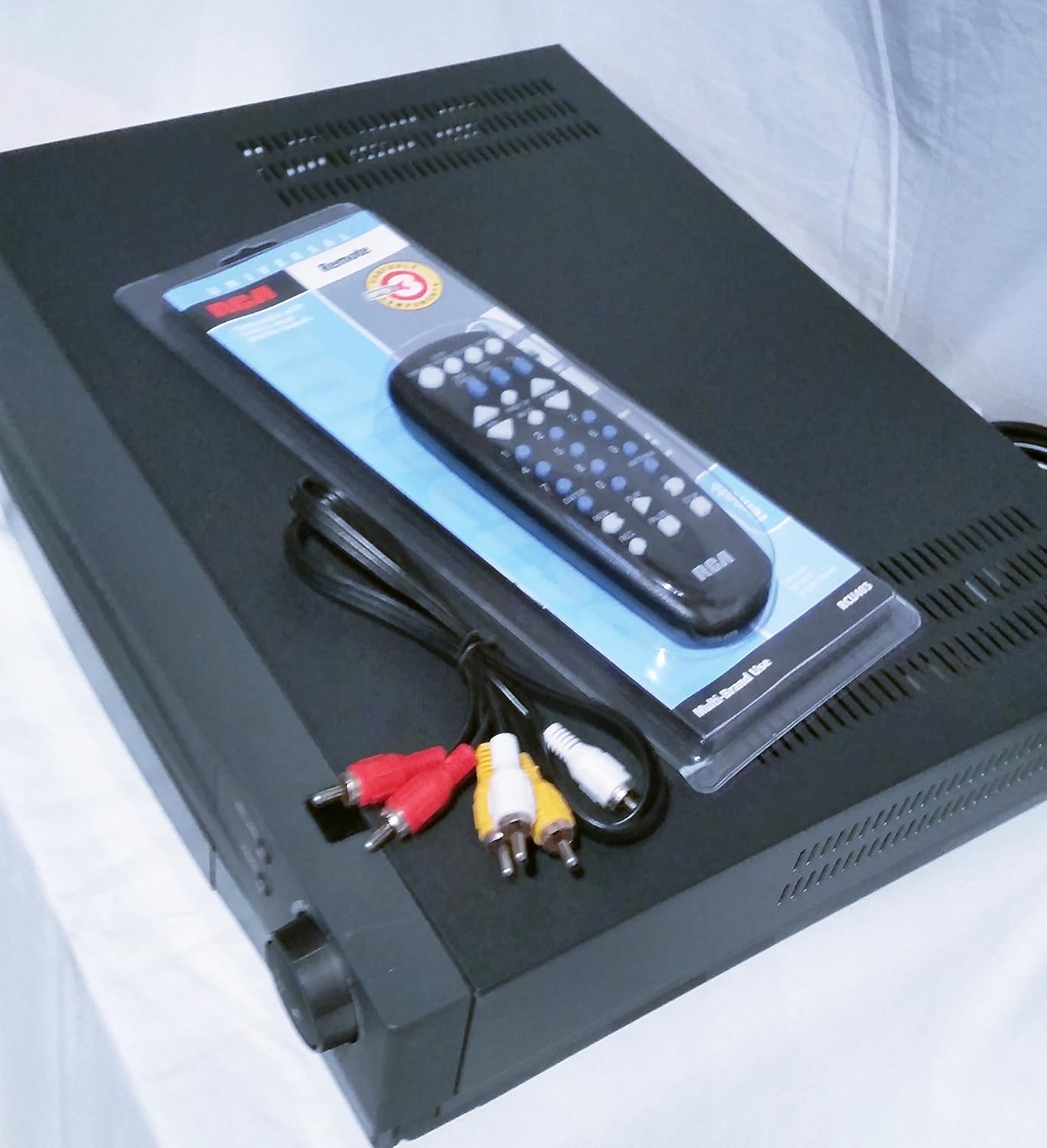
ചിത്രം 2: മുകളിൽ നിന്ന് താഴേക്ക് view of the Proscan PSVR62 VHS VCR player. This perspective highlights the top surface of the VCR, with the included remote control and RCA cables placed beside it, showing the multi-brand use label on the remote packaging.
ഫ്രണ്ട് പാനൽ നിയന്ത്രണങ്ങൾ:
- പവർ: VCR ഓണാക്കുകയോ ഓഫാക്കുകയോ ചെയ്യുന്നു.
- നിർത്തുക/പുറന്തള്ളുക: Stops playback/recording or ejects the VHS tape.
- REC/XPR: Initiates recording or activates Express Recording.
- താൽക്കാലികമായി നിർത്തുക: പ്ലേബാക്ക് അല്ലെങ്കിൽ റെക്കോർഡിംഗ് താൽക്കാലികമായി നിർത്തുന്നു.
- പ്ലേ: ടേപ്പ് പ്ലേബാക്ക് ആരംഭിക്കുന്നു.
- റിവേഴ്സ്: ടേപ്പ് റിവൈൻഡ് ചെയ്യുന്നു.
- മുന്നോട്ട്: ടേപ്പ് വേഗത്തിൽ മുന്നോട്ട്.
പിൻ പാനൽ കണക്ഷനുകൾ:
പിൻ പാനലിൽ സാധാരണയായി ഇവ ഉൾപ്പെടുന്നു:
- Audio/Video (RCA) Input/Output jacks (Yellow for Video, White for Left Audio, Red for Right Audio).
- RF Coaxial Input/Output (for antenna/cable connection).
- Power Cord input.
സജ്ജമാക്കുക
1. അൺപാക്കിംഗും പ്ലേസ്മെൻ്റും:
Carefully remove the VCR from its packaging. Place the unit on a stable, flat surface with adequate ventilation. Avoid placing it near heat sources or in direct sunlight.
2. ഒരു ടെലിവിഷനുമായി ബന്ധിപ്പിക്കുന്നു:
- Using RCA Cables (Recommended for best quality):
- Connect the yellow video output jack on the VCR to the yellow video input jack on your TV.
- Connect the white audio output jack on the VCR to the white audio input jack on your TV.
- Connect the red audio output jack on the VCR to the red audio input jack on your TV.
- Set your TV's input source to the corresponding AV input (e.g., Video 1, AV1, Input 1).
- Using RF Coaxial Cable (Alternative):
- Connect an RF coaxial cable from the VCR's RF OUT jack to your TV's ANTENNA IN jack.
- Connect your antenna or cable TV signal to the VCR's RF IN jack.
- Tune your TV to channel 3 or 4 (depending on the VCR's output setting) to receive the VCR signal.
3. പവർ കണക്ഷൻ:
Plug the VCR's power cord into a standard AC outlet.
4. റിമോട്ട് കൺട്രോൾ സജ്ജീകരണം:
Insert two AAA batteries (not included) into the remote control, observing the correct polarity (+/-).
പ്രവർത്തന നിർദ്ദേശങ്ങൾ
ഒരു VHS ടേപ്പ് പ്ലേ ചെയ്യുന്നു:
- വിസിആറും ടെലിവിഷനും ഓണാക്കുക.
- Select the correct input source on your TV (e.g., AV1, Video 1).
- Insert a VHS tape into the tape slot with the label facing up. The VCR will automatically load the tape.
- അമർത്തുക കളിക്കുക വിസിആറിലോ റിമോട്ട് കൺട്രോളിലോ ഉള്ള ബട്ടൺ.
- പ്ലേബാക്ക് നിർത്താൻ, അമർത്തുക നിർത്തുക/പുറത്തള്ളുക.
- താൽക്കാലികമായി നിർത്താൻ, അമർത്തുക താൽക്കാലികമായി നിർത്തുക. പുനരാരംഭിക്കാൻ വീണ്ടും അമർത്തുക.
- To fast forward or rewind, press മുന്നോട്ട് or റിവേഴ്സ്.
ഒരു പ്രോഗ്രാം റെക്കോർഡുചെയ്യുന്നു:
The Proscan PSVR62 features a 4-head system for high-quality recording and playback.
- Ensure a blank or recordable VHS tape is inserted.
- Tune the VCR to the desired channel you wish to record (if using RF input).
- അമർത്തുക REC/XPR button. Recording will begin immediately.
- റെക്കോർഡിംഗ് നിർത്താൻ, അമർത്തുക നിർത്തുക/പുറത്തള്ളുക.
Setting the Program Timer (8 Event, 1 Year):
The VCR allows you to program up to 8 recording events over a 1-year period.
- Access the VCR's menu system using the remote control. (Specific menu navigation will vary by remote, refer to remote's manual if needed).
- "ടൈമർ റെക്കോർഡിംഗ്" അല്ലെങ്കിൽ "പ്രോഗ്രാം" വിഭാഗത്തിലേക്ക് നാവിഗേറ്റ് ചെയ്യുക.
- Set the start time, end time, channel, and recording date/frequency for each event.
- Ensure the VCR is powered on or in standby mode and a recordable tape is inserted at the scheduled time.
മെയിൻ്റനൻസ്
യൂണിറ്റ് വൃത്തിയാക്കൽ:
- മൃദുവായതും ഉണങ്ങിയതുമായ തുണി ഉപയോഗിച്ച് VCR-ന്റെ പുറംഭാഗം തുടയ്ക്കുക.
- Do not use liquid cleaners or aerosol sprays, as they may damage the finish or internal components.
- Avoid blocking ventilation slots.
ടേപ്പ് ഹെഡ് ക്ലീനിംഗ്:
Over time, dust and tape residue can accumulate on the VCR's heads, affecting picture and sound quality. If you notice distorted playback, consider using a dry-type VHS head cleaning tape. Follow the instructions provided with the cleaning tape.
Note: Excessive use of wet-type cleaning tapes can damage the heads.
ട്രബിൾഷൂട്ടിംഗ്
| പ്രശ്നം | സാധ്യമായ കാരണം | പരിഹാരം |
|---|---|---|
| ശക്തിയില്ല | Power cord unplugged; outlet not active. | പവർ കോർഡ് കണക്ഷൻ പരിശോധിക്കുക; മറ്റൊരു ഔട്ട്ലെറ്റ് പരീക്ഷിക്കുക. |
| ചിത്രം/ശബ്ദമില്ല | Incorrect TV input; loose AV cables; VCR not on. | Select correct TV input (AV1, Video 1); ensure AV cables are securely connected; turn on VCR. |
| മോശം ചിത്ര നിലവാരം (മഞ്ഞുവീഴ്ച/വികൃതമായത്) | Dirty VCR heads; damaged tape; weak signal. | Use a VHS head cleaning tape; try a different tape; check antenna/cable connection. |
| ടേപ്പ് പുറത്തേക്ക് പോകില്ല | പവർ ഓഫ്; മെക്കാനിക്കൽ തകരാർ. | Ensure VCR is powered on; if problem persists, do not force, seek professional service. |
| റിമോട്ട് കൺട്രോൾ പ്രവർത്തിക്കുന്നില്ല | Dead batteries; obstructed sensor. | Replace batteries; ensure clear line of sight to VCR's IR sensor. |
സ്പെസിഫിക്കേഷനുകൾ
- മോഡൽ: Proscan PSVR62
- തരം: Hi-Fi Stereo 4-Head VHS VCR Plus Player
- തലവന്മാർ: 4 VHS Heads
- പ്രോഗ്രാം ടൈമർ: 8 Event, 1 Year
- നിറം: കറുപ്പ്
- അളവുകൾ (ഏകദേശം): 42.42 x 33.02 x 9.91 സെ.മീ (16.7 x 13.0 x 3.9 ഇഞ്ച്)
- ഭാരം (ഏകദേശം): 4.33 കി.ഗ്രാം (9.55 പൗണ്ട്)
- വൈദ്യുതി വിതരണം: AC 120V, 60Hz (standard for North America)
വാറൻ്റി വിവരങ്ങൾ
Proscan products are manufactured to high quality standards. For specific warranty terms and conditions, please refer to the warranty card included with your product or visit the official Proscan webവാറന്റി ക്ലെയിമുകൾക്കുള്ള വാങ്ങലിന്റെ തെളിവായി നിങ്ങളുടെ വാങ്ങൽ രസീത് സൂക്ഷിക്കുക.
ഉപഭോക്തൃ പിന്തുണ
For technical assistance, service, or general inquiries, please contact Proscan customer support. Contact information can typically be found on the manufacturer's webസൈറ്റ് അല്ലെങ്കിൽ ഉൽപ്പന്ന പാക്കേജിംഗിൽ.
കുറിപ്പ്: ഉൽപ്പന്ന സവിശേഷതകളും രൂപവും മുൻകൂർ അറിയിപ്പ് കൂടാതെ മാറ്റത്തിന് വിധേയമാണ്.


