1. ആമുഖം
Thank you for choosing the LyxPro SPA-10 Portable PA Speaker System. This active 10-inch speaker is designed for clear sound and performance, suitable for various occasions from personal use to small gatherings. Its compact and lightweight design ensures easy portability, while multiple input options provide versatile connectivity. This manual provides essential information for the proper setup, operation, and maintenance of your device.
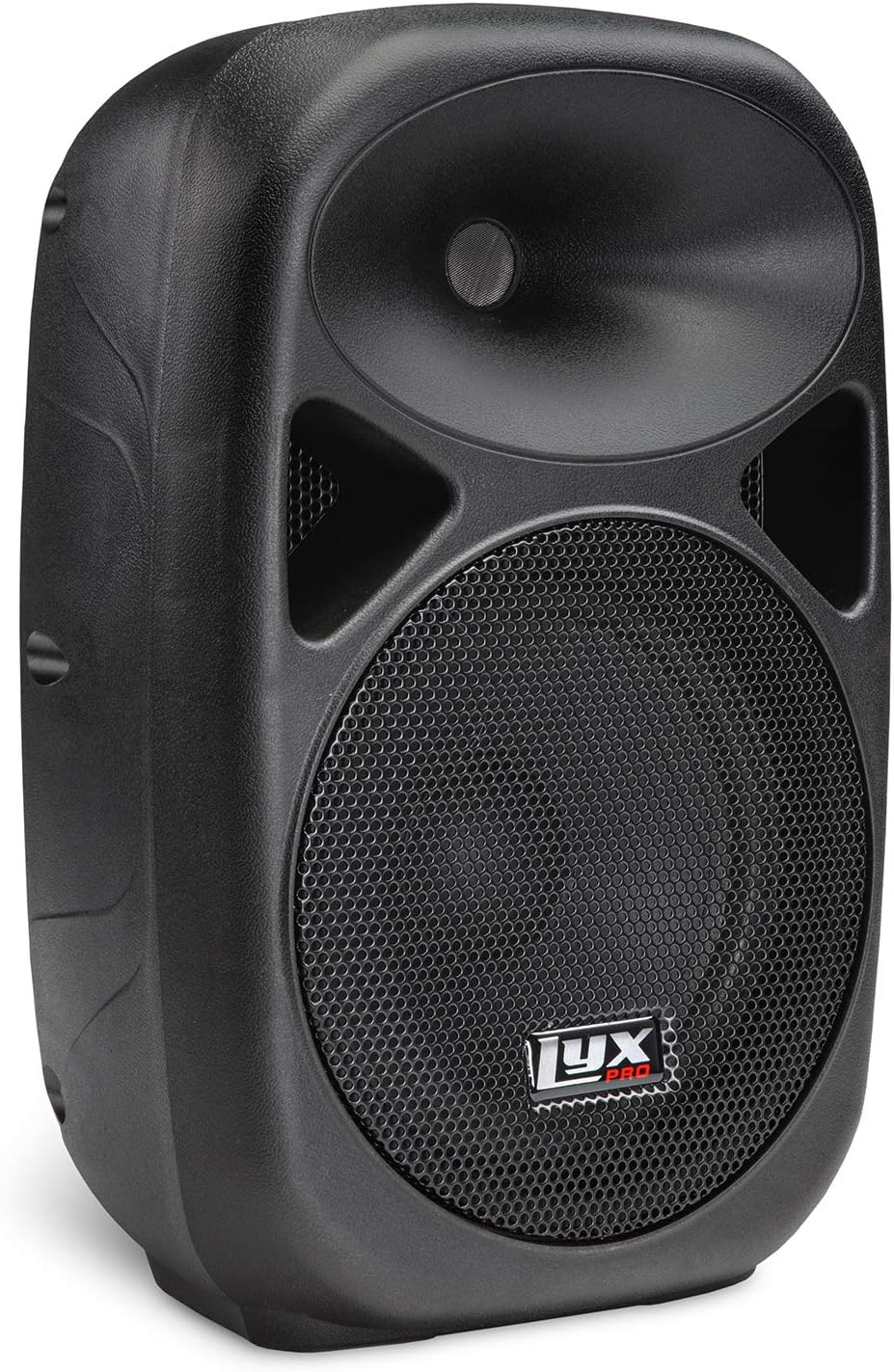
ചിത്രം 1: മുൻഭാഗം view of the LyxPro SPA-10 Portable PA Speaker.
2. പാക്കേജ് ഉള്ളടക്കം
താഴെ ലിസ്റ്റ് ചെയ്തിരിക്കുന്ന എല്ലാ ഇനങ്ങളും നിങ്ങളുടെ പാക്കേജിൽ ഉൾപ്പെടുത്തിയിട്ടുണ്ടെന്ന് ദയവായി പരിശോധിക്കുക:
- LyxPro SPA-10 10" Inch Portable PA Speaker
- പവർ കോർഡ്
- വിദൂര നിയന്ത്രണം (ബാധകമെങ്കിൽ)
- Various cables for input connections (if applicable)

Figure 2: Included accessories: power cord and remote control.
3. ഉൽപ്പന്ന സവിശേഷതകൾ
- Perfect Clear Sound and Performance: Professional powered 10" active PA system, compact and lightweight for easy transport (approx. 21 pounds).
- Great for Any Occasion and Location: Ideal for musical performances (guitar, piano, drums), indoor/outdoor parties, or public speaking.
- Multiple Easy Connections: Built-in Bluetooth for wireless streaming, MP3 EQ control section, SD Card Slot & USB Input, R/L RCA Inputs with Per-Input Level Knobs, XLR 1/4" Inputs with Mic/Line switch.
- Link Multiple Speakers at Once: Daisy chain multiple active speakers using a simple XLR cable for expanded sound coverage.

Figure 3: Integrated carry handle for easy portability.

Figure 4: Universal connectivity options including SD card, USB, and Bluetooth.
4. സജ്ജീകരണം
Follow these steps to set up your LyxPro SPA-10 speaker:
- പ്ലേസ്മെൻ്റ്: Position the speaker on a stable, flat surface or mount it on a compatible speaker stand. The bottom of the speaker features a standard 35mm pole mount with a tightening screw for secure installation.
- പവർ കണക്ഷൻ: Ensure the speaker's power switch is in the OFF position. Connect the provided power cord to the speaker's power input and then to a suitable electrical outlet.
- പ്രാരംഭ പവർ ഓൺ: Flip the power switch to the ON position. The 'Power' indicator light should illuminate.
- ഓഡിയോ സോഴ്സ് കണക്ഷൻ: Connect your desired audio source using one of the available inputs on the rear panel:
- Microphone/Line Input (XLR or 1/4"): For microphones or line-level instruments. Adjust the 'Volume 1' knob.
- Line Input (RCA or 3.5mm AUX): For connecting devices like MP3 players, phones, or mixers. Adjust the 'Volume 2' knob.
- ബ്ലൂടൂത്ത്: Activate Bluetooth on your device and pair with 'LyxPro SPA-10'.
- USB/SD കാർഡ്: Insert a USB drive or SD card into the respective slot for MP3/WMA playback.
- ഡെയ്സി ചെയിനിംഗ് (ഓപ്ഷണൽ): To connect multiple active speakers, use an XLR cable from the 'Mix Out' port of the first speaker to an input on the next active speaker.

Figure 5: Rear panel showing various inputs, outputs, and controls.

Figure 6: Speaker mounted on a stand, demonstrating the pole mount feature.
5. പ്രവർത്തന നിർദ്ദേശങ്ങൾ
Once set up, operate your LyxPro SPA-10 using the following guidelines:
- വോളിയം നിയന്ത്രണം: Use 'Volume 1' for Mic/Line Input and 'Volume 2' for Line Input (RCA/AUX). The 'MP3 Volume' knob controls the volume for Bluetooth, USB, and SD card playback.
- സമനില: Adjust the 'Treble' and 'Bass' knobs in the 'Equalizer' section to fine-tune the sound to your preference.
- ബ്ലൂടൂത്ത് പ്രവർത്തനം:
- സ്പീക്കർ ഓണാണെന്ന് ഉറപ്പാക്കുക.
- Select 'Bluetooth' mode using the 'MODE' button on the MP3 player section. The display will show 'BT'.
- On your device (smartphone, tablet, etc.), search for Bluetooth devices and select 'LyxPro SPA-10' to pair.
- ജോടിയാക്കിക്കഴിഞ്ഞാൽ, നിങ്ങൾക്ക് വയർലെസ് ആയി ഓഡിയോ സ്ട്രീം ചെയ്യാൻ കഴിയും.
- USB/SD കാർഡ് പ്ലേബാക്ക്:
- Insert a USB flash drive or SD card containing MP3/WMA fileഅനുബന്ധ സ്ലോട്ടിലേക്ക് എസ്.
- The speaker should automatically switch to USB or SD mode. If not, press the 'MODE' button.
- Use the playback controls (Play/Pause, Next/Previous Track) on the MP3 player section to manage your music.
- ക്ലിപ്പ് സൂചകം: The 'Clip' LED illuminates when the input signal is too high, indicating potential distortion. Reduce the input volume to prevent clipping.

Figure 7: Detail of equalizer and volume controls.
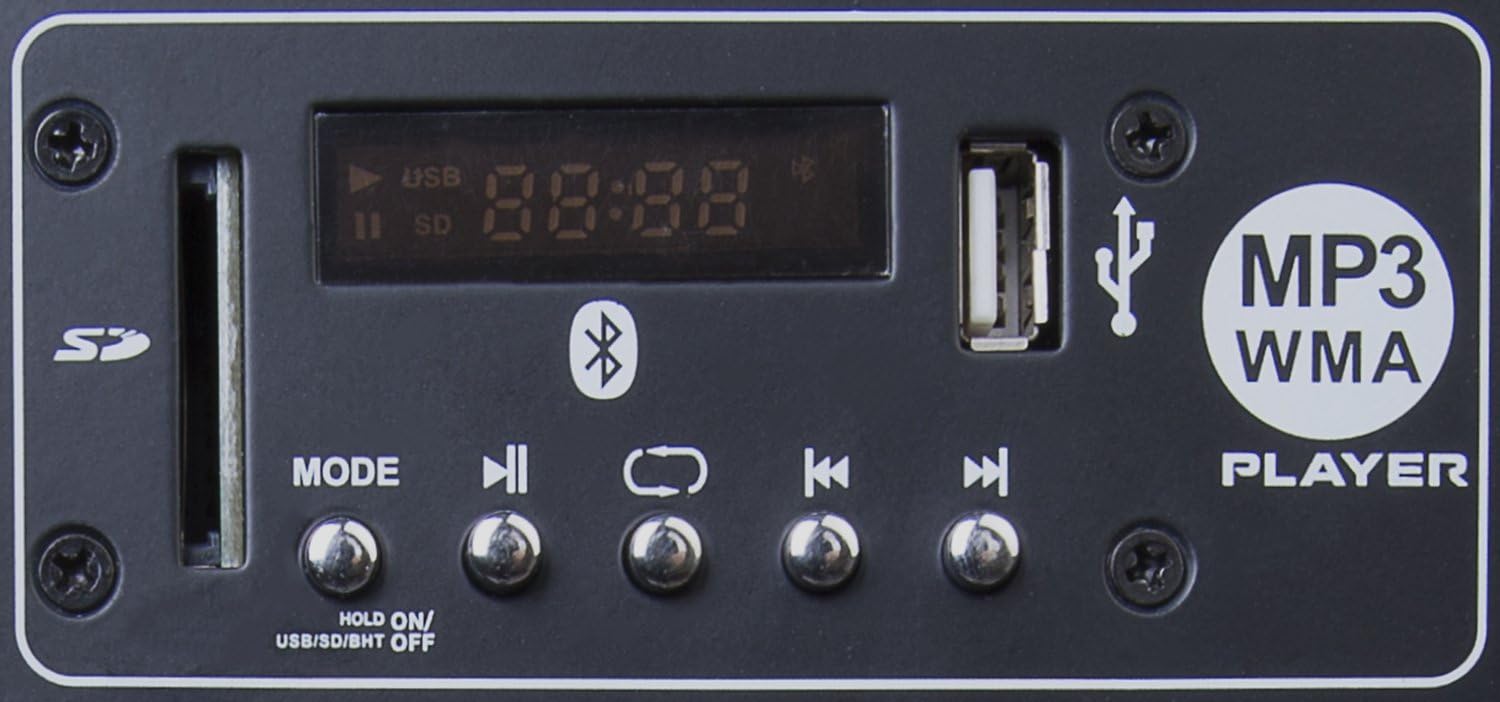
Figure 8: MP3 player section with SD card slot, USB port, and playback controls.
6. പരിപാലനം
To ensure the longevity and optimal performance of your LyxPro SPA-10 speaker, follow these maintenance tips:
- വൃത്തിയാക്കൽ: Use a soft, dry cloth to clean the exterior of the speaker. Avoid using abrasive cleaners, solvents, or strong chemicals, as they may damage the finish.
- സംഭരണം: When not in use, store the speaker in a cool, dry place away from direct sunlight, extreme temperatures, and excessive dust.
- കൈകാര്യം ചെയ്യൽ: Always use the integrated handle when moving the speaker. Avoid dropping or subjecting the speaker to strong impacts.
- വെൻ്റിലേഷൻ: Ensure proper ventilation around the speaker to prevent overheating. Do not block the ventilation openings.
7. പ്രശ്നപരിഹാരം
If you encounter issues with your LyxPro SPA-10 speaker, refer to the following common problems and solutions:
| പ്രശ്നം | സാധ്യമായ കാരണം | പരിഹാരം |
|---|---|---|
| ശക്തിയില്ല | Power cord not connected; Power switch off; Outlet malfunction | Ensure power cord is securely plugged in; Turn power switch ON; Try a different power outlet. |
| ശബ്ദ ഔട്ട്പുട്ട് ഇല്ല | Volume too low; Incorrect input selected; Audio source issue; Cables not connected properly | Increase master volume and individual input volumes; Verify correct input mode; Check audio source (e.g., phone volume); Re-connect all audio cables securely. |
| വികലമായ ശബ്ദം | Input signal too high (clipping); Equalizer settings incorrect; Speaker overloaded | Reduce input volume until 'Clip' LED is off; Adjust equalizer settings; Ensure speaker is not being driven beyond its capacity. |
| ബ്ലൂടൂത്ത് കണക്ഷൻ പ്രശ്നങ്ങൾ | Speaker not in Bluetooth mode; Device not paired; Interference | Select Bluetooth mode on speaker; Ensure device is discoverable and pair again; Move closer to speaker; Disconnect other Bluetooth devices. Note: Some users report needing to 'forget' the device on their phone before re-pairing if issues persist. |
| USB/SD കാർഡ് പ്ലേ ചെയ്യുന്നില്ല | തെറ്റാണ് file format; Card/drive corrupted; Not in correct mode | ഉറപ്പാക്കുക files are MP3/WMA format; Try a different USB/SD card; Select USB/SD mode using the 'MODE' button. |
8 സ്പെസിഫിക്കേഷനുകൾ
| ഫീച്ചർ | വിശദാംശങ്ങൾ |
|---|---|
| ബ്രാൻഡ് | LyxPro |
| മോഡലിൻ്റെ പേര് | 10 Inch (SPA10) |
| സ്പീക്കർ തരം | ഔട്ട്ഡോർ, വൂഫർ |
| പ്രത്യേക ഫീച്ചർ | Mp3 Section w, Bluetooth, SD Card Slot, Stereo pairing |
| ഉൽപ്പന്നത്തിനുള്ള ശുപാർശിത ഉപയോഗങ്ങൾ | മ്യൂസിക് പ്ലേയർമാർക്കായി |
| അനുയോജ്യമായ ഉപകരണങ്ങൾ | Piano, MP3 Player, Guitars, Keyboard, Electronic Drum |
| സബ് വൂഫർ വ്യാസം | 10 ഇഞ്ച് |
| യൂണിറ്റ് എണ്ണം | 1 എണ്ണം |
| കൺട്രോളർ തരം | ബട്ടൺ |
| നിറം | കറുപ്പ് |
| ഉൽപ്പന്ന അളവുകൾ | 10"D x 12.5"W x 19.5"H |
| പ്രതിരോധം | 4 ഓം |
| വാട്ടർപ്രൂഫ് ആണ് | തെറ്റ് |
| ചാർജിംഗ് സമയം | 10 മണിക്കൂർ |
| വയർലെസ് കമ്മ്യൂണിക്കേഷൻ ടെക്നോളജി | ബ്ലൂടൂത്ത് |
| സ്പീക്കർ വലിപ്പം | 10 ഇഞ്ച് |
| പവർ ഉറവിടം | കോർഡഡ് ഇലക്ട്രിക് |
| ഓഡിയോ ഡ്രൈവർ തരം | ഡൈനാമിക് ഡ്രൈവർ |
| മൈക്രോഫോണുകളുടെ എണ്ണം | 1 |
| സബ്വൂഫർ കണക്റ്റിവിറ്റി സാങ്കേതികവിദ്യ | വയർഡ് |
| കണക്റ്റിവിറ്റി പ്രോട്ടോക്കോൾ | ബ്ലൂടൂത്ത്, യുഎസ്ബി |
| MP3 പ്ലെയർ ഉൾപ്പെടുമോ? | അതെ |
| സർക്യൂട്ടുകളുടെ എണ്ണം | 1 |
| പവർ ലെവലുകളുടെ എണ്ണം | 1 |
| USB 2 പോർട്ടുകളുടെ എണ്ണം | 1 |
| ഉൽപ്പന്നത്തിൻ്റെ പ്രത്യേക ഉപയോഗങ്ങൾ | Live performances, presentations, educational settings |
| നിർമ്മാതാവ് | LyxPro |
| ഇനത്തിൻ്റെ ഭാരം | 17.36 പൗണ്ട് |
| സ്പീക്കർ പരമാവധി ഔട്ട്പുട്ട് പവർ | 110 വാട്ട്സ് |
| കണക്റ്റിവിറ്റി ടെക്നോളജി | XLR , 1/4 |
| ഓഡിയോ put ട്ട്പുട്ട് മോഡ് | Stereo, possibly others |
| മൗണ്ടിംഗ് തരം | Freestanding,Inside Mount,Outside Mount,Plug Mount |
9. വാറൻ്റിയും പിന്തുണയും
The LyxPro SPA-10 comes with a പരിമിത വാറൻ്റി. For specific details regarding warranty coverage, duration, and terms, please refer to the warranty card included with your product or contact LyxPro customer support directly.
For technical assistance, troubleshooting beyond this manual, or service inquiries, please visit the official LyxPro website or contact their customer support team. Keep your purchase receipt as proof of purchase for any warranty claims.


