1. ആമുഖം
The Pantone 5-Light Booth P5D65840 is a specialized color assessment cabinet designed to provide consistent and controlled lighting environments for accurate color evaluation. This device allows users to observe how colors appear under various standard light sources, helping to identify metameric effects and ensure color consistency across different viewing conditions. It is an essential tool for professionals in industries such as printing, manufacturing, and textiles where precise color matching is critical.
This manual provides comprehensive instructions for the setup, operation, maintenance, and troubleshooting of your Pantone 5-Light Booth.
2 സുരക്ഷാ വിവരങ്ങൾ
Please read all safety instructions carefully before operating the Pantone 5-Light Booth. Retain this manual for future reference.
- ഇലക്ട്രിക്കൽ സുരക്ഷ: പവർ സ്രോതസ്സ് വോള്യവുമായി പൊരുത്തപ്പെടുന്നുണ്ടെന്ന് ഉറപ്പാക്കുകtage requirements specified on the product label (120 Volts). Do not operate the unit with a damaged power cord or plug.
- പ്ലേസ്മെൻ്റ്: Place the booth on a stable, level surface. Ensure adequate ventilation around the unit to prevent overheating.
- കൈകാര്യം ചെയ്യൽ: The unit contains fluorescent lamps. Handle with care to avoid breakage.
- ഇൻഡോർ ഉപയോഗത്തിന് മാത്രം: This product is designed for indoor use in a controlled environment.
- വൃത്തിയാക്കൽ: Disconnect power before cleaning. Use a soft, dry cloth. Avoid abrasive cleaners or liquids that could damage electrical components.
3. എന്താണ് ഉൾപ്പെടുത്തിയിരിക്കുന്നത്
Upon unpacking, verify that the following components are present:
- Pantone 5-Light Booth Unit
- പവർ കോർഡ്
- ഉപയോക്തൃ മാനുവൽ (ഈ പ്രമാണം)
4. സജ്ജീകരണം
Follow these steps to set up your Pantone 5-Light Booth:
- യൂണിറ്റ് അൺപാക്ക് ചെയ്യുക: Carefully remove the light booth from its packaging. Inspect for any signs of damage during transit.
- പ്ലേസ്മെൻ്റ്: Position the light booth on a sturdy, flat surface in an area free from direct sunlight or other strong ambient light sources that could interfere with color assessment. Ensure sufficient space for air circulation.
- പവർ ബന്ധിപ്പിക്കുക: Plug the power cord into the designated power input on the back of the unit, then plug the other end into a standard 120V AC electrical outlet.
- പ്രാഥമിക പരിശോധന: Before first use, ensure all lampകൾ സുരക്ഷിതമായി സ്ഥാപിച്ചിരിക്കുന്നു.

Image 1: The Pantone 5-Light Booth with a color swatch book placed inside for assessment.
5. പ്രവർത്തന നിർദ്ദേശങ്ങൾ
The Pantone 5-Light Booth features a control panel with buttons to select different lighting conditions. Each setting is designed to simulate a specific environment for accurate color evaluation.

Image 2: Control panel of the Pantone 5-Light Booth, showing buttons for various light settings.
5.1. Light Settings
- Daylight (D65):
This setting simulates standard daylight with a color temperature of 6,500K. It is ideal for assessing colors as they would appear under natural outdoor light, such as morning or late afternoon horizon light. Use this setting for general color evaluation where natural light conditions are the primary concern.

Image 3: Objects viewed under the D65 Daylight setting.
- Store 1 (CWF - Cool White Fluorescent):
This setting replicates typical fluorescent lighting found in many retail stores and industrial environments in the USA. It helps to evaluate how products will appear to consumers under common commercial lighting conditions.

Image 4: Objects viewed under the CWF Store 1 setting.
- Store 2 (TL84):
This setting simulates another common fluorescent lighting condition, often found in European and Asian retail environments. It is useful for assessing products intended for international markets.
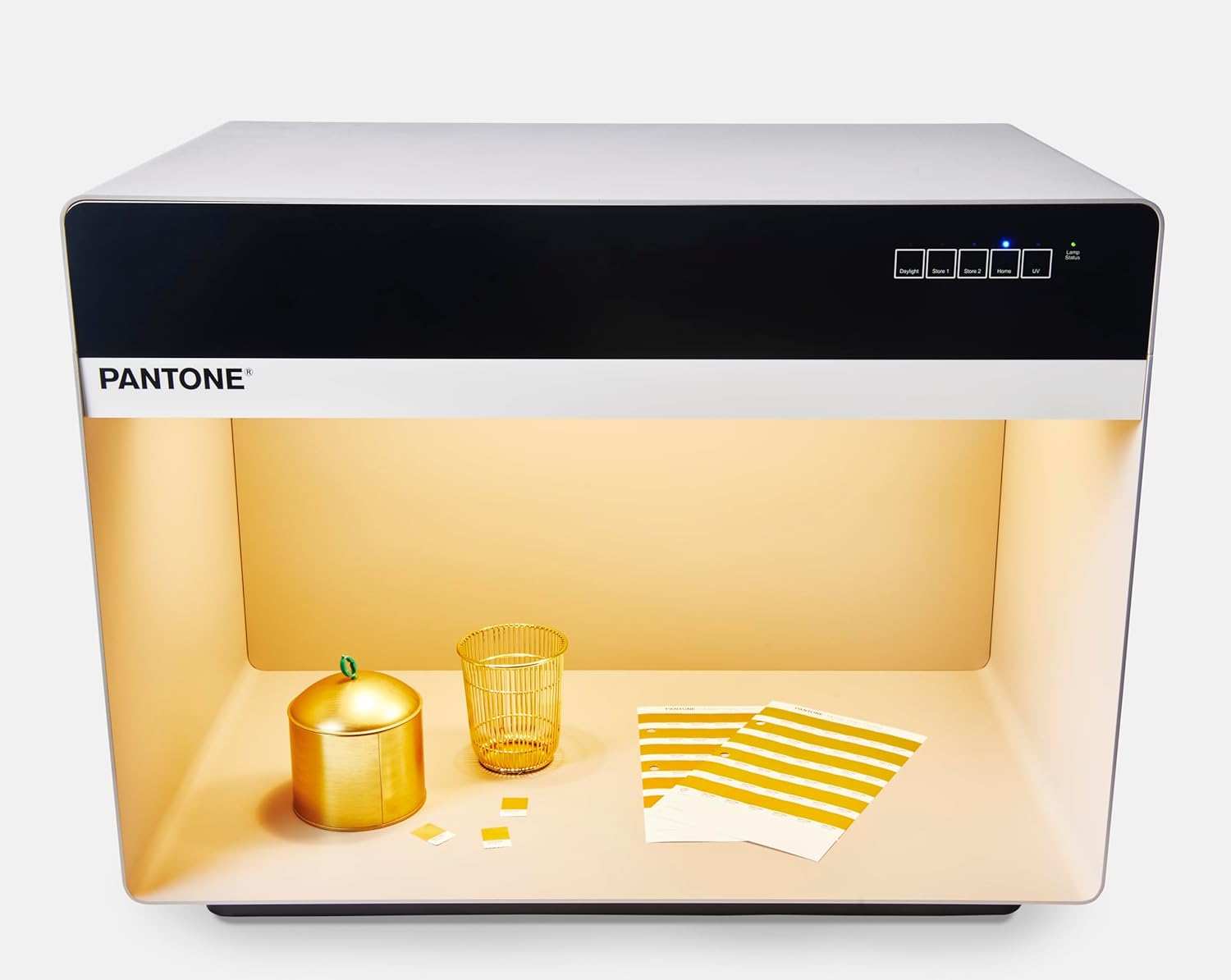
Image 5: Objects viewed under the TL84 Store 2 setting.
- Home (A - Tungsten):
This setting reproduces typical residential incandescent lighting, often referred to as 'Home A' illuminant. It allows for the evaluation of colors as they would appear in a home environment, which is crucial for products like textiles, paints, and home decor.

Image 6: Objects viewed under the Home A setting.
- UV (Ultraviolet):
The UV setting allows for the detection of optical brighteners or fluorescent dyes present in materials. These additives can significantly alter the appearance of colors under natural light, making UV assessment important for quality control.

Image 7: Objects viewed under the UV setting.
5.2. പൊതു പ്രവർത്തനം
- Place the item(s) to be assessed inside the booth.
- Press the desired light source button on the control panel. The corresponding indicator light will illuminate.
- Observe the color of the item under the selected light.
- Switch between different light sources to identify metamerism or color shifts.
- When finished, turn off the light booth by pressing the power button or disconnecting the power cord.
6. പരിപാലനം
Regular maintenance ensures the longevity and accuracy of your Pantone 5-Light Booth.
- വൃത്തിയാക്കൽ: Keep the interior and exterior surfaces of the booth clean. Use a soft, lint-free cloth to wipe down surfaces. For stubborn marks, a slightly damp cloth with mild soap can be used, followed by a dry cloth. Ensure no liquid enters the electrical components.
- Lamp മാറ്റിസ്ഥാപിക്കൽ: ഫ്ലൂറസന്റ് എൽamps have a limited lifespan. When a lamp begins to flicker, dim, or fails to illuminate, it should be replaced. Refer to the specifications for correct lamp types. Always disconnect power before attempting lamp മാറ്റിസ്ഥാപിക്കൽ.
- സംഭരണം: When not in use for extended periods, store the booth in a clean, dry environment, protected from dust and extreme temperatures.
7. പ്രശ്നപരിഹാരം
This section addresses common issues you might encounter with your light booth.
| പ്രശ്നം | സാധ്യമായ കാരണം | പരിഹാരം |
|---|---|---|
| Booth does not power on. | No power supply; loose power cord; faulty outlet. | Check power cord connection; try a different outlet; ensure power switch is on. |
| ഒന്നോ അതിലധികമോ എൽampകൾ പ്രകാശിക്കുന്നില്ല. | Lamp is loose; lamp has reached end of life; faulty lamp starter (if applicable). | ഉറപ്പാക്കുക എൽamp is securely seated; replace the lamp; consult support if issue persists after lamp മാറ്റിസ്ഥാപിക്കൽ. |
| Inconsistent color assessment. | External light interference; dirty viewing area; aged lamps. | Ensure booth is in a dark, controlled environment; clean viewing surfaces; replace aged lamps. |
| ബട്ടണുകൾ പ്രതികരിക്കുന്നില്ല. | Temporary electrical glitch; control panel malfunction. | Disconnect and reconnect power; if issue persists, contact customer support. |
8 സ്പെസിഫിക്കേഷനുകൾ
| ഫീച്ചർ | വിശദാംശങ്ങൾ |
|---|---|
| ബ്രാൻഡ് | പാന്റോൺ |
| മോഡലിൻ്റെ പേര് | 5 Light Booth - P5D65840 |
| ഉൽപ്പന്ന അളവുകൾ | 24"L x 22"W x 31.5"H (60.96 സെ.മീ L x 55.88 സെ.മീ W x 80.01 സെ.മീ H) |
| ഇനത്തിൻ്റെ ഭാരം | 1 പൗണ്ട് (0.45 കി.ഗ്രാം) |
| മെറ്റീരിയൽ | അലുമിനിയം |
| പ്രകാശ സ്രോതസ്സുകളുടെ എണ്ണം | 5 |
| പ്രകാശ സ്രോതസ്സ് തരം | ഫ്ലൂറസെൻ്റ് |
| വാല്യംtage | 120 വോൾട്ട് |
| നിയന്ത്രണ രീതി | ടച്ച് / പുഷ് ബട്ടൺ |
| ഉൾപ്പെടുത്തിയ ഘടകങ്ങൾ | ലൈറ്റ് ബൂത്ത് |
| ഇൻഡോർ/ഔട്ട്ഡോർ ഉപയോഗം | ഇൻഡോർ |
| പ്രത്യേക ഫീച്ചർ | Color Changing (referring to light settings) |
9. വാറൻ്റി വിവരങ്ങൾ
Pantone products are manufactured to high-quality standards. For specific warranty terms and conditions applicable to your Pantone 5-Light Booth P5D65840, please refer to the warranty card included with your purchase or visit the official Pantone webസൈറ്റ്. വാറന്റി ക്ലെയിമുകൾക്കായി നിങ്ങളുടെ വാങ്ങലിന്റെ തെളിവ് സൂക്ഷിക്കുക.
10. ഉപഭോക്തൃ പിന്തുണ
If you require assistance with your Pantone 5-Light Booth, have questions about its operation, or need to report a technical issue, please contact Pantone Customer Support.
- ഓൺലൈൻ പിന്തുണ: Visit the official Pantone webപതിവുചോദ്യങ്ങൾ, പിന്തുണാ ഉറവിടങ്ങൾ, കോൺടാക്റ്റ് ഫോമുകൾ എന്നിവയ്ക്കുള്ള സൈറ്റ്.
- ബന്ധപ്പെടാനുള്ള വിവരങ്ങൾ: Refer to the product packaging or the official Pantone webഏറ്റവും പുതിയ ഉപഭോക്തൃ സേവന കോൺടാക്റ്റ് വിശദാംശങ്ങൾക്കായുള്ള സൈറ്റ്.


