ആമുഖം
This manual provides essential information for the safe and efficient operation of your Tripp Lite SMX1500LCDT SmartPro Line-Interactive Uninterruptible Power Supply (UPS). Please read all instructions carefully before installation and use. This UPS is designed to provide reliable battery backup and surge protection for connected electronic equipment.
പ്രധാനപ്പെട്ട സുരക്ഷാ നിർദ്ദേശങ്ങൾ
Failure to follow these instructions may result in fire, electric shock, or serious injury.
- This UPS contains hazardous voltages. Do not attempt to open the UPS enclosure. Servicing should only be performed by qualified service personnel.
- Connect the UPS to a properly grounded AC power outlet. Do not use extension cords or adapters.
- മെഡിക്കൽ ഉപകരണങ്ങൾ, ലൈഫ് സപ്പോർട്ട് ഉപകരണങ്ങൾ, മൈക്രോവേവ് ഓവനുകൾ, അല്ലെങ്കിൽ വാക്വം ക്ലീനറുകൾ എന്നിവ പോലുള്ള കമ്പ്യൂട്ടറുമായി ബന്ധമില്ലാത്ത ഇനങ്ങൾ യുപിഎസുമായി ബന്ധിപ്പിക്കരുത്.
- Position the UPS in a well-ventilated area, away from direct sunlight, heat sources, and excessive moisture.
- Ensure the total current draw of connected equipment does not exceed the UPS's rated capacity.
- The battery inside the UPS is not user-replaceable. Refer to qualified service personnel for battery replacement.
പാക്കേജ് ഉള്ളടക്കം
താഴെ ലിസ്റ്റ് ചെയ്തിരിക്കുന്ന എല്ലാ ഇനങ്ങളും നിങ്ങളുടെ പാക്കേജിൽ ഉൾപ്പെടുത്തിയിട്ടുണ്ടെന്ന് ഉറപ്പാക്കുക:
- Tripp Lite SMX1500LCDT UPS Unit
- USB കേബിൾ
- പവർ കോർഡ്
- ഇൻസ്ട്രക്ഷൻ മാനുവൽ

Image: The Tripp Lite SMX1500LCDT UPS unit shown with its accompanying USB cable, power cord, and the instruction manual, illustrating the complete package contents.
സജ്ജമാക്കുക
1. പ്ലേസ്മെന്റ്
Place the UPS on a flat, stable surface. Ensure adequate airflow around the unit. The UPS can be positioned as a tower or mounted in a rack (rackmount hardware sold separately).
2 ശക്തിയിലേക്ക് ബന്ധിപ്പിക്കുന്നു
- Connect the provided power cord to the UPS input receptacle.
- Plug the other end of the power cord into a grounded AC wall outlet.
- Allow the UPS to charge for 24 hours before initial use to ensure full battery capacity.
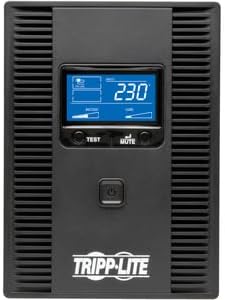
ചിത്രം: മുൻഭാഗം view of the Tripp Lite SMX1500LCDT UPS, highlighting the LCD display and the main power button for user interaction.

ചിത്രം: പിൻഭാഗം view of the Tripp Lite SMX1500LCDT UPS, displaying the AC input, various output outlets (battery backup and surge-only), and communication ports for connectivity.
3. ബന്ധിപ്പിക്കുന്ന ഉപകരണങ്ങൾ
Connect your electronic devices to the appropriate outlets on the rear of the UPS:
- Battery Backup & Surge Protected Outlets: These outlets provide both battery backup power during outages and surge protection. Connect critical equipment such as computers, monitors, and network devices here.
- സർജ്-ഒൺലി സംരക്ഷിത ഔട്ട്ലെറ്റുകൾ: These outlets provide surge protection only and do not offer battery backup. Connect non-critical peripherals like printers or scanners here.
4. USB Communication Port
Connect the provided USB cable from the UPS's USB port to a USB port on your computer. This allows your computer to communicate with the UPS for automatic shutdown, monitoring, and power management features using Tripp Lite's PowerAlert software (available for download from the Tripp Lite webസൈറ്റ്).
യുപിഎസ് പ്രവർത്തിപ്പിക്കുന്നു
1. പവർ ഓൺ/ഓഫ്
- പവർ ഓണാക്കാൻ: Press and hold the power button on the front panel for approximately two seconds until you hear a beep. The LCD display will illuminate.
- പവർ ഓഫ് ചെയ്യാൻ: Press and hold the power button for approximately two seconds until the UPS powers down.
2. എൽസിഡി ഡിസ്പ്ലേ
The front panel LCD provides real-time operational status and diagnostic information. Use the 'TEST' and 'MUTE' buttons to navigate through display screens and perform functions.

ചിത്രം: ഒരു ആംഗിൾ view of the Tripp Lite SMX1500LCDT UPS, prominently featuring its illuminated LCD display which shows operational data such as voltagഇ, ലോഡ്.
3. Self-Test Function
To perform a self-test, press and hold the 'TEST' button for a few seconds. The UPS will switch to battery power for a short period to test the battery and internal circuitry. The LCD will indicate the test status.
4. Mute Alarm
ഒരു വൈദ്യുതി സമയത്ത് outage or other alarm condition, the UPS will emit an audible alarm. Press the 'MUTE' button to silence the alarm temporarily. The alarm will reactivate if the condition persists or changes.
മെയിൻ്റനൻസ്
1. ബാറ്ററി മാറ്റിസ്ഥാപിക്കൽ
The internal battery is not user-serviceable. If the UPS indicates a battery fault or the battery runtime significantly decreases, contact Tripp Lite customer support or a qualified service technician for battery replacement. Using incorrect batteries can pose a safety risk.
2. വൃത്തിയാക്കൽ
Periodically clean the exterior of the UPS with a soft, dry cloth. Do not use liquid or aerosol cleaners. Ensure ventilation openings are free from dust and debris to maintain proper airflow.
ട്രബിൾഷൂട്ടിംഗ്
പൊതുവായ പ്രശ്നങ്ങളും അവയുടെ പരിഹാരങ്ങളും അറിയാൻ താഴെയുള്ള പട്ടിക കാണുക.
| പ്രശ്നം | സാധ്യമായ കാരണം | പരിഹാരം |
|---|---|---|
| യുപിഎസ് ഓണാകുന്നില്ല. | No AC input power; Battery discharged. | Ensure UPS is plugged into a live AC outlet. Allow 24 hours for initial battery charge. |
| സാധാരണ മോഡിൽ യുപിഎസ് തുടർച്ചയായി ബീപ്പ് ചെയ്യുന്നു. | ഓവർലോഡ് അവസ്ഥ. | Reduce the load by unplugging non-essential equipment from battery backup outlets. |
| യുപിഎസ് ഇടയ്ക്കിടെ ബാറ്ററി മോഡിലേക്ക് മാറുന്നു. | Unstable AC input power; Sensitivity setting too high. | Check AC power quality. Adjust UPS sensitivity setting via PowerAlert software if applicable. |
| ബാറ്ററി റൺടൈം പ്രതീക്ഷിച്ചതിലും കുറവാണ്. | Battery is old or not fully charged; Overload. | Allow 24 hours for battery to fully charge. Reduce connected load. Contact service for battery replacement if necessary. |
| എൽസിഡി ഡിസ്പ്ലേ ശൂന്യമാണ്. | UPS is off; Display sleep mode. | Press the power button to turn on. Press any button to wake the display. |
സ്പെസിഫിക്കേഷനുകൾ
- മോഡൽ: SMX1500LCDT
- ശേഷി: 1500VA / 900W
- ഇൻപുട്ട് വോളിയംtage: 230V
- Putട്ട്പുട്ട് വോളിയംtage: 230V
- ബാറ്ററി തരം: സീൽഡ് ലെഡ് ആസിഡ്
- അളവുകൾ (H x W x D): 19.3 x 9.1 x 11.3 ഇഞ്ച് (ഏകദേശം)
- ഭാരം: 0.16 ounces (This weight seems incorrect based on typical UPS units. Please refer to product packaging or official specifications for accurate weight.)
- പ്രവർത്തന താപനില: 0°C മുതൽ 40°C വരെ (32°F മുതൽ 104°F വരെ)
വാറൻ്റിയും പിന്തുണയും
Tripp Lite products are backed by a limited warranty. For specific warranty terms and conditions, please refer to the warranty card included with your product or visit the official Tripp Lite website. For technical support, product registration, or service inquiries, please contact Tripp Lite customer service through their official webസൈറ്റ് അല്ലെങ്കിൽ നിങ്ങളുടെ ഉൽപ്പന്ന ഡോക്യുമെന്റേഷനിൽ നൽകിയിരിക്കുന്ന ബന്ധപ്പെടാനുള്ള വിവരങ്ങൾ.


