ആമുഖം
This manual provides detailed instructions for the Somic G932 Virtual 7.1 Surround Sound Gaming Headset. Please read this manual thoroughly before using the product to ensure proper operation and to maximize your gaming experience.

ചിത്രം: മുൻഭാഗം view of the Somic G932 Gaming Headset, showcasing its design and orange LED lighting on the earcups.
പാക്കേജ് ഉള്ളടക്കം
പാക്കേജിൽ എല്ലാ ഇനങ്ങളും ഉണ്ടെന്ന് ഉറപ്പാക്കുക:
- Somic G932 Virtual 7.1 Surround Sound Gaming Headset
- Product Instruction Manual (this document)
- വാറൻ്റി കാർഡ്
സജ്ജീകരണ നിർദ്ദേശങ്ങൾ
ഹെഡ്സെറ്റ് ബന്ധിപ്പിക്കുന്നു
The Somic G932 headset connects via a USB plug. It is compatible with PCs, PS4, and laptops.
- Connect to PC/Laptop: Insert the USB plug of the headset into an available USB port on your computer. The operating system should automatically detect and install the necessary drivers.
- PS4-ലേക്ക് കണക്റ്റുചെയ്യുക: Insert the USB plug into an available USB port on your PlayStation 4 console. Navigate to the PS4 settings to configure audio output if necessary.
Virtual 7.1 Surround Sound Setup
For optimal Virtual 7.1 Surround Sound experience, ensure the headset's dedicated software (if available from Somic's official website) is installed on your PC. This software allows for customization of audio profiles and surround sound settings.
ഹെഡ്സെറ്റ് പ്രവർത്തിപ്പിക്കുന്നു
മൈക്രോഫോൺ ഉപയോഗം
The headset features an adjustable, omnidirectional microphone. It can be positioned for optimal voice capture.

Image: Somic G932 headset showing the adjustable and retractable omnidirectional microphone in an extended position.
- മൈക്രോഫോൺ ക്രമീകരിക്കുന്നു: Gently bend the microphone arm to position it closer to your mouth for clear communication.
- Retracting the Microphone: When not in use, the microphone can be retracted for convenience.
In-Line Control Functions
The headset features an in-line control unit for easy access to audio adjustments.

ചിത്രം: വിശദമായത് view of the in-line control unit, highlighting buttons for volume adjustment, microphone control, and LED light control.
- Volume + (1): Press to increase the headset volume.
- Volume - (2): Press to decrease the headset volume.
- Mic Control (3): Toggle this switch to mute or unmute the microphone. A light indicator on the microphone tip will show its status (e.g., lit when active, off when muted).
- Light Control (4): Toggle this switch to turn the LED lights on the earcups on or off.
ഹെഡ്സെറ്റ് ധരിക്കുന്നു
The headset features a lightweight and self-adjusting headband design for comfort during extended use. The large-sized earmuffs are designed for passive noise reduction and comfort.
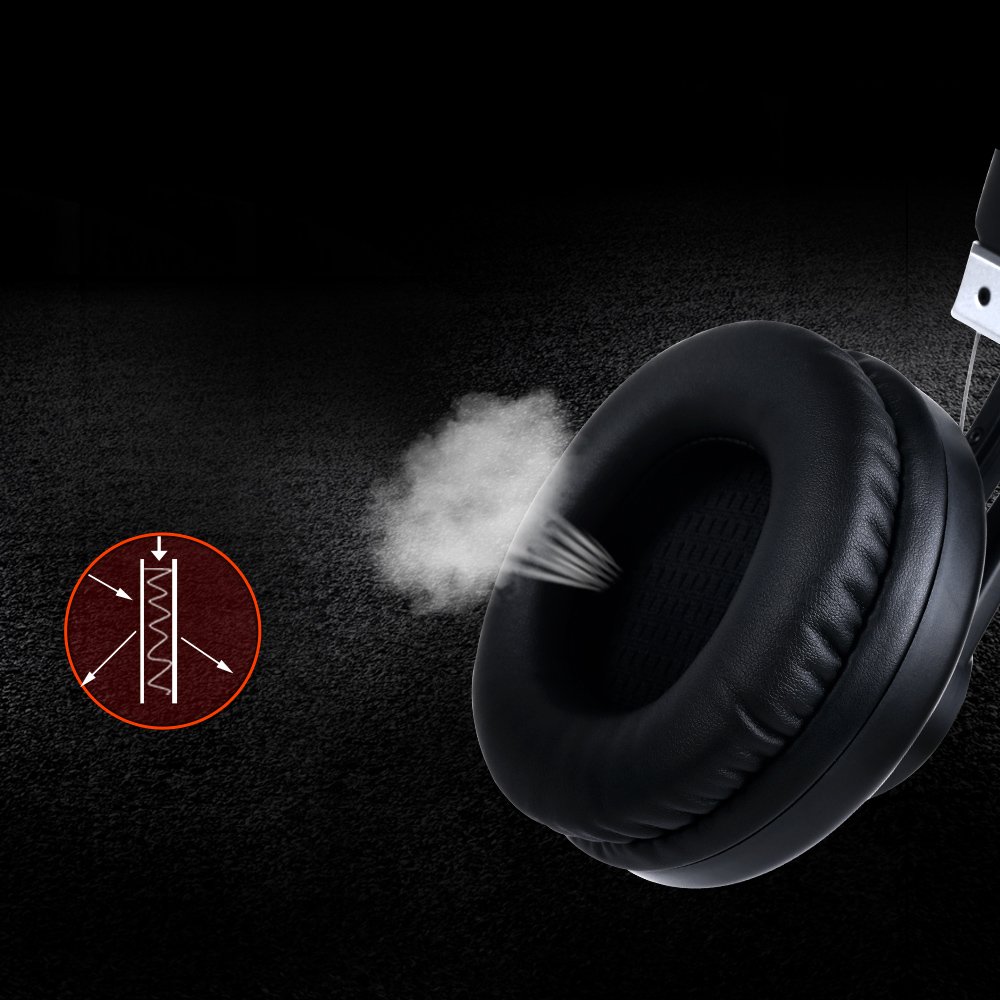
Image: Close-up of an earcup, illustrating the breathable material and design for comfort and passive noise reduction.
പരിപാലനവും പരിചരണവും
Proper maintenance ensures the longevity and performance of your Somic G932 headset.
- വൃത്തിയാക്കൽ: ഹെഡ്സെറ്റ് വൃത്തിയാക്കാൻ മൃദുവായതും ഉണങ്ങിയതുമായ തുണി ഉപയോഗിക്കുക. അബ്രസീവ് ക്ലീനറുകളോ ലായകങ്ങളോ ഉപയോഗിക്കരുത്.
- സംഭരണം: ഹെഡ്സെറ്റ് നേരിട്ട് സൂര്യപ്രകാശം ഏൽക്കാത്തതും ഉയർന്ന താപനില ഏൽക്കാത്തതുമായ ഒരു തണുത്ത വരണ്ട സ്ഥലത്ത് സൂക്ഷിക്കുക.
- കേബിൾ കെയർ: കേബിളിന് കേടുപാടുകൾ സംഭവിക്കാതിരിക്കാൻ മൂർച്ചയുള്ള വളവുകളോ അമിതമായി വലിക്കുന്നതോ ഒഴിവാക്കുക.
- ഇയർമഫ്സ്: Periodically check earmuffs for wear and tear.
ട്രബിൾഷൂട്ടിംഗ്
If you encounter issues with your Somic G932 headset, refer to the following common solutions:
- ശബ്ദമില്ല:
- Ensure the USB plug is fully inserted into the port.
- Check the in-line volume control to ensure it is not set to minimum.
- Verify audio settings on your computer or console (e.g., default playback device).
- ഒരു ഉപകരണ-നിർദ്ദിഷ്ട പ്രശ്നം ഒഴിവാക്കാൻ മറ്റൊരു ഉപകരണത്തിൽ ഹെഡ്സെറ്റ് പരിശോധിക്കുക.
- മൈക്രോഫോൺ പ്രവർത്തിക്കുന്നില്ല:
- Ensure the microphone mute switch on the in-line control is in the "unmuted" position.
- Check microphone settings in your computer's or console's sound control panel.
- Confirm the microphone is positioned correctly and not obstructed.
- Virtual 7.1 Surround Sound Not Functioning:
- Ensure the dedicated Somic audio software is installed and configured correctly on your PC.
- Verify that the 7.1 surround sound option is enabled within the software or your system's audio settings.
സാങ്കേതിക സവിശേഷതകൾ
Below are the technical specifications for the Somic G932 Gaming Headset.

Image: Chart displaying key technical specifications for the Somic G932 headset, including microphone dimensions, impedance, and driver diameter.
| ഫീച്ചർ | സ്പെസിഫിക്കേഷൻ |
|---|---|
| മോഡൽ നമ്പർ | G932 |
| കണക്റ്റിവിറ്റി ടെക്നോളജി | വയർഡ് (യുഎസ്ബി) |
| മൈക്രോഫോൺ അളവുകൾ | Ø4.0 X 1.5 മി.മീ. |
| മൈക്രോഫോൺ ഡയറക്റ്റിവിറ്റി | ഓമ്നിഡയറക്ഷണൽ |
| മൈക്രോഫോൺ ഇംപെഡൻസ് | <=2.2kΩ |
| മൈക്രോഫോൺ സെൻസിറ്റിവിറ്റി | -47±3dB (at 1KHz) |
| ഡ്രൈവർ വ്യാസം | Ø50mm |
| സംവേദനക്ഷമത (SPL) | 105±3dB (at 1KHz) |
| പ്രതിരോധം | 32Ω |
| ഫ്രീക്വൻസി പ്രതികരണം | 20Hz-20kHz |
| ചരട് നീളം | > = 2.2 മി |
| മൊത്തം ഭാരം | 378 ഗ്രാം |
| ഉൽപ്പന്ന അളവുകൾ (LxWxH) | 20.32 x 17.78 x 8.89 സെ.മീ |
| മെറ്റീരിയൽ | പ്ലാസ്റ്റിക് |
| നിറം | കറുപ്പ് |
| ശബ്ദ നിയന്ത്രണം | നിഷ്ക്രിയ ശബ്ദം കുറയ്ക്കൽ |
വാറൻ്റി വിവരങ്ങൾ
The Somic G932 Gaming Headset comes with a 1 വർഷത്തെ വാറൻ്റി from the date of purchase. Please retain your purchase receipt and the included Warranty Card for any warranty claims. The warranty covers manufacturing defects and malfunctions under normal use conditions.
For detailed terms and conditions, refer to the Warranty Card provided in your package.
ഉപഭോക്തൃ പിന്തുണ
If you require further assistance or have questions not covered in this manual, please contact Somic customer support. Refer to the contact information provided on the Warranty Card or visit the official Somic webപിന്തുണാ ഉറവിടങ്ങൾക്കായുള്ള സൈറ്റ്.


