ആമുഖം
This manual provides essential information for the proper setup, operation, and maintenance of your RCA Cambio 10.1 W101 V2 Windows 10 2-in-1 Tablet PC. Please read these instructions thoroughly before using your device to ensure optimal performance and longevity.
The RCA Cambio 10.1 W101 V2 is a versatile 10-inch tablet powered by an Intel quad-core processor and preloaded with Windows 10. It features a detachable keyboard, allowing for flexible use as both a tablet and a laptop. Key features include Bluetooth connectivity, front and rear 2MP cameras, and 32GB of internal storage.
സജ്ജമാക്കുക
1. അൺബോക്സിംഗും പ്രാരംഭ പരിശോധനയും
പാക്കേജിംഗിൽ നിന്ന് എല്ലാ ഘടകങ്ങളും ശ്രദ്ധാപൂർവ്വം നീക്കം ചെയ്യുക. ഇനിപ്പറയുന്ന ഇനങ്ങൾ ഉണ്ടെന്ന് ഉറപ്പാക്കുക:
- RCA Cambio 10.1 W101 V2 Tablet
- വേർപെടുത്താവുന്ന കീബോർഡ്
- പവർ അഡാപ്റ്റർ
Inspect the device for any visible damage. If any components are missing or damaged, contact customer support.
2 ഉപകരണം ചാർജ് ചെയ്യുന്നു
Before first use, fully charge the tablet. Connect the power adapter to the charging port on the tablet and then to a power outlet. The charging indicator will illuminate. A full charge may take several hours.
3. Attaching the Detachable Keyboard
Align the tablet with the magnetic connector on the detachable keyboard. Gently push the tablet down until it securely clicks into place. The keyboard does not require separate power or pairing.

ചിത്രം: പിൻഭാഗം view of the RCA Cambio 10.1 W101 V2 tablet with the detachable keyboard attached, illustrating the connection point and available ports.
4. പ്രാരംഭ പവർ ഓണും വിൻഡോസ് 10 സജ്ജീകരണവും
Press and hold the power button located on the side of the tablet until the screen illuminates. Follow the on-screen prompts to complete the initial Windows 10 setup, including language selection, network connection, and user account creation.
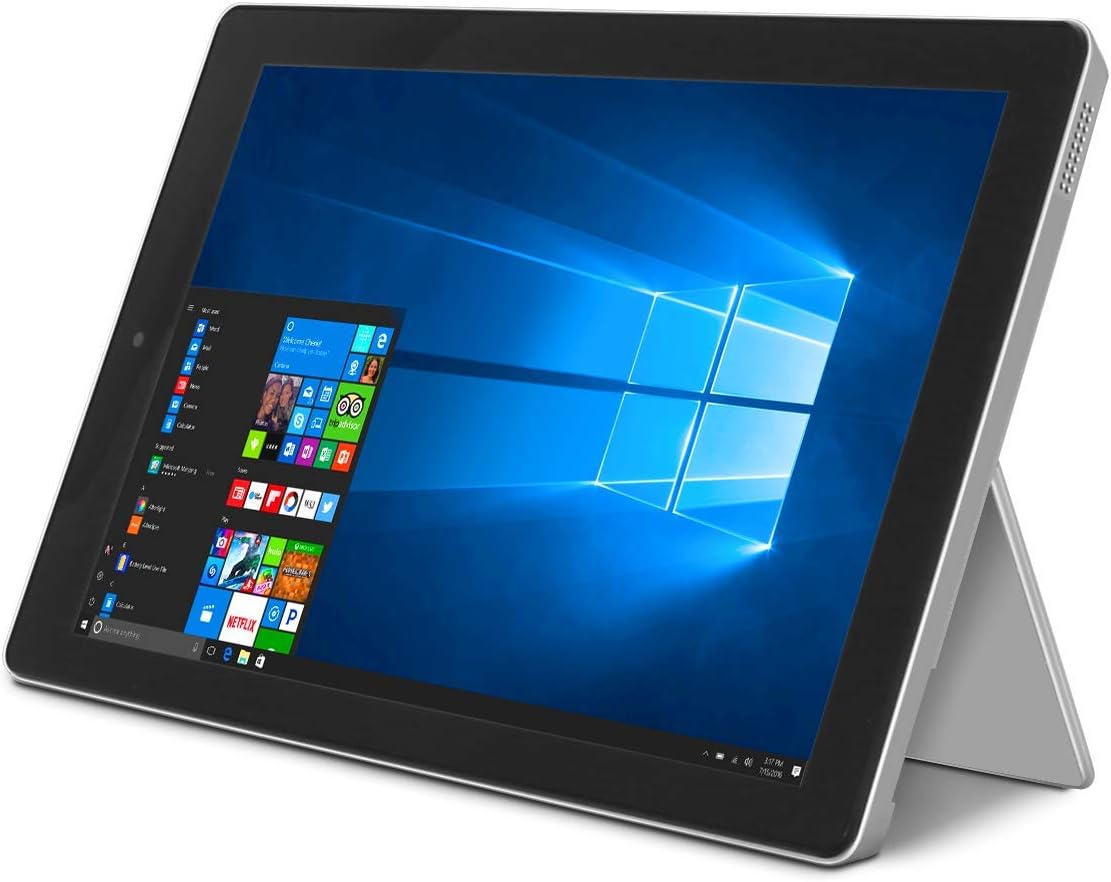
Image: The RCA Cambio 10.1 W101 V2 tablet in laptop mode, showcasing the Windows 10 operating system interface.
പ്രവർത്തന നിർദ്ദേശങ്ങൾ
1. അടിസ്ഥാന നാവിഗേഷൻ
ടച്ച് സ്ക്രീൻ:
The tablet features a multi-touch display. Use gestures such as tap, swipe, pinch-to-zoom, and press-and-hold to interact with the interface.
കീബോർഡും ടച്ച്പാഡും:
When the detachable keyboard is connected, you can use the physical keys for typing and the integrated touchpad for cursor control. The touchpad supports multi-touch gestures similar to a laptop touchpad.

Image: The RCA Cambio 10.1 W101 V2 tablet in portrait orientation, showing the Windows 10 Start screen with application tiles.
2. Wi-Fi-ലേക്ക് ബന്ധിപ്പിക്കുന്നു
- തുറക്കുക ആരംഭ മെനു ക്ലിക്ക് ചെയ്യുക ക്രമീകരണങ്ങൾ.
- തിരഞ്ഞെടുക്കുക നെറ്റ്വർക്കും ഇൻ്റർനെറ്റും.
- തിരഞ്ഞെടുക്കുക വൈഫൈ from the left-hand menu.
- വൈഫൈ ടോഗിൾ ചെയ്യുക On അത് ഓഫാണെങ്കിൽ.
- Select your desired network from the list and click ബന്ധിപ്പിക്കുക.
- ആവശ്യപ്പെടുകയാണെങ്കിൽ നെറ്റ്വർക്ക് പാസ്വേഡ് നൽകുക.
3. ബ്ലൂടൂത്ത് ജോടിയാക്കൽ
- തുറക്കുക ആരംഭ മെനു ക്ലിക്ക് ചെയ്യുക ക്രമീകരണങ്ങൾ.
- തിരഞ്ഞെടുക്കുക ഉപകരണങ്ങൾ.
- തിരഞ്ഞെടുക്കുക ബ്ലൂടൂത്തും മറ്റ് ഉപകരണങ്ങളും from the left-hand menu.
- ബ്ലൂടൂത്ത് ടോഗിൾ ചെയ്യുക On.
- ക്ലിക്ക് ചെയ്യുക ബ്ലൂടൂത്ത് അല്ലെങ്കിൽ മറ്റ് ഉപകരണം ചേർക്കുക and follow the instructions to pair with your desired device.
4. ക്യാമറകൾ ഉപയോഗിക്കുന്നത്
The tablet is equipped with front and rear 2MP cameras. To access the camera, open the ക്യാമറ application from the Start Menu or search bar. You can switch between front and rear cameras within the application interface.
5. Productivity with Microsoft Office 365
The device comes preloaded with Windows 10, which supports Microsoft Office 365 applications. You can create and edit documents, spreadsheets, and presentations. An active subscription to Microsoft Office 365 may be required for full functionality.

Image: The RCA Cambio 10.1 W101 V2 tablet running Microsoft Office applications, highlighting its use for productivity tasks.
6. സ്റ്റോറേജ് മാനേജ്മെൻ്റ്
The tablet includes 32GB of internal storage. To manage your storage, go to ക്രമീകരണങ്ങൾ > സിസ്റ്റം > സ്റ്റോറേജ്. നിങ്ങൾക്ക് കഴിയും view storage usage, free up space, and change where new content is saved. Consider using cloud storage or an external microSD card (not included) for additional space.
മെയിൻ്റനൻസ്
1. ഉപകരണം വൃത്തിയാക്കൽ
Use a soft, lint-free cloth to clean the screen and exterior surfaces. For stubborn smudges, slightly dampതുണിയിൽ വെള്ളം അല്ലെങ്കിൽ സ്ക്രീൻ-ക്ലീനിംഗ് ലായനി ഉപയോഗിക്കുക. കഠിനമായ രാസവസ്തുക്കളോ ഉരച്ചിലുകളോ ഉള്ള വസ്തുക്കൾ ഉപയോഗിക്കുന്നത് ഒഴിവാക്കുക.
2. സോഫ്റ്റ്വെയർ അപ്ഡേറ്റുകൾ
Regularly check for and install Windows updates to ensure your system has the latest security patches and features. Go to ക്രമീകരണങ്ങൾ > അപ്ഡേറ്റ് & സുരക്ഷ > വിൻഡോസ് അപ്ഡേറ്റ് അപ്ഡേറ്റുകൾ പരിശോധിക്കാൻ.
3. ബാറ്ററി പരിചരണം
ബാറ്ററി ആയുസ്സ് വർദ്ധിപ്പിക്കാൻ:
- ബാറ്ററി ഇടയ്ക്കിടെ പൂർണ്ണമായും ഡിസ്ചാർജ് ചെയ്യുന്നത് ഒഴിവാക്കുക.
- ഉപകരണത്തെ അങ്ങേയറ്റത്തെ താപനിലയിൽ തുറന്നുകാട്ടരുത്.
- Unplug the charger once the battery is fully charged, especially during extended periods of non-use.
4. ഡാറ്റ ബാക്കപ്പ്
Regularly back up important data to an external drive or cloud storage to prevent data loss in case of device malfunction.
ട്രബിൾഷൂട്ടിംഗ്
This section addresses common issues you might encounter with your RCA Cambio 10.1 W101 V2.
ഉപകരണം പവർ ചെയ്യുന്നില്ല:
- ഉപകരണം പൂർണ്ണമായും ചാർജ് ചെയ്തിട്ടുണ്ടെന്ന് ഉറപ്പാക്കുക. പവർ അഡാപ്റ്റർ കണക്റ്റ് ചെയ്ത് വീണ്ടും പവർ ഓൺ ചെയ്യാൻ ശ്രമിക്കുന്നതിന് മുമ്പ് കുറച്ച് മിനിറ്റ് കാത്തിരിക്കുക.
- Press and hold the power button for at least 10-15 seconds to perform a hard reset.
മന്ദഗതിയിലുള്ള പ്രകടനം അല്ലെങ്കിൽ മരവിപ്പിക്കൽ:
- പശ്ചാത്തലത്തിൽ പ്രവർത്തിക്കുന്ന അനാവശ്യ ആപ്ലിക്കേഷനുകൾ അടയ്ക്കുക.
- ശേഷിക്കുന്ന ഏതെങ്കിലും വിൻഡോസ് അപ്ഡേറ്റുകൾ പരിശോധിച്ച് ഇൻസ്റ്റാൾ ചെയ്യുക.
- മതിയായ സംഭരണ സ്ഥലം ഉറപ്പാക്കുക. അനാവശ്യമായവ ഇല്ലാതാക്കുക. files or move them to external storage.
- ഉപകരണം പുനരാരംഭിക്കുക.
വൈഫൈ കണക്റ്റിവിറ്റി പ്രശ്നങ്ങൾ:
- വൈ-ഫൈ പ്രവർത്തനക്ഷമമാക്കിയിട്ടുണ്ടെന്ന് ഉറപ്പാക്കുക ക്രമീകരണം > നെറ്റ്വർക്കും ഇൻ്റർനെറ്റും > വൈഫൈ.
- നിങ്ങളുടെ വൈഫൈ റൂട്ടറും ടാബ്ലെറ്റും പുനരാരംഭിക്കുക.
- നെറ്റ്വർക്ക് മറന്ന് വീണ്ടും പാസ്വേഡ് നൽകി വീണ്ടും കണക്റ്റുചെയ്യുക.
- നിങ്ങൾ വൈഫൈ സിഗ്നലിന്റെ പരിധിയിലാണെന്ന് ഉറപ്പാക്കുക.
ബ്ലൂടൂത്ത് ജോടിയാക്കൽ പ്രശ്നങ്ങൾ:
- ടാബ്ലെറ്റിലും നിങ്ങൾ ജോടിയാക്കാൻ ശ്രമിക്കുന്ന ഉപകരണത്തിലും ബ്ലൂടൂത്ത് പ്രവർത്തനക്ഷമമാക്കിയിട്ടുണ്ടെന്ന് ഉറപ്പാക്കുക.
- Make sure both devices are in pairing mode and within close proximity.
- Remove previously paired devices from the tablet's Bluetooth settings if you are experiencing conflicts.
കീബോർഡ് പ്രതികരിക്കുന്നില്ല:
- ടാബ്ലെറ്റിന്റെ മാഗ്നറ്റിക് കണക്ടറിൽ കീബോർഡ് സുരക്ഷിതമായി ഘടിപ്പിച്ചിട്ടുണ്ടെന്ന് ഉറപ്പാക്കുക.
- കീബോർഡ് വേർപെടുത്തി വീണ്ടും ഘടിപ്പിക്കുക.
- ടാബ്ലെറ്റ് പുനരാരംഭിക്കുക.
ബാറ്ററി പെട്ടെന്ന് തീർന്നു:
- സ്ക്രീൻ തെളിച്ചം താഴ്ന്ന സെറ്റിംഗിലേക്ക് ക്രമീകരിക്കുക.
- Close background applications and disable unnecessary features like Bluetooth or Wi-Fi when not in use.
- ബാറ്ററി ഉപയോഗം പരിശോധിക്കുക Settings > System > Battery to identify power-consuming applications.
ഫാക്ടറി റീസെറ്റ് (അവസാന ആശ്രയം):
If issues persist, you may consider performing a factory reset. This will erase all data and reinstall Windows 10. തുടരുന്നതിന് മുമ്പ് എല്ലാ പ്രധാനപ്പെട്ട ഡാറ്റയും ബാക്കപ്പ് ചെയ്യുക. പോകുക Settings > Update & Security > Recovery > Reset this PC കൂടാതെ സ്ക്രീനിലെ നിർദ്ദേശങ്ങൾ പാലിക്കുക.
സ്പെസിഫിക്കേഷനുകൾ
| ഫീച്ചർ | സ്പെസിഫിക്കേഷൻ |
|---|---|
| മോഡൽ നമ്പർ | W101 V2 |
| ഓപ്പറേറ്റിംഗ് സിസ്റ്റം | വിൻഡോസ് 10 |
| സ്ക്രീൻ വലിപ്പം | 10.1 ഇഞ്ച് |
| സ്ക്രീൻ റെസല്യൂഷൻ | 1280 x 800 |
| പ്രോസസ്സർ | Intel Quad-Core (1.83 GHz) |
| റാം | 2 ജിബി ഡിഡിആർ3 എസ്ഡിആർഎഎം |
| ആന്തരിക സംഭരണം | 32 ജിബി ഫ്ലാഷ് മെമ്മറി |
| വയർലെസ് കണക്റ്റിവിറ്റി | 802.11b Wi-Fi, Bluetooth |
| ക്യാമറകൾ | Front and Rear (2 MP) |
| ബാറ്ററി | 1 ലിഥിയം അയോൺ ബാറ്ററി (ഉൾപ്പെടുത്തിയിരിക്കുന്നു) |
| അളവുകൾ (LxWxH) | 12.2 x 8.5 x 3.15 ഇഞ്ച് |
| ഇനത്തിൻ്റെ ഭാരം | 2.75 പൗണ്ട് |
വാറൻ്റിയും പിന്തുണയും
വാറന്റി വിവരങ്ങൾക്കും സാങ്കേതിക പിന്തുണയ്ക്കും, ദയവായി നിങ്ങളുടെ ഉൽപ്പന്നത്തിനൊപ്പം ഉൾപ്പെടുത്തിയിരിക്കുന്ന ഡോക്യുമെന്റേഷൻ പരിശോധിക്കുക അല്ലെങ്കിൽ ഔദ്യോഗിക RCA പിന്തുണ സന്ദർശിക്കുക. webസൈറ്റ്. വാറന്റി ക്ലെയിമുകൾക്കായി നിങ്ങളുടെ വാങ്ങലിന്റെ തെളിവ് സൂക്ഷിക്കുക.
For further assistance, you may contact RCA customer service. Contact details are typically available on the manufacturer's webസൈറ്റ്.


