1. ആമുഖം
The Monoprice Maker Select 3D Printer v2 is designed to bring your ideas and designs from digital files to physical objects. This printer offers a large build volume and compatibility with various filament types, making it suitable for both beginners and experienced users. This manual provides essential information for the safe and effective operation, maintenance, and troubleshooting of your 3D printer.
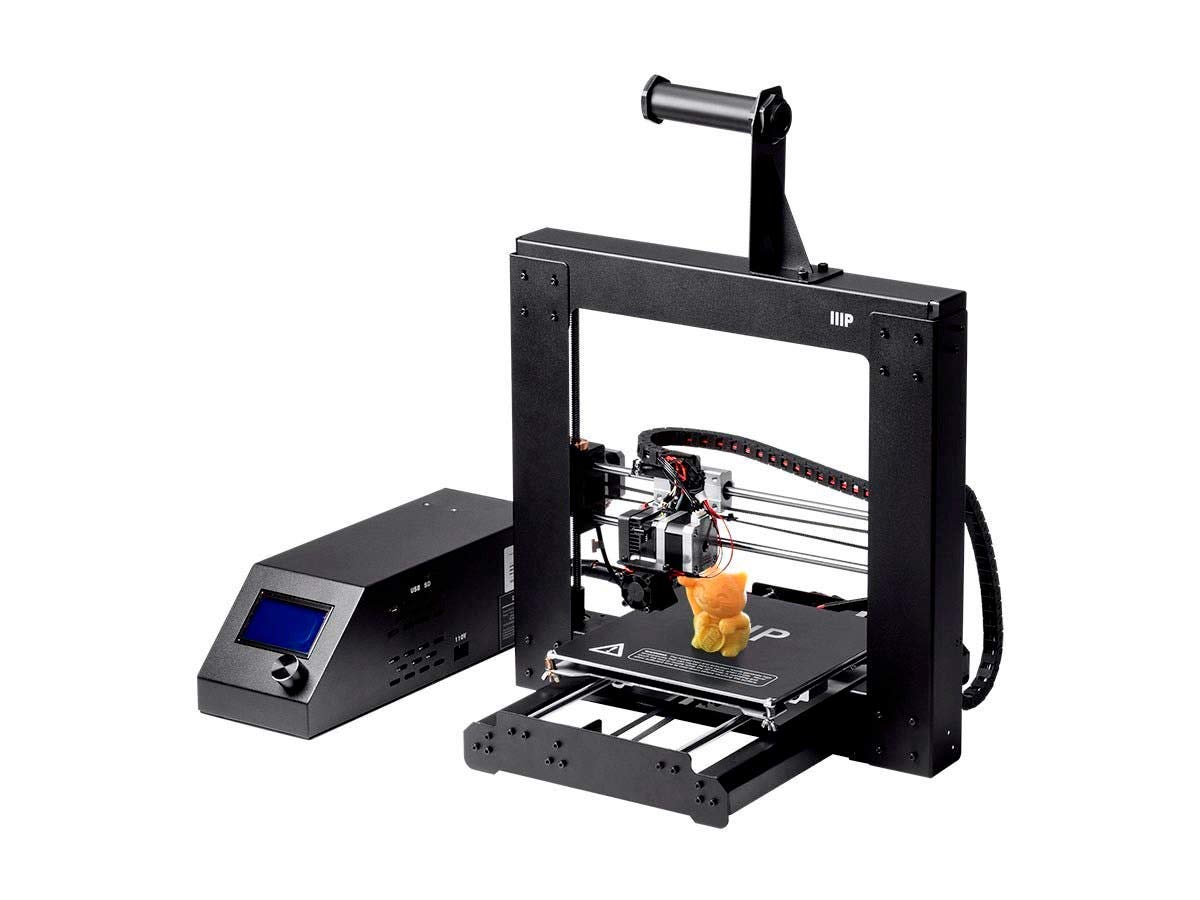
ചിത്രം 1.1: മുൻഭാഗം view of the Monoprice Maker Select 3D Printer v2, showing the main printer frame and the separate control box.
2 സുരക്ഷാ വിവരങ്ങൾ
WARNING: The heated bed and extrusion nozzle generate high temperatures that can cause serious injury when in use. Never touch the bed or nozzle while the 3D Printer is operating and allow sufficient time to cool down before touching the surface.
- പ്രിന്റർ എപ്പോഴും നന്നായി വായുസഞ്ചാരമുള്ള സ്ഥലത്ത് പ്രവർത്തിപ്പിക്കുക.
- പ്രവർത്തന സമയത്ത് കൈകളും അയഞ്ഞ വസ്ത്രങ്ങളും ചലിക്കുന്ന ഭാഗങ്ങളിൽ നിന്ന് അകറ്റി നിർത്തുക.
- Do not leave the printer unattended while it is operating.
- പവർ സപ്ലൈ ശരിയായി ബന്ധിപ്പിച്ചിട്ടുണ്ടെന്നും ഗ്രൗണ്ട് ചെയ്തിട്ടുണ്ടെന്നും ഉറപ്പാക്കുക.
- പ്രവർത്തന സമയത്ത് കുട്ടികളെയും വളർത്തുമൃഗങ്ങളെയും പ്രിന്ററിൽ നിന്ന് അകറ്റി നിർത്തുക.
3. പാക്കേജ് ഉള്ളടക്കം
പാക്കേജിൽ എല്ലാ ഇനങ്ങളും ഉണ്ടെന്ന് ഉറപ്പാക്കുക:
- Monoprice Maker Select 3D Printer v2 unit
- നിയന്ത്രണ ബോക്സ്
- ഫിലമെൻ്റ് ഹോൾഡർ
- Sample PLA Filament
- 2GB MicroSD Card (preloaded with printable 3D models)
- പവർ കേബിൾ
- USB കേബിൾ
- Tools for assembly and maintenance
4. സജ്ജീകരണം
The Monoprice Maker Select 3D Printer v2 is designed for quick assembly, requiring only 6 screws to be tightened before you can begin printing.
- അൺപാക്ക് ചെയ്യുന്നു: പാക്കേജിംഗിൽ നിന്ന് എല്ലാ ഘടകങ്ങളും ശ്രദ്ധാപൂർവ്വം നീക്കം ചെയ്യുക. ഗതാഗത സമയത്ത് എന്തെങ്കിലും കേടുപാടുകൾ സംഭവിച്ചിട്ടുണ്ടോ എന്ന് പരിശോധിക്കുക.
- ഫ്രെയിം അസംബ്ലി: Attach the gantry frame to the base unit using the provided screws. Ensure all connections are secure.
- Filament Holder Installation: Mount the filament holder onto the designated slot on the printer frame.
- കേബിൾ കണക്ഷനുകൾ: Connect the main cable from the printer unit to the control box. Connect the power cable to the control box and then to a power outlet.
- പവർ ഓൺ: Turn on the printer using the power switch on the control box.
- കിടക്ക നിരപ്പാക്കൽ: Before your first print, it is crucial to level the print bed. Follow the on-screen instructions or refer to the detailed manual for the bed leveling procedure. Proper bed leveling is essential for successful prints.

ചിത്രം 4.1: പിൻഭാഗം view of the printer, illustrating the connection points for the power supply and control box.
Video: Monoprice 13860 Maker Select 3d Printer V2 Overview
വീഡിയോ 4.1: ഒരു ഉദ്യോഗസ്ഥൻview of the Monoprice Maker Select 3D Printer V2, demonstrating its features and basic setup.
5. പ്രവർത്തന നിർദ്ദേശങ്ങൾ
This section details the steps for preparing and initiating a 3D print.
- സോഫ്റ്റ്വെയർ തയ്യാറാക്കൽ: The printer is compatible with various slicing software such as Cura, Repetier-Host, or Simplify3D. Use your preferred software to convert your 3D model (e.g., STL file) into G-code, which the printer understands.
- ഫിലമെൻ്റ് ലോഡിംഗ്:
- ഫിലമെന്റ് സ്പൂൾ ഫിലമെന്റ് ഹോൾഡറിൽ വയ്ക്കുക.
- Feed the filament into the extruder mechanism.
- Heat the nozzle to the appropriate temperature for your filament type (e.g., PLA: 190-220°C, ABS: 220-250°C).
- Once heated, push the filament through the extruder until it emerges from the nozzle.
- Loading Print File:
- Save your G-code file onto the provided MicroSD card.
- Insert the MicroSD card into the slot on the control box.
- Navigate the printer's menu using the control knob and LCD screen to select your print file.
- ഒരു പ്രിന്റ് ആരംഭിക്കുന്നു: Select 'Print' from the menu. The printer will automatically heat the bed and nozzle to the set temperatures, then begin the printing process.
- പ്രിന്റ് നിരീക്ഷിക്കൽ: Observe the first few layers to ensure proper adhesion to the heated build plate. The heated build plate allows for high-reliability printing of slow cooling materials, such as ABS, as well as PLA and PLA blends.
- Print Completion: Once the print is finished, allow the bed and nozzle to cool down before carefully removing the printed object.

ചിത്രം 5.1: ക്ലോസ്-അപ്പ് view of the control panel and LCD screen, used for navigating menus and initiating prints.
6. പരിപാലനം
പതിവ് അറ്റകുറ്റപ്പണികൾ നിങ്ങളുടെ 3D പ്രിന്ററിന്റെ മികച്ച പ്രകടനവും ദീർഘായുസ്സും ഉറപ്പാക്കുന്നു.
- ബിൽഡ് പ്ലേറ്റ് വൃത്തിയാക്കുക: After each print, clean the build plate to remove any residue. Use isopropyl alcohol for best results.
- നോസൽ വൃത്തിയാക്കൽ: Periodically clean the nozzle to prevent clogs. A small brass brush or needle can be used for this purpose.
- ലൂബ്രിക്കേഷൻ: Lubricate the smooth rods and lead screws with appropriate grease or oil every few weeks, depending on usage. Pay particular attention to the bearings under the print bed, as they are subject to wear.
- Tighten Belts and Screws: Check and tighten all belts and screws regularly to maintain print accuracy and prevent vibrations.
- ഫേംവെയർ അപ്ഡേറ്റുകൾ: Check the Monoprice website for any available firmware updates to improve printer functionality.
7. പ്രശ്നപരിഹാരം
This section addresses common issues you might encounter during 3D printing.
| പ്രശ്നം | സാധ്യമായ കാരണം | പരിഹാരം |
|---|---|---|
| ഫിലമെന്റ് പുറത്തെടുക്കുന്നില്ല | Clogged nozzle, incorrect temperature, tangled filament | Clean nozzle, verify temperature settings, untangle filament |
| പ്രിന്റ് കിടക്കയിൽ പറ്റിപ്പിടിക്കുന്നില്ല | Bed not level, incorrect bed temperature, dirty bed | Re-level bed, adjust bed temperature, clean build plate |
| മോശം പ്രിന്റ് നിലവാരം (ലെയർ ഷിഫ്റ്റിംഗ്, സ്ട്രിംഗ്) | Loose belts, incorrect print speed/temperature, G-code error | Tighten belts, adjust print settings in slicer, check G-code file for corruption |
| പ്രിന്റർ പ്രതികരിക്കുന്നില്ല | Power issue, software error, MicroSD card issue | Check power connections, restart printer, reformat/replace MicroSD card |
If you encounter issues, ensure that the G-code file is complete and not corrupted. Always check the original model file for integrity.
8 സ്പെസിഫിക്കേഷനുകൾ
| ഫീച്ചർ | വിശദാംശങ്ങൾ |
|---|---|
| മോഡൽ നമ്പർ | 113860 |
| ബിൽഡ് വോളിയം | 200 x 200 x 180 മിമി (8 x 8 x 7 ഇഞ്ച്) |
| Heated Build Plate | അതെ |
| Max. Extruder Temperature | 260°C (500°F) |
| അനുയോജ്യമായ ഫിലമെന്റുകൾ | ABS, PLA, XT Copolyester, PET, TPU, TPC, FPE, PVA, HIPS, Jelly, Foam, Felty |
| അനുയോജ്യമായ സോഫ്റ്റ്വെയർ | Cura, Repetier-Host, Simplify3D |
| ഓപ്പറേറ്റിംഗ് സിസ്റ്റം അനുയോജ്യത | Windows, Mac OS X, Linux |
| ഉൽപ്പന്ന അളവുകൾ | 19.7 x 18.9 x 11.2 ഇഞ്ച് |
| ഇനത്തിൻ്റെ ഭാരം | 0.04 Kilograms (Note: This weight seems incorrect based on typical 3D printer weights and product dimensions. Please refer to product packaging for accurate weight.) |
| ആംബിയൻ്റ് ഓപ്പറേറ്റിംഗ് താപനില | +15 – +30°C (+59 - +86°F) |
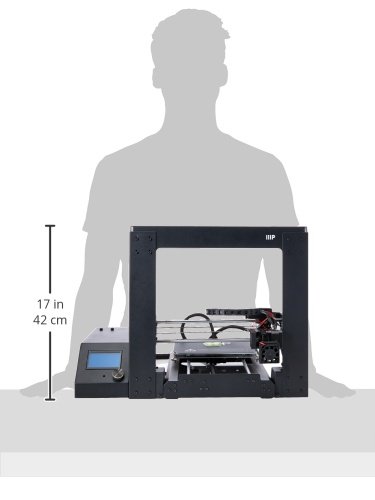
Image 8.1: Diagram showing the approximate dimensions of the Monoprice Maker Select 3D Printer v2.
9. വാറൻ്റിയും പിന്തുണയും
For warranty information and technical support, please refer to the official Monoprice website or contact their customer service directly. Monoprice support is known to be helpful for addressing product-related inquiries and issues.
You can also find a wealth of community support and resources online, particularly in forums dedicated to this printer model (often referred to as the Wanhao Duplicator i3, which is a rebadged version).


