ആമുഖം
This manual provides detailed instructions for the safe and efficient operation of your Telefunken RC1007BM Bluetooth Boombox. Please read this manual thoroughly before using the device and retain it for future reference.

ചിത്രം: മുൻഭാഗം view of the Telefunken RC1007BM Bluetooth Boombox, showcasing its speakers, central control panel, and antenna.
സുരക്ഷാ നിർദ്ദേശങ്ങൾ
- തീയോ വൈദ്യുതാഘാതമോ തടയാൻ ഉപകരണം മഴയിലോ ഈർപ്പത്തിലോ തുറന്നുകാട്ടരുത്.
- വെന്റിലേഷൻ തുറസ്സുകളൊന്നും തടയരുത്. നിർമ്മാതാവിന്റെ നിർദ്ദേശങ്ങൾക്കനുസൃതമായി ഇൻസ്റ്റാൾ ചെയ്യുക.
- റേഡിയറുകൾ, ഹീറ്റ് രജിസ്റ്ററുകൾ, സ്റ്റൗകൾ, അല്ലെങ്കിൽ മറ്റ് ഉപകരണങ്ങൾ (ഉൾപ്പെടെ) പോലെയുള്ള താപ സ്രോതസ്സുകൾക്ക് സമീപം ഇൻസ്റ്റാൾ ചെയ്യരുത്. ampലൈഫയറുകൾ) ചൂട് ഉത്പാദിപ്പിക്കുന്നത്.
- പ്രത്യേകിച്ച് പ്ലഗുകൾ, കൺവീനിയൻസ് റെസെപ്റ്റക്കിളുകൾ, ഉപകരണത്തിൽ നിന്ന് പുറത്തുകടക്കുന്ന ഇടം എന്നിവയിൽ നടക്കുകയോ നുള്ളുകയോ ചെയ്യുന്നതിൽ നിന്ന് പവർ കോർഡ് സംരക്ഷിക്കുക.
- നിർമ്മാതാവ് വ്യക്തമാക്കിയ അറ്റാച്ച്മെൻ്റുകൾ/ആക്സസറികൾ മാത്രം ഉപയോഗിക്കുക.
- മിന്നൽ കൊടുങ്കാറ്റുകളുടെ സമയത്തോ ദീർഘനേരം ഉപയോഗിക്കാത്ത സമയത്തോ ഈ ഉപകരണം അൺപ്ലഗ് ചെയ്യുക.
- യോഗ്യതയുള്ള സേവന ഉദ്യോഗസ്ഥർക്ക് എല്ലാ സേവനങ്ങളും റഫർ ചെയ്യുക. ഉപകരണം ഏതെങ്കിലും വിധത്തിൽ കേടുവരുമ്പോൾ സർവീസ് ആവശ്യമാണ്.
പാക്കേജ് ഉള്ളടക്കം
എല്ലാ ഇനങ്ങളും നിലവിലുണ്ടോ എന്ന് ദയവായി പരിശോധിക്കുക:
- Telefunken RC1007BM Bluetooth Boombox
- പവർ അഡാപ്റ്റർ
- ഷോൾഡർ സ്ട്രാപ്പ്
- റിമോട്ട് കൺട്രോൾ
- ഉപയോക്തൃ മാനുവൽ (ഈ പ്രമാണം)
ഉൽപ്പന്നം കഴിഞ്ഞുview
ഫ്രണ്ട് പാനൽ നിയന്ത്രണങ്ങളും കണക്ഷനുകളും
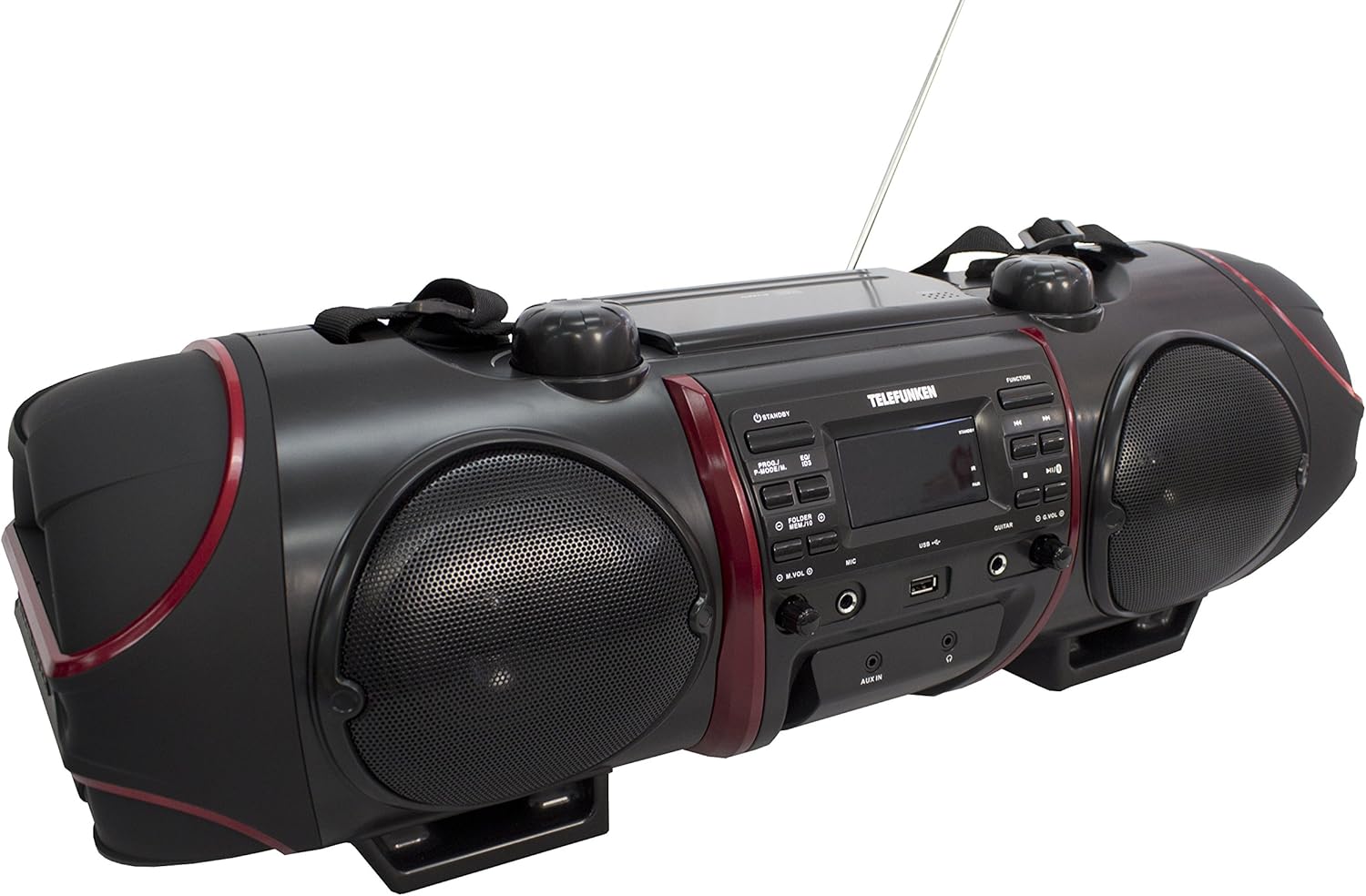
Image: Close-up of the central control panel, showing buttons, LCD display, USB port, and input jacks.
- സ്റ്റാൻഡ്ബൈ ബട്ടൺ: യൂണിറ്റ് ഓണാക്കുകയോ ഓഫാക്കുകയോ ചെയ്യുന്നു.
- PROG./P-MODE/M. Button: Program CD tracks, select playback mode, or store/recall radio presets.
- EQ/ID3 Button: Select equalizer presets or display ID3 tag information for MP3s.
- FOLDER/MENU/TS Button: Navigate folders on USB/CD or access menu options.
- M.VOL (Microphone Volume) Knob: മൈക്രോഫോൺ ഇൻപുട്ട് വോളിയം ക്രമീകരിക്കുന്നു.
- MIC (Microphone) Input: 3.5mm jack for microphone connection.
- USB പോർട്ട്: USB സംഭരണ ഉപകരണങ്ങൾ ബന്ധിപ്പിക്കുന്നതിന്.
- ഗിറ്റാർ ഇൻപുട്ട്: 3.5mm jack for guitar connection.
- G.VOL (Guitar Volume) Knob: Adjusts guitar input volume.
- ഫംഗ്ഷൻ ബട്ടൺ: Selects input source (CD, FM, Bluetooth, AUX).
- പ്ലേ/പോസ് ബട്ടൺ: പ്ലേബാക്ക് ആരംഭിക്കുകയോ താൽക്കാലികമായി നിർത്തുകയോ ചെയ്യുന്നു.
- സ്റ്റോപ്പ് ബട്ടൺ: പ്ലേബാക്ക് നിർത്തുന്നു.
- SKIP/TUNE Buttons (Previous/Next): Skips tracks or tunes radio frequencies.
- ജോടി ബട്ടൺ: ബ്ലൂടൂത്ത് ജോടിയാക്കൽ ആരംഭിക്കുന്നു.
- VOL (Volume) Knob: മാസ്റ്റർ വോളിയം ക്രമീകരിക്കുന്നു.
- ജാക്സിലെ ഓക്സ്: ബാഹ്യ ഓഡിയോ ഉപകരണങ്ങൾക്കായി 3.5mm ഇൻപുട്ട്.
- ഹെഡ്ഫോൺ ജാക്ക്: ഹെഡ്ഫോണുകൾക്ക് 3.5mm ഔട്ട്പുട്ട്.
- LCD ഡിസ്പ്ലേ: Shows current status, track information, and radio frequency.
Top Panel (CD Compartment)

ചിത്രം: മുകളിൽ view of the boombox, highlighting the CD compartment with 'PUSH TO OPEN' label.
The CD compartment is located on the top of the unit. Press the 'PUSH TO OPEN' area to open the lid and insert a CD.
Rear Panel (Power and Battery Compartment)

ചിത്രം: പിൻഭാഗം view of the boombox, displaying the AC power input and the battery compartment cover.
The AC power input and battery compartment are located on the rear of the unit. Ensure the correct power source is connected or batteries are inserted correctly.
റിമോട്ട് കൺട്രോൾ

Image: The remote control for the Telefunken RC1007BM, showing various function buttons.
The remote control provides convenient access to most functions of the boombox. Refer to the button labels on the remote for specific operations.
സജ്ജമാക്കുക
പവർ കണക്ഷൻ
- എസി പവർ: Connect the supplied power adapter to the AC input jack on the rear of the unit and then to a standard wall outlet.
- ബാറ്ററി പവർ: For portable use, open the battery compartment on the rear of the unit and insert the required batteries (not included), ensuring correct polarity.
ആന്റിന അഡ്ജസ്റ്റ്മെന്റ്
Extend the telescopic antenna fully for optimal FM radio reception. Adjust its position for the best signal.
ഷോൾഡർ സ്ട്രാപ്പ് അറ്റാച്ച്മെൻ്റ്
Attach the provided shoulder strap to the designated loops on the sides of the boombox for easy portability.
പ്രവർത്തന നിർദ്ദേശങ്ങൾ
പവർ ചെയ്യുന്നത് ഓൺ/ഓഫ്
അമർത്തുക സ്റ്റാൻഡ് ബൈ യൂണിറ്റ് ഓണാക്കാനോ ഓഫാക്കാനോ ഫ്രണ്ട് പാനലിലെ ബട്ടണോ റിമോട്ട് കൺട്രോളോ അമർത്തുക.
CD/MP3-CD പ്ലേബാക്ക്
- അമർത്തുക ഫങ്ഷൻ സിഡി മോഡ് തിരഞ്ഞെടുക്കാനുള്ള ബട്ടൺ.
- Open the CD compartment lid by pressing 'PUSH TO OPEN' on the top.
- Place a CD or MP3-CD with the label side facing up. Close the lid.
- Playback will start automatically. If not, press the പ്ലേ/താൽക്കാലികമായി നിർത്തുക ബട്ടൺ.
- ഉപയോഗിക്കുക ഒഴിവാക്കുക/ട്യൂൺ ചെയ്യുക ട്രാക്കുകൾ ഒഴിവാക്കാനുള്ള ബട്ടണുകൾ.
- അമർത്തുക നിർത്തുക പ്ലേബാക്ക് നിർത്താനുള്ള ബട്ടൺ.
- പ്രോഗ്രാം പ്ലേബാക്ക്: While in stop mode, press PROG./P-MODE/M. to program tracks.
- ആവർത്തിക്കുക/റാൻഡം പ്ലേബാക്ക്: അമർത്തുക PROG./P-MODE/M. during playback to cycle through repeat modes (e.g., repeat one, repeat all) or random play.
എഫ്എം റേഡിയോ ഓപ്പറേഷൻ
- അമർത്തുക ഫങ്ഷൻ എഫ്എം റേഡിയോ മോഡ് തിരഞ്ഞെടുക്കാൻ ബട്ടൺ.
- ഓട്ടോ സ്കാൻ ചെയ്ത് സംഭരിക്കുക: അമർത്തിപ്പിടിക്കുക PROG./P-MODE/M. ലഭ്യമായ എഫ്എം സ്റ്റേഷനുകൾ സ്വയമേവ സ്കാൻ ചെയ്യാനും സംഭരിക്കാനും ബട്ടൺ.
- സ്വമേധയാലുള്ള ട്യൂണിംഗ്: ഉപയോഗിക്കുക ഒഴിവാക്കുക/ട്യൂൺ ചെയ്യുക ആവശ്യമുള്ള ആവൃത്തികളിലേക്ക് സ്വമേധയാ ട്യൂൺ ചെയ്യാനുള്ള ബട്ടണുകൾ.
- പ്രീസെറ്റുകൾ തിരിച്ചുവിളിക്കുക: അമർത്തുക PROG./P-MODE/M. repeatedly to cycle through stored preset stations.
ബ്ലൂടൂത്ത് ജോടിയാക്കൽ
- അമർത്തുക ഫങ്ഷൻ ബ്ലൂടൂത്ത് മോഡ് തിരഞ്ഞെടുക്കാനുള്ള ബട്ടൺ. ഡിസ്പ്ലേ "BT" കാണിക്കുകയും ഫ്ലാഷ് കാണിക്കുകയും ചെയ്യും, ഇത് ജോടിയാക്കൽ മോഡിലാണെന്ന് സൂചിപ്പിക്കുന്നു.
- Activate Bluetooth on your smartphone or tablet and search for available devices.
- Select "RC1007BM" from the list of devices.
- Once paired, the display will stop flashing, and you can play music from your device.
- The effective transmission range is up to 10 meters.
AUX ഇൻപുട്ട്
- ഒരു ബാഹ്യ ഓഡിയോ ഉപകരണം (ഉദാ. MP3 പ്ലെയർ) ഇതിലേക്ക് ബന്ധിപ്പിക്കുക ഓക്സ് ഇൻ jack using a 3.5mm audio cable (not included).
- അമർത്തുക ഫങ്ഷൻ AUX മോഡ് തിരഞ്ഞെടുക്കാൻ ബട്ടൺ.
- നിങ്ങളുടെ ബന്ധിപ്പിച്ച ഉപകരണത്തിൽ നിന്ന് ഓഡിയോ പ്ലേ ചെയ്യുക.
മൈക്രോഫോണും ഗിത്താർ ഇൻപുട്ടും
- ഇതിലേക്ക് ഒരു മൈക്രോഫോൺ ബന്ധിപ്പിക്കുക എം.ഐ.സി input jack and/or a guitar to the ഗുട്ടാർ ഇൻപുട്ട് ജാക്ക്.
- ഉപയോഗിച്ച് മൈക്രോഫോൺ വോളിയം ക്രമീകരിക്കുക എം.വി.ഒ.എൽ knob and the guitar volume using the G.VOL മുട്ട്.
ശബ്ദ സമനില
അമർത്തുക EQ/ID3 button repeatedly to cycle through the 6 preset equalizer levels: Flat, Classic, Pop, Jazz, Rock, and 3D. Select the one that best suits your audio preference.
മെയിൻ്റനൻസ്
- വൃത്തിയാക്കൽ: യൂണിറ്റിന്റെ പുറംഭാഗം വൃത്തിയാക്കാൻ മൃദുവായതും ഉണങ്ങിയതുമായ തുണി ഉപയോഗിക്കുക. അബ്രസീവ് ക്ലീനറുകളോ ലായകങ്ങളോ ഉപയോഗിക്കരുത്.
- സിഡി കെയർ: സിഡികൾ അവയുടെ അരികുകളിൽ പിടിക്കുക. മലിനമായ സിഡികൾ മൃദുവായ, ലിന്റ് രഹിത തുണി ഉപയോഗിച്ച് വൃത്തിയാക്കുക, മധ്യഭാഗത്ത് നിന്ന് പുറത്തേക്ക് തുടയ്ക്കുക.
- ബാറ്ററി കെയർ: യൂണിറ്റ് ദീർഘനേരം ഉപയോഗിക്കുന്നില്ലെങ്കിൽ, ചോർച്ചയും കേടുപാടുകളും തടയാൻ ബാറ്ററികൾ നീക്കം ചെയ്യുക.
ട്രബിൾഷൂട്ടിംഗ്
| പ്രശ്നം | സാധ്യമായ കാരണം | പരിഹാരം |
|---|---|---|
| ശക്തിയില്ല | പവർ കോർഡ് ബന്ധിപ്പിച്ചിട്ടില്ല; ബാറ്ററികൾ തീർന്നു അല്ലെങ്കിൽ തെറ്റായി ചേർത്തിരിക്കുന്നു. | Ensure AC adapter is securely connected. Replace batteries or check polarity. |
| ശബ്ദമില്ല | ശബ്ദം വളരെ കുറവാണ്; തെറ്റായ ഉറവിടം തിരഞ്ഞെടുത്തു; ഹെഡ്ഫോണുകൾ കണക്റ്റ് ചെയ്തു. | Increase volume. Press FUNCTION to select correct source. Disconnect headphones. |
| സിഡി പ്ലേ ചെയ്യുന്നില്ല | CD inserted incorrectly; CD dirty or scratched; Disc format not supported. | Insert CD with label side up. Clean or replace CD. Ensure it's a CD-R/RW or MP3-CD. |
| ബ്ലൂടൂത്ത് ജോടിയാക്കുന്നില്ല | Device too far; Bluetooth not enabled on external device; Unit not in pairing mode. | Move device closer. Enable Bluetooth on your device. Press FUNCTION to select BT mode and PAIR button. |
| മോശം റേഡിയോ സ്വീകരണം | Antenna not extended or positioned correctly; Weak signal. | ടെലിസ്കോപ്പിക് ആന്റിന പൂർണ്ണമായും നീട്ടി ക്രമീകരിക്കുക. യൂണിറ്റ് മറ്റൊരു സ്ഥലത്തേക്ക് മാറ്റാൻ ശ്രമിക്കുക. |
സ്പെസിഫിക്കേഷനുകൾ
- മോഡൽ: RC1007BM
- ബ്രാൻഡ്: ടെലിഫങ്കൻ
- ഊർജ്ജ സ്രോതസ്സ്: AC 100-240V ~ 50/60Hz or Batteries (not included)
- മൊത്തം ഔട്ട്പുട്ട് പവർ (RMS): 52 W (2 x 8 W speakers, 2 x 18 W subwoofer)
- ബ്ലൂടൂത്ത് പതിപ്പ്: 3.0
- ബ്ലൂടൂത്ത് ശ്രേണി: 10 മീറ്റർ വരെ
- ട്യൂണർ: Digital PLL FM/FM-Stereo
- എഫ്എം പ്രീസെറ്റുകൾ: 30
- സിഡി പ്ലേബാക്ക്: CD, CD-R/-RW, MP3-CD
- പിന്തുണയ്ക്കുന്ന ഓഡിയോ ഫോർമാറ്റുകൾ: എംപി3, ഡബ്ല്യുഎംഎ, എഎസി, ഡബ്ല്യുഎവി
- ഇൻപുട്ടുകൾ: 3.5mm AUX-in, 3.5mm Microphone, 3.5mm Guitar, USB
- ഔട്ട്പുട്ടുകൾ: 3.5 എംഎം ഹെഡ്ഫോൺ
- ഡിസ്പ്ലേ തരം: എൽസിഡി
- ഈക്വലൈസർ പ്രീസെറ്റുകൾ: 6 (Flat, Classic, Pop, Jazz, Rock, 3D)
- ഉൽപ്പന്ന അളവുകൾ (L x W x H): 68 x 23 x 22 സെ.മീ
- ഇനത്തിൻ്റെ ഭാരം: 6 കി.ഗ്രാം
വാറൻ്റിയും പിന്തുണയും
For warranty information and technical support, please refer to the documentation provided at the time of purchase or contact your local Telefunken dealer or service center. Keep your proof of purchase for any warranty claims.