Zenith MPC-680P Mobile Multi Case & Sticky Notes Set
ഉപയോക്തൃ മാനുവൽ
1. ആമുഖം
വാങ്ങിയതിന് നന്ദി.asing the Zenith MPC-680P Mobile Multi Case & Sticky Notes Set. This versatile product is designed to help you organize your mobile device and notes efficiently. It features a dedicated pocket for your smartphone, a pen holder, and multiple sticky note pads, all within a compact and portable case. Please read this manual carefully to ensure proper use and maintenance of your new multi-case.
2. ഉൽപ്പന്നം കഴിഞ്ഞുview
The Zenith MPC-680P is a practical accessory for daily organization. It combines a protective case for your mobile phone with essential stationery items.
- Mobile Phone Pocket: A clear, touch-sensitive pocket designed to hold your smartphone, allowing interaction without removal.
- Sticky Note Pads: Includes various sizes and colors of sticky notes for quick reminders and messages.
- Pen Holder: A convenient loop to secure a pen or stylus.
- കോംപാക്റ്റ് ഡിസൈൻ: Foldable case with a secure closure for portability.

Figure 2.1: The Zenith MPC-680P Mobile Multi Case shown open, displaying its compartments for a smartphone and various sticky notes. A separate, closed case is visible in the background.
3. സജ്ജീകരണം
Follow these steps to set up your Zenith MPC-680P Mobile Multi Case:
- അൺപാക്ക്: Carefully remove the multi-case and sticky notes from their packaging.
- Insert Mobile Phone: Open the case and slide your smartphone into the clear, designated pocket. Ensure it lies flat for optimal touchscreen responsiveness.
- Arrange Sticky Notes: Place the included sticky note pads into their respective slots within the case.
- Add Pen: Insert your preferred pen or stylus into the elastic pen holder loop.
4. പ്രവർത്തന നിർദ്ദേശങ്ങൾ
The multi-case is designed for ease of use in various situations.
4.1 Using Your Mobile Phone
The clear pocket allows you to operate your smartphone's touchscreen without removing it from the case. This is ideal for quick checks, notifications, or light usage.
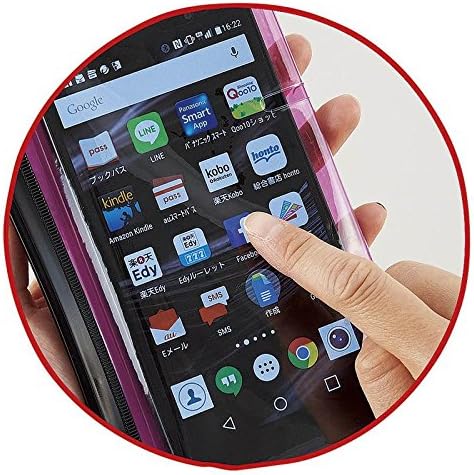
Figure 4.1: A hand is shown touching the screen of a smartphone through the clear protective layer of the multi-case, demonstrating touch functionality.
4.2 Using Sticky Notes
The integrated sticky notes are perfect for jotting down quick reminders, to-do lists, or messages.
- Peel off a sticky note from the pad.
- Write your note clearly.
- Adhere the note to any desired surface.

Figure 4.2: A hand is shown writing on one of the sticky notes included in the multi-case, illustrating its practical use for quick notes.
4.3 Utilizing the Pen Holder
The pen holder keeps your writing instrument secure and readily accessible.
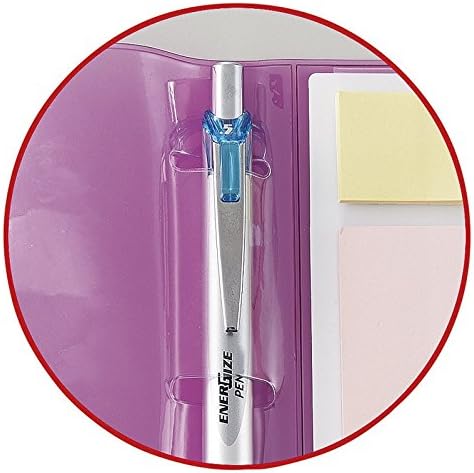
ചിത്രം 4.3: ഒരു ക്ലോസ്-അപ്പ് view of a pen securely held within the dedicated pen loop of the multi-case, highlighting its integrated design.
5. പരിപാലനം
To ensure the longevity of your Zenith MPC-680P Mobile Multi Case, follow these simple maintenance guidelines:
- വൃത്തിയാക്കൽ: Wipe the exterior of the case with a soft, slightly damp തുണി. കഠിനമായ രാസവസ്തുക്കളോ ഉരച്ചിലുകളുള്ള ക്ലീനറുകളോ ഒഴിവാക്കുക.
- Sticky Notes: Replace sticky note pads when they run out. Ensure replacement pads fit the designated slots.
- സംഭരണം: ഉപയോഗത്തിലില്ലാത്തപ്പോൾ നേരിട്ട് സൂര്യപ്രകാശം ഏൽക്കാത്ത ഒരു തണുത്ത വരണ്ട സ്ഥലത്ത് കേസ് സൂക്ഷിക്കുക.
6. പ്രശ്നപരിഹാരം
If you encounter any issues with your multi-case, refer to the following common problems and solutions:
- Mobile Phone Not Fitting: Ensure your phone's dimensions are compatible with the case's pocket. The pocket is designed for standard smartphone sizes.
- Touchscreen Unresponsive Through Case: Ensure your phone is positioned flat against the clear panel without any air bubbles or debris between the screen and the case. Clean both surfaces if necessary.
- Sticky Notes Not Adhering: The adhesive on sticky notes can weaken over time or with repeated use. Replace the sticky note pad with a new one.
- Case Not Closing Properly: Check if any items inside the case are overfilling it or obstructing the zipper/closure mechanism. Remove excess items if needed.
7 സ്പെസിഫിക്കേഷനുകൾ
| ഫീച്ചർ | വിശദാംശങ്ങൾ |
|---|---|
| ബ്രാൻഡ് | സെനിത്ത് |
| മോഡൽ നമ്പർ | MPC-680P |
| ഇനത്തിൻ്റെ ഭാരം | 2.32 ഔൺസ് |
| പാക്കേജ് അളവുകൾ | 7.87 x 4.65 x 0.39 ഇഞ്ച് |
| ആദ്യ തീയതി ലഭ്യമാണ് | 18 മാർച്ച് 2016 |
8. വാറൻ്റിയും പിന്തുണയും
This product is designed for durability and functionality. For specific warranty information, please refer to the documentation provided at the time of purchase or contact your retailer. For any product-related inquiries or support, please reach out to the customer service department of your point of purchase.


