ആമുഖം
The Skullcandy Uproar Wireless On-Ear Headphones provide a comfortable and convenient audio experience. Designed for extended wear, these headphones feature Bluetooth connectivity and a built-in microphone for hands-free control.
പ്രധാന സവിശേഷതകൾ:
- ബ്ലൂടൂത്ത് വയർലെസ് ടെക്നോളജി
- 10 മണിക്കൂർ വരെ ബാറ്ററി ലൈഫ്
- Plush On-Ear Cushions for Comfort
- Built-in Microphone with Call, Track, and Volume Control
പാക്കേജ് ഉള്ളടക്കം
Ensure all items are present in your Skullcandy Uproar Wireless Headphone package:
- Skullcandy Uproar വയർലെസ് ഹെഡ്ഫോണുകൾ
- യുഎസ്ബി ചാർജിംഗ് കേബിൾ
- ഉപയോക്തൃ ഗൈഡ് (ഈ പ്രമാണം)
ഉൽപ്പന്നം കഴിഞ്ഞുview

ചിത്രം 1: മുൻഭാഗം view of the Skullcandy Uproar Wireless On-Ear Headphones in Royal Blue.
നിയന്ത്രണങ്ങളും തുറമുഖങ്ങളും:
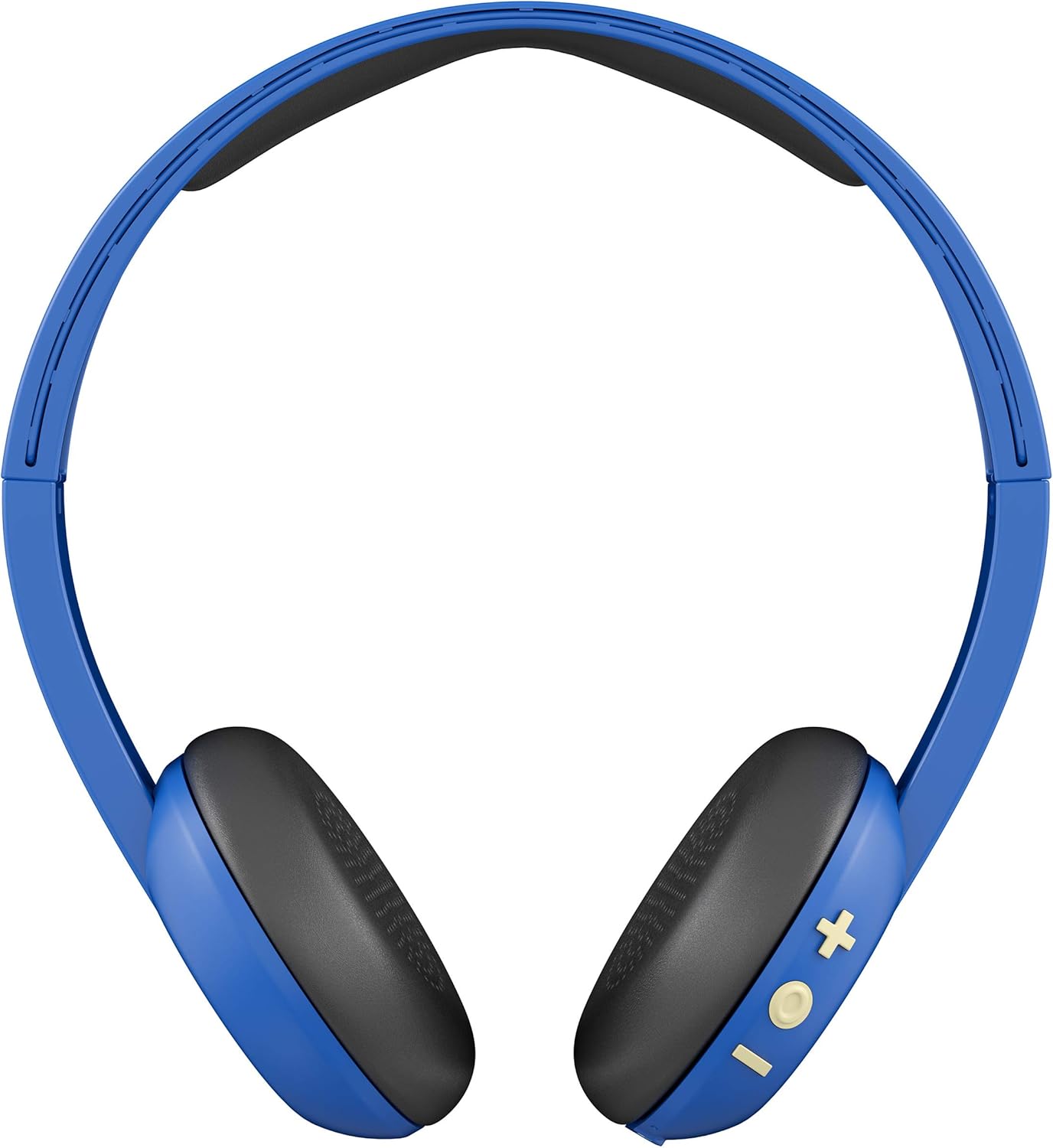
ചിത്രം 2: പിന്നിലേക്ക് view showing the control buttons (+, -, and multi-function) on the right ear cup.

ചിത്രം 3: വിശദമായി view of the control buttons (+ for volume up/track forward, - for volume down/track backward, and multi-function button for power/play/pause/calls).

ചിത്രം 4: സൈഡ് പ്രോfile of the Skullcandy Uproar Wireless On-Ear Headphones, highlighting the adjustable headband.
- മൾട്ടി-ഫംഗ്ഷൻ ബട്ടൺ: Power On/Off, Play/Pause, Answer/End Call.
- വോളിയം കൂട്ടുക (+) ബട്ടൺ: Increase volume, Track forward.
- വോളിയം കുറയ്ക്കൽ (-) ബട്ടൺ: Decrease volume, Track backward.
- മൈക്രോഫോൺ: Integrated for calls.
- യുഎസ്ബി ചാർജിംഗ് പോർട്ട്: For recharging the headphones.
സജ്ജമാക്കുക
1. Charging Your Headphones:
- Locate the USB charging port on your Uproar headphones.
- Connect the provided USB charging cable to the headphone's charging port and to a USB power source (e.g., computer, wall adapter).
- ചാർജ് ചെയ്യുമ്പോൾ LED ഇൻഡിക്കേറ്റർ പ്രകാശിക്കുകയും നിറം മാറുകയോ പൂർണ്ണമായി ചാർജ് ചെയ്യുമ്പോൾ ഓഫാകുകയോ ചെയ്യും.
2. ബ്ലൂടൂത്ത് ജോടിയാക്കൽ:
- നിങ്ങളുടെ ഹെഡ്ഫോണുകൾ ഓഫാക്കിയിട്ടുണ്ടെന്ന് ഉറപ്പാക്കുക.
- Press and hold the Multi-function Button for approximately 5 seconds until the LED indicator flashes blue and red, indicating pairing mode.
- നിങ്ങളുടെ ഉപകരണത്തിൽ (സ്മാർട്ട്ഫോൺ, ടാബ്ലെറ്റ്, കമ്പ്യൂട്ടർ), ബ്ലൂടൂത്ത് പ്രവർത്തനക്ഷമമാക്കി ലഭ്യമായ ഉപകരണങ്ങൾക്കായി തിരയുക.
- Select "Uproar Wireless" from the list of available devices.
- Once connected, the LED indicator on the headphones will flash blue periodically.
Video 1: Official Skullcandy Uproar product overview and features, including a visual demonstration of the headphones.
പ്രവർത്തന നിർദ്ദേശങ്ങൾ
പവർ ഓൺ/ഓഫ്:
- പവർ ഓൺ: മൾട്ടി-ഫംഗ്ഷൻ ബട്ടൺ 3 സെക്കൻഡ് അമർത്തിപ്പിടിക്കുക.
- പവർ ഓഫ്: മൾട്ടി-ഫംഗ്ഷൻ ബട്ടൺ 5 സെക്കൻഡ് അമർത്തിപ്പിടിക്കുക.
സംഗീത നിയന്ത്രണങ്ങൾ:
- പ്ലേ/താൽക്കാലികമായി നിർത്തുക: മൾട്ടി-ഫംഗ്ഷൻ ബട്ടൺ ഒരിക്കൽ അമർത്തുക.
- വോളിയം കൂട്ടുക: Press the Volume Up (+) Button.
- വോളിയം താഴേക്ക്: Press the Volume Down (-) Button.
- മുന്നോട്ട് ട്രാക്ക് ചെയ്യുക: Press and hold the Volume Up (+) Button for 2 seconds.
- പിന്നിലേക്ക് ട്രാക്കുചെയ്യുക: Press and hold the Volume Down (-) Button for 2 seconds.
കോൾ നിയന്ത്രണങ്ങൾ:
- ഉത്തരം/അവസാന കോൾ: മൾട്ടി-ഫംഗ്ഷൻ ബട്ടൺ ഒരിക്കൽ അമർത്തുക.
- കോൾ നിരസിക്കുക: മൾട്ടി-ഫംഗ്ഷൻ ബട്ടൺ 2 സെക്കൻഡ് അമർത്തിപ്പിടിക്കുക.
മെയിൻ്റനൻസ്
- വൃത്തിയാക്കൽ: ഹെഡ്ഫോണുകൾ വൃത്തിയാക്കാൻ മൃദുവായതും ഉണങ്ങിയതുമായ തുണി ഉപയോഗിക്കുക. കഠിനമായ രാസവസ്തുക്കളോ ഉരച്ചിലുകളോ ഉള്ള വസ്തുക്കൾ ഉപയോഗിക്കുന്നത് ഒഴിവാക്കുക.
- സംഭരണം: തീവ്രമായ താപനിലയിൽ നിന്നും നേരിട്ടുള്ള സൂര്യപ്രകാശത്തിൽ നിന്നും മാറി തണുത്തതും വരണ്ടതുമായ സ്ഥലത്ത് ഹെഡ്ഫോണുകൾ സൂക്ഷിക്കുക.
- ജല പ്രതിരോധം: ഈ ഹെഡ്ഫോണുകൾ വെള്ളത്തെ പ്രതിരോധിക്കുന്നില്ല. ദ്രാവകങ്ങളുമായി സമ്പർക്കം പുലർത്തുന്നത് ഒഴിവാക്കുക.
ട്രബിൾഷൂട്ടിംഗ്
| ഇഷ്യൂ | പരിഹാരം |
|---|---|
| ഹെഡ്ഫോണുകൾ ഓണാകുന്നില്ല | Ensure the headphones are fully charged. Connect them to a power source using the USB cable. |
| ബ്ലൂടൂത്ത് വഴി ജോടിയാക്കാൻ കഴിയില്ല |
|
| ശബ്ദമോ കുറഞ്ഞ വോളിയമോ ഇല്ല |
|
സ്പെസിഫിക്കേഷനുകൾ
| ഫീച്ചർ | വിശദാംശങ്ങൾ |
|---|---|
| മോഡലിൻ്റെ പേര് | കോലാഹലം |
| ഇനം മോഡൽ നമ്പർ | S5URJW-546 |
| കണക്റ്റിവിറ്റി ടെക്നോളജി | ബ്ലൂടൂത്ത് |
| വയർലെസ് കമ്മ്യൂണിക്കേഷൻ ടെക്നോളജി | ബ്ലൂടൂത്ത് |
| ബ്ലൂടൂത്ത് ശ്രേണി | 10 മീറ്റർ |
| ബാറ്ററി ലൈഫ് | 10 മണിക്കൂർ |
| ഓഡിയോ ഡ്രൈവർ തരം | ഡൈനാമിക് ഡ്രൈവർ |
| പ്രതിരോധം | 32 ഓം |
| നിയന്ത്രണ തരം | വോളിയം നിയന്ത്രണം, റിമോട്ട് |
| മൈക്രോഫോൺ | അന്തർനിർമ്മിത |
| ശബ്ദ നിയന്ത്രണം | None (Passive Noise Isolation from On-Ear design) |
| ജല പ്രതിരോധ നില | വാട്ടർ റെസിസ്റ്റൻ്റ് അല്ല |
| മെറ്റീരിയൽ | വ്യാജമായത് |
| ഇനത്തിൻ്റെ ഭാരം | 9.4 ഔൺസ് (0.27 കിലോഗ്രാം) |
| ഉൽപ്പന്ന അളവുകൾ | 7.3 x 3.1 x 7.3 ഇഞ്ച് |
വാറൻ്റിയും പിന്തുണയും
The Skullcandy Uproar Wireless On-Ear Headphones come with a one-year manufacturer's warranty. For warranty claims or technical support, please visit the official Skullcandy webസൈറ്റ് അല്ലെങ്കിൽ അവരുടെ ഉപഭോക്തൃ സേവനവുമായി ബന്ധപ്പെടുക.
കൂടുതൽ പിന്തുണയ്ക്കും ഉൽപ്പന്ന വിവരങ്ങൾക്കും, നിങ്ങൾക്ക് സന്ദർശിക്കാവുന്നതാണ് ആമസോണിലെ സ്കൾകാൻഡി സ്റ്റോർ.


