ആമുഖം
The Power Acoustik PL-51B is a single-DIN in-dash digital audio receiver designed to enhance your in-vehicle audio experience. This unit features Bluetooth connectivity for hands-free calling and wireless audio streaming, along with multiple media playback options including USB, SD card, and AUX input. Its mechless design ensures durability by eliminating moving parts associated with CD players.
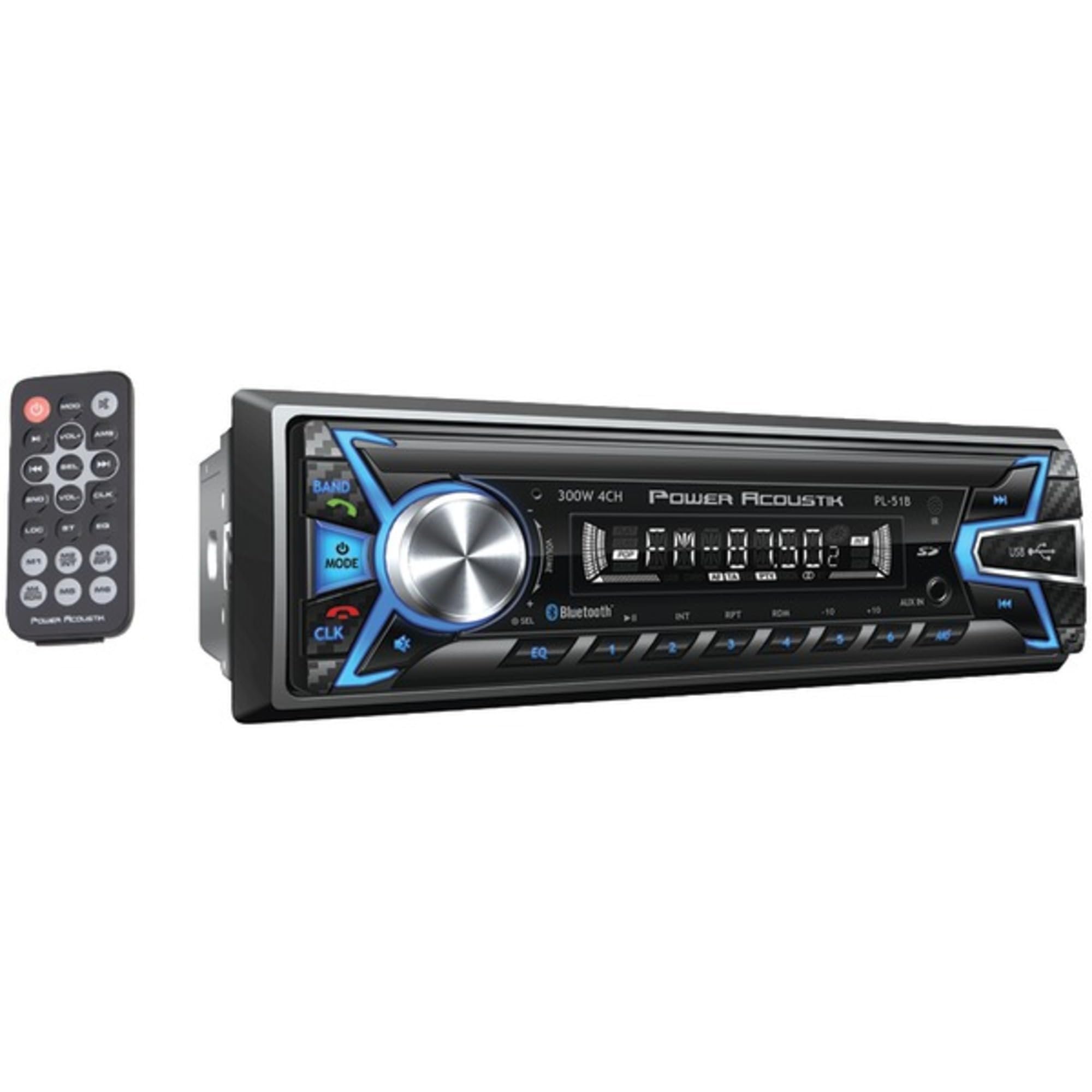
Figure 1: Power Acoustik PL-51B Digital Audio Head Unit and included remote control.
പ്രധാന സവിശേഷതകൾ
- Single-DIN In-Dash Design: Standard size for easy integration into most vehicle dashboards.
- Mechless Receiver: No moving parts for increased durability and reliability.
- ബ്ലൂടൂത്ത് v3.0: Supports hands-free calling and A2DP wireless MP3 audio playback.
- Multiple Media Inputs: MP3 & MP4 playback from 32GB SD Card/USB.
- ID3 MP3 Tag വായന: Displays track and artist information for compatible MP3 files.
- Theft-Deterrent: Detachable faceplate for added security.
- AM/FM ട്യൂണർ: Integrated radio tuner for broadcast reception.
സജ്ജീകരണവും ഇൻസ്റ്റാളേഷനും
Installation of the PL-51B unit requires basic automotive electrical knowledge. It is recommended to have the unit professionally installed if you are unfamiliar with car audio wiring.
1. വയറിംഗ് കണക്ഷനുകൾ
Refer to the wiring diagram provided in the included installation guide for specific connections. Key connections typically include:
- ശക്തി: കോൺസ്റ്റന്റ് 12V (മഞ്ഞ), ആക്സസറി 12V (ചുവപ്പ്), ഗ്രൗണ്ട് (കറുപ്പ്).
- സ്പീക്കറുകൾ: Connect speaker wires to the corresponding positive (+) and negative (-) terminals for each speaker (Front Left, Front Right, Rear Left, Rear Right).
- ആൻ്റിന: Connect the vehicle's antenna cable to the unit's antenna input.
- റിമോട്ട് ഓൺ: (Blue) for external amplifiers or power antennas.
2. യൂണിറ്റ് മൌണ്ട് ചെയ്യുന്നു
The PL-51B is a single-DIN chassis size. Secure the unit into the vehicle's dashboard using the provided mounting sleeve and hardware. Ensure all connections are made before fully securing the unit.
3. Detachable Faceplate
The faceplate is detachable for theft deterrence. To attach, align the faceplate with the main unit and gently push until it clicks into place. To detach, press the release button (usually labeled "REL" or similar) and pull the faceplate away.
പ്രവർത്തന നിർദ്ദേശങ്ങൾ
1. അടിസ്ഥാന നിയന്ത്രണങ്ങൾ
- പവർ ഓൺ/ഓഫ്: അമർത്തുക മോഡ് button briefly to turn the unit on. Press and hold to turn off.
- വോളിയം നിയന്ത്രണം: വോളിയം ലെവൽ ക്രമീകരിക്കുന്നതിന് വലിയ മധ്യ നോബ് തിരിക്കുക.
- മോഡ് തിരഞ്ഞെടുക്കൽ: അമർത്തുക മോഡ് button repeatedly to cycle through available audio sources (FM, AM, Bluetooth, USB, SD, AUX).
- ബാൻഡ്/എഎംഎസ്: റേഡിയോ മോഡിൽ, അമർത്തുക ബാൻഡ്/AMS to switch between FM1, FM2, FM3, and AM bands. Press and hold for Automatic Memory Store (AMS) to scan and save strong stations.
- Track Skip/Search: ഉപയോഗിക്കുക >> | ഒപ്പം |< buttons to skip tracks in media playback or tune radio frequencies.
2. ബ്ലൂടൂത്ത് പ്രവർത്തനം
The PL-51B supports Bluetooth v3.0 for hands-free calling and wireless audio streaming.
- ജോടിയാക്കൽ:
- നിങ്ങളുടെ മൊബൈൽ ഉപകരണത്തിൽ ബ്ലൂടൂത്ത് പ്രവർത്തനക്ഷമമാക്കിയിട്ടുണ്ടെന്ന് ഉറപ്പാക്കുക.
- Select "Bluetooth" mode on the head unit. The unit will typically display "BT PAIRING" or similar.
- On your mobile device, search for available Bluetooth devices and select "PL-51B" (or similar name).
- If prompted, enter the pairing code (usually "0000").
- Once paired, the unit will display "BT CONNECTED".
- ഹാൻഡ്സ് ഫ്രീ കോളിംഗ്:
- When a call comes in, the unit will display the caller ID (if supported).
- അമർത്തുക ഉത്തരം button (often a green phone icon) on the unit or remote to accept the call.
- അമർത്തുക കോൾ അവസാനിപ്പിക്കുക button (often a red phone icon) to end the call.
- ഓഡിയോ സ്ട്രീമിംഗ് (A2DP):
- Once paired, select "Bluetooth" mode.
- Start playing audio on your mobile device. The audio will stream wirelessly to the head unit.
- Use the unit's controls or your phone to play/pause and skip tracks.
3. യുഎസ്ബി/എസ്ഡി കാർഡ് പ്ലേബാക്ക്
The unit supports MP3 and MP4 playback from USB drives and SD cards up to 32GB.
- USB പോർട്ടിലേക്ക് ഒരു USB ഡ്രൈവ് അല്ലെങ്കിൽ SD കാർഡ് സ്ലോട്ടിലേക്ക് ഒരു SD കാർഡ് ഇടുക.
- The unit will automatically switch to USB or SD mode and begin playback.
- ഉപയോഗിക്കുക >> | ഒപ്പം |< ട്രാക്കുകൾ നാവിഗേറ്റ് ചെയ്യുന്നതിനുള്ള ബട്ടണുകൾ.
- The unit supports ID3 MP3 tag reading, displaying track and artist information on the LCD.
4. AUX ഇൻപുട്ട്
Connect external audio devices (e.g., MP3 players, smartphones without Bluetooth) using a 3.5mm audio cable to the AUX input jack on the front panel.
- Connect your device to the AUX input.
- Select "AUX" mode on the head unit.
- Control playback directly from your connected device.
5. FM/AM റേഡിയോ
- Select "FM" or "AM" mode using the മോഡ് ബട്ടൺ.
- ഉപയോഗിക്കുക >> | ഒപ്പം |< buttons for manual tuning or seek.
- അമർത്തുക ബാൻഡ്/AMS to cycle through FM1, FM2, FM3, and AM bands. Press and hold to automatically scan and store strong stations.
വീഡിയോ 1: ഉൽപ്പന്നം കഴിഞ്ഞുview - Demonstrates the unit's features and interface.
മെയിൻ്റനൻസ്
- വൃത്തിയാക്കൽ: Use a soft, dry cloth to clean the unit's faceplate and display. Avoid abrasive cleaners or solvents.
- വേർപെടുത്താവുന്ന ഫെയ്സ്പ്ലേറ്റ്: Regularly detach and reattach the faceplate to ensure proper contact and functionality. Store the faceplate in a protective case when removed from the vehicle.
- ഫേംവെയർ അപ്ഡേറ്റുകൾ: Check the Power Acoustik webനിങ്ങളുടെ മോഡലിന് ലഭ്യമായ ഏതെങ്കിലും ഫേംവെയർ അപ്ഡേറ്റുകൾക്കായി ഇടയ്ക്കിടെ സൈറ്റ് സന്ദർശിക്കുക.
ട്രബിൾഷൂട്ടിംഗ്
| പ്രശ്നം | സാധ്യമായ കാരണം | പരിഹാരം |
|---|---|---|
| പവർ ഇല്ല | തെറ്റായ വയറിംഗ്; ഫ്യൂസ് പൊട്ടി; വാഹന ബാറ്ററി തകരാർ. | Check all power connections (Yellow, Red, Black). Inspect the unit's fuse and replace if necessary. Verify vehicle battery voltage. |
| ശബ്ദമില്ല | Incorrect speaker wiring; Volume too low; Mute activated; Incorrect audio source. | സ്പീക്കർ കണക്ഷനുകൾ പരിശോധിക്കുക. ശബ്ദം വർദ്ധിപ്പിക്കുക. മ്യൂട്ട് നിർജ്ജീവമാക്കുക. ശരിയായ ഓഡിയോ ഉറവിടം തിരഞ്ഞെടുക്കുക. |
| ബ്ലൂടൂത്ത് കണക്റ്റുചെയ്യുന്നില്ല | Device not in pairing mode; Incorrect pairing code; Interference. | Ensure Bluetooth is enabled on both devices and in pairing mode. Re-enter pairing code. Move closer to the unit. Reset Bluetooth settings on both devices. |
| USB/SD Card Not Reading | പിന്തുണയ്ക്കുന്നില്ല file format; Corrupted media; Incompatible storage size. | ഉറപ്പാക്കുക files are MP3/MP4 format. Reformat media or try a different USB/SD card. Max capacity is 32GB. |
| Radio Static/Poor Reception | Weak signal; Antenna not connected properly; Interference. | ആന്റിന കണക്ഷൻ പരിശോധിക്കുക. കൂടുതൽ ശക്തമായ ഒരു സ്റ്റേഷനിലേക്ക് ട്യൂൺ ചെയ്യാൻ ശ്രമിക്കുക. വൈദ്യുത തടസ്സങ്ങളുടെ ഉറവിടങ്ങളിൽ നിന്ന് മാറി നിൽക്കുക. |
സ്പെസിഫിക്കേഷനുകൾ
- മോഡൽ: PL-51B
- ബ്രാൻഡ്: പവർ അക്കോസ്റ്റിക്
- ചേസിസ് വലുപ്പം: സിംഗിൾ-ഡിഐഎൻ
- ഡിസ്പ്ലേ തരം: എൽസിഡി
- ഇനത്തിൻ്റെ ഭാരം: 1.1 പൗണ്ട്
- ഉൽപ്പന്ന അളവുകൾ: 4.5 x 7.25 x 2 ഇഞ്ച്
- കണക്റ്റിവിറ്റി ടെക്നോളജി: ഓക്സിലറി, ബ്ലൂടൂത്ത്
- പ്രത്യേക സവിശേഷതകൾ: Built-In Bluetooth, FM Tuner, Detachable Face
- മെമ്മറി കാർഡ് സ്ലോട്ട്: SD കാർഡ് (32GB വരെ)
- Media Playback Supported: എംപി3, എംപി4
- കണക്റ്റർ തരം: 3.5എംഎം ജാക്ക്, യുഎസ്ബി
- ഓഡിയോ putട്ട്പുട്ട് മോഡ്: സ്റ്റീരിയോ
- സറൗണ്ട് സൗണ്ട് ചാനൽ കോൺഫിഗറേഷൻ: 4.0
- നിറം: കറുപ്പ്
വാറൻ്റി & പിന്തുണ
The Power Acoustik PL-51B comes with a 1 വർഷത്തെ നിർമ്മാതാവിന്റെ വാറന്റി. For warranty claims, technical support, or additional product information, please refer to the contact details provided in your product packaging or visit the official Power Acoustik webസൈറ്റ്.


