1. ആമുഖം
Thank you for choosing the Paulmann 70621 MaxLED RGB Controller. This device allows you to control RGB LED strips, offering color changing, dimming, and remote control functionalities. Please read this manual carefully before installation and operation to ensure proper use and longevity of the product.
2 സുരക്ഷാ വിവരങ്ങൾ
- ഇൻസ്റ്റാളേഷൻ അല്ലെങ്കിൽ അറ്റകുറ്റപ്പണിക്ക് മുമ്പ് വൈദ്യുതി വിതരണം വിച്ഛേദിച്ചിട്ടുണ്ടെന്ന് ഉറപ്പാക്കുക.
- ഈ ഉൽപ്പന്നം ഇൻഡോർ ഉപയോഗത്തിന് മാത്രമായി രൂപകൽപ്പന ചെയ്തിരിക്കുന്നു (IP20 റേറ്റിംഗ്). ഈർപ്പമോ തീവ്രമായ താപനിലയോ ഏൽക്കരുത്.
- Only use with compatible 24V DC LED strips and power supplies. Exceeding the maximum wattage of 144W can damage the device.
- ഉപകരണം കുട്ടികളിൽ നിന്ന് അകറ്റി നിർത്തുക.
- Do not attempt to open or modify the controller or remote control. This will void the warranty.
3. പാക്കേജ് ഉള്ളടക്കം
പാക്കേജിൽ എല്ലാ ഘടകങ്ങളും ഉണ്ടെന്ന് ഉറപ്പാക്കുക:
- 1x Paulmann 70621 MaxLED RGB Controller
- 1x 2.4 GHz RGB Remote Control
- 1x Assembly Instructions (this manual)
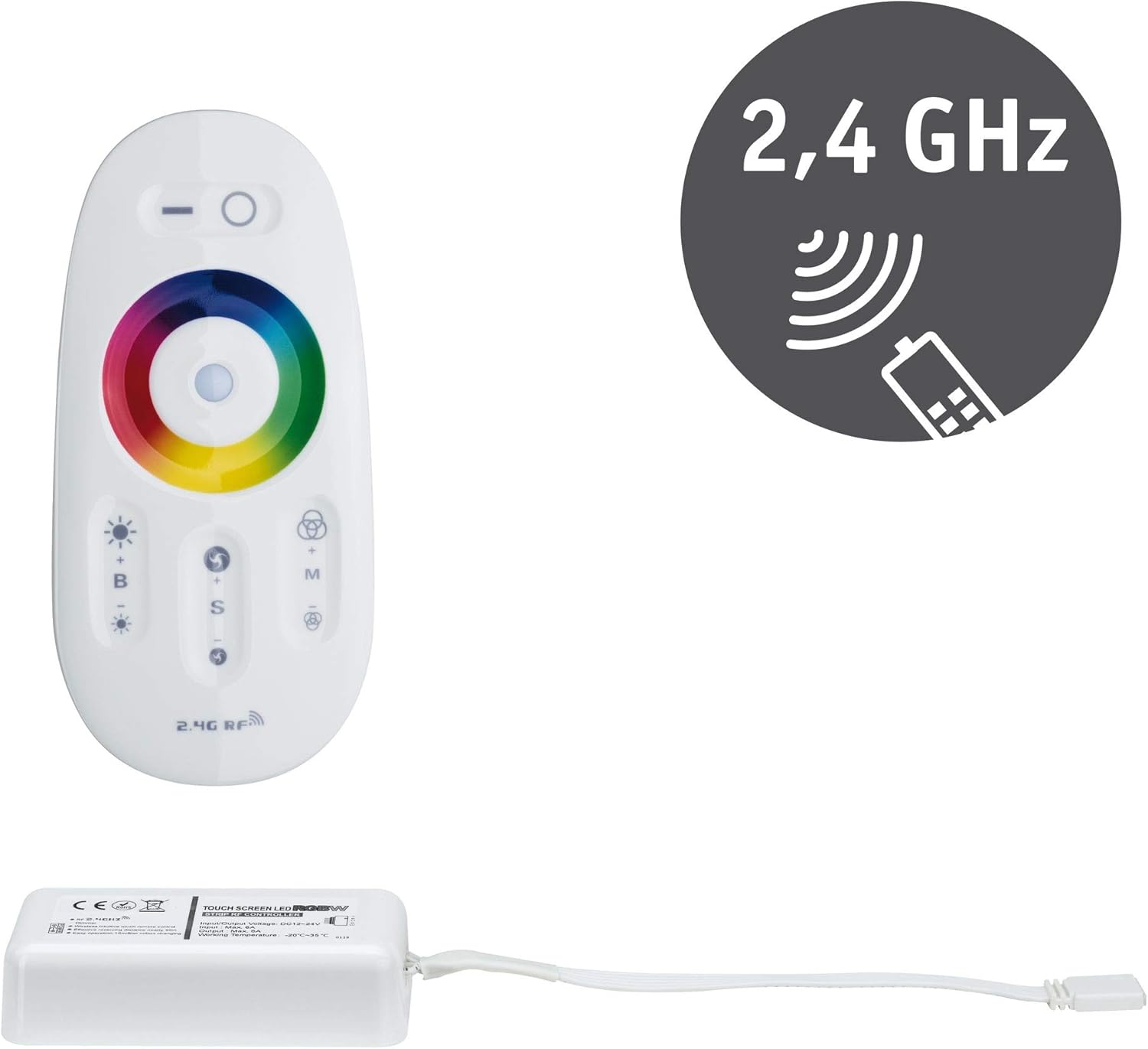
Image 3.1: Paulmann 70621 MaxLED RGB Controller and its accompanying 2.4 GHz remote control. The controller is a white rectangular unit with a cable, and the remote is an oval white unit with a color wheel and various buttons.
4. സജ്ജീകരണവും ഇൻസ്റ്റാളേഷനും
Follow these steps to install your MaxLED RGB Controller:
- വിദൂര നിയന്ത്രണം തയ്യാറാക്കുക: The remote control requires 2 AAA batteries (not included). Open the battery compartment on the back of the remote and insert the batteries, observing the correct polarity.
- LED സ്ട്രിപ്പ് ബന്ധിപ്പിക്കുക: Connect your 24V DC RGB LED strip to the output connector of the MaxLED RGB Controller. Ensure the connections are secure and correctly aligned according to the strip's markings (e.g., R, G, B, V+).
- പവർ സപ്ലൈ ബന്ധിപ്പിക്കുക: Connect a compatible 24V DC power supply (not included) to the input connector of the MaxLED RGB Controller. Ensure the power supply is capable of providing sufficient wattage for your LED strip (up to 144W maximum for the controller).
- പവർ ഓൺ: Once all connections are secure, connect the power supply to a mains outlet. The LED strip should briefly illuminate or be ready for control.
- ജോടിയാക്കൽ (ആവശ്യമെങ്കിൽ): The controller and remote are usually pre-paired. If the remote does not respond, power off the controller, then power it back on. Within 3 seconds of powering on, press and hold the 'ON' button (top right circle) on the remote control until the LED strip flashes, indicating successful pairing.

Image 4.1: The Paulmann 70621 MaxLED RGB Controller and its remote, illustrating the components involved in the setup process.
5. പ്രവർത്തന നിർദ്ദേശങ്ങൾ
The 2.4 GHz remote control provides intuitive operation of your MaxLED RGB strip:

Image 5.1: Close-up of the Paulmann 70621 MaxLED RGB Remote Control, highlighting its various buttons and the color wheel.
- Power On/Off (Top Left/Right Buttons): Press the top left button (line icon) to turn off the LED strip. Press the top right button (circle icon) to turn on the LED strip.
- Color Selection (Color Wheel): Touch the color wheel to select your desired static color.
- Brightness Adjustment (B+/-): Use the 'B+' button to increase brightness and 'B-' button to decrease brightness.
- മോഡ് തിരഞ്ഞെടുക്കൽ (M): Press the 'M' button to cycle through various dynamic color changing modes.
- Speed Adjustment (S+/-): When a dynamic mode is active, use the 'S+' button to increase the speed of the color change and 'S-' button to decrease it.
6. പരിപാലനം
The Paulmann 70621 MaxLED RGB Controller requires minimal maintenance:
- വൃത്തിയാക്കൽ: Wipe the controller and remote control with a soft, dry cloth. Do not use abrasive cleaners or solvents.
- ബാറ്ററി മാറ്റിസ്ഥാപിക്കൽ: When the remote control's range decreases or it becomes unresponsive, replace the 2 AAA batteries. Ensure correct polarity.
7. പ്രശ്നപരിഹാരം
If you encounter issues with your MaxLED RGB Controller, refer to the following common problems and solutions:
| പ്രശ്നം | സാധ്യമായ കാരണം | പരിഹാരം |
|---|---|---|
| LED സ്ട്രിപ്പ് പ്രകാശിക്കുന്നില്ല. | No power, incorrect connections, faulty LED strip or power supply. | Check power supply connection. Verify LED strip and controller connections. Test with a known working LED strip/power supply. |
| റിമോട്ട് കൺട്രോൾ പ്രതികരിക്കുന്നില്ല. | Dead batteries, remote not paired, out of range. | Replace AAA batteries. Re-pair the remote (see Section 4). Ensure remote is within range of the controller. |
| നിറങ്ങൾ തെറ്റാണ് അല്ലെങ്കിൽ പൊരുത്തമില്ലാത്തതാണ്. | Incorrect wiring of RGB channels, faulty LED strip. | Double-check the RGB wiring between the controller and the LED strip. Ensure R, G, B, V+ are connected correctly. |
| LED strip flickers. | Insufficient power supply, loose connection. | വൈദ്യുതി വിതരണം ഉറപ്പാക്കുകtage is adequate for the LED strip. Check all connections for tightness. |
8 സ്പെസിഫിക്കേഷനുകൾ
| മോഡൽ നമ്പർ | 70621 |
| ബ്രാൻഡ് | പോൾമാൻ |
| ഉൽപ്പന്ന അളവുകൾ (L x W x H) | 8.5 x 4.5 x 2.25 സെ.മീ |
| ഭാരം | 104 ഗ്രാം |
| മെറ്റീരിയൽ | പ്ലാസ്റ്റിക് |
| നിറം | വെള്ള |
| ഇൻപുട്ട് വോളിയംtage | 24 വോൾട്ട് ഡിസി |
| പരമാവധി. ഔട്ട്പുട്ട് പവർ | 144 വാട്ട്സ് |
| പ്രത്യേക സവിശേഷതകൾ | RGB Color Change, Dimmable, Remote Control |
| റിമോട്ട് കൺട്രോൾ ഫ്രീക്വൻസി | 2.4 GHz |
| റിമോട്ട് കൺട്രോൾ ബാറ്ററികൾ | 2 AAA (ഉൾപ്പെടുത്തിയിട്ടില്ല) |
| സംരക്ഷണ റേറ്റിംഗ് | IP20 (ഇൻഡോർ ഉപയോഗം മാത്രം) |
9. വാറൻ്റിയും പിന്തുണയും
Information regarding specific warranty terms and customer support for the Paulmann 70621 MaxLED RGB Controller is not available in this document. Please refer to the product packaging, the official Paulmann website, or contact your retailer for detailed warranty information and support options.


