1. ആമുഖം
തിരഞ്ഞെടുത്തതിന് നന്ദി AMPIRE DVX104 DVD Player with USB Interface. This compact 3/4 DIN unit is designed to provide versatile media playback in various installations, supporting a wide range of audio and video formats. This manual provides essential information for proper installation, operation, and maintenance of your device. Please read it thoroughly before use.
2 സുരക്ഷാ വിവരങ്ങൾ
- Ensure the device is installed by a qualified professional to prevent damage or injury.
- യൂണിറ്റിനെ ഈർപ്പം, മഴ, അല്ലെങ്കിൽ തീവ്രമായ താപനില എന്നിവയ്ക്ക് വിധേയമാക്കരുത്.
- ഏതെങ്കിലും അറ്റകുറ്റപ്പണികൾ അല്ലെങ്കിൽ ഇൻസ്റ്റാളേഷൻ നടത്തുന്നതിന് മുമ്പ് വൈദ്യുതി വിച്ഛേദിക്കുക.
- Use only the specified power supply (12V DC).
- വെന്റിലേഷൻ തുറക്കൽ തടയരുത്.
- കുട്ടികൾക്ക് ലഭ്യമാകാതെ സൂക്ഷിക്കുക.
3. പാക്കേജ് ഉള്ളടക്കം
പാക്കേജിൽ എല്ലാ ഇനങ്ങളും ഉണ്ടോ എന്ന് ദയവായി പരിശോധിക്കുക:
- AMPIRE DVX104 DVD Player Unit
- IR റിമോട്ട് കൺട്രോൾ
- ബാഹ്യ ഐആർ റിസീവർ
- മൗണ്ടിംഗ് ബ്രാക്കറ്റുകളും സ്ക്രൂകളും
- ഉപയോക്തൃ മാനുവൽ (ഈ പ്രമാണം)

Image: Included mounting brackets and various screws for installation.
4. ഉൽപ്പന്നം കഴിഞ്ഞുview
4.1 ഫ്രണ്ട് പാനൽ

ചിത്രം: ദി AMPIRE DVX104 DVD player, showing the disc slot, USB port, and control buttons with blue illumination.
The front panel features the disc slot, a USB port, and essential control buttons for power, play/pause, stop, source selection, track navigation, and disc eject. The buttons are illuminated with a blue night design.
4.2 വിദൂര നിയന്ത്രണം
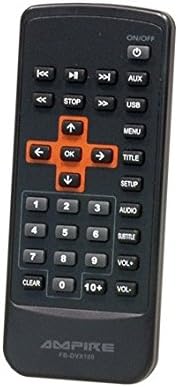
Image: The infrared remote control for the DVX104, featuring navigation, playback, volume, and menu buttons.
The included IR remote control provides full functionality, allowing you to control playback, navigate menus, adjust volume, and select input sources from a distance. Ensure the external IR receiver is positioned correctly for optimal signal reception.
5. സജ്ജീകരണവും ഇൻസ്റ്റാളേഷനും
The DVX104 is designed for flexible installation, supporting both vertical and horizontal mounting positions. It is a 3/4 DIN size unit, suitable for various integration scenarios, including automotive or home entertainment systems.

ചിത്രം: ഉദാample installation of the DVX104 unit discreetly integrated into a vehicle's center console.
5.1 മൗണ്ടിംഗ്
- Choose a suitable location for installation, considering ventilation and accessibility for disc insertion/removal.
- Use the provided mounting brackets and screws to secure the unit. The unit can be mounted vertically or horizontally.
- Ensure the mounting surface is stable and can support the unit's weight (approx. 1.6 kg).
5.2 വയറിംഗ് കണക്ഷനുകൾ
- പവർ കണക്ഷൻ: Connect the unit to a 12V DC power source. The maximum power consumption is 15W. The unit consumes 0W when the ignition is off.
- എവി put ട്ട്പുട്ട്: Connect the 1 AV output to your display device (e.g., television, monitor) using appropriate cables. The video signal is 1Vp-p, and the audio signal is 6Vss (2.1V RMS).
- ബാഹ്യ IR റിസീവർ: Plug in the external IR receiver and position it where it has a clear line of sight to your remote control.
6. പ്രവർത്തന നിർദ്ദേശങ്ങൾ
6.1 ഡിസ്ക് പ്ലേബാക്ക്
- Insert a compatible disc (DVD, SVCD, MVCD, MSVCD, VCD1.0/2.0, CD-DA) into the disc slot. The unit will automatically begin playback.
- Use the remote control or front panel buttons for Play/Pause, Stop, and track navigation.
- The unit features a "last position memory" function for disc operation, allowing you to resume playback from where you left off (not applicable for MPEG4 fileഎസ്).
6.2 യുഎസ്ബി മീഡിയ പ്ലേബാക്ക്
- Insert a USB stick (up to 8GB) or a 2.5-inch hard drive (up to 80GB, FAT32 formatted) into the USB port.
- If the hard drive is not recognized, it may require an external power supply.
- Use the "SRC" (Source) button on the front panel or remote to switch to USB input.
- നിങ്ങളുടെ മീഡിയയിലൂടെ നാവിഗേറ്റ് ചെയ്യുക files (MPEG4, WMA, MP3, JPEG) using the remote control.
6.3 ഓൺ-സ്ക്രീൻ ഡിസ്പ്ലേ (OSD) മെനു
The unit features a German on-screen operating menu. Use the remote control's navigation buttons to access and adjust settings such as audio output, video settings, and system preferences.
6.4 പിന്തുണയ്ക്കുന്ന ഫോർമാറ്റുകൾ
- വീഡിയോ: DVD, SVCD, MVCD, MSVCD, VCD1.0, VCD2.0, MPEG4 (Video encoding: MPEG-2)
- ഓഡിയോ: WMA, CD-DA, MP3, Dolby Digital Audio format
- ചിത്രങ്ങൾ: JPEG
7. പരിപാലനം
- Clean the unit's exterior with a soft, dry cloth. Do not use abrasive cleaners or solvents.
- Keep the disc slot free from dust and debris.
- അമിതമായി ചൂടാക്കുന്നത് തടയാൻ യൂണിറ്റിന് ചുറ്റും ശരിയായ വായുസഞ്ചാരം ഉറപ്പാക്കുക.
8. പ്രശ്നപരിഹാരം
| പ്രശ്നം | സാധ്യമായ കാരണം | പരിഹാരം |
|---|---|---|
| ശക്തിയില്ല | Incorrect power connection; Blown fuse | Check 12V DC power supply and connections. Verify fuse. |
| ഡിസ്ക് പ്ലേബാക്ക് ഇല്ല | Disc is dirty or scratched; Incompatible disc format | Clean the disc. Ensure the disc format is supported (DVD, VCD, CD-DA). |
| USB ഉപകരണം തിരിച്ചറിഞ്ഞില്ല. | Incorrect format (not FAT32); Device requires external power; USB device capacity too large | Ensure USB device is FAT32 formatted. For HDDs, try with external power. Check capacity limits (8GB for sticks, 80GB for HDDs). |
| റിമോട്ട് കൺട്രോൾ പ്രതികരണമില്ല | Batteries are dead; IR receiver blocked or misplaced | Replace remote control batteries. Ensure IR receiver has a clear line of sight to the remote. |
| വീഡിയോ ഔട്ട്പുട്ട് ഇല്ല | AV cable not connected properly; Incorrect input selected on display device | Check AV cable connections. Select the correct AV input on your television/monitor. |
9 സ്പെസിഫിക്കേഷനുകൾ
| ഫീച്ചർ | വിശദാംശങ്ങൾ |
|---|---|
| മോഡൽ | DVX104 |
| അളവുകൾ (W x H) | 159 x 43 മി.മീ |
| ഇൻസ്റ്റലേഷൻ ആഴം | 164 മി.മീ |
| ഭാരം | 1.6 കി.ഗ്രാം |
| ഓപ്പറേറ്റിംഗ് വോളിയംtage | 12V DC |
| പരമാവധി. വൈദ്യുതി ഉപഭോഗം | 15W |
| Power Consumption (Ignition Off) | 0W (0.0 Ampമുമ്പ്) |
| വീഡിയോ സിഗ്നൽ | 1Vp-p |
| ഓഡിയോ സിഗ്നൽ | 6Vss (2.1V RMS) |
| ഓഡിയോ put ട്ട്പുട്ട് മോഡ് | Surround (2.0 Channel) |
| USB പിന്തുണ | USB sticks up to 8GB, 2.5" HDDs up to 80GB (FAT32) |
| പിന്തുണയ്ക്കുന്ന ഡിസ്ക് ഫോർമാറ്റുകൾ | DVD, SVCD, MVCD, MSVCD, VCD1.0, VCD2.0, CD-DA |
| പിന്തുണയ്ക്കുന്ന മീഡിയ ഫോർമാറ്റുകൾ | MPEG4, WMA, MP3, JPEG |
| പാലിക്കൽ | RoHS compliant, E8 10R-03 1242 |
10. വാറൻ്റിയും പിന്തുണയും
This product is licensed and approved. For warranty information and technical support, please refer to the documentation provided with your purchase or contact your local Ampire dealer. Keep your proof of purchase for warranty claims.


