1. ആമുഖം
The Datavideo HRS-30 is a versatile portable recorder and integrated 10.1-inch monitor designed for professional field recording and playback applications. This device supports both HD and SD video equipment, accepting signals via HD/SD-SDI inputs. It is compatible with various video formats including 1080i, 720p, 576i, and 480i.
The HRS-30 offers flexible recording formats, including MPEG-II Long-GOP or intra-frame (i-frame) with 4:2:2 color sampling. Recorded files are stored in the MXF/OP1A format, ensuring compatibility with a wide range of Non-Linear Editing (NLE) systems and playout solutions. Storage is facilitated by a removable caddy, compatible with standard 2.5-inch HDD and SSD drives.
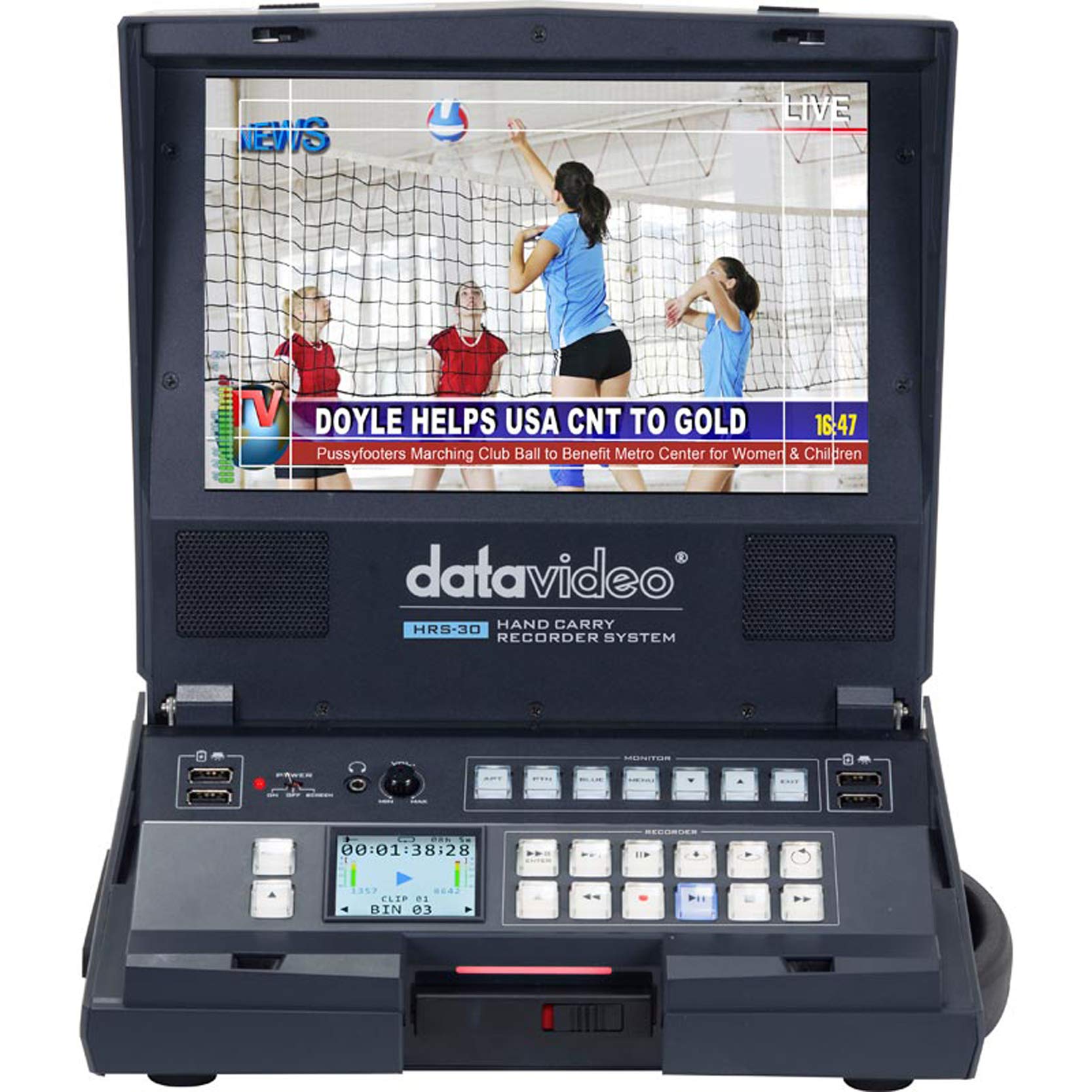
ചിത്രം 1.1: മുൻഭാഗം view of the Datavideo HRS-30 Portable Recorder Monitor, showing the integrated screen and control interface.
2 സുരക്ഷാ വിവരങ്ങൾ
Please read and understand all safety instructions before operating the HRS-30. Failure to follow these instructions may result in electric shock, fire, or damage to the unit.
- ഊർജ്ജ സ്രോതസ്സ്: Use only the specified power adapter and ensure the voltage യൂണിറ്റിന്റെ ആവശ്യകതകളുമായി പൊരുത്തപ്പെടുന്നു.
- വെൻ്റിലേഷൻ: വെന്റിലേഷൻ തുറസ്സുകൾ തടയരുത്. അമിതമായി ചൂടാകുന്നത് തടയാൻ യൂണിറ്റിന് ചുറ്റും മതിയായ വായുസഞ്ചാരം ഉറപ്പാക്കുക.
- ജലവും ഈർപ്പവും: Do not expose the unit to rain, moisture, or immerse it in water.
- സേവനം: ഈ ഉൽപ്പന്നം സ്വയം സേവിക്കാൻ ശ്രമിക്കരുത്. യോഗ്യതയുള്ള സേവന ഉദ്യോഗസ്ഥർക്ക് എല്ലാ സേവനങ്ങളും റഫർ ചെയ്യുക.
- പ്ലേസ്മെൻ്റ്: യൂണിറ്റ് ഒരു സ്ഥിരതയുള്ള, നിരപ്പായ പ്രതലത്തിൽ വയ്ക്കുക. നേരിട്ടുള്ള സൂര്യപ്രകാശത്തിലോ താപ സ്രോതസ്സുകൾക്ക് സമീപമോ വയ്ക്കുന്നത് ഒഴിവാക്കുക.
3. പാക്കേജ് ഉള്ളടക്കം
Verify that all items are present in the package. If any items are missing or damaged, contact your dealer immediately.
- Datavideo HRS-30 Portable Recorder Monitor Unit
- പവർ അഡാപ്റ്റർ
- Removable Caddy for 2.5" HDD/SSD
- ഉപയോക്തൃ മാനുവൽ (ഈ പ്രമാണം)
- Additional accessories as specified by your retailer
4. സജ്ജീകരണം
Follow these steps to set up your HRS-30 unit for operation.
4.1 Installing Storage Media
- Ensure the HRS-30 is powered off.
- Locate the removable caddy slot on the unit.
- Insert a compatible 2.5-inch HDD or SSD into the removable caddy.
- Slide the caddy with the installed drive into the HRS-30's caddy slot until it clicks securely into place.
4.2 ബന്ധിപ്പിക്കുന്ന പവർ
- Connect the power adapter to the DC IN 12V port on the rear of the HRS-30.
- അനുയോജ്യമായ ഒരു ഇലക്ട്രിക്കൽ ഔട്ട്ലെറ്റിലേക്ക് പവർ അഡാപ്റ്റർ പ്ലഗ് ചെയ്യുക.
- Press the POWER switch on the rear panel to turn on the unit.
4.3 വീഡിയോ, ഓഡിയോ കണക്ഷനുകൾ
The HRS-30 supports various input and output connections. Refer to the rear panel diagram for port locations.
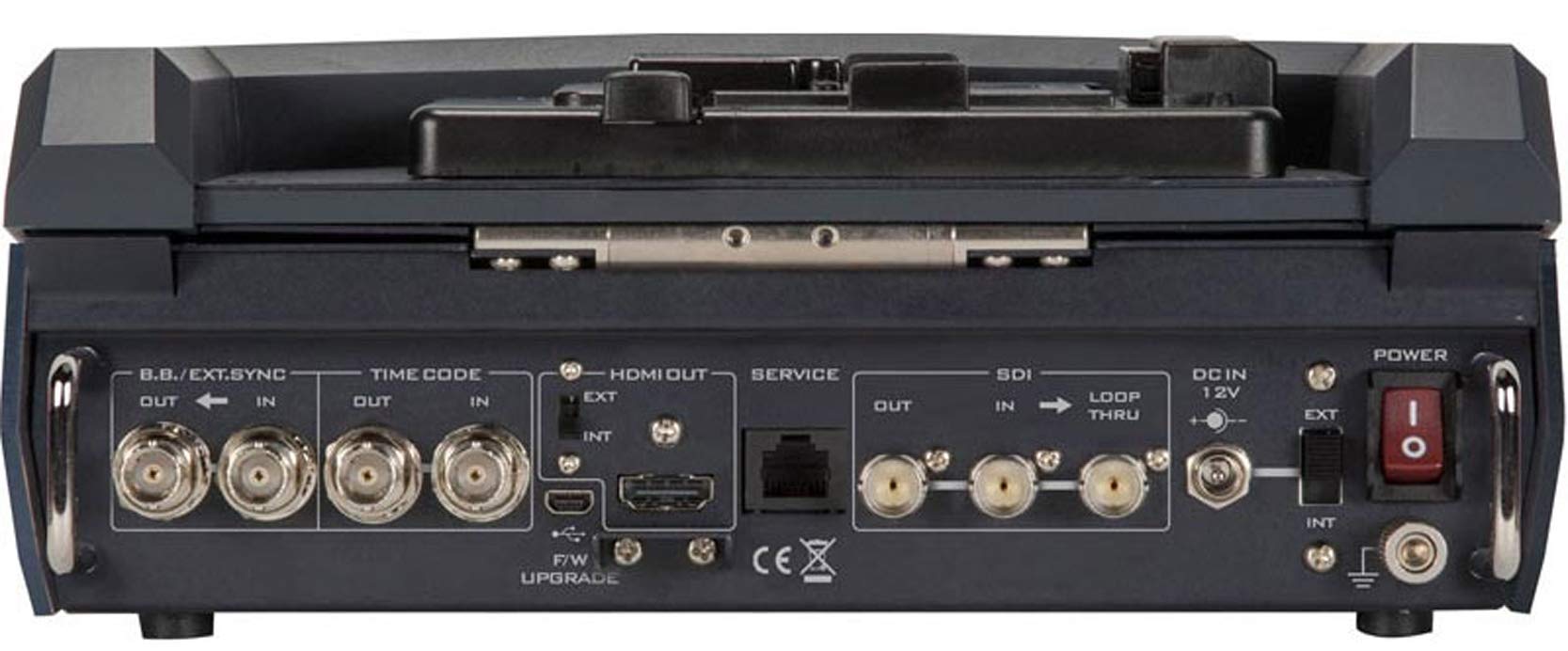
Figure 4.1: Rear panel connections of the Datavideo HRS-30, including SDI, HDMI, Timecode, and Power inputs/outputs.
- SDI ഇൻപുട്ട്: Connect your HD/SD-SDI video source to the SDI IN port. The unit also features an SDI LOOP THRU for connecting to another device.
- HDMI ഔട്ട്പുട്ട്: Connect an external monitor or display to the HDMI OUT port for video monitoring.
- സമയകോഡ്: Use the TIME CODE IN/OUT ports for external timecode synchronization.
- BB/EXT.SYNC: Connect Black Burst or external sync signals to the BB/EXT.SYNC IN/OUT ports.
- സർവീസ് പോർട്ട്: For firmware upgrades and maintenance.
5. പ്രവർത്തന നിർദ്ദേശങ്ങൾ
This section details the basic operation of the HRS-30 for recording and playback.
5.1 പവർ ചെയ്യൽ ഓണും പ്രാരംഭ സ്ക്രീനും
- Ensure all necessary connections are made and the storage caddy is installed.
- Flip the POWER switch on the rear panel to the 'ON' position.
- The integrated 10.1-inch monitor will display the boot-up sequence, followed by the live video input or the last recorded clip.
5.2 വീഡിയോ റെക്കോർഡിംഗ്
The HRS-30 records video from HD/SD-SDI sources in various formats.
- ഇൻപുട്ട് തിരഞ്ഞെടുക്കുക: Use the control panel buttons to select the desired SDI input source.
- ഇൻപുട്ട് നിരീക്ഷിക്കുക: Verify the incoming video signal on the integrated monitor.
- റെക്കോർഡിംഗ് ആരംഭിക്കുക: അമർത്തുക REC button on the control panel to begin recording. The recording indicator will illuminate.
- റെക്കോർഡിംഗ് നിർത്തുക: അമർത്തുക നിർത്തുക button to end the recording. The recording indicator will turn off.
The HRS-30 supports recording in MPEG-II Long-GOP or intra-frame (i-frame) with 4:2:2 color sampling, producing MXF/OP1A files.
5.3 പ്ലേബാക്ക്
വീണ്ടുംview recorded content:
- Access Playback Mode: Use the navigation buttons to enter playback mode.
- Select Clip: Browse through your recorded clips using the navigation controls.
- പ്ലേബാക്ക് ആരംഭിക്കുക: അമർത്തുക കളിക്കുക button to start playback of the selected clip.
- പ്ലേബാക്ക് നിയന്ത്രിക്കുക: ഉപയോഗിക്കുക താൽക്കാലികമായി നിർത്തുക, FFW (ഫാസ്റ്റ് ഫോർവേഡ്), കൂടാതെ REW (Rewind) buttons to control playback.
5.4 മെനു നാവിഗേഷൻ
The HRS-30 features an on-screen menu system for configuring settings such as video format, recording quality, audio settings, and system preferences. Use the MENU button and directional arrows to navigate, and the ENTER button to confirm selections.
6. പരിപാലനം
Proper maintenance ensures the longevity and optimal performance of your HRS-30.
- വൃത്തിയാക്കൽ: Use a soft, dry cloth to clean the exterior of the unit. For the screen, use a specialized screen cleaning solution and a microfiber cloth. Do not use abrasive cleaners or solvents.
- സംഭരണം: When not in use, store the HRS-30 in a cool, dry place, away from direct sunlight and extreme temperatures.
- ഫേംവെയർ അപ്ഡേറ്റുകൾ: Periodically check the Datavideo website for firmware updates to ensure your unit has the latest features and bug fixes. Follow the instructions provided with the firmware update carefully.
7. പ്രശ്നപരിഹാരം
This section addresses common issues you might encounter with the HRS-30.
| പ്രശ്നം | സാധ്യമായ കാരണം | പരിഹാരം |
|---|---|---|
| യൂണിറ്റ് പവർ ഓണാക്കുന്നില്ല | No power, faulty adapter, power switch off | Check power cable connection, verify power outlet, ensure power switch is ON. |
| No video on screen | Incorrect input selected, no signal from source, faulty cable | Select correct input, check video source, replace SDI/HDMI cable. |
| രേഖപ്പെടുത്താൻ കഴിയില്ല | No storage media, full storage, media error | Ensure caddy with drive is installed, check available storage space, format or replace drive if necessary. |
| Playback issues | അഴിമതിക്കാരൻ file, incompatible format | Try playing another clip. Ensure recorded fileകൾ കേടായിട്ടില്ല. |
8 സ്പെസിഫിക്കേഷനുകൾ
Detailed technical specifications for the Datavideo HRS-30.
- മോഡൽ: എച്ച്ആർഎസ്-30
- ദൃശ്യമായ സ്ക്രീൻ ഡയഗണൽ: 10 ഇഞ്ച് / 26 സെ.മീ
- ഉൽപ്പന്ന അളവുകൾ: 10.83 x 10.24 x 3.94 ഇഞ്ച് (27.5 x 26 x 10 സെ.മീ)
- ഇനത്തിൻ്റെ ഭാരം: 7.92 പൗണ്ട് (3.6 കി.ഗ്രാം)
- വീഡിയോ ഇൻപുട്ടുകൾ: HD/SD-SDI
- വീഡിയോ ഔട്ട്പുട്ടുകൾ: HDMI, SDI Loop Thru
- പിന്തുണയ്ക്കുന്ന വീഡിയോ ഫോർമാറ്റുകൾ: 1080i, 720p, 576i, 480i
- റെക്കോർഡിംഗ് ഫോർമാറ്റുകൾ: MPEG-II Long-GOP, Intra-frame (i-frame) with 4:2:2 color sampലിംഗം
- File ഫോർമാറ്റ്: MXF/OP1A
- സ്റ്റോറേജ് മീഡിയ: Removable caddy for 2.5" HDD & SSD drives
- നിർമ്മാതാവ്: ഡാറ്റാവിഡിയോ
- ആദ്യം ലഭ്യമായ തീയതി: 23 മാർച്ച് 2016
9. വാറൻ്റിയും പിന്തുണയും
For warranty information and technical support, please refer to the official Datavideo website or contact your authorized Datavideo dealer. Keep your purchase receipt as proof of purchase for warranty claims.


