1. ഉൽപ്പന്നം കഴിഞ്ഞുview
The Kit Magnetic Bluetooth Keyboard Case transforms your 9-10 inch tablet into a portable laptop, offering both protection and enhanced typing capabilities. Its sleek design features a leather-effect finish and an integrated stand for versatile use. The detachable Bluetooth keyboard ensures quick and easy pairing with a wide range of devices.
പ്രധാന സവിശേഷതകൾ:
- ബ്ലൂടൂത്ത് കണക്റ്റിവിറ്റി: Seamlessly connect the wireless keyboard to your tablet.
- വിശാലമായ അനുയോജ്യത: Designed for 9-10 inch iOS, Android, and Windows tablets, including various iPad and Samsung Galaxy Tab models.
- നീണ്ട ബാറ്ററി ലൈഫ്: The rechargeable battery provides approximately 65 hours of continuous typing.
- സംയോജിത സ്റ്റാൻഡ്: Folds into a stable stand for comfortable viewടൈപ്പിംഗ് ആംഗിളുകൾ.
- കാന്തിക രൂപകൽപ്പന: Securely holds the tablet and keyboard in place.

Image: The Kit Magnetic Bluetooth Keyboard Case with a tablet securely placed, illustrating its use as a portable workstation.
2. ആരംഭിക്കുന്നു
2.1 പാക്കേജ് ഉള്ളടക്കം
- Kit Magnetic Bluetooth Keyboard Case
- യുഎസ്ബി ചാർജിംഗ് കേബിൾ
- ഉപയോക്തൃ മാനുവൽ
2.2 കീബോർഡ് ചാർജ് ചെയ്യുന്നു
Before first use, fully charge the keyboard. Connect the provided USB charging cable to the keyboard's charging port and plug the other end into a USB power source (e.g., computer USB port, USB wall adapter). The charging indicator light will illuminate during charging and turn off when fully charged.
2.3 നിങ്ങളുടെ ടാബ്ലെറ്റ് ചേർക്കൽ
- Open the keyboard case flat.
- Carefully slide your 9-10 inch tablet into the designated slot or frame within the case. Ensure it is securely seated and aligned with any cutouts for buttons or ports.
- The magnetic design will help hold the tablet in place.
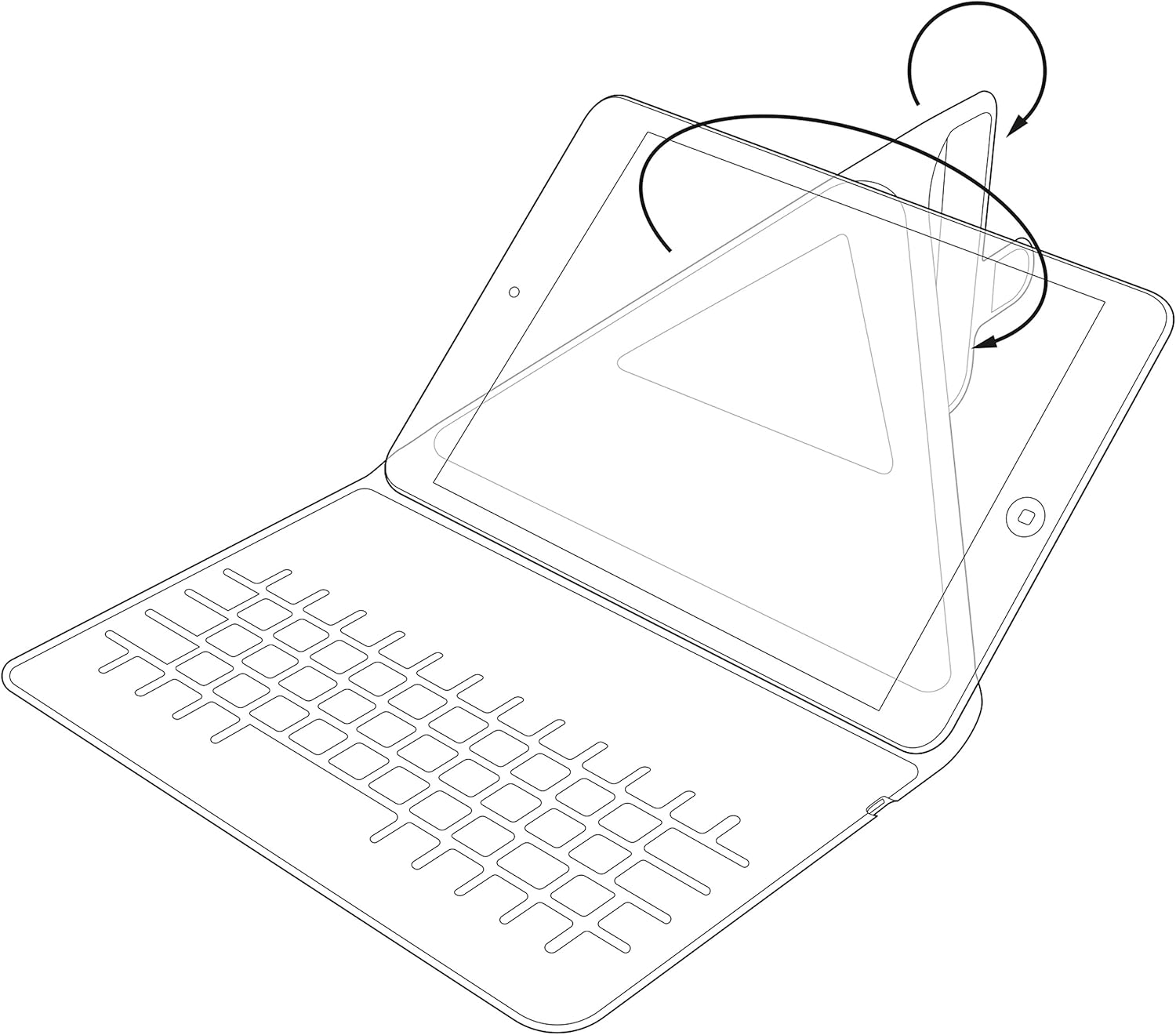
Image: Diagram showing the process of inserting a tablet into the case's holding mechanism.
2.4 ബ്ലൂടൂത്ത് കീബോർഡ് ജോടിയാക്കൽ
- Turn on the keyboard by sliding the power switch to the 'ON' position. The power indicator light will briefly illuminate.
- Press the 'Connect' or 'Pair' button on the keyboard (refer to the keyboard layout for exact button location). The Bluetooth indicator light will start blinking, indicating it is in pairing mode.
- On your tablet, go to 'Settings' > 'Bluetooth'. Ensure Bluetooth is enabled.
- Your tablet will search for available Bluetooth devices. Select 'Kit Keyboard' or a similar name from the list of found devices.
- If prompted, enter the pairing code displayed on your tablet screen using the keyboard, then press 'Enter'.
- Once paired, the Bluetooth indicator light on the keyboard will stop blinking and remain solid or turn off, and your tablet will show the keyboard as 'Connected'.
3. പ്രവർത്തന നിർദ്ദേശങ്ങൾ
3.1 കീബോർഡ് പ്രവർത്തനങ്ങൾ
The keyboard features a standard QWERTY layout with additional function keys (Fn) for quick access to multimedia controls, volume, and other tablet-specific functions. Refer to the key labels for their specific actions. For example, you may find keys for Home, Search, Volume Up/Down, Play/Pause, etc.

ചിത്രം: വിശദമായത് view of the keyboard layout, highlighting various function keys and standard alphanumeric keys.
3.2 Using the Integrated Stand
The case is designed to fold into a stable stand, allowing you to position your tablet at an optimal viewing angle for typing, watching videos, or making video calls. Simply fold the back cover of the case to create a triangular support structure.

Image: Diagram demonstrating the folding mechanism of the case to create a stable viewing stand for the tablet.
4. പരിചരണവും പരിപാലനവും
- വൃത്തിയാക്കൽ: ഒരു സോഫ്റ്റ് ഉപയോഗിക്കുക, ഡിamp cloth to wipe the exterior of the case. For the keyboard, use a dry, lint-free cloth. Avoid harsh chemicals or abrasive cleaners.
- സംഭരണം: ദീർഘനേരം ഉപയോഗിക്കാത്തപ്പോൾ, കീബോർഡ് കേസ് തണുത്തതും വരണ്ടതുമായ സ്ഥലത്ത് സൂക്ഷിക്കുക.
- ബാറ്ററി കെയർ: To prolong battery life, avoid fully discharging the keyboard frequently. Charge it regularly, even if not completely depleted.
- ദ്രാവകങ്ങൾ ഒഴിവാക്കുക: Keep the keyboard case away from water and other liquids to prevent damage to electronic components.
5. പ്രശ്നപരിഹാരം
5.1 കീബോർഡ് കണക്റ്റുചെയ്യുന്നില്ല/ജോടിയാക്കുന്നില്ല
- Ensure the keyboard is turned ON and fully charged.
- Make sure Bluetooth is enabled on your tablet.
- Place the keyboard and tablet within close proximity (within 10 meters).
- Delete any previous pairings of the keyboard from your tablet's Bluetooth settings and attempt to pair again.
- Restart both the keyboard (turn off and on) and your tablet.
5.2 കീകൾ പ്രതികരിക്കുന്നില്ല
- Check the keyboard's battery level and charge if necessary.
- Ensure the keyboard is properly connected via Bluetooth. Re-pair if needed.
- താക്കോലുകൾക്ക് ചുറ്റുമുള്ള അവശിഷ്ടങ്ങൾ വൃത്തിയാക്കുക.
5.3 ചാർജിംഗ് പ്രശ്നങ്ങൾ
- Verify that the charging cable is securely connected to both the keyboard and the power source.
- മറ്റൊരു USB പോർട്ട് അല്ലെങ്കിൽ പവർ അഡാപ്റ്റർ പരീക്ഷിക്കുക.
- Ensure the charging cable is not damaged.
6. ഉൽപ്പന്ന സവിശേഷതകൾ
| ബ്രാൻഡ് | കിറ്റ് |
| മോഡൽ നമ്പർ | KBMAG10BK |
| ഉൽപ്പന്ന അളവുകൾ | 1.6 x 20 x 24.5 സെ.മീ |
| ഇനത്തിൻ്റെ ഭാരം | 356 ഗ്രാം |
| നിറം | കറുപ്പ് |
| മെറ്റീരിയൽ | തുകൽ |
| കണക്റ്റിവിറ്റി ടെക്നോളജി | ബ്ലൂടൂത്ത് |
| ബാറ്ററി തരം | ലിഥിയം പോളിമർ |
| ബാറ്ററി എനർജി ഉള്ളടക്കം | 1 വാട്ട് മണിക്കൂർ |
| അനുയോജ്യമായ ഉപകരണങ്ങൾ | 9-10 inch iOS, Android, Windows Tablets (e.g., iPad, Samsung Galaxy Tab) |
7. വാറൻ്റിയും പിന്തുണയും
This Kit Magnetic Bluetooth Keyboard Case comes with a full one-year warranty from the date of purchase. For any technical assistance, troubleshooting, or warranty claims, please contact Kit's experienced and friendly UK-based customer service team. Refer to your purchase documentation for specific contact details.


