ആമുഖം
This user manual provides comprehensive instructions for the MI Redmi 4A smartphone. It covers essential information regarding device setup, operation, maintenance, and troubleshooting to ensure optimal performance and user experience. Please read this manual carefully before using your device.
ഉപകരണം കഴിഞ്ഞുview
The MI Redmi 4A is a compact and lightweight smartphone designed for everyday use. It features a touchscreen display, front and rear cameras, and essential connectivity options.

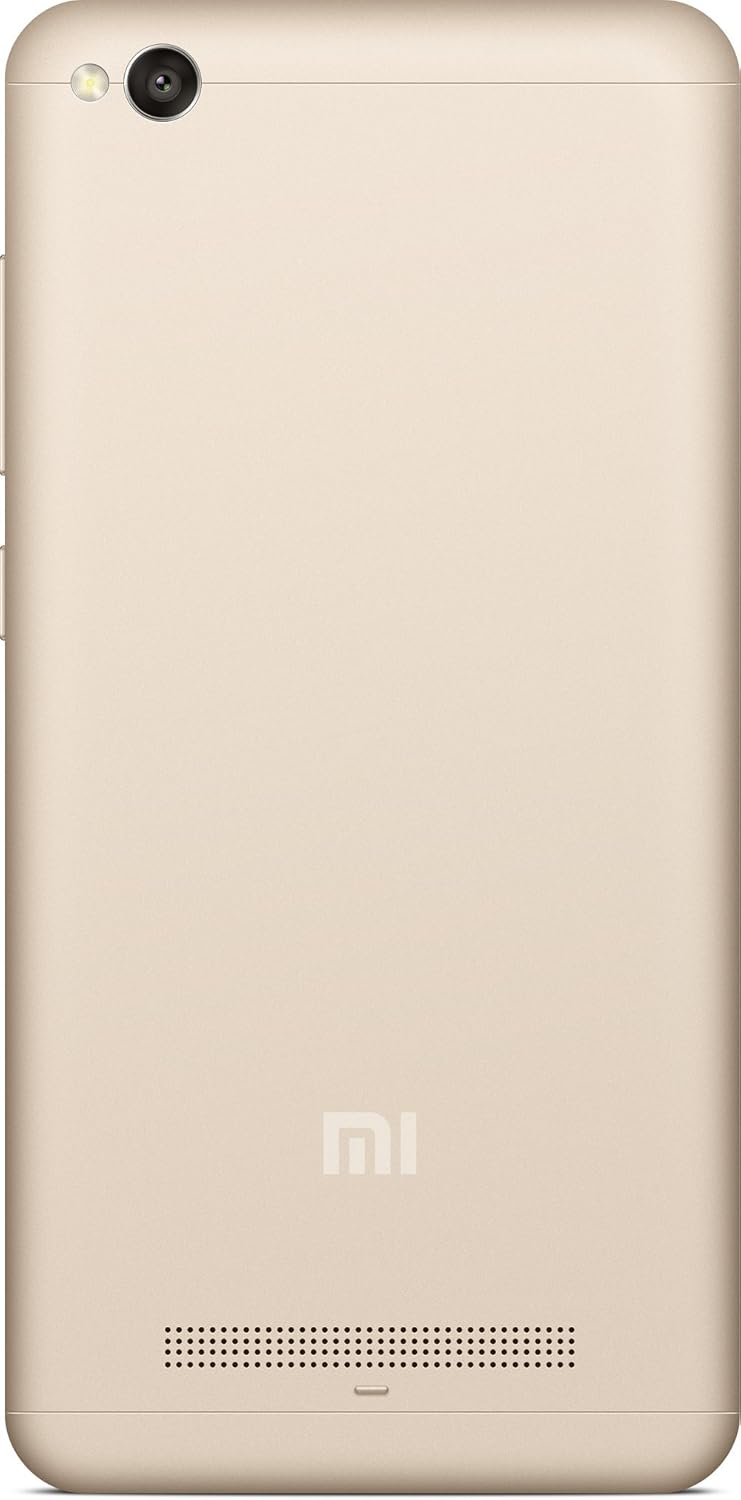


സജ്ജീകരണ ഗൈഡ്
1. അൺബോക്സിംഗും പ്രാരംഭ ചാർജും
Carefully remove the MI Redmi 4A and all accessories from the packaging. Before first use, it is recommended to fully charge the device using the provided charger and USB cable.
- ഫോണിന്റെ ചാർജിംഗ് പോർട്ടിലേക്ക് USB കേബിൾ ബന്ധിപ്പിക്കുക.
- യുഎസ്ബി കേബിളിൻ്റെ മറ്റേ അറ്റം പവർ അഡാപ്റ്ററുമായി ബന്ധിപ്പിക്കുക.
- ഒരു മതിൽ ഔട്ട്ലെറ്റിലേക്ക് പവർ അഡാപ്റ്റർ പ്ലഗ് ചെയ്യുക.
- ചാർജിംഗ് ഇൻഡിക്കേറ്റർ സ്ക്രീനിൽ ദൃശ്യമാകും.
2. സിം കാർഡും മൈക്രോ എസ്ഡി കാർഡും ചേർക്കുന്നു
The MI Redmi 4A supports dual SIM cards and a microSD card for expandable storage.
- Locate the SIM tray on the left side of the device (refer to Figure 4).
- സിം ട്രേയിലെ ചെറിയ ദ്വാരം തുറക്കാൻ അതിലേക്ക് സിം എജക്റ്റർ ഉപകരണം തിരുകുക.
- നിങ്ങളുടെ നാനോ-സിം കാർഡ്(കൾ) കൂടാതെ/അല്ലെങ്കിൽ മൈക്രോ എസ്ഡി കാർഡ് ട്രേയിലെ നിയുക്ത സ്ലോട്ടുകളിൽ വയ്ക്കുക, ശരിയായ ഓറിയന്റേഷൻ ഉറപ്പാക്കുക.
- ട്രേ അതിന്റെ സ്ഥാനത്ത് ക്ലിക്കായി വരുന്നത് വരെ ഫോണിലേക്ക് പതുക്കെ തിരികെ തള്ളുക.
3. പവർ ഓൺ, പ്രാരംഭ കോൺഫിഗറേഷൻ
നിങ്ങളുടെ ഉപകരണം ആദ്യമായി ഓണാക്കാൻ:
- Press and hold the Power button (located on the right side, refer to Figure 3) until the MI logo appears.
- Follow the on-screen prompts to select your language, region, connect to Wi-Fi, and set up your Google account.
പ്രവർത്തന നിർദ്ദേശങ്ങൾ
അടിസ്ഥാന നാവിഗേഷൻ
- ടച്ച് സ്ക്രീൻ: ഡിസ്പ്ലേയിൽ ടാപ്പ് ചെയ്തും, സ്വൈപ്പ് ചെയ്തും, പിഞ്ച് ചെയ്തും, വിരിച്ചും ഉപകരണവുമായി സംവദിക്കുക.
- ഹോം ബട്ടണ്: ഹോം സ്ക്രീനിലേക്ക് മടങ്ങുന്നു.
- Recents Button: അടുത്തിടെ തുറന്ന ആപ്ലിക്കേഷനുകൾ പ്രദർശിപ്പിക്കുന്നു.
- ബാക്ക് ബട്ടൺ: മുമ്പത്തെ സ്ക്രീനിലേക്ക് മടങ്ങുന്നു.
- വോളിയം ബട്ടണുകൾ: മീഡിയ വോളിയം, കോൾ വോളിയം, അറിയിപ്പ് വോളിയം എന്നിവ ക്രമീകരിക്കുക.
- പവർ ബട്ടൺ: Press to turn the screen on/off, press and hold to power off or restart.
ക്യാമറ ഉപയോഗം
The MI Redmi 4A is equipped with a 13MP primary camera and a front camera.
- ഹോം സ്ക്രീനിൽ നിന്നോ ആപ്പ് ഡ്രോയറിൽ നിന്നോ ക്യാമറ ആപ്ലിക്കേഷൻ തുറക്കുക.
- ക്യാമറ സ്വിച്ച് ഐക്കൺ ഉപയോഗിച്ച് മുൻ ക്യാമറയും പിൻ ക്യാമറയും തമ്മിൽ മാറുക.
- ഒരു പ്രത്യേക വസ്തുവിൽ ശ്രദ്ധ കേന്ദ്രീകരിക്കാൻ സ്ക്രീനിൽ ടാപ്പ് ചെയ്യുക.
- ഒരു ഫോട്ടോ എടുക്കാൻ ഷട്ടർ ബട്ടൺ അമർത്തുക.
- Explore various modes like Panorama, Manual, and Beautify for enhanced photography.
കണക്റ്റിവിറ്റി
- വൈഫൈ: ലഭ്യമായ വയർലെസ് നെറ്റ്വർക്കുകളിലേക്ക് കണക്റ്റുചെയ്യാൻ ക്രമീകരണങ്ങൾ > വൈ-ഫൈ എന്നതിലേക്ക് പോകുക.
- ബ്ലൂടൂത്ത്: Go to Settings > Bluetooth to pair with Bluetooth devices like headphones or speakers.
- USB: Connect the phone to a computer using a USB cable for file കൈമാറ്റം അല്ലെങ്കിൽ ചാർജ്ജുചെയ്യൽ.
മെയിൻ്റനൻസ്
- സോഫ്റ്റ്വെയർ അപ്ഡേറ്റുകൾ: Regularly check for system updates to ensure your device has the latest features and security patches. Go to Settings > About phone > System update.
- വൃത്തിയാക്കൽ: ഫോണിന്റെ സ്ക്രീനും ബോഡിയും വൃത്തിയാക്കാൻ മൃദുവായ, ലിന്റ് രഹിത തുണി ഉപയോഗിക്കുക. കഠിനമായ രാസവസ്തുക്കളോ ഉരച്ചിലുകളോ ഉള്ള വസ്തുക്കൾ ഉപയോഗിക്കുന്നത് ഒഴിവാക്കുക.
- ബാറ്ററി കെയർ: To prolong battery life, avoid extreme temperatures and do not let the battery drain completely before recharging frequently.
- സ്റ്റോറേജ് മാനേജ്മെന്റ്: Periodically clear cache, uninstall unused apps, and transfer large files to external storage or cloud services to free up internal memory.
ട്രബിൾഷൂട്ടിംഗ്
| പ്രശ്നം | സാധ്യമായ കാരണം | പരിഹാരം |
|---|---|---|
| ഉപകരണം ഓണാക്കുന്നില്ല | ബാറ്ററി ചാർജ് കുറവാണ്; സിസ്റ്റം ക്രാഷ് ആയി | കുറഞ്ഞത് 30 മിനിറ്റെങ്കിലും ഉപകരണം ചാർജ് ചെയ്യുക. റീസ്റ്റാർട്ട് ചെയ്യാൻ നിർബന്ധിക്കുന്നതിന് പവർ ബട്ടൺ 10-15 സെക്കൻഡ് അമർത്തിപ്പിടിക്കുക. |
| ആപ്പുകൾ ക്രാഷാകുന്നു അല്ലെങ്കിൽ മരവിക്കുന്നു | Insufficient RAM; App conflict; Outdated app | Close background apps. Clear app cache (Settings > Apps > [App Name] > Storage > Clear cache). Update the app from Google Play Store. Restart the device. |
| മോശം ബാറ്ററി ലൈഫ് | High screen brightness; Many background apps; Weak signal | Reduce screen brightness. Close unused apps. Enable battery saver mode. Check network signal strength. |
| Wi-Fi-യിലേക്ക് കണക്റ്റുചെയ്യാൻ കഴിയില്ല | Incorrect password; Router issue; Wi-Fi module error | Verify Wi-Fi password. Restart your router. Toggle Wi-Fi off and on on the phone. Forget the network and reconnect. |
സ്പെസിഫിക്കേഷനുകൾ
| ഫീച്ചർ | വിശദാംശങ്ങൾ |
|---|---|
| മോഡൽ | MI Redmi 4A |
| ഓപ്പറേറ്റിംഗ് സിസ്റ്റം | ആൻഡ്രോയിഡ് 9.0 |
| റാം | 2 ജിബി |
| ആന്തരിക സംഭരണം | 16 ജിബി |
| സിപിയു മോഡൽ | സ്നാപ്ഡ്രാഗൺ |
| സിപിയു വേഗത | 1.4 GHz |
| ഡിസ്പ്ലേ ടെക്നോളജി | എൽസിഡി |
| റെസലൂഷൻ | 1280 x 720 |
| പ്രാഥമിക ക്യാമറ | 13 എം.പി |
| മുൻ ക്യാമറ | അതെ |
| ഓഡിയോ ജാക്ക് | 3.5 മി.മീ |
| കണക്റ്റിവിറ്റി | ബ്ലൂടൂത്ത്, വൈ-ഫൈ, യുഎസ്ബി, സെല്ലുലാർ |
| ജിപിഎസ് | എ.ജി.പി.എസ് |
| നിറം | സ്വർണ്ണം |
| ഇനത്തിൻ്റെ ഭാരം | 240 ഗ്രാം |
| പാക്കേജ് അളവുകൾ | 14.8 x 8 x 3.6 സെ.മീ |
| ആദ്യ തീയതി ലഭ്യമാണ് | 13 മെയ് 2016 |
വാറൻ്റിയും പിന്തുണയും
For warranty information and customer support, please refer to the official MI website or contact their authorized service centers. Keep your purchase receipt as proof of purchase for warranty claims.
Note: Specific warranty terms and conditions may vary by region and purchase date.