ആമുഖം
This manual provides detailed instructions for the setup, operation, and maintenance of your UNIC UC30 LED Mini Projector. Please read this manual thoroughly before using the projector to ensure proper functionality and to prevent damage.
സുരക്ഷാ വിവരങ്ങൾ
- വെന്റിലേഷൻ ദ്വാരങ്ങൾ അടയ്ക്കരുത്. ശരിയായ വായുസഞ്ചാരത്തിനായി പ്രൊജക്ടറിന് ചുറ്റും മതിയായ ഇടം ഉറപ്പാക്കുക.
- l ചെയ്യുമ്പോൾ പ്രൊജക്ടർ ലെൻസിലേക്ക് നേരിട്ട് നോക്കരുത്amp ഓണാണ്. തിളക്കമുള്ള വെളിച്ചം കണ്ണിന് കേടുപാടുകൾ വരുത്തിയേക്കാം.
- പ്രൊജക്ടർ വെള്ളത്തിൽ നിന്നോ മറ്റ് ദ്രാവകങ്ങളിൽ നിന്നോ അകറ്റി നിർത്തുക. ഈർപ്പമുള്ള അന്തരീക്ഷത്തിൽ പ്രവർത്തിക്കരുത്.
- പ്രൊജക്ടറിനൊപ്പം നൽകിയിരിക്കുന്ന പവർ അഡാപ്റ്റർ മാത്രം ഉപയോഗിക്കുക.
- പ്രൊജക്ടർ സ്വയം വേർപെടുത്താനോ നന്നാക്കാനോ ശ്രമിക്കരുത്. എല്ലാ സേവനങ്ങളും യോഗ്യതയുള്ള ഉദ്യോഗസ്ഥർക്ക് റഫർ ചെയ്യുക.
- പ്രൊജക്ടർ വീഴാതിരിക്കാൻ ഒരു സ്ഥിരതയുള്ള, നിരപ്പായ പ്രതലത്തിൽ വയ്ക്കുക.
പാക്കേജ് ഉള്ളടക്കം
തുറക്കുമ്പോൾ പാക്കേജ് ഉള്ളടക്കം പരിശോധിക്കുക. ഏതെങ്കിലും ഇനങ്ങൾ നഷ്ടപ്പെട്ടാലോ കേടുപാടുകൾ സംഭവിച്ചാലോ, നിങ്ങളുടെ റീട്ടെയിലറെ ബന്ധപ്പെടുക.
- UNIC UC30 LED Mini Projector
- പവർ അഡാപ്റ്റർ
- എവി കേബിൾ
- റിമോട്ട് കൺട്രോൾ
- ഉപയോക്തൃ മാനുവൽ (ഈ പ്രമാണം)

Image: The UNIC UC30 projector, its power adapter, an AV cable, and the remote control, laid out to show the complete package contents.
ഉൽപ്പന്നം കഴിഞ്ഞുview
Familiarize yourself with the various parts and connections of your projector.
മുന്നിലും വശത്തും View

ചിത്രം: ഒരു മുൻവശം view of the UNIC UC30 projector, highlighting the main projection lens and the ventilation grilles on the side.
- പ്രൊജക്ഷൻ ലെൻസ്: ചിത്രം പുറപ്പെടുവിക്കുന്നു.
- ഫോക്കസ് റിംഗ്: ചിത്രത്തിന്റെ വ്യക്തത ക്രമീകരിക്കുന്നു.
- Keystone Correction Dial: ട്രപസോയിഡൽ ഇമേജ് വികലത ശരിയാക്കുന്നു.
- വെന്റിലേഷൻ ഗ്രില്ലുകൾ: Essential for heat dissipation. Do not block.
പിൻഭാഗത്തെയും വശങ്ങളെയും ബന്ധിപ്പിക്കുന്ന പോർട്ടുകൾ
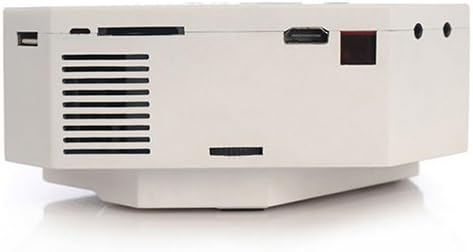
ചിത്രം: ഒരു വശം view of the UNIC UC30 projector, clearly showing the USB port, SD card slot, HDMI port, and other audio/video input jacks.
- VGA പോർട്ട്: Connects to computers.
- എച്ച്ഡിഎംഐ പോർട്ട്: Connects to HDMI-enabled devices (laptops, gaming consoles, media players).
- USB പോർട്ട്: Connects USB storage devices for media playback.
- SD കാർഡ് സ്ലോട്ട്: Inserts SD cards for media playback.
- AV ഇൻപുട്ട്: Connects to devices using the included AV cable (RCA composite).
- ഹെഡ്ഫോൺ ജാക്ക്: ബാഹ്യ ഓഡിയോ ഔട്ട്പുട്ടിനായി.
- പവർ ഇൻപുട്ട്: പവർ അഡാപ്റ്റർ ബന്ധിപ്പിക്കുന്നു.
ടോപ്പ് കൺട്രോൾ പാനൽ

ചിത്രം: മുകളിൽ നിന്ന് താഴേക്ക് view of the UNIC UC30 projector, displaying the integrated control panel with navigation buttons and source selection keys.
- പവർ ബട്ടൺ: പ്രൊജക്ടർ ഓൺ/ഓഫ് ചെയ്യുന്നു.
- ഉറവിട ബട്ടൺ: Selects input source (HDMI, VGA, AV, USB, SD).
- മെനു ബട്ടൺ: പ്രൊജക്ടർ ക്രമീകരണങ്ങൾ ആക്സസ് ചെയ്യുന്നു.
- നാവിഗേഷൻ ബട്ടണുകൾ (മുകളിലേക്ക്/താഴേക്ക്/ഇടത്/വലത്): മെനുകൾ നാവിഗേറ്റ് ചെയ്യുകയും ക്രമീകരണങ്ങൾ ക്രമീകരിക്കുകയും ചെയ്യുന്നു.
- ശരി/നൽകുക ബട്ടൺ: തിരഞ്ഞെടുക്കലുകൾ സ്ഥിരീകരിക്കുന്നു.
- മടങ്ങുക/പുറത്തുകടക്കുക ബട്ടൺ: Goes back or exits menus.
സജ്ജമാക്കുക
1. പ്ലേസ്മെന്റ്
Place the projector on a stable, flat surface. Ensure there is sufficient space around the projector for ventilation. The ideal projection distance is between 1 to 3.5 meters, yielding a picture size of 30 to 120 inches.
Image: The UNIC UC30 projector positioned on a flat surface, illustrating a typical setup scenario.
2. പവർ കണക്ഷൻ
- Connect the power adapter to the "Power Input" port on the projector.
- പവർ അഡാപ്റ്ററിന്റെ മറ്റേ അറ്റം ഒരു മതിൽ ഔട്ട്ലെറ്റിലേക്ക് പ്ലഗ് ചെയ്യുക.
- പ്രൊജക്ടറിലെ പവർ ഇൻഡിക്കേറ്റർ ലൈറ്റ് പ്രകാശിക്കണം.
3. ഉപകരണങ്ങൾ ബന്ധിപ്പിക്കുന്നു
പ്രൊജക്ടർ ഒന്നിലധികം ഇൻപുട്ട് ഉറവിടങ്ങളെ പിന്തുണയ്ക്കുന്നു:
- എച്ച്ഡിഎംഐ: നിങ്ങളുടെ ഉപകരണത്തിൽ നിന്ന് (ഉദാ: ലാപ്ടോപ്പ്, ഡിവിഡി പ്ലെയർ, ഗെയിം കൺസോൾ) ഒരു HDMI കേബിൾ പ്രൊജക്ടറിന്റെ HDMI പോർട്ടിലേക്ക് ബന്ധിപ്പിക്കുക.
- വി.ജി.എ: Connect a VGA cable from your computer to the projector's VGA port.
- ഓഫ്: Use the provided AV cable to connect to devices with RCA composite outputs (e.g., older DVD players, set-top boxes).
- USB: Insert a USB flash drive into the USB port for direct media playback.
- SD കാർഡ്: Insert an SD card into the SD card slot for direct media playback.
പ്രവർത്തന നിർദ്ദേശങ്ങൾ
1. പവർ ഓൺ/ഓഫ്
- പവർ ഓണാക്കാൻ: Press the Power button on the projector's top panel or the remote control. The projector will start up.
- പവർ ഓഫ് ചെയ്യാൻ: Press the Power button again. Confirm shutdown if prompted.
2. ഫോക്കസും കീസ്റ്റോണും ക്രമീകരിക്കൽ
- ഫോക്കസ്: Rotate the focus ring around the lens until the projected image is clear and sharp.
- കീസ്റ്റോൺ തിരുത്തൽ: ചിത്രം ട്രപസോയിഡൽ ആകൃതിയിൽ (മുകളിലോ താഴെയോ വീതി കൂടുതലായി) കാണപ്പെടുന്നുണ്ടെങ്കിൽ, ചിത്രം ദീർഘചതുരമാകുന്നതുവരെ കീസ്റ്റോൺ കറക്ഷൻ ഡയൽ ക്രമീകരിക്കുക.
3. ഇൻപുട്ട് ഉറവിടം തിരഞ്ഞെടുക്കൽ
അമർത്തുക ഉറവിടം button on the projector or remote control to cycle through available input sources (HDMI, VGA, AV, USB, SD). Select the source corresponding to your connected device.
4. മീഡിയ പ്ലേബാക്ക് (USB/SD)
When a USB drive or SD card is inserted, the projector will typically prompt you to select the media type (Photo, Music, Movie, Text). Navigate using the arrow keys and press OK തിരഞ്ഞെടുക്കാൻ.
പിന്തുണച്ചു File ഫോർമാറ്റുകൾ:
- Encoding Formats: MPEG1/MPEG2/MPEG4/DivX/Xvid
- വീഡിയോ ഫോർമാറ്റുകൾ: AVI/MOV/VOB/DAT/MPEG/MPG/RM/RMVB
- ഓഡിയോ ഫോർമാറ്റുകൾ: MP3/WMA/WAV
- ഇമേജ് ഫോർമാറ്റുകൾ: JPEG / BMP / GIF / PNG
- E-book Format: ടെക്സ്റ്റ്
മെയിൻ്റനൻസ്
- ലെൻസ് ക്ലീനിംഗ്: പ്രൊജക്ടർ ലെൻസ് മൃദുവായി തുടയ്ക്കാൻ ഒപ്റ്റിക്കൽ ലെൻസുകൾക്കായി പ്രത്യേകം രൂപകൽപ്പന ചെയ്ത മൃദുവായ, ലിന്റ് രഹിത തുണി ഉപയോഗിക്കുക. അബ്രസീവ് ക്ലീനറുകളോ അമിത ബലമോ ഉപയോഗിക്കരുത്.
- വെൻ്റിലേഷൻ: Regularly check that the ventilation grilles are free from dust and debris. Use a soft brush or compressed air to clean them. Never block the vents during operation.
- സംഭരണം: When not in use for extended periods, store the projector in a cool, dry place, protected from dust.
ട്രബിൾഷൂട്ടിംഗ്
| പ്രശ്നം | സാധ്യമായ പരിഹാരം |
|---|---|
| ഒരു ചിത്രവും പ്രൊജക്റ്റ് ചെയ്തിട്ടില്ല. |
|
| ചിത്രം മങ്ങിയതാണ്. |
|
| ചിത്രം ട്രപസോയിഡൽ ആണ്. | Adjust the keystone correction dial on the projector. |
| ശബ്ദമില്ല. |
|
| റിമോട്ട് കൺട്രോൾ പ്രവർത്തിക്കുന്നില്ല. |
|
സ്പെസിഫിക്കേഷനുകൾ
| ഫീച്ചർ | വിശദാംശങ്ങൾ |
|---|---|
| ബ്രാൻഡ് | Itech |
| മോഡലിൻ്റെ പേര് | UC30 |
| മോഡൽ നമ്പർ | VP02W |
| ഡിസ്പ്ലേ ടെക്നോളജി | എൽസിഡി |
| നേറ്റീവ് റെസല്യൂഷൻ | 480 x 320 പിക്സലുകൾ |
| തെളിച്ചം | 150 LUX |
| കോൺട്രാസ്റ്റ് റേഷ്യോ | 300:1 |
| ചിത്രത്തിൻ്റെ വലിപ്പം | 30-120 ഇഞ്ച് |
| പ്രൊജക്ഷൻ ദൂരം | 1-3.5 മീറ്റർ |
| Projection Model | Front/Rear projection |
| ഹാർഡ്വെയർ ഇന്റർഫേസ് | VGA, USB, HDMI |
| സ്പീക്കർ | 2.0W *2 |
| വാട്ട്tage | 60 വാട്ട്സ് |
| പ്രത്യേക സവിശേഷതകൾ | Portable, Keystone Correction |
| മൗണ്ടിംഗ് തരം | ടേബിൾടോപ്പ് മൗണ്ട് |
വാറൻ്റിയും പിന്തുണയും
വാറന്റി വിവരങ്ങൾക്കും സാങ്കേതിക പിന്തുണയ്ക്കും, വാങ്ങുന്ന സമയത്ത് നൽകിയിട്ടുള്ള ഡോക്യുമെന്റേഷൻ പരിശോധിക്കുകയോ നിങ്ങളുടെ റീട്ടെയിലറെ ബന്ധപ്പെടുകയോ ചെയ്യുക. വാങ്ങിയതിന്റെ തെളിവായി നിങ്ങളുടെ വാങ്ങൽ രസീത് സൂക്ഷിക്കുക.


