1. ഉൽപ്പന്നം കഴിഞ്ഞുview
The VONETS VAP11G-500 is an industrial-grade wireless device designed for various networking applications. It functions as a WiFi repeater, AP client, bridge, booster, and extender, offering 300Mbps high-speed transmission and strong coverage. This device is suitable for challenging environments such as elevators, factories, and farms, facilitating video transmission and long-range WiFi coverage projects.

Image 1.1: The VONETS VAP11G-500 device with its integrated USB power and RJ45 Ethernet cables.
പ്രധാന സവിശേഷതകൾ:
- Professional Intelligent WiFi repeater/extender/bridge, signal booster/ampജീവൻ.
- High-power mode transmission distance: up to 200 meters (without obstacles and for small data); Video transmission: less than 50 meters.
- Suitable for use in elevators, factories, farms, and similar environments for video transmission or long-range WiFi coverage projects.
- Easy three-step setup process.
- Supports WPA-PSK/WPA2-PSK, 64/128/WEP security mechanisms.
- Supports 2.4Ghz, 802.11b/g/n wireless transmission protocol, 300Mbps high-speed transmission.
- ഇൻപുട്ട് വോളിയംtage: DC5V-15V, designed to reduce electronic waste by not requiring a special power source.
2. പാക്കേജ് ഉള്ളടക്കം
താഴെ ലിസ്റ്റ് ചെയ്തിരിക്കുന്ന എല്ലാ ഇനങ്ങളും നിങ്ങളുടെ പാക്കേജിൽ ഉൾപ്പെടുത്തിയിട്ടുണ്ടെന്ന് ദയവായി പരിശോധിക്കുക. ഏതെങ്കിലും ഇനങ്ങൾ നഷ്ടപ്പെട്ടിട്ടുണ്ടെങ്കിലോ കേടായിട്ടുണ്ടെങ്കിലോ, ദയവായി ഉപഭോക്തൃ പിന്തുണയുമായി ബന്ധപ്പെടുക.
- VONETS VAP11G-500 Industrial Wireless Repeater/Bridge device (with integrated USB power and RJ45 Ethernet cables)
- ആൻ്റിന
- ഉപയോക്തൃ മാനുവൽ (ഈ പ്രമാണം)
3 സ്പെസിഫിക്കേഷനുകൾ
| ഫീച്ചർ | വിശദാംശങ്ങൾ |
|---|---|
| മോഡൽ നമ്പർ | VAP11G-500 ഉൽപ്പന്ന വിവരണം |
| ഉൽപ്പന്ന അളവുകൾ | 5.8 x 3.6 x 1.8 ഇഞ്ച് |
| ഇനത്തിൻ്റെ ഭാരം | 7 ഔൺസ് |
| വയർലെസ് സ്റ്റാൻഡേർഡ് | 802.11bgn (2.4GHz) |
| ഡാറ്റ കൈമാറ്റ നിരക്ക് | സെക്കൻഡിൽ 300 മെഗാബൈറ്റുകൾ |
| ഇൻപുട്ട് വോളിയംtage | DC5V-15V |
| നിർമ്മാതാവ് | ഷെൻഷെൻ ഹൗട്ടിയൻ നെറ്റ്വർക്ക് കമ്മ്യൂണിക്കേഷൻ ടെക്നോളജി കമ്പനി, ലിമിറ്റഡ് |
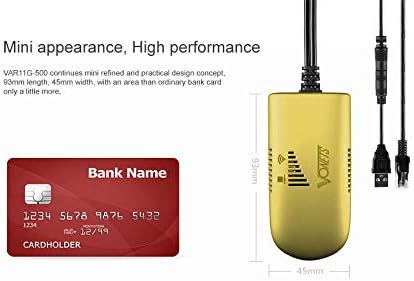
Image 3.1: The compact size of the VAP11G-500, shown next to a bank card for scale.
4. സജ്ജീകരണവും കോൺഫിഗറേഷനും
The VAP11G-500 can be configured via a computer or a smartphone. Ensure the device is powered correctly before starting the configuration process.
4.1 ഉപകരണം പവർ ചെയ്യുന്നു
- Connect the USB power cable of the VAP11G-500 to a 5V/2A power source (e.g., a computer USB port or a USB power adapter).
- Observe the LED indicator on the device. It should flash normally, indicating it is powered on.
Video 4.1: How to Configure 2.4GHz WiFi Bridge VAP11G-500. This video demonstrates the initial power-on and configuration steps for the device.
4.2 കമ്പ്യൂട്ടർ വഴിയുള്ള കോൺഫിഗറേഷൻ
- Connect the VAP11G-500's RJ45 Ethernet cable to your computer's Ethernet port.
- എ തുറക്കുക web നിങ്ങളുടെ കമ്പ്യൂട്ടറിലെ ബ്രൗസർ.
- In the address bar, enter the configured domain http://vonets.cfg or the IP address 192.168.254.254 എൻ്റർ അമർത്തുക.
- When prompted, enter the User ID and password. Both are typically "അഡ്മിൻ". Click "Login".
- Navigate to the "Scan Hotspots" section. The device will search for available WiFi networks.
- Select the desired WiFi hotspot from the list and click "Next".
- Enter the password for the selected WiFi hotspot.
- Click "Apply" and then "Reboot". The device will reboot, which may take about 1 minute. Wait until the LED light flashes normally.
- Once rebooted, the device should be connected to the internet. You can verify by opening a webനിങ്ങളുടെ ബ്രൗസറിലെ സൈറ്റ്.
4.3 സ്മാർട്ട്ഫോൺ വഴിയുള്ള കോൺഫിഗറേഷൻ
- Ensure the VAP11G-500 is powered on.
- On your smartphone, go to WiFi settings and search for available networks.
- Find the WiFi network (SSID) of the VAP11G-500. The SSID typically starts with "VONETS_2.4G_XXXX" where XXXX corresponds to the last four digits of the device's MAC address (found on the back of the device).
- Connect to this network. The default password is "12345678".
- എ തുറക്കുക web browser on your smartphone.
- വിലാസ ബാറിൽ, നൽകുക http://vonets.cfg or 192.168.254.254 എൻ്റർ അമർത്തുക.
- Enter the User ID and password, both typically "അഡ്മിൻ". Click "Login".
- Navigate to the "Scan Hotspots" section.
- Select the desired WiFi hotspot from the list and click "Next".
- Enter the password for the selected WiFi hotspot.
- Click "Apply" and then "Reboot". The device will reboot.
- After reboot, reconnect your smartphone to the VAP11G-500's configured WiFi network (the SSID will be the same as the source WiFi SSID, e.g., H3C_VONETS_2.4G_30). The password will be the same as the source WiFi hotspot's password.
- You can now enjoy WiFi Internet.
5 ഓപ്പറേറ്റിംഗ് മോഡുകൾ
The VAP11G-500 supports multiple operating modes to suit various networking needs:
- വൈഫൈ റിപ്പീറ്റർ: Extends the range of an existing WiFi network.
- AP Client: Connects a wired device to a wireless network.
- പാലം: Connects two wired networks wirelessly or extends a wireless network to a wired device.
- Booster/Extender: Enhances WiFi signal strength and coverage.

Image 5.1: Diagram illustrating the high-power WiFi bridge/repeater functionality with a range of up to 200 meters.

Image 5.2: Application of VAP11G-500 in WiFi Bridge mode, connecting a network camera to a router and monitoring display.

Image 5.3: Wireless monitoring application connection diagram (Case 1), showing multiple cameras connected via a switch to the VAP11G-500 for extended range.
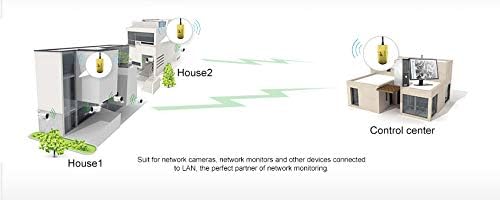
Image 5.4: Application diagram demonstrating how two VAP11G-500 devices can extend network coverage between two buildings (House 1 and House 2) to a control center.
6. പരിപാലനം
- ഉപകരണം തണുത്തതും വരണ്ടതുമായ സ്ഥലത്ത് സൂക്ഷിക്കുക, നേരിട്ടുള്ള സൂര്യപ്രകാശത്തിൽ നിന്നും കടുത്ത താപനിലയിൽ നിന്നും അകറ്റി നിർത്തുക.
- ഉപകരണം വെള്ളത്തിലോ ഈർപ്പത്തിലോ തുറന്നുകാട്ടുന്നത് ഒഴിവാക്കുക.
- മൃദുവായതും ഉണങ്ങിയതുമായ തുണി ഉപയോഗിച്ച് ഉപകരണം പതിവായി വൃത്തിയാക്കുക. ലിക്വിഡ് ക്ലീനറുകളോ എയറോസോളുകളോ ഉപയോഗിക്കരുത്.
- അമിതമായി ചൂടാക്കുന്നത് തടയാൻ ശരിയായ വായുസഞ്ചാരം ഉറപ്പാക്കുക.
- നിർമ്മാതാവിന്റെ ഫേംവെയർ അപ്ഡേറ്റുകൾക്കായി ഇടയ്ക്കിടെ പരിശോധിക്കുക webമികച്ച പ്രകടനവും സുരക്ഷയും ഉറപ്പാക്കാൻ സൈറ്റ്.
7. പ്രശ്നപരിഹാരം
If you encounter issues with your VAP11G-500, refer to the following common troubleshooting steps:
- പവർ/എൽഇഡികൾ ഓഫല്ല:
- Ensure the USB power cable is securely connected to a 5V/2A power source.
- മറ്റൊരു USB പോർട്ട് അല്ലെങ്കിൽ പവർ അഡാപ്റ്റർ പരീക്ഷിക്കുക.
- കോൺഫിഗറേഷൻ പേജ് ആക്സസ് ചെയ്യാൻ കഴിയില്ല:
- Verify that your computer or smartphone is directly connected to the VAP11G-500 via Ethernet (for computer) or its default WiFi SSID (for smartphone).
- Confirm that you are entering the correct domain (http://vonets.cfg) or IP address (192.168.254.254).
- നിങ്ങളുടെ കമ്പ്യൂട്ടറിന്റെ നെറ്റ്വർക്ക് അഡാപ്റ്റർ ഒരു IP വിലാസം (DHCP) സ്വയമേവ ലഭിക്കാൻ സജ്ജമാക്കിയിട്ടുണ്ടെന്ന് ഉറപ്പാക്കുക.
- നിങ്ങളുടെ ബ്രൗസറിന്റെ കാഷെ മായ്ക്കുകയോ മറ്റൊരു ബ്രൗസർ ഉപയോഗിക്കുകയോ ചെയ്യുക.
- No Internet Connection After Configuration:
- Double-check the WiFi hotspot password entered during configuration. A single incorrect character will prevent connection.
- Ensure the source WiFi hotspot is active and providing internet access.
- Reboot both the VAP11G-500 and your main router.
- Verify that the VAP11G-500's operating mode (e.g., Repeater, Bridge) is correctly set for your network topology.
- Poor Signal/Slow Speed:
- Relocate the VAP11G-500 closer to your main router or the area requiring extended coverage.
- Minimize obstacles (walls, large metal objects) between the VAP11G-500 and the source WiFi.
- Check for interference from other 2.4GHz devices (e.g., cordless phones, microwaves).
- ഉപകരണം പ്രതികരിക്കുന്നില്ല (ഹാർഡ് റീസെറ്റ്):
- If the device becomes unresponsive, you may need to perform a factory reset. Refer to the full product manual or manufacturer's website for specific instructions on how to perform a hard reset, as this will revert all settings to default.
8. വാറൻ്റിയും പിന്തുണയും
For warranty information, technical support, or further assistance, please contact Vonets customer service. Details can typically be found on the product packaging or the official Vonets webസൈറ്റ്.
നിർമ്മാതാവ്: ഷെൻഷെൻ ഹൗട്ടിയൻ നെറ്റ്വർക്ക് കമ്മ്യൂണിക്കേഷൻ ടെക്നോളജി കമ്പനി, ലിമിറ്റഡ്
Webസൈറ്റ്: www.vonets.com


