ആമുഖം
This manual provides detailed instructions for the proper use and maintenance of your ELECTRA RC7 Air Conditioner Remote Control. Please read this manual thoroughly before operating the device to ensure optimal performance and longevity. The RC7 remote control is designed for specific Airwell, Emailair, and Electra air conditioning units.
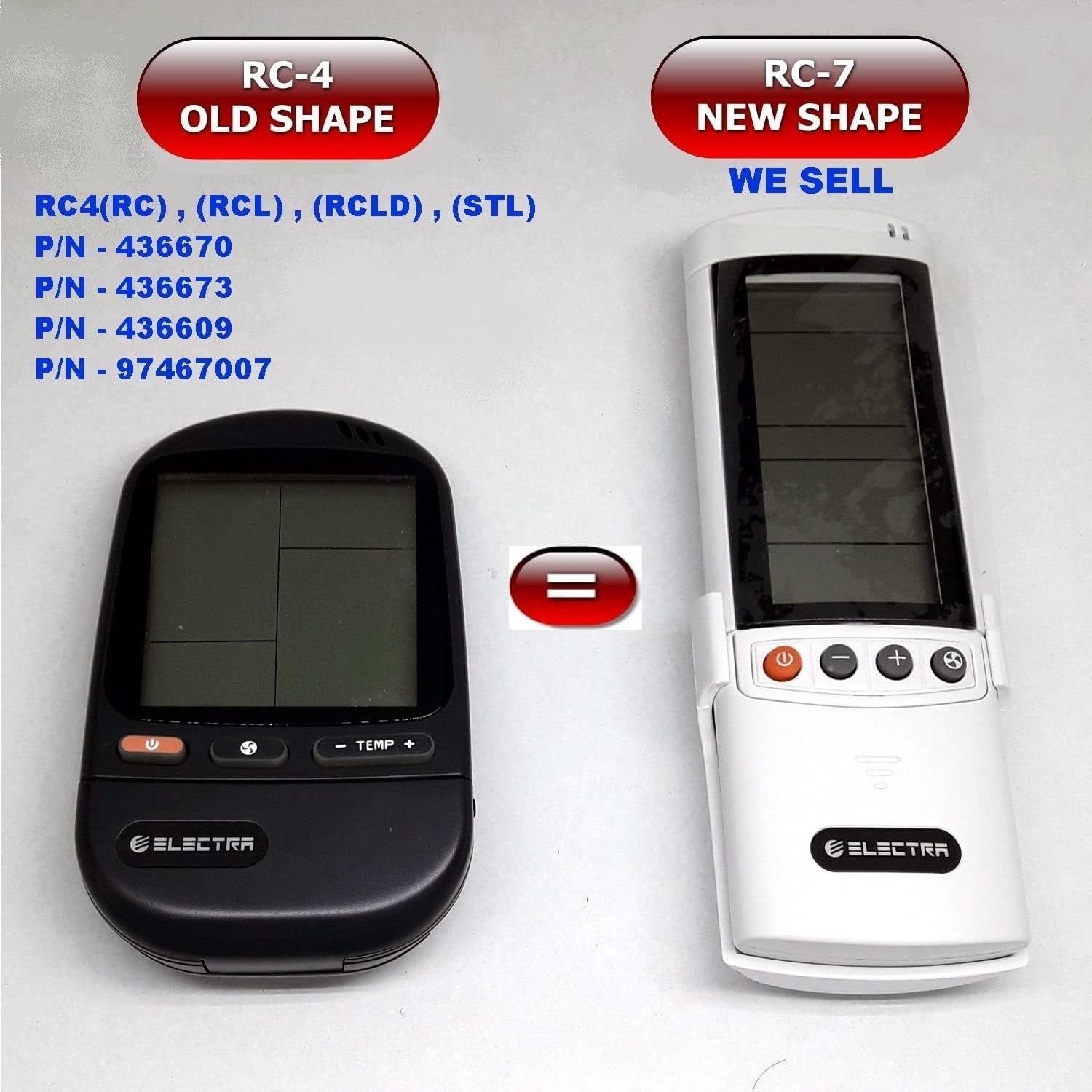
Image: Comparison of the older RC-4 model and the newer RC-7 model. This image helps users identify the correct remote control for their air conditioning unit.
പാക്കേജ് ഉള്ളടക്കം
- 1 x ELECTRA RC7 Air Conditioner Remote Control
- 1 x Wall Mount Holder (optional, may vary by package)

Image: The ELECTRA RC7 remote control shown alongside its accompanying wall mount holder, illustrating the complete package contents.
ഉൽപ്പന്നം കഴിഞ്ഞുview
The ELECTRA RC7 remote control features an ergonomic design with clearly labeled buttons and a digital display for easy operation. Familiarize yourself with the layout below.
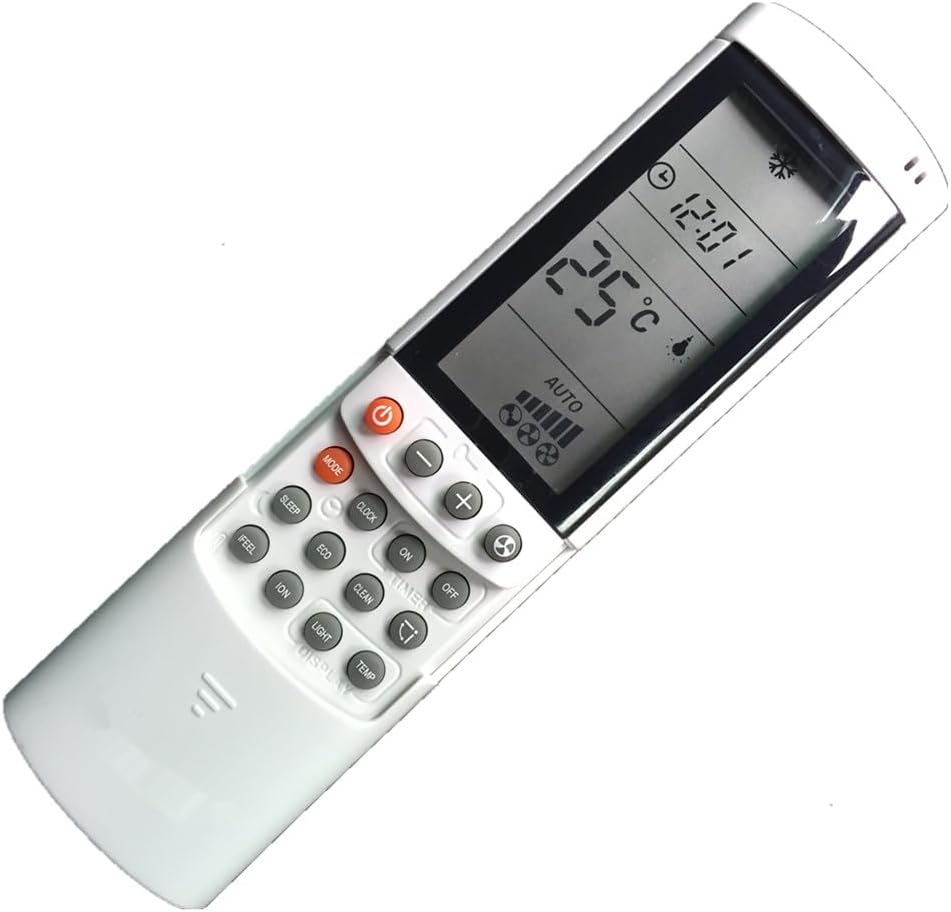
ചിത്രം: വിശദമായ ഒരു ചിത്രം view of the ELECTRA RC7 remote control, highlighting the digital display and various function buttons for air conditioner operation.
ബട്ടൺ പ്രവർത്തനങ്ങൾ:
- പവർ (⏻): Turns the air conditioner unit On or Off.
- മോഡ്: ഓപ്പറേറ്റിംഗ് മോഡുകളിലൂടെയുള്ള സൈക്കിളുകൾ (ഉദാ: കൂൾ, ഹീറ്റ്, ഫാൻ, ഡ്രൈ, ഓട്ടോ).
- സെറ്റ്: Used for confirming settings or entering specific menus.
- Temperature Up (+) / Down (-): Adjusts the desired temperature.
- ഫാൻ വേഗത (☁): ഫാൻ വേഗത ക്രമീകരിക്കുന്നു (ഉദാ., ലോ, മീഡിയം, ഹൈ, ഓട്ടോ).
- ടൈമർ: Sets the timer for automatic On/Off operation.
- ഉറങ്ങുക: Activates or deactivates sleep mode for comfortable night operation.
- ക്ലിയർ: Clears current settings or cancels a function.
- തോന്നുക: Activates a specific comfort mode based on ambient conditions.
- മുറി: Displays or sets the room temperature.
- വെളിച്ചം: Controls the display light on the indoor unit.
- ഡിസ്പ്ലേ: Toggles the remote's display backlight or unit's display.
- ECO: Activates energy-saving mode.
- ക്ലീൻ: Initiates a self-cleaning function for the indoor unit.
- ION: Activates the ionizer function (if available on the AC unit).
- ഊഞ്ഞാലാടുക (⇄): Controls the louver swing direction.
സജ്ജമാക്കുക
ബാറ്ററി ഇൻസ്റ്റാളേഷൻ:
- റിമോട്ട് കൺട്രോളിൻ്റെ പിൻഭാഗത്ത് ബാറ്ററി കമ്പാർട്ട്മെൻ്റ് കവർ കണ്ടെത്തുക.
- കവർ താഴേക്ക് സ്ലൈഡ് ചെയ്യുക അല്ലെങ്കിൽ അത് തുറക്കാൻ ലാച്ച് അമർത്തുക.
- രണ്ട് (2) AAA ബാറ്ററികൾ ഇടുക, പോസിറ്റീവ് (+) ഉം നെഗറ്റീവ് (-) ടെർമിനലുകളും കമ്പാർട്ടുമെന്റിനുള്ളിലെ അടയാളപ്പെടുത്തലുകളുമായി പൊരുത്തപ്പെടുന്നുണ്ടെന്ന് ഉറപ്പാക്കുക.
- ബാറ്ററി കമ്പാർട്ട്മെന്റ് കവർ മാറ്റിസ്ഥാപിക്കുക, അത് സുരക്ഷിതമായി സ്ഥലത്ത് ക്ലിക്ക് ചെയ്യുന്നുണ്ടെന്ന് ഉറപ്പാക്കുക.
കുറിപ്പ്: എപ്പോഴും പുതിയ ബാറ്ററികൾ ഉപയോഗിക്കുക, രണ്ട് ബാറ്ററികളും ഒരേ സമയം മാറ്റി സ്ഥാപിക്കുക. പഴയതും പുതിയതുമായ ബാറ്ററികളോ വ്യത്യസ്ത തരം ബാറ്ററികളോ കൂട്ടിക്കലർത്തരുത്.
പ്രവർത്തന നിർദ്ദേശങ്ങൾ
Ensure the remote control is pointed directly at the air conditioner's receiver when sending commands.
അടിസ്ഥാന പ്രവർത്തനം:
- പവർ ഓൺ/ഓഫ്: അമർത്തുക ശക്തി button once to turn the unit on. Press it again to turn the unit off.
- മോഡ് തിരഞ്ഞെടുക്കുന്നു: അമർത്തുക മോഡ് button repeatedly to cycle through available operating modes (e.g., Auto, Cool, Dry, Fan, Heat). The selected mode will be displayed on the remote's screen.
- താപനില ക്രമീകരിക്കൽ: ഉപയോഗിക്കുക Temperature Up (+) or താഴേക്ക് (-) നിങ്ങൾ ആഗ്രഹിക്കുന്ന താപനില സജ്ജമാക്കുന്നതിനുള്ള ബട്ടണുകൾ.
- ഫാൻ വേഗത ക്രമീകരിക്കുന്നു: അമർത്തുക ഫാൻ വേഗത button to cycle through different fan speed settings (e.g., Auto, Low, Medium, High).
വിപുലമായ പ്രവർത്തനങ്ങൾ:
- ടൈമർ പ്രവർത്തനം: അമർത്തുക ടൈമർ button to set a specific time for the unit to turn on or off. Follow the on-screen prompts to adjust the time using the temperature buttons and confirm with സെറ്റ്.
- സ്ലീപ്പ് മോഡ്: അമർത്തുക ഉറങ്ങുക button to activate sleep mode, which typically adjusts temperature and fan speed for quiet, comfortable sleep.
- ECO മോഡ്: അമർത്തുക ECO button to engage energy-saving operation, which optimizes settings to reduce power consumption.
- സ്വിംഗ് പ്രവർത്തനം: അമർത്തുക സ്വിംഗ് button to activate or adjust the automatic louver swing, distributing air evenly.
മെയിൻ്റനൻസ്
റിമോട്ട് കൺട്രോൾ വൃത്തിയാക്കൽ:
- മൃദുവായതും ഉണങ്ങിയതുമായ തുണി ഉപയോഗിച്ച് റിമോട്ട് കൺട്രോളിന്റെ ഉപരിതലം തുടയ്ക്കുക.
- ദുശ്ശാഠ്യമുള്ള അഴുക്കിന്, ലഘുവായി ഡിampതുണിയിൽ വെള്ളവും നേരിയ ഡിറ്റർജന്റും ചേർത്ത് തുടയ്ക്കുക, എന്നിട്ട് ഉടൻ ഉണക്കുക.
- അബ്രാസീവ് ക്ലീനറുകൾ, ആൽക്കഹോൾ, കെമിക്കൽ ലായകങ്ങൾ എന്നിവ ഉപയോഗിക്കരുത്, കാരണം ഇവ റിമോട്ടിന്റെ ഉപരിതലത്തിനോ ആന്തരിക ഘടകങ്ങളോ കേടുവരുത്തും.
ബാറ്ററി മാറ്റിസ്ഥാപിക്കൽ:
Replace batteries when the remote's display becomes dim or the remote fails to operate the air conditioner from a normal distance. Refer to the "Battery Installation" section under Setup for detailed instructions.
പ്രധാനപ്പെട്ടത്: ചോർച്ചയും കേടുപാടുകളും തടയാൻ റിമോട്ട് കൺട്രോൾ ദീർഘനേരം ഉപയോഗിക്കുന്നില്ലെങ്കിൽ ബാറ്ററികൾ നീക്കം ചെയ്യുക.
ട്രബിൾഷൂട്ടിംഗ്
- റിമോട്ട് പ്രതികരിക്കുന്നില്ല:
- ബാറ്ററികൾ ശരിയായ പോളാരിറ്റിയോടെ ശരിയായി ചേർത്തിട്ടുണ്ടോയെന്ന് പരിശോധിക്കുക.
- പഴയ ബാറ്ററികൾ പുതിയവ ഉപയോഗിച്ച് മാറ്റിസ്ഥാപിക്കുക.
- Ensure there are no obstructions between the remote and the air conditioner's receiver.
- Confirm the remote is pointed directly at the air conditioner.
- ഡിസ്പ്ലേ മങ്ങിയതോ ശൂന്യമോ ആണ്:
- ബാറ്ററികൾ കുറവായിരിക്കാം. അവ മാറ്റിസ്ഥാപിക്കുക.
- പരിമിതമായ പ്രവർത്തന ശ്രേണി:
- ബാറ്ററികൾ ദുർബലമായിരിക്കാം. അവ മാറ്റിസ്ഥാപിക്കുക.
- Ensure no strong light sources (e.g., direct sunlight) are interfering with the signal.
സ്പെസിഫിക്കേഷനുകൾ
- മോഡൽ: RC7
- ബ്രാൻഡ്: ELECTRA (Compatible with Airwell, Emailair, Electra)
- കൺട്രോളർ തരം: ബട്ടൺ നിയന്ത്രണം
- പ്രത്യേക സവിശേഷത: എർഗണോമിക് ഡിസൈൻ
- നിറം: വെള്ള
- പിന്തുണയ്ക്കുന്ന ഉപകരണങ്ങളുടെ പരമാവധി എണ്ണം: 1 (per remote)
- പരമാവധി ശ്രേണി: Approximately 10 Meters (33 feet)
- ഊർജ്ജ സ്രോതസ്സ്: 2 x AAA ബാറ്ററികൾ (ഉൾപ്പെടുത്തിയിട്ടില്ല)
വാറൻ്റിയും പിന്തുണയും
For warranty information or technical support, please refer to the documentation provided with your air conditioning unit or contact the original seller or manufacturer of the ELECTRA RC7 remote control. Keep your purchase receipt as proof of purchase.


