1. ആമുഖം
This manual provides detailed instructions for the proper setup, operation, and maintenance of your LyxPro SPA-5.5 Small PA Speaker Monitor. Please read this manual thoroughly before using the device to ensure optimal performance and safety.
The LyxPro SPA-5.5 is a compact and powerful active speaker system featuring a Class-D amplifier, a 3-channel mixer, and a 3-band equalizer. It is designed for various applications including vocal and instrument monitoring, public address, and as a guitar amplifier or karaoke system.
2. സുരക്ഷാ നിർദ്ദേശങ്ങൾ
- ഊർജ്ജ സ്രോതസ്സ്: Connect the unit only to the specified power supply (100V – 240V AC). Ensure the power cord is not damaged or pinched.
- വെൻ്റിലേഷൻ: വെന്റിലേഷൻ തുറസ്സുകൾ തടയരുത്. അമിതമായി ചൂടാകുന്നത് തടയാൻ യൂണിറ്റിന് ചുറ്റും മതിയായ വായുസഞ്ചാരം ഉറപ്പാക്കുക.
- ജലവും ഈർപ്പവും: Do not expose the unit to rain, moisture, or any liquids. Do not place objects filled with liquids on the unit.
- താപ സ്രോതസ്സുകൾ: റേഡിയേറ്ററുകൾ, ഹീറ്റ് രജിസ്റ്ററുകൾ, സ്റ്റൗകൾ അല്ലെങ്കിൽ മറ്റ് ചൂട് ഉൽപ്പാദിപ്പിക്കുന്ന ഉപകരണങ്ങൾ പോലുള്ള താപ സ്രോതസ്സുകളിൽ നിന്ന് യൂണിറ്റ് അകറ്റി നിർത്തുക.
- വൃത്തിയാക്കൽ: Clean only with a dry cloth. Disconnect from power before cleaning.
- സേവനം: ഈ ഉൽപ്പന്നം സ്വയം സേവിക്കാൻ ശ്രമിക്കരുത്. യോഗ്യതയുള്ള സേവന ഉദ്യോഗസ്ഥർക്ക് എല്ലാ സേവനങ്ങളും റഫർ ചെയ്യുക.
- പ്ലേസ്മെൻ്റ്: Place the unit on a stable surface. If mounting on a microphone stand, ensure the stand is stable and capable of supporting the unit's weight.
3. പാക്കേജ് ഉള്ളടക്കം
പാക്കേജിൽ എല്ലാ ഇനങ്ങളും ഉണ്ടെന്ന് ഉറപ്പാക്കുക:
- LyxPro SPA-5.5 Speaker Monitor
- പവർ കേബിൾ
- Microphone Stand Mounting Hardware
- ഉപയോക്തൃ മാനുവൽ (ഈ പ്രമാണം)
4. ഉൽപ്പന്ന സവിശേഷതകൾ
- 125W RMS / 150W Peak Class-D Ampജീവപര്യന്തം
- Integrated 3-Channel Mixer
- 3-Band Equalizer (Bass, Mid, Treble)
- +48V Phantom Power Supply for Condenser Microphones
- Multiple Inputs: XLR, 1/4" (6.35mm), RCA, and 3.5mm (1/8") Aux
- Instrument Switch for Direct Instrument Connection
- XLR Thru Connection for Daisy-Chaining
- എക്കോ നിയന്ത്രണം
- ബിൽറ്റ്-ഇൻ ബ്ലൂടൂത്ത് കണക്റ്റിവിറ്റി
- SD കാർഡ് അനുയോജ്യത
- Mounts on Standard Microphone Stands
- Durable and Compact Design
5. നിയന്ത്രണങ്ങളും കണക്ഷനുകളും
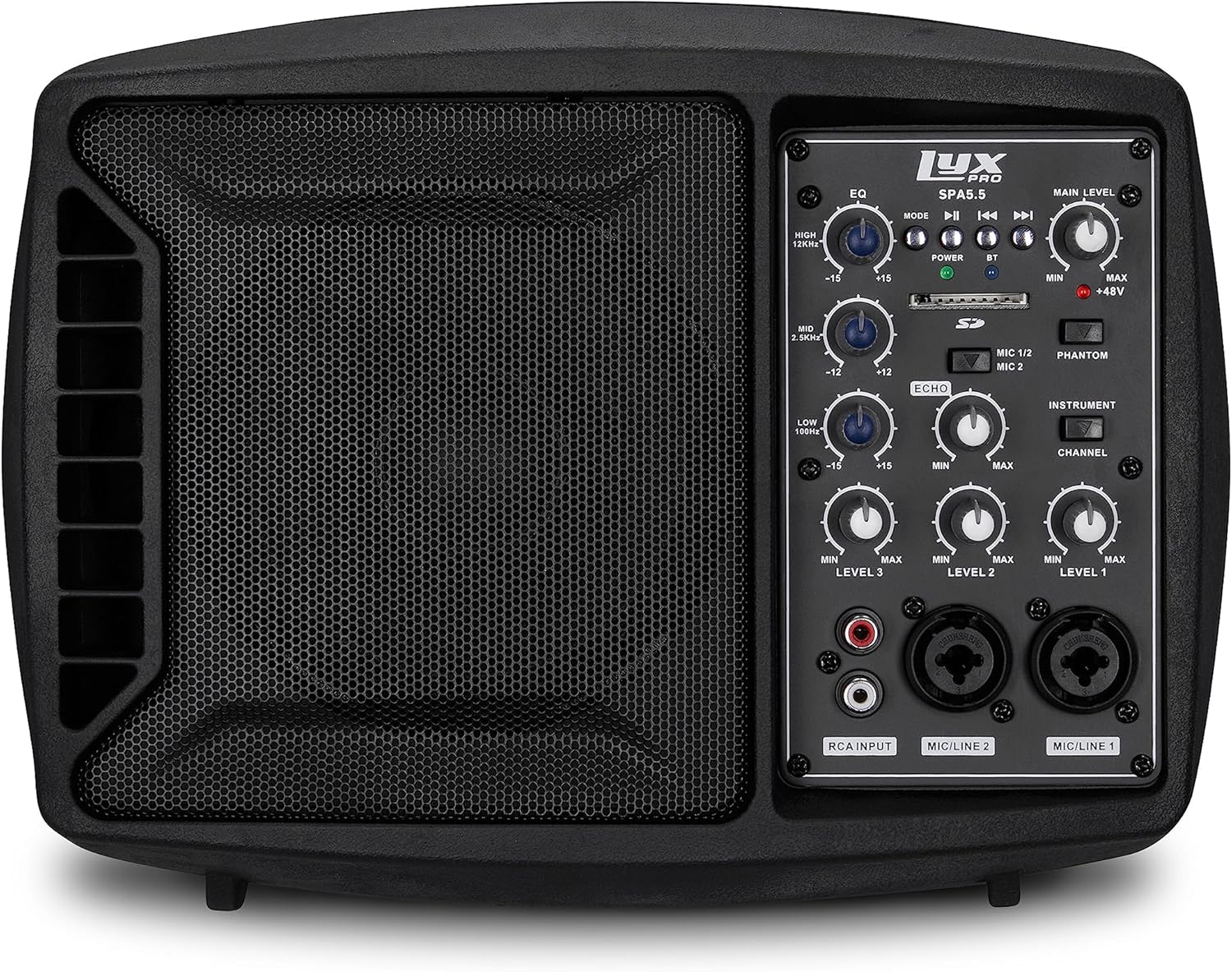
ചിത്രം 5.1: മുൻഭാഗം view of the LyxPro SPA-5.5 speaker monitor, showing the speaker grille and control panel.
5.1 ഫ്രണ്ട് പാനൽ നിയന്ത്രണങ്ങൾ

Figure 5.2: Detailed diagram of the LyxPro SPA-5.5 front control panel with labeled components.
- ഇക്വലൈസർ (EQ):
- HIGH (12kHz): Adjusts high frequencies. Range: ±15dB.
- MID (2.5kHz): Adjusts mid frequencies. Range: ±15dB.
- LOW (80Hz): Adjusts low frequencies. Range: ±15dB.
- പ്രധാന നില: സ്പീക്കറിന്റെ മൊത്തത്തിലുള്ള ഔട്ട്പുട്ട് വോളിയം നിയന്ത്രിക്കുന്നു.
- പവർ ലൈറ്റ്: Indicates when the unit is powered on.
- BT (Bluetooth) Light: ബ്ലൂടൂത്ത് കണക്ഷൻ നില സൂചിപ്പിക്കുന്നു.
- SD കാർഡ് സ്ലോട്ട്: ഓഡിയോ പ്ലേ ചെയ്യുന്നതിന് fileഒരു SD കാർഡിൽ നിന്നുള്ള എസ്.
- Phantom Power Switch (+48V): Activates +48V phantom power for condenser microphones connected to MIC 1 or MIC 2.
- MIC 1/2 Switch: Selects between MIC 1 and MIC 2 inputs for Channel 1.
- Instrument Switch: Optimizes input impedance for direct connection of instruments (e.g., guitar) to Channel 1.
- എക്കോ കൺട്രോൾ: Adjusts the level of echo effect applied to microphone inputs.
- Channel Level Controls (LEVEL 1, LEVEL 2, LEVEL 3): Adjusts the individual volume for each input channel.
- RCA Input (LINE 3): Stereo RCA inputs for connecting devices like CD players, MP3 players, or keyboards.
- MIC/LINE 2 ഇൻപുട്ട്: Combo XLR/1/4" (6.35mm) input for microphones or line-level devices.
- MIC/LINE 1 ഇൻപുട്ട്: Combo XLR/1/4" (6.35mm) input for microphones or line-level devices.
5.2 പിൻ പാനൽ കണക്ഷനുകൾ

Figure 5.3: Detailed diagram of the LyxPro SPA-5.5 rear panel with labeled connections.
- MAIN IN (XLR): Main input for connecting external audio sources.
- MIC/LINE Level Switch: Selects between microphone or line level for the MAIN IN.
- THRU (XLR): XLR output for daisy-chaining to other speakers or sending the mixed signal to another device.
- വൈദ്യുതി സ്വിച്ച്: യൂണിറ്റ് ഓണാക്കുകയോ ഓഫാക്കുകയോ ചെയ്യുന്നു.
- എസി ഇൻപുട്ട്: Power connector for the included AC power cable (100V – 240V AC).
6. സജ്ജീകരണം
6.1 പ്രാരംഭ പവർ-അപ്പ്
- Ensure all level controls (Main Level, Channel Levels) are set to minimum.
- Connect the provided AC power cable to the AC INPUT on the rear panel and then to a suitable power outlet.
- Flip the Power Switch on the rear panel to the "ON" position. The Power Light on the front panel will illuminate.
6.2 മൗണ്ടിംഗ് ഓപ്ഷനുകൾ
The SPA-5.5 can be used in various configurations:
- ഫ്ലോർ മോണിറ്റർ: Place the unit on the floor in front of the performer, angled upwards.
- ടേബിൾടോപ്പ്: പരന്നതും സുസ്ഥിരവുമായ പ്രതലത്തിൽ സ്ഥാനം.
- Microphone Stand Mounting: The unit includes hardware to mount it directly onto a standard microphone stand.

Figure 6.1: The LyxPro SPA-5.5 speaker monitor positioned on a microphone stand, demonstrating its use as a personal monitor for a musician.

Figure 6.2: A band performing outdoors, utilizing the compact LyxPro SPA-5.5 speaker for sound reinforcement.
7. പ്രവർത്തന നിർദ്ദേശങ്ങൾ
7.1 മൈക്രോഫോണുകളും ഉപകരണങ്ങളും ബന്ധിപ്പിക്കുന്നു
- മൈക്രോഫോണുകൾ: Connect dynamic or condenser microphones to the MIC/LINE 1 or MIC/LINE 2 inputs using XLR cables. If using a condenser microphone, activate the +48V Phantom Power Switch. Adjust the corresponding Channel Level control.
- ഉപകരണങ്ങൾ: Connect instruments (e.g., guitar, bass) directly to MIC/LINE 1 or MIC/LINE 2 using a 1/4" (6.35mm) cable. Engage the Instrument Switch for optimal impedance matching. Adjust the corresponding Channel Level control.
- ലൈൻ-ലെവൽ ഉപകരണങ്ങൾ: Connect devices like keyboards or audio interfaces to MIC/LINE 1 or MIC/LINE 2 using 1/4" (6.35mm) cables. Ensure the Instrument Switch is disengaged. Adjust the corresponding Channel Level control.
- Stereo Audio Sources: Connect CD players, MP3 players, or other stereo sources to the RCA Input (LINE 3). Adjust LEVEL 3.
7.2 ശബ്ദം ക്രമീകരിക്കുന്നു
- ചാനൽ ലെവലുകൾ: Use the LEVEL 1, LEVEL 2, and LEVEL 3 controls to balance the volume of individual inputs.
- പ്രധാന നില: Adjust the Main Level knob to control the overall output volume of the speaker.
- ഇക്വലൈസർ (EQ): Use the HIGH, MID, and LOW knobs to shape the tone of your sound.
- Increase HIGH for brighter sound.
- Adjust MID for vocal clarity or instrument presence.
- Increase LOW for more bass.
- എക്കോ കൺട്രോൾ: Turn the Echo knob to add a reverberation effect to the microphone inputs.
7.3 Media Playback (SD Card & Bluetooth)

Figure 7.1: Icons indicating SD card compatibility and built-in Bluetooth functionality on the LyxPro SPA-5.5.
- SD കാർഡ്: Insert an SD card containing audio files into the SD Card Slot. The unit will automatically detect and begin playback. Use the built-in controls (Mode, Play/Pause, Skip) to manage playback.
- ബ്ലൂടൂത്ത്:
- യൂണിറ്റ് ഓണാണെന്ന് ഉറപ്പാക്കുക.
- നിങ്ങളുടെ മൊബൈൽ ഉപകരണത്തിൽ ബ്ലൂടൂത്ത് സജീവമാക്കുക.
- ഇതിനായി തിരയുക "LyxPro SPA-5.5" in your device's Bluetooth settings and pair. The BT light on the unit will indicate a successful connection.
- Play audio from your device. Adjust volume using both your device and the SPA-5.5's Main Level control.

Figure 7.2: A musician utilizing the LyxPro SPA-5.5 as a personal monitor in a studio environment.
8. പരിപാലനം
- വൃത്തിയാക്കൽ: യൂണിറ്റിന്റെ പുറംഭാഗം വൃത്തിയാക്കാൻ മൃദുവായതും ഉണങ്ങിയതുമായ തുണി ഉപയോഗിക്കുക. ലിക്വിഡ് ക്ലീനറുകളോ എയറോസോളുകളോ ഉപയോഗിക്കരുത്.
- സംഭരണം: ദീർഘനേരം ഉപയോഗിക്കാത്തപ്പോൾ, യൂണിറ്റ് തണുത്തതും വരണ്ടതുമായ സ്ഥലത്ത് സൂക്ഷിക്കുക, നേരിട്ടുള്ള സൂര്യപ്രകാശത്തിൽ നിന്നും കടുത്ത താപനിലയിൽ നിന്നും അകറ്റി നിർത്തുക.
- ഫ്യൂസ് മാറ്റിസ്ഥാപിക്കൽ: If the unit does not power on, check the fuse located near the AC input. Replace with a fuse of the same type and rating (T 3.15 A H 250V). Refer to qualified personnel if unsure.
9. പ്രശ്നപരിഹാരം
| പ്രശ്നം | സാധ്യമായ കാരണം | പരിഹാരം |
|---|---|---|
| ശക്തിയില്ല | Power cable disconnected; Power switch off; Blown fuse | Check power cable connection; Turn power switch on; Replace fuse (refer to Maintenance section) |
| ശബ്ദ ഔട്ട്പുട്ട് ഇല്ല | Main Level or Channel Levels too low; Input device not connected or muted; Incorrect input selected | Increase Main Level and Channel Levels; Check input device connection and volume; Verify correct input is used |
| വികലമായ ശബ്ദം | Input signal too high; Main Level too high; EQ settings incorrect | Reduce input device volume; Lower Main Level; Adjust EQ settings |
| മൈക്രോഫോൺ പ്രവർത്തിക്കുന്നില്ല (കണ്ടൻസർ മൈക്ക്) | Phantom power not enabled | Activate the +48V Phantom Power Switch |
| ബ്ലൂടൂത്ത് കണക്റ്റ് ചെയ്യുന്നില്ല | Unit not in pairing mode; Device too far; Incorrect device selected | Ensure Bluetooth is active on SPA-5.5 and device; Move device closer; Select "LyxPro SPA-5.5" from device list |
10 സ്പെസിഫിക്കേഷനുകൾ

Figure 10.1: Diagram illustrating the compact dimensions of the LyxPro SPA-5.5 speaker monitor.
| ഫീച്ചർ | വിശദാംശങ്ങൾ |
|---|---|
| പവർ ഔട്ട്പുട്ട് | 125W RMS / 150W പീക്ക് |
| സ്പീക്കർ വലിപ്പം | 5 ഇഞ്ച് |
| Ampജീവിത തരം | ക്ലാസ്-ഡി |
| ഫ്രീക്വൻസി പ്രതികരണം (-10dB) | 80Hz - 14kHz |
| ഫ്രീക്വൻസി പ്രതികരണം (-3dB) | 100Hz - 10kHz |
| പരമാവധി SPL | 114dB SPL @ 1M |
| ഫാന്റം പവർ | +48V |
| ഇൻപുട്ട് ഇംപെഡൻസ് | 20 കെ |
| EQ High (12kHz) | ±15dB |
| EQ Mid (2.5kHz) | ±15dB |
| EQ Low (80Hz) | ±15dB |
| ഇൻപുട്ട് വോളിയംtage | 100V - 240V എസി |
| വൈദ്യുതി ഉപഭോഗം | പരമാവധി 180W. |
| അളവുകൾ (L x W x H) | 13.5" x 9" x 11.8" (34.3 സെ.മീ x 22.9 സെ.മീ x 30 സെ.മീ) |
| ഭാരം | 6.1 പൗണ്ട് (2.77 കി.ഗ്രാം) |
11. വാറൻ്റിയും പിന്തുണയും
For warranty information and technical support, please refer to the warranty card included with your product or visit the official LyxPro webസൈറ്റ്. വാങ്ങിയതിന്റെ തെളിവായി നിങ്ങളുടെ വാങ്ങൽ രസീത് സൂക്ഷിക്കുക.
For further assistance, contact LyxPro customer support.


